1. Introduction
This manual provides detailed instructions for the assembly, operation, and maintenance of your LITTLE TREE 70.8 Inch X-Large Executive Computer Office Desk, Model SU012. Please read this manual thoroughly before assembly and use to ensure proper setup and longevity of your product.
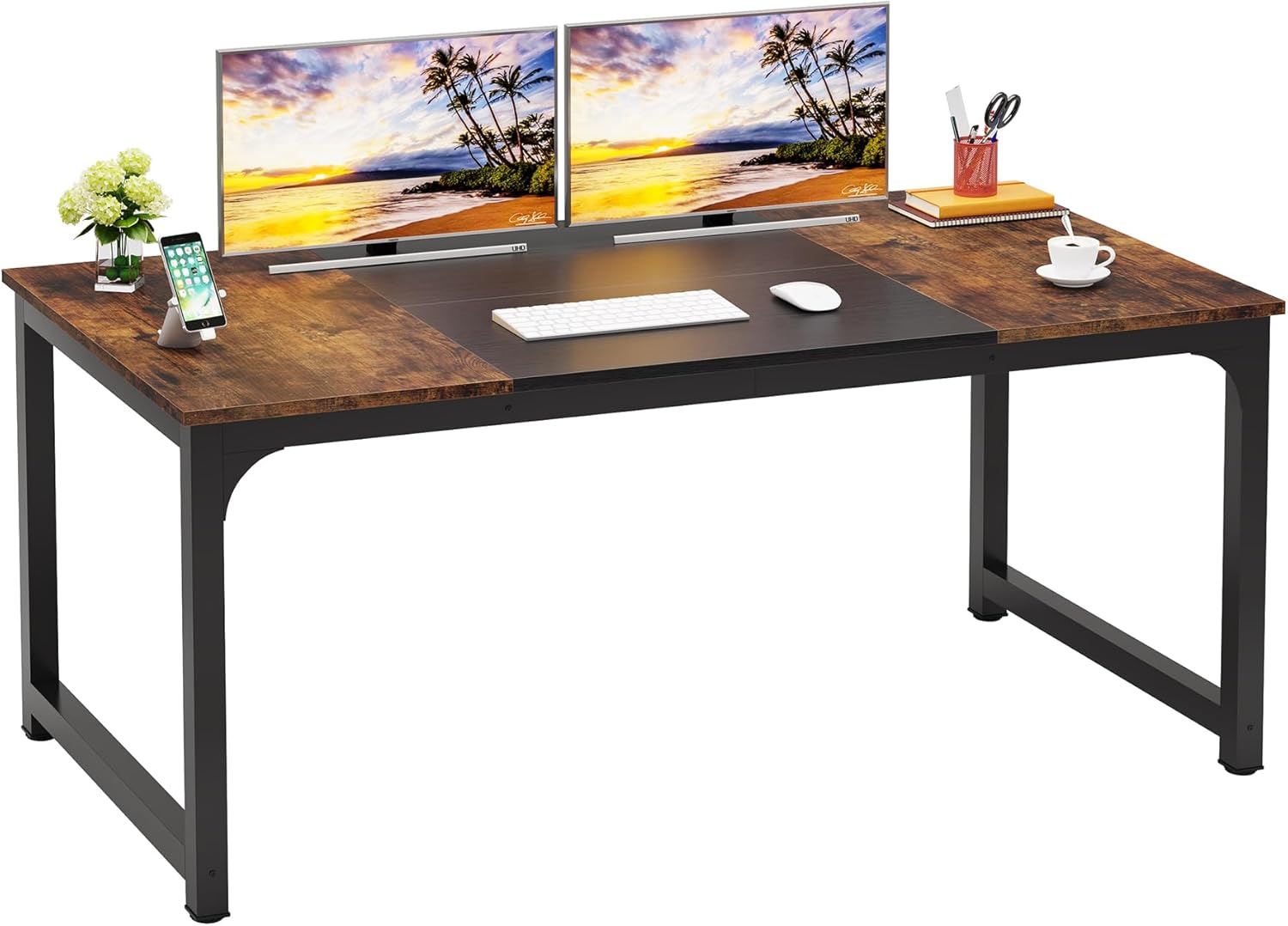
The desk is designed to offer a spacious and versatile workspace, suitable for various needs including computer work, paperwork, or meetings. Its robust construction and ample dimensions provide a comfortable and productive environment. The desk features a two-color splicing design in black and retro brown, with smooth lines and finishes that integrate rustic and industrial elements, allowing it to complement various interior design styles.
2. Safety Information
- Always follow the assembly instructions carefully.
- Ensure the desk is properly anchored to the floor to prevent tipping, especially when the desk is fully loaded with people or heavy objects.
- Do not exceed the maximum weight limit of 70 pounds (31.75 kg).
- Keep small parts away from children during assembly.
- Avoid standing or climbing on the desk.
3. Package Contents
Before beginning assembly, verify that all components listed below are present and undamaged. If any parts are missing or damaged, please contact customer support.
- Desk Panels (Tabletop sections)
- Metal Frame Components (Legs, support beams)
- Hardware (Screws, bolts, washers, Allen wrench)
- Adjustable Leg Pads
- Assembly Instructions Manual
4. Setup: Assembly Instructions
Your LITTLE TREE desk is designed for straightforward assembly. Most users can complete the assembly within an hour by following these instructions.
Tools Required:
- An Allen wrench is included.
- A Phillips head screwdriver may be useful but is not strictly required.
Important Assembly Tips:
- Do not fully tighten any bolts until all components are loosely assembled. This allows for minor adjustments and ensures proper alignment.
- Once all parts are in place, gradually tighten all bolts securely. Avoid overtightening, as this can damage the metal frame or desk panels.
- Assemble the desk on a soft, clean surface to prevent scratches.
Assembly Steps:
- Unpack all components and lay them out on a clean, flat surface. Identify each part using the included diagram.
- Attach the metal frame components (legs and support beams) using the provided hardware. Ensure all connections are aligned correctly before partially tightening bolts.
- Secure the desk panels to the assembled frame. Pay attention to the orientation of the panels as indicated in the diagram.
- Install the adjustable leg pads at the bottom of each leg. These pads help stabilize the desk on uneven floors and protect your flooring.
- Once all parts are assembled, carefully tighten all bolts evenly until secure.

5. Operating Instructions
The LITTLE TREE Executive Computer Office Desk provides a large and stable surface for various activities.
Workspace Utilization:
The 70.8-inch length and 31.5-inch depth offer ample space for multiple monitors, laptops, and other office equipment. The open area underneath ensures generous legroom for comfortable use, accommodating various seating preferences.
Multipurpose Functionality:
This desk can serve as a primary computer workstation, an executive desk, or a conference table for small to mid-sized meetings, comfortably accommodating up to 6 people.

6. Maintenance
To maintain the appearance and longevity of your desk, follow these simple care instructions:
- Cleaning: Wipe the desk surface with a dry cloth. For stubborn marks, use a slightly damp cloth with a mild, non-abrasive cleaner, then dry immediately.
- Avoid: Do not use harsh chemicals, abrasive cleaners, or excessive moisture, as these can damage the finish.
- Regular Checks: Periodically check all bolts and connections to ensure they remain tight. Retighten if necessary to maintain stability.
7. Troubleshooting
This section addresses common issues you might encounter with your desk.
Issue: Desk wobbles or is unstable.
Solution: Ensure all assembly bolts are securely tightened. Use the adjustable leg pads at the bottom of each leg to level the desk on uneven floors. Rotate the pads until the desk is stable and does not rock.
Issue: Parts do not align during assembly.
Solution: Loosen all bolts slightly. Re-align the components carefully, then gradually tighten all bolts evenly. Minor adjustments are often needed before final tightening to ensure all holes and parts fit correctly.
Issue: Surface scratches or minor damage.
Solution: For minor scratches, furniture repair pens or waxes matching the desk's finish may be used. Always test any repair product on an inconspicuous area first to ensure color match and compatibility.
8. Specifications
Detailed technical specifications for the LITTLE TREE SU012 Executive Computer Office Desk.
| Brand | LITTLE TREE |
| Model Number | SU012 |
| Product Dimensions (D x W x H) | 31.49"D x 70.86"W x 29.52"H (Approx. 70.8"L x 31.5"W x 29.5"H) |
| Color | Brown+black |
| Style | Industrial |
| Base Material | Metal |
| Top Material Type | Engineered Wood |
| Finish Type | Laminated |
| Special Feature | Scratch Resistant |
| Maximum Weight Recommendation | 70 Pounds (31.75 kg) |
| Required Assembly | Yes |
| Includes All Assembly Tools | Yes |
| Item Weight | 57.3 Pounds (25.99 kg) |
| Tabletop Thickness | 22 Millimeters (Approx. 0.87 inches) |

9. Warranty and Support
Manufacturer's Warranty:
This product comes with a 60-day manufacturer's warranty covering defects in materials and workmanship from the date of purchase. Please retain your proof of purchase for warranty claims.
Customer Support:
For assistance with assembly, missing parts, or any other inquiries, please contact LITTLE TREE customer service. Refer to your purchase documentation for specific contact details or visit the official LITTLE TREE website.
Online Resources: Additional support and FAQs may be available on the LITTLE TREE brand store: LITTLE TREE Store on Amazon.


