
1. Introduction
Thank you for choosing the Absima Micro Crawler PRO. This 1:18 scale brushed electric RC model car features 4-wheel drive (4WD) and operates on a 2.4 GHz radio system, designed for off-road crawling and precision driving. This manual provides essential information for the safe operation, setup, maintenance, and troubleshooting of your new RC model.
Please read this manual thoroughly before operating the vehicle to ensure proper function and to maximize your enjoyment.
2. Safety Instructions
- Adult Supervision: This product is not a toy. Adult supervision is recommended for users under 14 years of age.
- Battery Safety: Always use batteries according to manufacturer's instructions. Do not mix old and new batteries, or different types of batteries. Remove batteries when not in use for extended periods.
- Operating Environment: Operate the vehicle in open areas, away from people, pets, and obstacles. Avoid operating near water, heat sources, or electrical wires.
- Moving Parts: Keep fingers, hair, and loose clothing away from moving parts such as wheels and drivetrain components.
- Vehicle Condition: Before each use, inspect the vehicle for any damage or loose parts. Do not operate if damaged.
- Disassembly: Do not attempt to disassemble or modify the vehicle or remote control. This may void your warranty and cause damage.
3. Package Contents
Please check the contents of your package to ensure all items are present:
- Absima Micro Crawler PRO 1:18 RC Model Car
- 2.4 GHz Remote Control Transmitter
- USB Charging Cable (for vehicle battery)
- Instruction Manual
Note: Vehicle battery and remote control batteries are not included and must be purchased separately.
4. Setup
4.1. Vehicle Battery Installation and Charging
The Absima Micro Crawler PRO uses a rechargeable LiPo battery (not included). Follow these steps to install and charge the battery:
- Locate the battery compartment on the underside of the vehicle.
- Open the battery compartment cover.
- Carefully insert the compatible LiPo battery into the compartment, ensuring correct polarity.
- Connect the battery to the vehicle's power connector.
- Close the battery compartment cover securely.
- To charge the battery, disconnect it from the vehicle and connect it to the provided USB charging cable. Connect the USB cable to a suitable USB power source (e.g., computer USB port, USB wall adapter).
- Monitor the charging process. The indicator light on the USB charger will typically show red during charging and turn off or green when fully charged.
- Never leave charging batteries unattended.
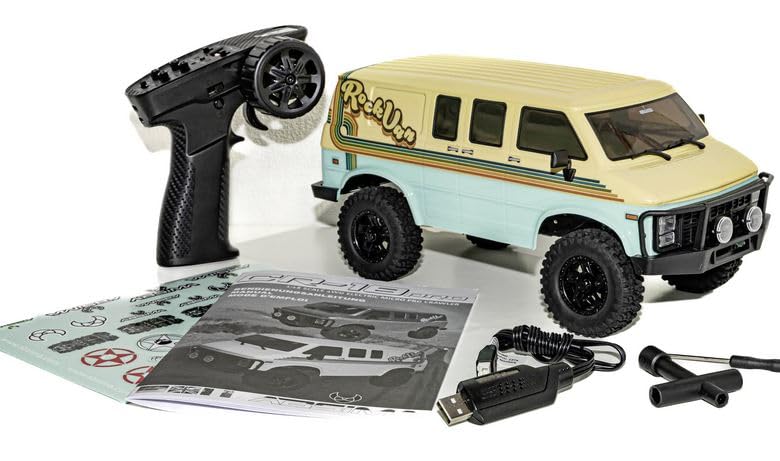
Figure 1: Absima Micro Crawler PRO 1:18 RC Model Car. This image shows the compact design of the vehicle, highlighting its robust chassis and off-road tires, suitable for micro crawling.
4.2. Remote Control Battery Installation
The 2.4 GHz remote control transmitter requires 2x AA batteries (not included). Follow these steps:
- Locate the battery compartment on the back of the remote control.
- Slide open the battery compartment cover.
- Insert 2x AA batteries, ensuring correct polarity (+/-).
- Close the battery compartment cover securely.
4.3. Pairing the Transmitter and Vehicle
Your Absima Micro Crawler PRO and its transmitter are typically pre-paired from the factory. If re-pairing is necessary, follow these general steps:
- Ensure both the vehicle battery and transmitter batteries are fully charged and installed.
- Turn on the transmitter first. The indicator light on the transmitter may flash.
- Turn on the vehicle. The indicator light on the vehicle's receiver (or ESC) may flash.
- Wait a few seconds for the transmitter and vehicle to establish a connection. The indicator lights on both devices should become solid, indicating a successful bind.
- If pairing fails, turn off both devices and repeat the process. Refer to the specific instructions on the vehicle's ESC/receiver for any dedicated bind button or procedure.
5. Operating
5.1. Basic Controls
The 2.4 GHz remote control typically features the following controls:
- Throttle Trigger: Pull to move forward, push to brake/reverse.
- Steering Wheel: Turn left to steer left, turn right to steer right.
- Trim Dials: Fine-tune steering and throttle to ensure the vehicle drives straight and stops when the trigger is neutral.
- Power Switch: Turns the transmitter on/off.
5.2. Driving Tips for Micro Crawlers
- Slow and Steady: Micro crawlers excel at slow, precise movements over obstacles. Avoid fast, jerky inputs.
- Throttle Control: Use gentle throttle inputs to maintain traction and navigate challenging terrain.
- Steering Angle: Utilize the full steering angle to maneuver around tight spots.
- Center of Gravity: Observe how the vehicle's weight shifts when climbing or descending. Adjust your approach to prevent rollovers.
- Explore: Experiment with different lines and angles to conquer obstacles.
6. Maintenance
6.1. Cleaning
- After each use, especially in dusty or dirty conditions, clean the vehicle.
- Use a soft brush or compressed air to remove dirt and debris from the chassis, suspension, and drivetrain.
- Wipe down the body with a soft, damp cloth. Avoid using harsh chemicals.
- Ensure all electronic components are dry before storing.
6.2. Storage
- Store the vehicle and remote control in a cool, dry place, away from direct sunlight and extreme temperatures.
- Remove batteries from both the vehicle and the remote control if storing for an extended period to prevent leakage.
- Store LiPo batteries at a "storage charge" level (typically around 3.8V per cell) to prolong their lifespan.
7. Troubleshooting
| Problem | Possible Cause | Solution |
|---|---|---|
| Vehicle does not respond. |
|
|
| Poor range or intermittent control. |
|
|
| Vehicle pulls to one side. |
|
|
8. Specifications
| Model Name: | Absima Micro Crawler PRO |
| Model Number: | 18029 |
| Scale: | 1:18 |
| Drive Type: | 4WD (Four-Wheel Drive) |
| Motor Type: | Brushed Electric |
| Radio System: | 2.4 GHz |
| Dimensions (LxWxH): | 9 x 19 x 17 cm (approximately) |
| Item Weight: | 400 Grams (approximately) |
| Material: | Tool steel (chassis components), plastic, rubber |
| Vehicle Battery: | Not included (compatible LiPo recommended) |
| Transmitter Batteries: | 2x AA (not included) |
9. Warranty and Support
For warranty information and technical support, please refer to the documentation provided with your purchase or contact your retailer or the manufacturer directly. Keep your proof of purchase for warranty claims.
Manufacturer: Absima
Model Number: 18029
