1. Product Overview
The SULMILE FM-100V5 is a portable velocity flow meter designed for accurate measurement of flow velocity in open channels. It is suitable for various applications including hydrological stations, factories, mines, environmental protection monitoring, farmland irrigation and drainage, and hydrogeological surveys. Its design emphasizes simplicity and powerful functionality, making it a light and convenient tool for field use.

Figure 1.1: The FM-100V5 Portable Velocity Flow Meter, showing the handheld display unit connected to the velocity probe with a paddle wheel sensor.
2. What's in the Box
Upon unpacking, please verify that all components listed below are present and in good condition:
- Host (Handheld Display Unit)
- Speedometer (Velocity Probe with Paddle Wheel)
- Probe Rod (Extension Rods for Probe)
- Signal Line (Cable connecting Host and Probe)
- Package Packing Boxes

Figure 2.1: All included components of the FM-100V5 flow meter, laid out for inspection.
3. Setup and Assembly
Follow these steps to assemble and prepare your FM-100V5 flow meter for use:
- Install Batteries: The host unit requires 4 AAA batteries. Open the battery compartment on the back of the host unit and insert the batteries, ensuring correct polarity.
- Assemble Probe Rod: The probe rod consists of multiple sections. Connect the extension rods to achieve the desired length for your measurement application. Ensure they are securely fastened.
- Attach Speedometer (Probe): Securely attach the speedometer (velocity probe with paddle wheel) to the end of the assembled probe rod.
- Connect Signal Line: Connect one end of the signal line to the speedometer and the other end to the corresponding port on the host unit. Ensure the connection is firm to prevent signal loss.

Figure 3.1: Dimensional overview of the FM-100V5, illustrating the compact size of the display unit and the extendable probe.

Figure 3.2: The FM-100V5 fully assembled, ready for deployment.
4. Operating Instructions
This section details the operation of your FM-100V5 flow meter.
4.1. Display Interface Overview
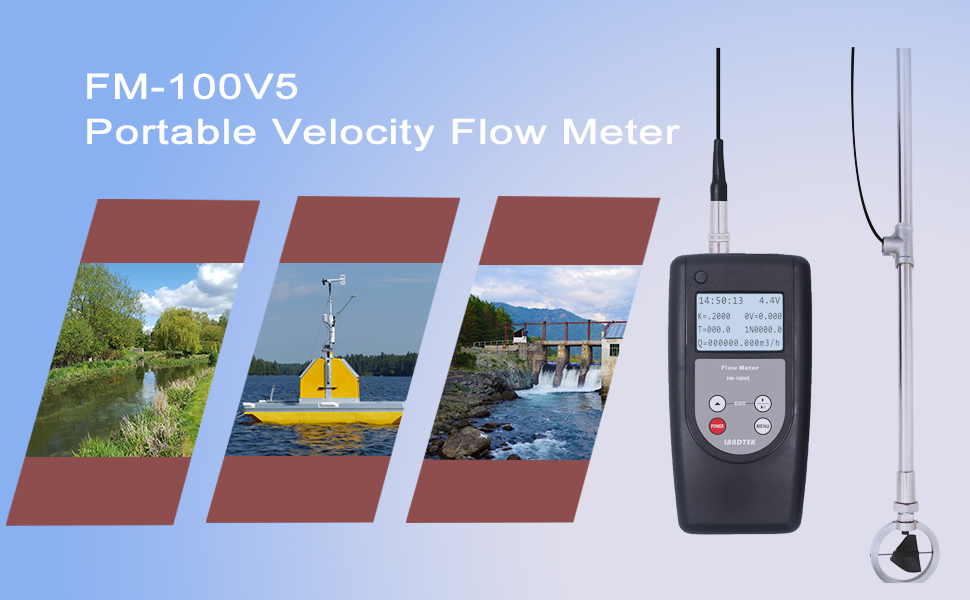
Figure 4.1: Detailed view of the FM-100V5 display, indicating various measurement parameters.
The display provides real-time information. Refer to the following breakdown for understanding the display elements:

Figure 4.2: Explanation of display elements.
- 6-1: Time: Current time.
- 6-2: Battery Voltage: Current battery level of the unit.
- 6-3: K: Blade hydraulic pitch (K-factor).
- 6-4: 0V: Automatic test interval time.
- 6-5: T: Automatic measuring time.
- 6-6: 1N: Manual time measurement.
- 6-7: Q: Instantaneous flow.
- 6-8: N: Shock pulse number.
4.2. Basic Operation
- Power On/Off: Press the POWER button to turn the unit on or off.
- Menu Navigation: Use the MENU button to access the settings menu. Use the arrow buttons (▲, ▼, ◀, ▶) to navigate through options and adjust values.
- Exit: Press the EXIT button to return to the previous screen or the main measurement interface.
4.3. Settings Configuration
The device allows for various settings adjustments to optimize measurements. Access these through the MENU button.

Figure 4.3: Overview of various setting screens.
- Set 1: Adjust screw pitch (K-factor), constant (c), and last measurement time.
- Set 2: Configure voluntary and delayed settings, and fracture surface area.
- Set 3: Set CIRCLE and PULSE parameters, and select display language (e.g., Chinese).
- Set 4: Adjust date and time, and reset the clock.
4.4. Taking Measurements
- Position the Probe: Carefully lower the velocity probe into the water channel or pipe where you wish to measure flow. Ensure the paddle wheel is fully submerged and oriented correctly with the flow.
- Stabilize: Allow the probe to stabilize in the flow for a few moments.
- Read Data: The display will show real-time velocity and flow data. Note down the readings as required.
- Record Data: If the device supports data logging (refer to specific model features), ensure data is being recorded or manually log the readings.
5. Maintenance
Proper maintenance ensures the longevity and accuracy of your FM-100V5 flow meter.
- Cleaning: After each use, especially in turbid water, rinse the probe and paddle wheel with clean fresh water. Gently remove any debris or sediment. Do not use abrasive cleaners or solvents.
- Storage: Store the device in a dry, cool place, away from direct sunlight and extreme temperatures. Ensure the probe and cable are not kinked or stressed.
- Battery Care: If the device will not be used for an extended period, remove the AAA batteries to prevent leakage and damage to the unit.
- Inspection: Periodically inspect the cable for any signs of wear or damage. Check the paddle wheel for free rotation and ensure no foreign objects are obstructing it.
6. Troubleshooting
This section provides solutions to common issues you might encounter.
| Problem | Possible Cause | Solution |
|---|---|---|
| Device does not power on. | Dead or incorrectly installed batteries. | Replace batteries with new AAA batteries, ensuring correct polarity. |
| No reading or erratic readings. | Probe not fully submerged; paddle wheel obstructed; loose cable connection; K-factor incorrect. | Ensure paddle wheel is fully submerged and free of debris. Check cable connections. Verify K-factor setting in menu. |
| Display is dim or flickering. | Low battery voltage. | Check battery voltage on display (6-2) and replace batteries if low. |
| Cannot navigate menu. | Buttons stuck or unresponsive. | Ensure buttons are not physically stuck. Try restarting the device. If issue persists, contact support. |
7. Specifications
Key technical specifications for the FM-100V5 Portable Velocity Flow Meter:
| Parameter | Value |
|---|---|
| Speed Range | 0.01 ~ 5.00 m/s |
| Temperature Range | -10℃ ~ 50℃ |
| Power Source | 4 AAA batteries (included) |
| Package Dimensions | 15 x 9 x 3 inches |
| Weight | 4 Pounds |
| Manufacturer | M&A INSTRUMENTS INC |
| ASIN | B0BXDNPJXD |
8. Warranty and Support
For warranty information and technical support, please refer to the documentation provided with your purchase or contact the manufacturer directly. Keep your purchase receipt as proof of purchase for any warranty claims.
Manufacturer: M&A INSTRUMENTS INC
For further assistance, please visit the SULMILE Store on Amazon or contact their customer service through the Amazon platform.