
Introduction
This manual provides detailed instructions for the Inkbird IBS-TH3-PLUS WiFi Thermometer Hygrometer, an indoor device designed to accurately monitor temperature and humidity. It covers setup, operation, maintenance, and troubleshooting to ensure optimal performance and help you understand all features of your new device.
Product Overview
The Inkbird IBS-TH3-PLUS is a compact and precise Wi-Fi enabled thermometer and hygrometer. It features a large LCD display for immediate readings and connects to the Inkbird App for remote monitoring, data logging, and alerts, making it ideal for various indoor environments.
Key Features
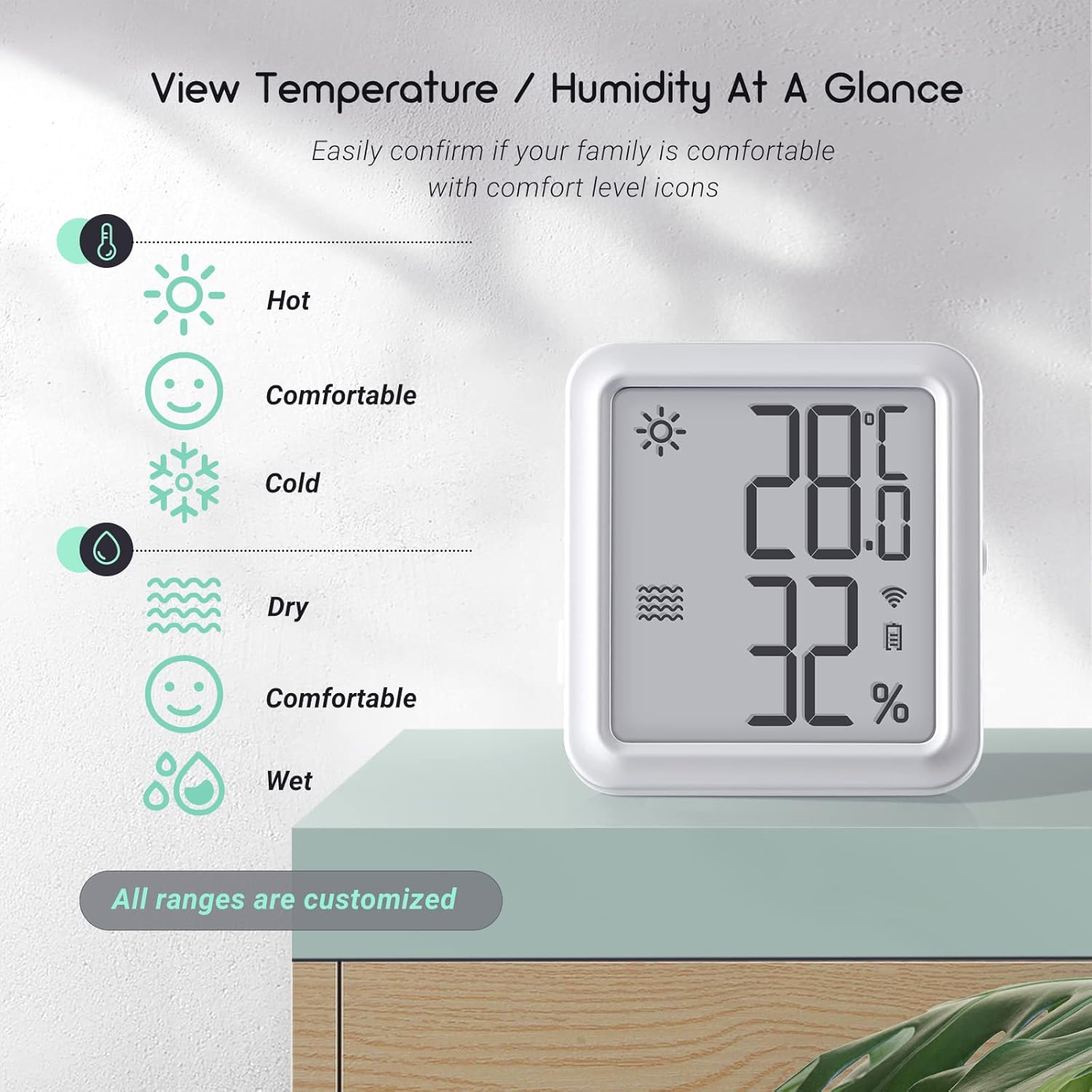
- High Precision and LCD Screen: Accurate temperature (±0.3°C) and humidity (±3% RH) measurements with a clear LCD display and comfort level emoticons.
- App Control and Real-time Alerts: Monitor conditions remotely via the Inkbird App (2.4 GHz Wi-Fi) and receive instant notifications for high/low thresholds and low battery.
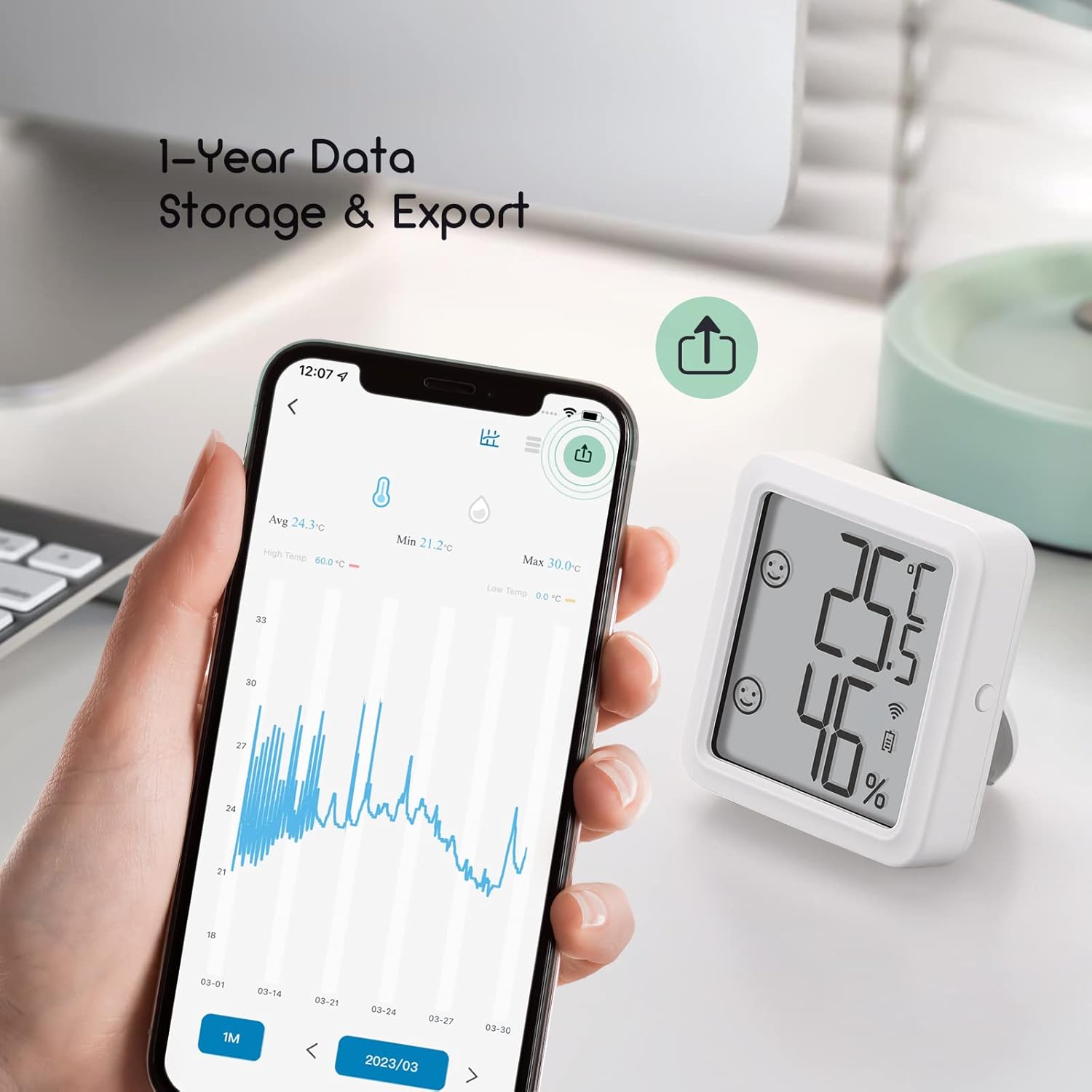
- Historical Graphs and Data Export: View up to one year of historical data in graphical format and export to CSV for detailed analysis.
- USB Rechargeable Battery: Built-in rechargeable battery provides extended operation, with adjustable recording intervals to optimize battery life.
- Easy Installation and Multiple Placement Options: Features a magnetic back, foldable stand, and hanging hole for versatile placement in various spaces.
Product Components and Visuals




Setup Guide
Initial Charging
Before first use, fully charge the device using a standard USB power adapter and the provided USB cable. The integrated rechargeable battery ensures long-term operation. A full charge can last approximately three months under typical usage (60-minute recording interval at 25°C).
App Download and Installation
To utilize the full features of your IBS-TH3-PLUS, download the "Inkbird" app from your smartphone's app store (iOS App Store or Google Play Store). Alternatively, scan the QR code provided in the device's packaging or on the manufacturer's website to quickly find the app.
Device Pairing and Wi-Fi Connection
- Ensure your smartphone is connected to a 2.4 GHz Wi-Fi network. The IBS-TH3-PLUS does not support 5 GHz Wi-Fi networks.
- Open the Inkbird app and create an account or log in.
- Follow the in-app instructions to add a new device. This typically involves pressing a button on the IBS-TH3-PLUS to enter pairing mode and confirming the connection in the app.
- Once connected, the device's Wi-Fi icon on the LCD screen will illuminate, indicating a successful connection.
Operating Instructions
LCD Display Overview
The large LCD screen displays current temperature (in Celsius or Fahrenheit) and relative humidity. Additionally, comfort level emoticons provide a quick visual indicator of the environment:
- 🙂 Smiling Face: Indicates comfortable temperature and humidity conditions.
- 😐 Neutral Face: Indicates acceptable but not ideal conditions.
- 😟 Frowning Face: Indicates uncomfortable conditions (e.g., too hot, too cold, too dry, or too wet).
App Control and Alerts
Use the Inkbird app to view real-time temperature and humidity data remotely from anywhere with an internet connection. You can also:
- Set custom high and low temperature and humidity alerts. When readings exceed these predefined thresholds, you will receive push notifications on your smartphone.
- Receive low battery alerts directly through the app, prompting you to recharge the device.
Historical Data and Export
The Inkbird app stores historical temperature and humidity data, which can be viewed in graphical format. You can access up to one year of past data for trend analysis. For more detailed study, historical data can be exported to a CSV file directly from the app to your computer.
Adjusting Recording Interval
The frequency at which the device records data can be adjusted within the Inkbird app to suit your monitoring needs. Available intervals include: 10 min, 30 min, 60 min (default), 120 min, 180 min, 240 min. A longer interval will generally result in extended battery life.
Maintenance
Charging the Battery
When the low battery alert is received via the app or the battery indicator on the LCD is low, connect the device to a USB power source using the provided cable. Ensure the device is fully charged for optimal performance and battery longevity.
Cleaning
To clean the device, gently wipe its surface with a soft, dry cloth. Do not use liquid cleaners, abrasive materials, or chemical solvents, as these can damage the device or its sensors.
Storage
When storing the device for extended periods, ensure it is fully charged and kept in a cool, dry place, away from direct sunlight and extreme temperatures.
Important Note: Water Resistance
This device is NOT waterproof.
Do not place it in freezers, refrigerators, or any environment where it may be exposed to water, high humidity leading to condensation, or direct liquid contact. Such exposure can cause permanent damage and void the warranty.
Troubleshooting
If you encounter issues with your Inkbird IBS-TH3-PLUS, please refer to the table below for common problems and their solutions.
| Issue | Possible Cause | Solution |
|---|---|---|
| Device not connecting to Wi-Fi | Incorrect Wi-Fi band (5GHz not supported), weak signal, incorrect password, device not in pairing mode. | Ensure your router is broadcasting a 2.4 GHz Wi-Fi signal. Check signal strength. Verify Wi-Fi password. Restart the device and the Inkbird app, then re-initiate pairing mode as per setup instructions. |
| Inaccurate readings | Device placement (near heat/cold sources, direct sunlight, drafts), sensor obstruction. | Relocate the device to a stable environment away from direct heat sources (e.g., radiators, electronics), cold drafts, or direct sunlight. Ensure the sensor vents are not obstructed. If issues persist, check the Inkbird app for any calibration options or contact customer support. |
| No app notifications | App permissions, notification settings in the app, phone's system notification settings. | Check the Inkbird app's notification settings to ensure alerts are enabled. Verify your phone's system settings allow notifications for the Inkbird app. Confirm that alert thresholds are set correctly within the app. |
| Short battery life | Frequent data recording interval, low ambient temperature. | Increase the data recording interval in the Inkbird app (e.g., from 10 min to 60 min or higher). Battery life is optimized at 25°C; lower temperatures may reduce its duration. |
For further assistance or issues not listed here, please refer to the Inkbird app's help section or visit the official Inkbird support website.
Technical Specifications
| Feature | Specification |
|---|---|
| Model | IBS-TH3 PLUS |
| Temperature Measurement Range | 0°C to 50°C (32°F to 122°F) |
| Temperature Accuracy | ±0.3°C (±0.5°F) |
| Humidity Measurement Range | 0% RH to 99% RH |
| Humidity Accuracy | ±3% RH |
| Connectivity | 2.4 GHz Wi-Fi |
| Battery Type | Integrated Lithium-polymer rechargeable battery |
| Battery Life (typical) | Approx. 3 months (at 25°C, 60 min recording interval) |
| Data Storage | Up to 1 year of historical data in app |
| Weight | 91 Grams |
| Voltage | 5 Volts |
| Country of Origin | China |
Warranty and Support
For detailed warranty information regarding your Inkbird IBS-TH3-PLUS, please refer to the official Inkbird website or the warranty documentation included with your product packaging. Warranty terms and conditions may vary by region.
If you encounter any issues, have questions about product functionality, or require technical assistance, please contact Inkbird customer support. You can typically find contact details on their official website or within the Inkbird mobile application.


