
UTRAI JS-1 Pro
UTRAI Pro 5000A Portable Car Jump Starter Instruction Manual
Model: JS-1 Pro
Brand: UTRAI
1. Introduction
The UTRAI Pro 5000A Portable Car Jump Starter (Model: JS-1 Pro) is a versatile and powerful device designed to provide emergency jump-starting for vehicles, along with additional functionalities such as a power bank, flashlight, and emergency tools. It is engineered for reliability and safety, featuring multiple protection mechanisms to ensure secure operation.
This jump starter is capable of instantly starting 12V vehicles with all gas or up to 8.5-liter diesel engines, offering up to 50 starts on a single charge. Its robust design is dustproof and waterproof (IP65), making it suitable for various environmental conditions.
2. What's in the Box
Please check the package contents to ensure all items are present:
- 1 × JS-1 Pro Portable Car Jump Starter
- 1 × Heavy Duty Smart Clamp
- 1 × USB-C Charging Cable
- 1 × EC5 Cigarette Lighter Socket Cable
- 1 × User Manual
- 1 × Portable Soft Storage Bag
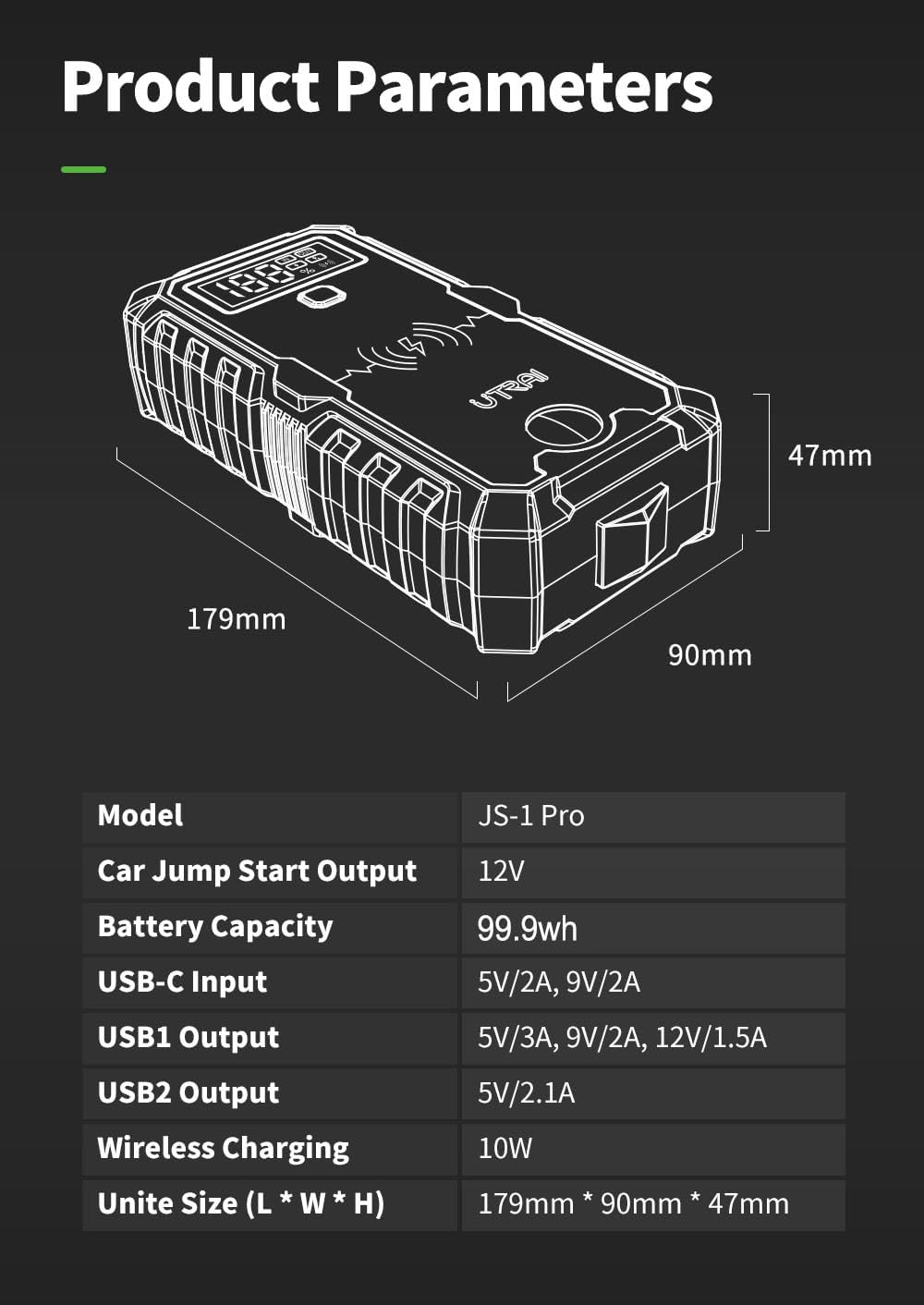
Figure 2.1: Package Contents of the UTRAI Pro 5000A Jump Starter.
3. Product Overview
The UTRAI JS-1 Pro is designed with user convenience and safety in mind. Below is an overview of its main components and features:
- Display Screen: A 2-inch large LCD screen shows real-time power percentage and input/output status.
- Power Button: Activates the device and controls flashlight modes.
- Wireless Charging Pad: Supports 10W wireless charging for compatible mobile devices.
- USB Output Ports: Two USB outputs (USB1: 5V 3A/9V 2A/12V 1.5A with fast charging; USB2: 5V 2.1A) for charging phones, tablets, and other devices.
- USB-C Input Port: For recharging the jump starter unit (5V 2A/9V 2A).
- LED Flashlight: Features 4 modes (SOS, spotlight, strobe, flash) for emergency situations.
- Compass: Integrated for navigation in outdoor or emergency scenarios.
- Safety Hammer: A built-in emergency escape hammer for breaking glass.
- EC5 Output Port: For connecting the smart clamp for jump-starting.

Figure 3.1: UTRAI Pro 5000A Jump Starter Layout.
4. Setup
4.1 Initial Charging
Before first use, fully charge the UTRAI JS-1 Pro. Connect the provided USB-C charging cable to the USB-C input port on the jump starter and to a suitable USB power adapter (not included). The LCD screen will display the charging progress. A full charge can take several hours. It is recommended to keep the unit charged above 50% for optimal performance and longevity.
4.2 Connecting the Smart Clamp
The smart clamp is essential for jump-starting. Ensure the jump starter is turned off before connecting the clamp.
- Locate the EC5 output port on the jump starter unit.
- Insert the blue end of the heavy-duty smart clamp cable firmly into the EC5 output port. Ensure a secure connection.

Figure 4.1: Connecting the Smart Clamp.
5. Operating Instructions
5.1 Jump-Starting a Vehicle
Follow these steps to safely jump-start your vehicle:
- Ensure the jump starter is adequately charged (preferably above 50%).
- Connect the smart clamp to the jump starter unit as described in Section 4.2.
- Open your vehicle's hood and locate the car battery.
- Connect the red (+) clamp to the positive (+) terminal of your car battery.
- Connect the black (-) clamp to the negative (-) terminal of your car battery.
- Once connected, the indicator light on the smart clamp will flash red and green, then turn solid green, indicating it's ready to jump-start.
- Return to your vehicle and start the engine.
- Immediately remove the smart clamp from the car battery (first black, then red).
- Disconnect the smart clamp from the jump starter unit.

Figure 5.1: Easy 4-Step Jump-Starting Process.
Video 5.1: Official demonstration of the UTRAI Portable Car Jump Starter in action, showing connection and vehicle start-up.
5.2 Using as a Power Bank
The UTRAI JS-1 Pro can charge your electronic devices:
- USB Charging: Connect your device's USB cable to either of the USB output ports (USB1 or USB2).
- Wireless Charging: Place your Qi-compatible smartphone on the wireless charging pad located on the top surface of the jump starter. Ensure the phone is centered for effective charging.

Figure 5.2: Charging multiple devices with the UTRAI Jump Starter.
5.3 Using the LED Flashlight
The built-in LED flashlight has multiple modes for various situations:
- Press and hold the Power Button for 3 seconds to turn on the flashlight (Normal mode).
- Press the Power Button once to cycle through modes: Normal → SOS → Strobe → Warning (Red/Blue Flash).
- Press and hold the Power Button again to turn off the flashlight.

Figure 5.3: 4-Mode Emergency Flashlight.
6. Safety Precautions
The UTRAI JS-1 Pro is equipped with multiple advanced protection features to ensure safe operation. Always adhere to the following guidelines:
- Correct Polarity: Always connect the red clamp to the positive (+) terminal and the black clamp to the negative (-) terminal. The smart clamp has built-in reverse polarity protection.
- Spark Protection: The smart clamp is designed to prevent sparks during connection.
- Over-Current/Over-Voltage/Over-Charge/Over-Discharge Protection: The device automatically protects against these conditions.
- Over-Temperature Protection: The unit is designed to operate safely within a wide temperature range (-20°C/-4°F to 60°C/140°F) and has internal temperature monitoring.
- Short-Circuit Protection: Prevents damage in case of a short circuit.
- Water and Dust Resistance: Rated IP65, offering protection against dust and water splashes.
- Do not attempt to jump-start a vehicle if the jump starter's battery level is critically low.
- Do not leave the clamps connected to the car battery after the vehicle has started.
- Keep the device away from children.

Figure 6.1: Multiple Protection Features.
7. Maintenance
- Recharging: Recharge the jump starter after each use. For long-term storage, recharge every 3-6 months to maintain battery health. The unit can last on standby for up to 24 months when fully charged.
- Cleaning: Use a soft, dry cloth to clean the unit. Do not use harsh chemicals or abrasive materials.
- Storage: Store the device in a cool, dry place, away from direct sunlight and extreme temperatures. The recommended operating and storage temperature range is -20°C (-4°F) to 60°C (140°F).
8. Troubleshooting
If you encounter issues with your UTRAI JS-1 Pro, refer to the following common solutions:
- Device Not Turning On: Ensure the unit is charged. Press and hold the power button for a few seconds.
- Vehicle Not Starting:
- Check that the smart clamp is securely connected to both the jump starter and the car battery terminals with correct polarity.
- Ensure the jump starter has sufficient charge (above 50%).
- If the smart clamp indicator shows an error (e.g., solid red or flashing red/green), disconnect and reconnect the clamps.
- Charging Issues:
- Ensure the USB-C cable is properly connected to both the jump starter and the power source.
- Try a different USB-C cable or power adapter.
- For more detailed troubleshooting, please consult the included User Manual.
9. Specifications
| Feature | Specification |
|---|---|
| Model | JS-1 Pro |
| Peak Current | 5000 Amps |
| Battery Capacity | 99.9Wh (27000mAh) |
| Car Jump Start Output | 12V |
| Engine Compatibility | All Gas Engines, up to 8.5L Diesel Engines |
| USB-C Input | 5V/2A, 9V/2A |
| USB1 Output | 5V/3A, 9V/2A, 12V/1.5A (Fast Charging) |
| USB2 Output | 5V/2.1A |
| Wireless Charging | 10W |
| Operating Temperature | -20°C (-4°F) to 60°C (140°F) |
| Dimensions (L×W×H) | 179mm × 90mm × 47mm (7"D x 3.6"W x 1.8"H) |
| Item Weight | 2.59 Pounds (1.17 kg) |
| Material | PC+ABS UL94-V0 flame retardant |
| Waterproof Rating | IP65 |

Figure 9.1: UTRAI Pro 5000A Jump Starter.
10. Warranty and Support
UTRAI is committed to providing high-quality products and excellent customer service. Your UTRAI JS-1 Pro comes with:
- 2-Year Warranty: Enjoy peace of mind with a comprehensive 2-year warranty covering manufacturing defects.
- Lifetime Technical Support: UTRAI offers lifetime technical assistance for any questions or issues you may encounter.
- 30-Day Unconditional Return & Refund: If you are not satisfied with your purchase, you may return it within 30 days for a full refund.
- 24-Hour Customer Support: Our dedicated customer support team is available 24 hours a day to assist you.
For support, please refer to the contact information provided in your User Manual or visit the official UTRAI website.

Figure 10.1: UTRAI Customer Support and Warranty Information.
Related documentsJS-1 Pro


Ask a question about this manual
Ask about setup, troubleshooting, compatibility, parts, safety, or missing instructions. Manuals+ will review the question and use this page’s manual context to help answer it.