1. Introduction
This manual provides instructions for the VINABTY AK59-00104J replacement remote control. This remote is designed to function as a direct replacement for the original remote controls of various Samsung DVD Player models, including DVD-SH893, DVD-SH897A, DVD-SH893A, DVD-SH895, DVD-SH895A, and DVD-SH897. No programming is required for its operation.
2. Product Overview
The AK59-00104J remote control offers full functionality for compatible Samsung DVD players. It features an ergonomic design for comfortable handling and uses infrared technology for communication with your device.
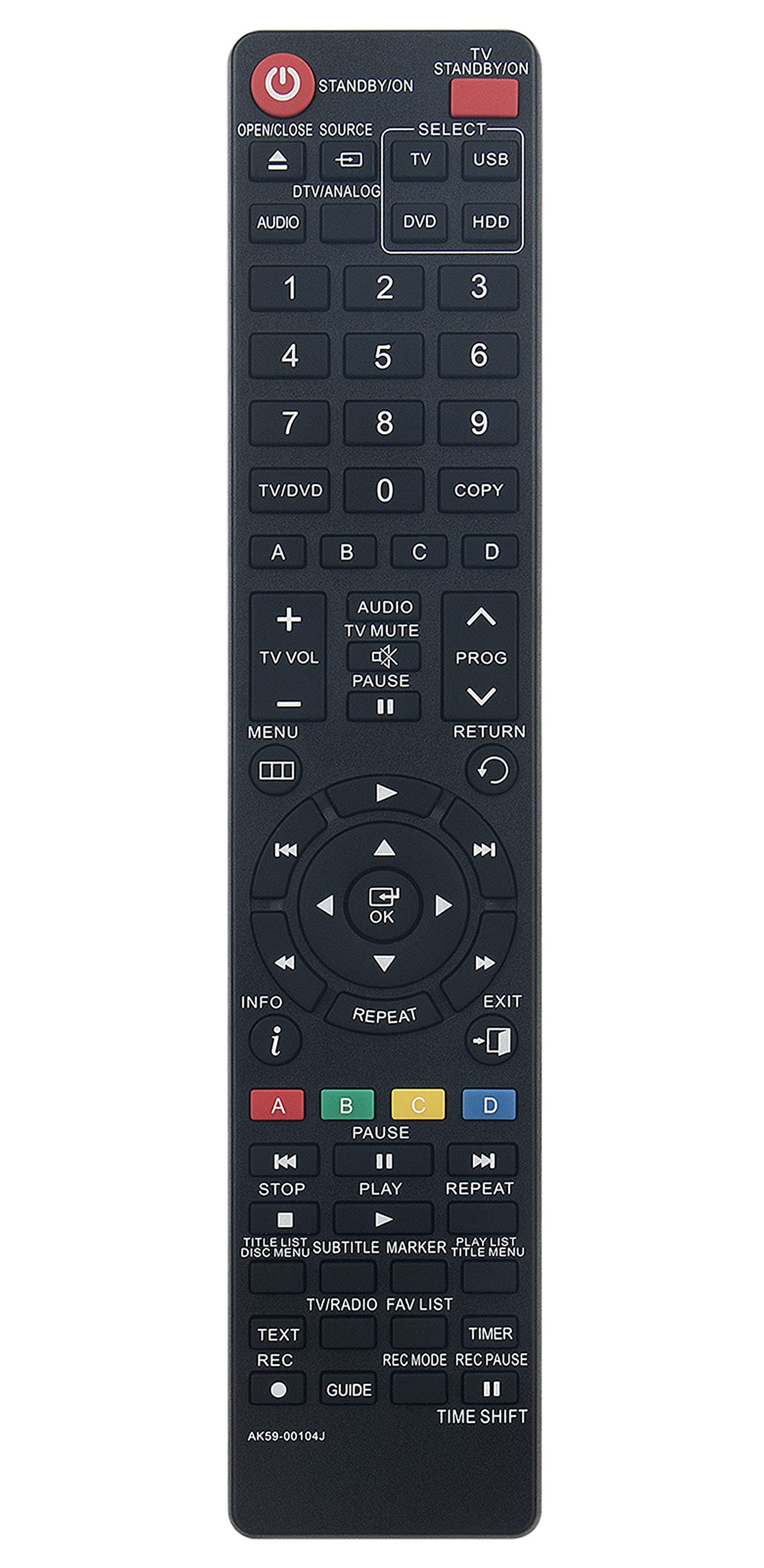
Figure 2.1: Front view of the AK59-00104J remote control, showing all buttons and layout.

Figure 2.2: Back view of the AK59-00104J remote control, highlighting the battery compartment.

Figure 2.3: Compatibility illustration, demonstrating the AK59-00104J remote as a suitable replacement for the original Samsung remote.
3. Setup
To begin using your remote control, follow these simple steps for battery installation:
- Locate the battery compartment on the back of the remote control.
- Slide the battery compartment cover downwards or in the direction indicated by an arrow to open it.
- Insert two (2) AAA batteries, ensuring the positive (+) and negative (-) terminals match the diagrams inside the compartment.
- Replace the battery compartment cover by sliding it back into position until it clicks securely.
The remote control is now ready for use. No additional programming is required.
4. Operating Instructions
This replacement remote control functions identically to the original Samsung remote. Point the remote directly at your Samsung DVD player and press the desired function button.
- Power Button: Located at the top right, use to turn the DVD player on or off.
- Source Selection: Buttons like DVD, HDD, USB, TV, AUDIO, DTV/ANALOG allow you to switch input sources.
- Numeric Keypad: Use for direct track selection or channel input.
- Navigation Buttons: The central directional pad (up, down, left, right, OK) is used to navigate menus and confirm selections.
- Playback Controls: Standard buttons for PLAY, PAUSE, STOP, REWIND, FAST FORWARD, SKIP (previous/next track).
- Volume Control: Use TV VOL + and TV VOL - to adjust television volume, and TV MUTE to mute sound.
- Menu/Return: Access DVD player menus and return to previous screens.
- Color Buttons (A, B, C, D): These buttons perform specific functions depending on the DVD or menu displayed. Refer to your DVD player's manual for their exact use.
For detailed information on specific functions, please refer to the original user manual of your Samsung DVD player.
5. Maintenance
Proper care will ensure the longevity of your remote control:
- Cleaning: Wipe the remote control with a soft, dry cloth. For stubborn dirt, lightly dampen the cloth with water or a mild cleaning solution, then wipe dry immediately. Do not use abrasive cleaners or solvents.
- Battery Replacement: Replace batteries when the remote's response becomes sluggish or stops working. Always replace both batteries at the same time with new ones of the same type (AAA).
- Storage: If the remote control will not be used for an extended period, remove the batteries to prevent leakage and potential damage. Store in a cool, dry place away from direct sunlight.
- Avoid Moisture: Do not expose the remote control to water or excessive humidity.
- Avoid Drops: Protect the remote from physical impact and drops.
6. Troubleshooting
If you experience issues with your remote control, try the following troubleshooting steps:
- Remote Not Responding:
- Check if the batteries are inserted correctly with the correct polarity (+/-).
- Replace the batteries with new AAA batteries.
- Ensure there are no obstructions between the remote control and the DVD player's infrared sensor.
- Make sure you are within the effective range and pointing the remote directly at the DVD player.
- Specific Buttons Not Working:
- Clean the remote control, especially around the unresponsive buttons, to remove any dirt or debris that might be interfering with button presses.
- If only certain buttons are not working after battery replacement, the remote might be faulty.
- Interference:
- Bright light sources (like direct sunlight or certain types of fluorescent lighting) can sometimes interfere with infrared signals. Try operating the remote in a different lighting condition.
If the problem persists after trying these steps, contact customer support for further assistance.
7. Specifications
| Model Number | AK59-00104J |
| Brand | VINABTY |
| Compatible Devices | Samsung DVD Players (DVD-SH893, DVD-SH897A, DVD-SH893A, DVD-SH895, DVD-SH895A, DVD-SH897) |
| Connectivity Technology | Infrared (IR) |
| Battery Type | 2 x AAA (not included) |
| Product Dimensions | 7.9 x 2 x 0.7 inches (20.07 x 5.08 x 1.78 cm) |
| Item Weight | 3 ounces (85 grams) |
| Special Feature | Ergonomic design, No programming needed |
| Manufacturer | XINHAO |
8. Warranty and Support
This product is covered by a standard manufacturer's warranty. For specific warranty details, please refer to the product packaging or contact your retailer. For technical support or inquiries, please reach out to the seller or manufacturer through the contact information provided at the point of purchase.
Please retain your proof of purchase for warranty claims.

