1. Introduction
Thank you for purchasing the Benechef 0.01g High-Accuracy Digital Jewelry Scale. This portable mini scale is designed for precise weighing of small items such as diamonds, gold, gemstones, powders, and medicines. Featuring a backlit LCD display and multiple measurement units, it provides accurate and convenient measurements for various applications. Please read this manual carefully to ensure proper use and maintenance of your scale.

Image: The Benechef digital jewelry scale demonstrating its versatility for weighing various small items including jewelry, powders, medicines, and hardware.
2. Product Features
- High Accuracy: Measures with a precision of 0.01 grams.
- Multi-Unit Conversion: Supports g (grams), oz (ounces), ct (carats), gn (grains), tl (taels), and ozt (troy ounces).
- Tare Function: Allows you to subtract the weight of a container for net weight measurement.
- PCS Counting Function: Enables quick counting of multiple small items.
- Backlit LCD Display: Provides clear and easy-to-read measurements in various lighting conditions.
- Protective Cover: The transparent lid protects the weighing platform and can be used as a weighing tray.
- Compact and Portable: Mini size for easy carrying and storage.
- Auto-Off Function: Conserves battery life by automatically shutting off after a period of inactivity.
3. Package Contents
- 1 x Benechef Digital Jewelry Scale
- 2 x AAA Batteries
- 1 x User Manual (this document)

Image: The Benechef Digital Jewelry Scale shown alongside two AAA batteries, illustrating the typical package contents.
4. Setup
- Battery Installation: Open the battery compartment on the back of the scale. Insert the two AAA batteries, ensuring correct polarity (+/-). Close the compartment.
- Placement: Place the scale on a hard, flat, and stable surface. Avoid placing it on soft or uneven surfaces, or near sources of vibration or drafts, as this can affect accuracy.
- Protective Film: If present, gently remove the blue protective anti-static plastic film from the stainless steel weighing platform before first use.
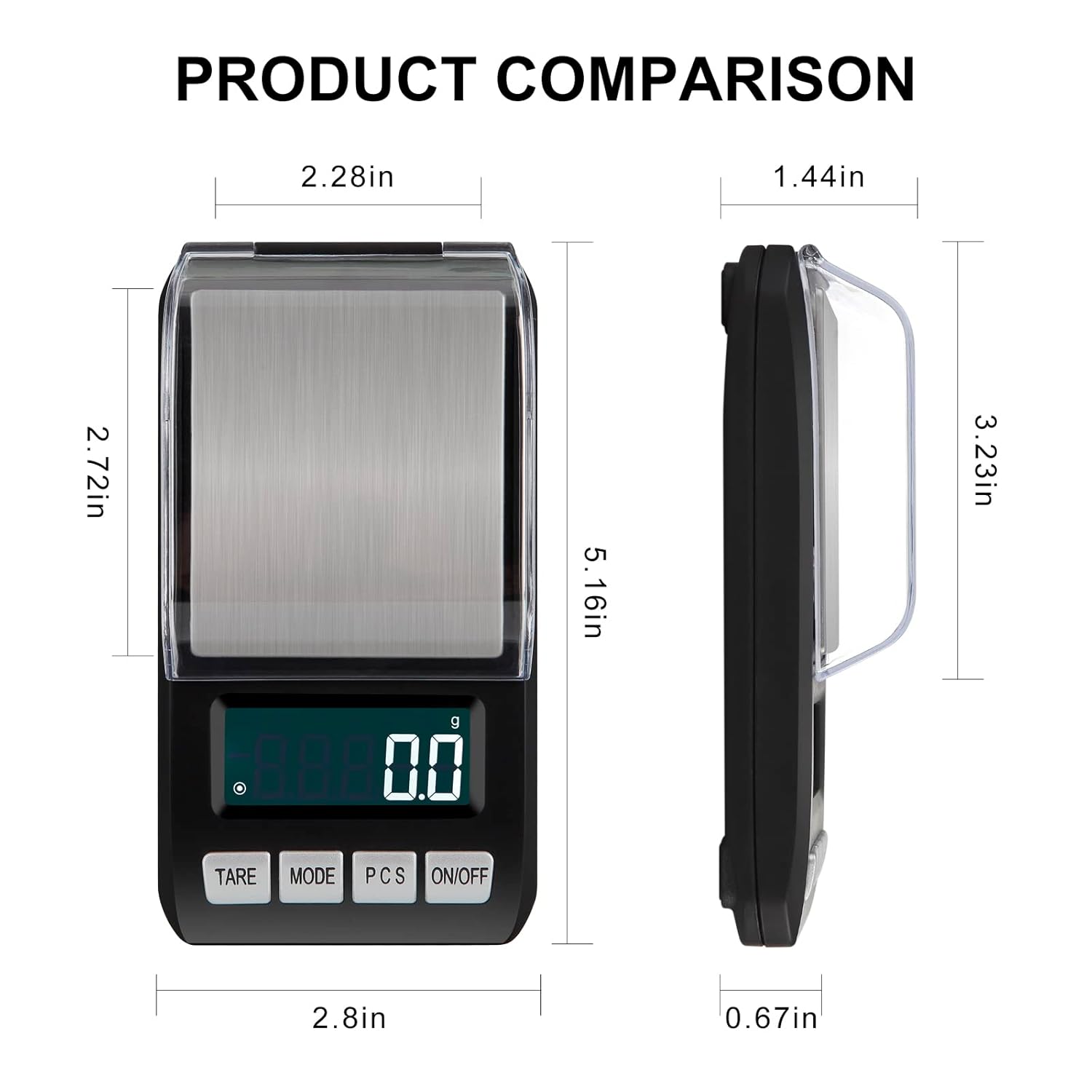
Image: A diagram showing the dimensions of the digital jewelry scale from top and side views, indicating its compact size.
5. Operating Instructions
5.1 Power On/Off
- To turn on the scale, press the ON/OFF button. The display will show "88888" and then "0.00g".
- To turn off the scale, press and hold the ON/OFF button for a few seconds until the display turns off. The scale will also automatically shut off after approximately 3 minutes of inactivity to conserve battery life.
5.2 Unit Conversion
- With the scale on, press the MODE button to cycle through the available weighing units: grams (g), ounces (oz), carats (ct), grains (gn), taels (tl), and troy ounces (ozt).
- The selected unit will be displayed on the screen.

Image: The scale display cycling through different measurement units: grams, ounces, carats, grains, taels, and troy ounces, demonstrating the unit conversion feature.
5.3 Tare Function
- The tare function allows you to weigh items in a container by subtracting the container's weight.
- Place an empty container on the weighing platform.
- Press the TARE button. The display will reset to "0.00g".
- Now, place the items you wish to weigh into the container. The display will show only the net weight of the items.

Image: A three-panel image illustrating the tare function: first, a container is placed on the scale showing its weight; second, the TARE button is pressed, zeroing the display; third, items are added to the container, and only their weight is shown.
5.4 PCS Counting Function
- This function allows you to count a large number of small items quickly.
- Turn on the scale and ensure it is in weighing mode (not PCS mode).
- Press and hold the PCS button until "25", "50", "75", or "100" appears on the display. This is the sample quantity.
- Place the corresponding number of sample items (e.g., 25 pieces) on the weighing platform.
- Press the PCS button again to confirm the sample quantity. The display will show "PCS" and the number of sample items.
- Now, add the items you wish to count to the platform. The display will show the total count of the items.
- To exit PCS mode, press the MODE button.
5.5 Calibration
Important Note: Calibration should only be performed if you are certain the scale requires adjustment and you have a precise calibration weight (e.g., 500g). Incorrect calibration can lead to inaccurate measurements. If you do not have a calibration weight, please do not attempt to calibrate the scale.
- Turn the scale on.
- Press and hold the MODE button until "CAL" appears on the display, then release.
- The display will then show the required calibration weight (e.g., "500.00g").
- Place the exact calibration weight (e.g., 500g) onto the center of the weighing platform.
- Wait for the display to show "PASS" and then return to normal weighing mode. This indicates successful calibration.
- Remove the calibration weight.
6. Maintenance and Care
- Cleaning: Wipe the scale with a soft, damp cloth. Do not use abrasive cleaners or immerse the scale in water.
- Storage: Store the scale in a clean, dry place at room temperature. Avoid extreme temperatures or humidity.
- Battery Replacement: If the display shows "LO" or becomes dim, replace both AAA batteries.
- Handle with Care: Avoid dropping the scale or subjecting it to strong impacts, as this can damage the internal sensors.
- Protective Lid: Always keep the protective lid closed when not in use or during transport to prevent damage to the weighing platform.
7. Troubleshooting
| Problem | Possible Cause | Solution |
|---|---|---|
| Scale does not turn on. | Dead or incorrectly installed batteries. | Check battery polarity or replace batteries. |
| Inaccurate readings. |
|
|
| "LO" displayed. | Low battery power. | Replace both AAA batteries. |
| "O_LD" or "EEEE" displayed. | Overload. | Remove the item immediately. The maximum capacity is 500g. |
8. Specifications
- Brand: Benechef
- Model: B0BXC8RZZF
- Capacity: 500g / 1.1lb
- Accuracy: 0.01g
- Units: g, oz, ct, gn, tl, ozt
- Display: Backlit LCD (LED type)
- Power: 2 x AAA Batteries (included)
- Product Dimensions: Approximately 4 x 2 x 1 inches (10.16 x 5.08 x 2.54 cm)
- Product Weight: Approximately 4.66 ounces (132 grams)
- Color: Silver / Black
- Auto-Off: Approx. 3 minutes
9. Warranty and Support
Benechef is committed to providing high-quality products. For any questions, concerns, or support needs regarding your digital jewelry scale, please contact Benechef customer service. Please refer to your purchase documentation for specific warranty details and contact information.
You can visit the official Benechef store on Amazon for more information: Benechef Store