1. Introduction
The NOVUS Automation N480D-RPR is a high-precision USB Temperature Controller designed for industrial applications requiring accurate temperature monitoring and control. This manual provides essential information for the safe and effective installation, operation, and maintenance of your device.
2. Key Features
- Accepts various thermocouple types: J (-50 °C to 760 °C), K (-90 °C to 1370 °C), T (-100 °C to 400 °C), R (0 to 1760 °C), S (0 to 1760 °C), E (-30 °C to 720 °C), and N (-90 °C to 1300 °C), with cold junction compensation.
- Supports 2 or 3-wire Pt100 RTD, range -200 °C to 530 °C, with cable resistance compensation.
- Pt100 excitation current: 0.170 mA.
- Internal A/D resolution: 15,000 levels; Displayed resolution: 7,500 levels.
- Four-digit 10 mm red display for measured variable and four-digit 7 mm green display for setpoint.
- Sampling rate: 5 measurements per second.
- Control output update: 200 ms.
- 5 Vdc 20 mA logic control output.
- Equipped with 1 SPDT relay and 2 SPST 3A @ 250 Vac relays.
- Power supply: 100 to 240 Vac/dc, 50/60 Hz; optional 24 Vdc/ac.
- Power consumption: less than 9 VA.
- Operating environment: 0 to 55 °C, 20 to 95 % RH.
- Front panel: IP65, Polycarbonate UL94 V-2.
- Back panel: IP30, ABS+PC UL94 V-0.
- Compact dimensions: 48 x 48 x 110 mm (1.89” x 1.89” x 4.33”).
3. Setup and Installation
3.1 Unpacking
Carefully remove the N480D-RPR controller from its packaging. Inspect the device for any signs of damage during transit. Retain the packaging for future transport or storage.
3.2 Panel Cutout and Mounting
The controller is designed for panel mounting. Ensure the panel cutout dimensions are precisely 45.5 mm x 45.5 mm. Secure the controller using the provided mounting hardware.
3.3 Wiring Instructions
Before proceeding with wiring, ensure that all power sources are disconnected to prevent electrical shock. Refer to the wiring diagram on the side of the unit and the detailed instructions below for correct connections.
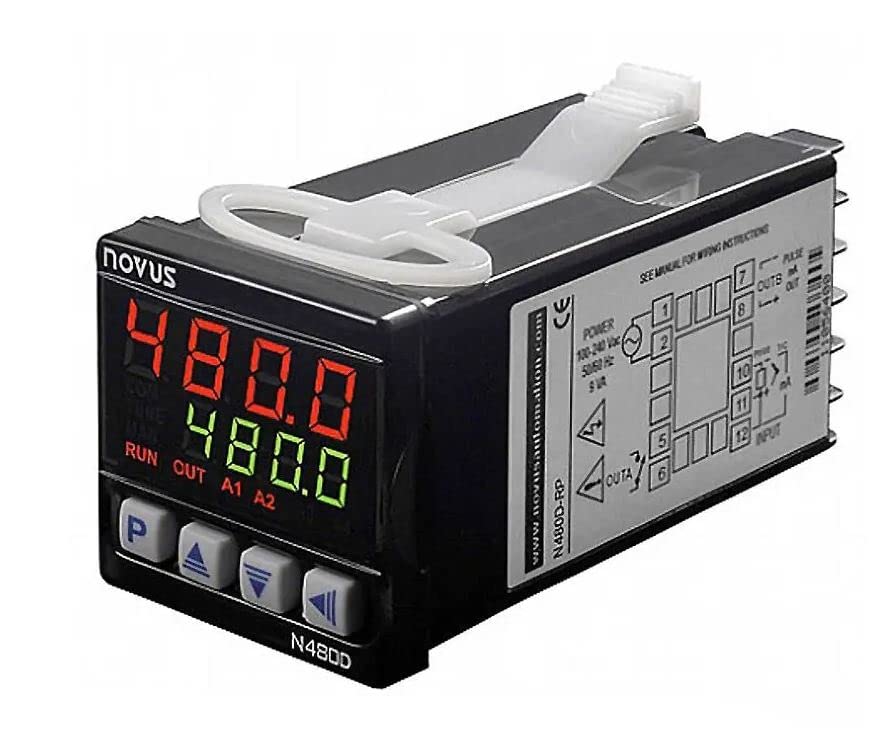
The wiring diagram indicates the terminal assignments for power supply, control outputs, and sensor inputs. Ensure that the power supply (100-240 Vac/dc, 50/60 Hz) is connected to the designated terminals. Connect your thermocouples or Pt100 RTD to the input terminals as specified. The relay outputs (SPDT and SPST) should be wired according to your application's control requirements.
4. Operating Instructions
4.1 Front Panel Overview
The front panel features a prominent red digital display for the current measured temperature and a green digital display for the setpoint. Below the displays are four buttons: 'P' (Program/Parameter), 'Up Arrow', 'Down Arrow', and 'Left/Right Arrow'. These buttons are used for navigation, parameter adjustment, and menu access.
4.2 Basic Operation
- Power On: After ensuring correct wiring, apply power to the controller. The displays will illuminate, showing the current measured temperature and the setpoint.
- Setpoint Adjustment: Use the 'Up Arrow' and 'Down Arrow' buttons to adjust the desired setpoint value. Press the 'P' button to confirm the change or to access further programming menus.
- Menu Navigation: The 'P' button typically enters the programming menu. Use the 'Up' and 'Down' arrows to scroll through parameters and the 'Left/Right' arrow to select digits for editing.
4.3 Control Modes
The N480D-RPR controller supports various control modes, including PID (Proportional-Integral-Derivative) control, to maintain precise temperature stability. Refer to the full product manual for detailed instructions on configuring specific control parameters and modes for your application.
5. Maintenance
Regular maintenance ensures the longevity and accuracy of your N480D-RPR controller.
- Cleaning: Periodically clean the front panel with a soft, damp cloth. Do not use abrasive cleaners or solvents.
- Inspection: Routinely check wiring connections for tightness and signs of wear or corrosion.
- Calibration: For critical applications, periodic calibration by qualified personnel is recommended to maintain measurement accuracy.
6. Troubleshooting
If you encounter issues with your N480D-RPR controller, consider the following basic troubleshooting steps:
- No Power: Check the power supply connections and ensure the voltage is within the specified range (100-240 Vac/dc).
- Incorrect Temperature Reading: Verify the sensor type selected matches the connected sensor (thermocouple or RTD). Check sensor wiring for proper polarity and secure connections. Ensure the sensor is correctly placed in the measurement environment.
- Control Output Not Activating: Confirm that the setpoint is correctly configured and that the control mode is appropriate for your application. Check relay connections and ensure they are not overloaded.
- Display Errors: Consult the full product manual for specific error codes and their meanings.
For persistent issues or complex problems, contact NOVUS Automation technical support.
7. Technical Specifications
| Feature | Specification |
|---|---|
| Thermocouple Types | J, K, T, R, S, E, N (with cold junction compensation) |
| Thermocouple Ranges | J: -50 to 760 °C; K: -90 to 1370 °C; T: -100 to 400 °C; R: 0 to 1760 °C; S: 0 to 1760 °C; E: -30 to 720 °C; N: -90 to 1300 °C |
| RTD Type | Pt100 (2 or 3-wire, with cable resistance compensation) |
| RTD Range | -200 °C to 530 °C |
| Pt100 Excitation Current | 0.170 mA |
| Internal A/D Resolution | 15,000 levels |
| Displayed Resolution | 7,500 levels |
| Measured Variable Display | Four-digit 10 mm red display |
| Setpoint Display | Four-digit 7 mm green display |
| Sampling Rate | 5 measurements per second |
| Control Output Update | 200 ms |
| Logic Control Output | 5 Vdc 20 mA |
| Relay Outputs | 1 SPDT relay, 2 SPST 3A @ 250 Vac relays |
| Power Supply | 100 to 240 Vac/dc, 50/60 Hz; optional 24 Vdc/ac |
| Power Consumption | Less than 9 VA |
| Operating Environment | 0 to 55 °C, 20 to 95 % RH (non-condensing) |
| Front Panel Protection | IP65, Polycarbonate UL94 V-2 |
| Back Panel Protection | IP30, ABS+PC UL94 V-0 |
| Weight | 140 g (with 1 relay), 160 g (with 3 relays) |
| Panel Cutout Dimensions | 45.5 mm x 45.5 mm |
| Overall Dimensions | 48 x 48 x 110 mm (1.89” x 1.89” x 4.33”) |
| Package Dimensions | 4 x 4 x 4 inches |
| Manufacturer | NOVUS Automation |
| ASIN | B0BXBKF5GQ |
8. Warranty and Support
The NOVUS Automation N480D-RPR USB Temperature Controller is manufactured to high-quality standards. For information regarding product warranty, technical support, or service, please refer to the official NOVUS Automation website or contact your authorized distributor. Keep your purchase receipt for warranty claims.