
1. Important Safety Information
Please read and understand all safety information before using this product. Failure to follow these instructions may result in electric shock, fire, or serious injury.
- Do not jump start a frozen battery.
- Do not use the jump starter if the cables or clamps are damaged.
- Do not connect the positive (+) and negative (-) clamps together.
- Do not expose the product to rain or moisture.
- Do not disassemble the unit. Refer servicing to qualified personnel.
- Ensure proper ventilation during use.
- Keep out of reach of children.
- Wear eye protection when working with batteries.
- The unit features an intelligent protection system against short circuit, reverse connection, low voltage, high voltage, overcharge, over-discharge, and high temperature.
2. Product Overview
The UTRAI JS-1 PRO is a versatile 12V jump starter and portable power bank designed for emergency vehicle starting and charging electronic devices. It features a high capacity battery, multiple charging outputs, and integrated safety tools.
Package Contents
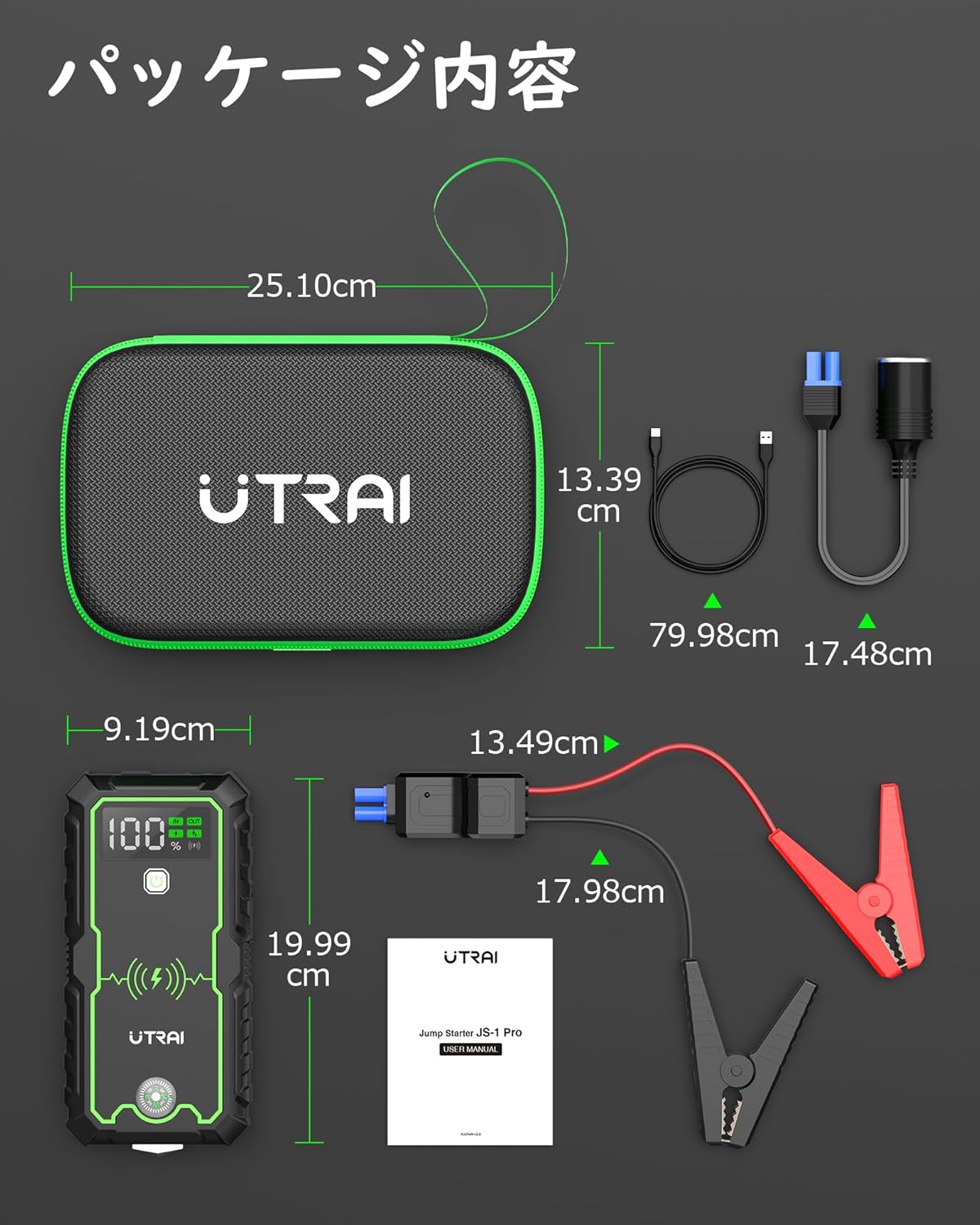
Image: Contents of the UTRAI JS-1 PRO package, including the jump starter unit, smart booster cables, USB-C charging cable, and user manual.
- UTRAI JS-1 PRO Jump Starter Unit
- Smart Booster Cables
- USB-C Charging Cable
- Storage Case
- User Manual
Key Features

Image: Overview of the UTRAI JS-1 PRO highlighting its 16000mAh capacity, 2500A peak current, compatibility with all gas and up to 8.5L diesel engines, 10W wireless charging, 3.0 USB fast charging, and lithium power.
- Peak Current: 2500A (suitable for all 12V gasoline engines and up to 8.5L diesel engines)
- Battery Capacity: 16000mAh (can jump start up to 30 times on a full charge)
- Wireless Charging: 10W for compatible mobile devices.
- USB Outputs: Two USB ports (USB 1-QC3.0: 5V/3A, 9V/2A, 12V/1.5A; USB 2: 5V/2.4A) for charging phones and tablets.
- Integrated LED Lamp: Features Flashlight, SOS, Strobe, and Red/Blue alternating alarm modes.
- Emergency Escape Hammer: Built-in for emergency situations.
- Compass Function: Integrated for navigation.
- Full Protection System: Safeguards against short circuit, reverse connection, low/high voltage, overcharge, over-discharge, and high temperature.
- Compact Design: Portable and easy to store.
3. Setup and Charging
Initial Charge
Before first use, fully charge the UTRAI JS-1 PRO. The unit comes partially charged, but a full charge ensures optimal performance.
- Connect the supplied USB-C charging cable to the Type-C input port on the jump starter.
- Connect the other end of the USB-C cable to a USB wall adapter (not included) or a powered USB port.
- The LCD display will show the charging progress. Charge until the display indicates 100%.
It is recommended to recharge the unit every 3-6 months to maintain battery health, even if not in use.
Checking Battery Level
Press the power button once to view the current battery level on the LCD display.
4. Operating Instructions
Jump Starting a Vehicle
Ensure the jump starter is at least 50% charged before attempting to jump start a vehicle.

Image: Visual guide demonstrating the four steps to jump start a vehicle using the UTRAI JS-1 PRO.
- Connect Cables to Unit: Insert the blue plug of the smart booster cables into the jump start port on the UTRAI JS-1 PRO. Ensure it is fully seated.
- Connect Clamps to Battery:
- Connect the RED positive (+) clamp to the positive (+) terminal of the vehicle battery.
- Connect the BLACK negative (-) clamp to the negative (-) terminal of the vehicle battery.
The indicator light on the smart booster cable will turn GREEN if connected correctly. If an error occurs (e.g., reverse polarity), the cable will display an alert and sound a warning.
- Start Vehicle: Once the green light is solid, start your vehicle's engine.
- Remove Clamps: After the engine starts, immediately remove the black negative (-) clamp, then the red positive (+) clamp from the vehicle battery. Finally, disconnect the smart booster cables from the jump starter unit.
If the vehicle does not start on the first attempt, wait at least 30 seconds before trying again. Do not attempt more than 3 consecutive jump starts.
Charging Electronic Devices

Image: The UTRAI JS-1 PRO demonstrating its 10W wireless charging capability and multiple USB output ports for charging various electronic devices like smartphones and tablets.
- Wireless Charging: Place your Qi-compatible device on the wireless charging pad located on the top surface of the jump starter. The charging icon will appear on the LCD display.
- USB Charging: Connect your device's USB charging cable to either of the two USB output ports on the jump starter.
Using the LED Lamp
Press and hold the power button for 3 seconds to turn on the LED flashlight. Press the power button repeatedly to cycle through the different modes:
- Flashlight (White Light)
- SOS Signal Light (White Light)
- Strobe Mode (White Light)
- Alternating Red and Blue Flashing Alarm Mode
Press and hold the power button again for 3 seconds to turn off the LED lamp.
Emergency Escape Hammer
The side of the jump starter is equipped with an emergency hammer. In case of an emergency requiring window breakage, use the pointed end to strike a corner of the window.
5. Maintenance and Storage
- Recharging: Recharge the unit every 3-6 months to maintain optimal battery performance, even if not used.
- Cleaning: Wipe the unit with a dry, soft cloth. Do not use harsh chemicals or abrasive cleaners.
- Storage Temperature: Store the jump starter in a cool, dry place, away from direct sunlight and extreme temperatures. The operating and storage temperature range is -20°C to 60°C (-4°F to 140°F).
- Cable Care: Inspect the booster cables and clamps for any damage before each use. Store them neatly in the provided case.

Image: The UTRAI JS-1 PRO demonstrating its ability to operate in extreme temperatures, from -20°C (-4°F) to 60°C (140°F).
6. Troubleshooting
| Problem | Possible Cause | Solution |
|---|---|---|
| Vehicle does not start. |
|
|
| Smart booster cable shows error/warning. |
|
|
| Jump starter not charging. |
|
|
7. Specifications

Image: Detailed view of the UTRAI JS-1 PRO unit, labeling its various components such as the compass, safety hammer, wireless charging area, power switch, LCD display, Type-C input, USB outputs, LED light, starting port, indicator lamp, and boost cable connection.
| Model | JS-1 PRO |
| Peak Current | 2500 Amps |
| Battery Capacity | 16000mAh |
| Start Voltage | 12V |
| USB Output 1 (QC3.0) | 5V/3A, 9V/2A, 12V/1.5A |
| USB Output 2 | 5V/2.4A |
| Wireless Charging Output | 10W |
| Input (Type-C) | Standard USB-C (specifications not explicitly detailed) |
| Dimensions (L x W x H) | 18.5 x 9.2 x 4.5 cm (7.3 x 3.6 x 1.8 inches) |
| Weight | 1.26 kg (2.9 lbs) |
| Operating/Storage Temperature | -20°C to 60°C (-4°F to 140°F) |
| Material | ABS Plastic |
8. Warranty and Support
The UTRAI JS-1 PRO Jump Starter comes with a 12-month worry-free warranty from the date of purchase. This warranty covers manufacturing defects and issues arising from normal use.
For warranty claims, technical support, or any questions regarding your product, please contact UTRAI customer service through the retailer where the product was purchased or visit the official UTRAI website for contact information.
Please have your purchase receipt and product model number (JS-1 PRO) available when contacting support.


