
JORAIR AP-T40, AP-T45
Contents
JORAIR AP-T40/AP-T45 HEPA Replacement Filter Instruction Manual
For HoMedics 5-in-1 Total Clean Air Purifier Models AP-T40, AP-T43, AP-T45, and Costco 1461901
1. Introduction
This instruction manual provides essential information for the proper installation, maintenance, and understanding of your JORAIR AP-T40/AP-T45 HEPA Replacement Filters. These filters are designed to maintain optimal air quality in compatible HoMedics air purifiers.

Image: Two JORAIR AP-T40/AP-T45 HEPA replacement filters, ready for installation.
2. Product Compatibility
The JORAIR AP-T40/AP-T45 HEPA Replacement Filters are compatible with the following HoMedics 5-in-1 Total Clean Air Purifier models:
- AP-T40FL
- AP-T40WT
- AP-T43
- AP-T45-BK
- AP-T45-WT
- Costco Model 1461901
Important: Always verify your air purifier's model number before purchasing replacement filters. The model number is typically located on the bottom of your air purifier unit.

Image: Visual guide illustrating the compatible HoMedics air purifier models (AP-T40, AP-T43, AP-T45) and the dimensions of the replacement filter (12.1 inches height, 7.5 inches diameter).
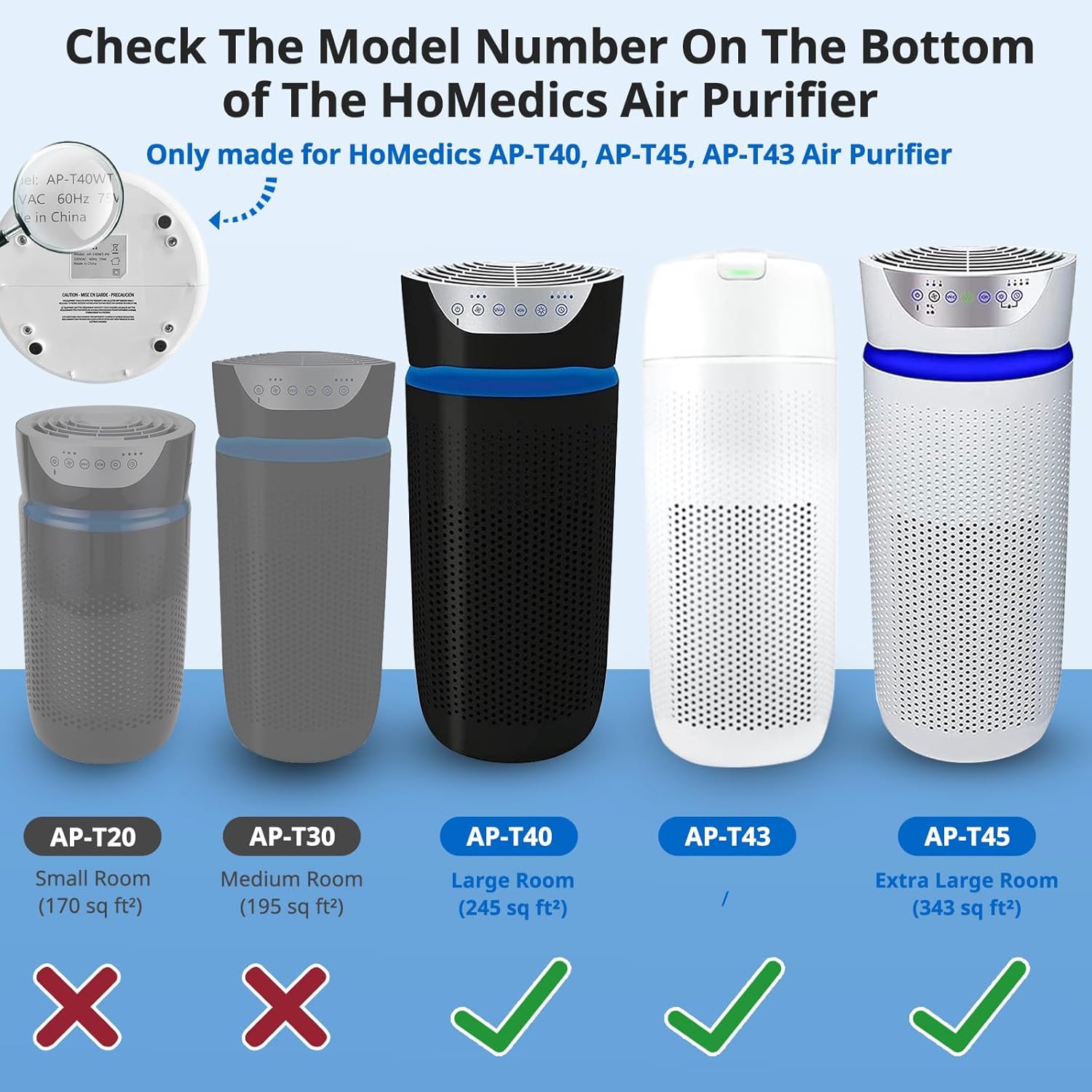
Image: A close-up view demonstrating where to locate the model number on the underside of a HoMedics air purifier for verification.
Video: How to Identify the Correct Filter
Video Description: This video provides guidance on how to correctly identify if you have purchased the appropriate replacement filters for your air purifier model.
3. Product Features
The JORAIR AP-T40/AP-T45 HEPA Replacement Filter utilizes a comprehensive 3-in-1 filtration system to ensure clean and fresh air in your living space.
3-in-1 Filtration System:
- Fine Pre-Filter: Captures larger particles such as dust, lint, pet hair, and dander.
- H13 True HEPA Filter: Reduces up to 99.97% of airborne particles as small as 0.3 microns, including pollen, dust mites, and other allergens.
- Activated Carbon Filter: Effectively absorbs various household odors, fumes, smoke, and cooking smells, improving overall air quality.

Image: A cutaway diagram showing the three distinct layers of the filter: fine pre-filter, H13 True HEPA filter, and activated carbon filter, working together for comprehensive air purification.

Image: An infographic highlighting the filter's capability to capture various airborne pollutants and odors, including dust, lint, smoke, VOCs, pollen, cooking odors, pet dander, and hair, with an air purifier operating in a living room setting.
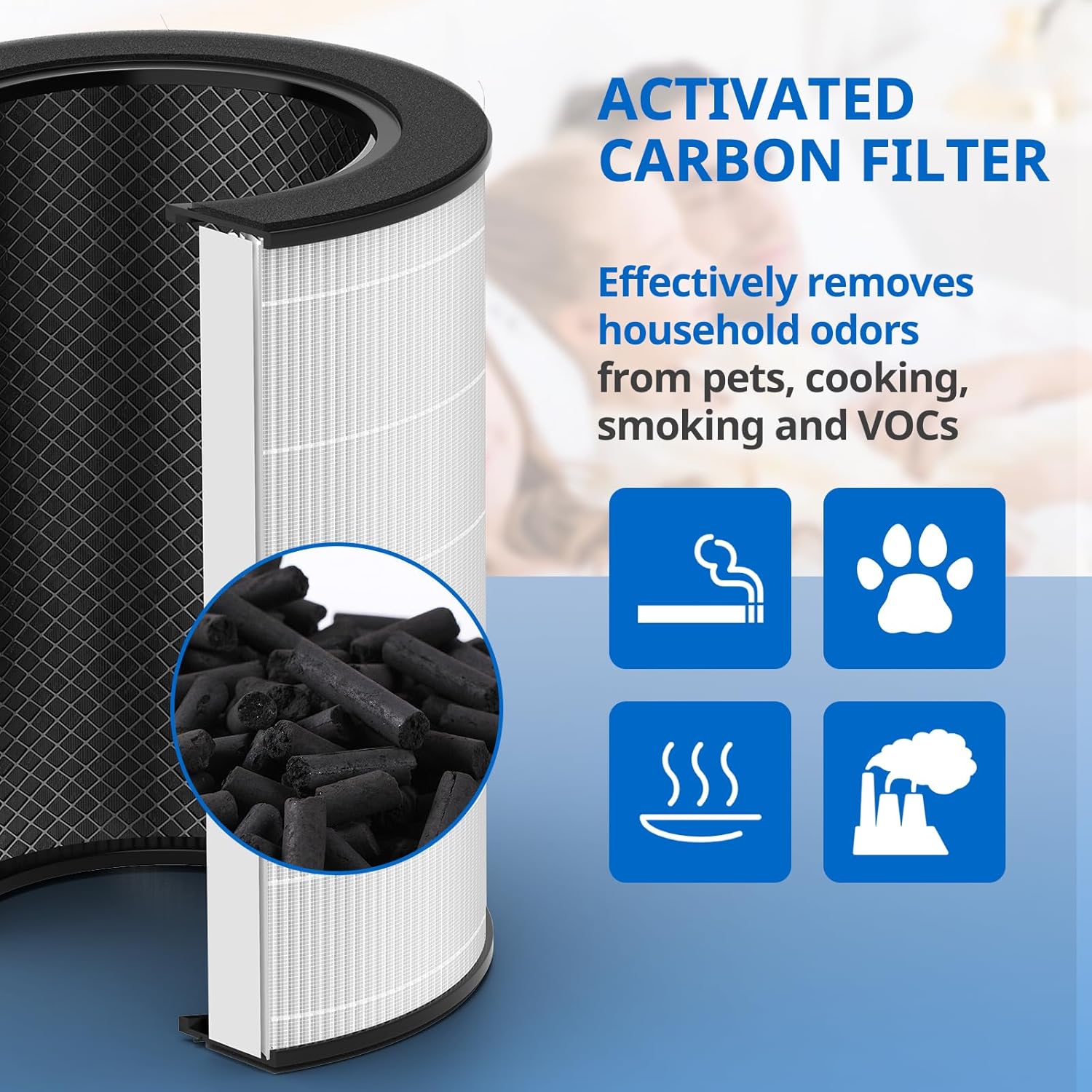
Image: A detailed close-up of the activated carbon filter, emphasizing its granular structure designed to absorb odors and harmful gases.
4. Installation Instructions
Follow these steps to replace the filter in your compatible HoMedics air purifier:
- Power Off: Ensure the air purifier is turned off and unplugged from the power outlet.
- Access Filter Compartment: Locate and open the filter compartment cover on your air purifier. This is typically on the side or bottom of the unit.
- Remove Old Filter: Carefully pull out the used filter from the compartment. Dispose of the old filter responsibly.
- Unpack New Filter: Remove the new JORAIR replacement filter from its packaging.
- Insert New Filter: Place the new filter into the compartment, ensuring it is seated correctly. Follow any directional arrows on the filter or unit.
- Close Cover: Securely close the filter compartment cover.
- Restore Power: Plug the air purifier back into the power outlet and turn it on.
- Reset Filter Indicator: If your air purifier has a filter replacement indicator light, press and hold the designated reset button (often the 'Ionizer' or 'Filter Reset' button) for 3-5 seconds until the light turns off or resets. Refer to your air purifier's original manual for specific reset instructions.
Video: How to Replace Your HoMedics Air Purifier Filter
Video Description: A step-by-step demonstration on how to replace the filter in a HoMedics Total Clean air purifier, including opening the unit, removing the old filter, inserting the new one, and closing the cover.
5. Maintenance
To ensure optimal performance and air purification efficiency, it is recommended to replace your JORAIR AP-T40/AP-T45 HEPA Replacement Filter every 6 to 12 months. The actual replacement interval may vary depending on your air quality, frequency of use, and the presence of pets or smokers in your environment.
6. Troubleshooting
Filter Reset Light Remains On:
If the filter indicator light on your HoMedics air purifier remains illuminated after replacing the filter, it typically means the indicator needs to be manually reset. Follow these general steps:
- Ensure the new filter is correctly installed and the cover is securely closed.
- With the air purifier powered on, locate the 'Ionizer' or 'Filter Reset' button on the control panel.
- Press and hold this button for approximately 3-5 seconds until the indicator light turns off or flashes to confirm the reset.
If the issue persists, consult the original user manual for your specific HoMedics air purifier model for detailed troubleshooting steps or contact customer support.
7. Specifications
| Attribute | Detail |
|---|---|
| Brand | JORAIR |
| Model (Filter) | AP-T40, AP-T45 |
| Filtration Type | 3-in-1 (Pre-Filter, H13 True HEPA, Activated Carbon) |
| Filter Dimensions | 12.1 inches (Height) x 7.5 inches (Diameter) |
| Item Weight | 16 ounces |
| Included Components | 2 Pack filters for AP-T40 |
8. Warranty and Support
JORAIR values customer service and satisfaction. Your purchase is covered by a 90-day warranty or refund policy. If you encounter any problems with the AP-T40/AP-T45 filter fitting your air purifier or have any other concerns, please contact JORAIR customer service for assistance. Our after-sales team is dedicated to providing satisfactory service.
Documents and downloads
Ask a question about this manual
Ask about setup, troubleshooting, compatibility, parts, safety, or missing instructions. Manuals+ will review the question and use this page’s manual context to help answer it.