
iGPSPORT BSC200S
Contents
iGPSPORT BSC200S GPS Bike Computer User Manual
Model: BSC200S
1. Introduction
The iGPSPORT BSC200S is a versatile GPS bike computer designed for cyclists seeking advanced navigation, comprehensive data tracking, and smart connectivity. Featuring a 2.4-inch semi-transparent and semi-reflective color screen, it offers clear visibility even in direct sunlight. This device supports Bluetooth and ANT+ connectivity, allowing seamless pairing with various sensors such as speed, cadence, heart rate, and power meters, as well as iGPSPORT front and radar lights.
With a robust IPX7 waterproof rating and a 25-hour battery life, the BSC200S is built for extended rides in diverse conditions. It provides over 100 riding data points and can store up to 400 hours of riding data. Key features include route navigation, one-touch navigation, smart notifications for calls and messages, and a "continue last ride" function.

Figure 1: iGPSPORT BSC200S GPS Bike Computer
2. Package Contents
Ensure all items are present in the package:
- 1 x BSC200S Bike Computer
- 1 x Rubber pad
- 2 x Rubber band
- 1 x User manual (this document)

Figure 2: Package contents of the BSC200S
3. Setup
3.1 Charging the Device
Before first use, fully charge the BSC200S. The device features a Type-C USB port for charging. A full charge takes approximately 1.5 hours and provides up to 25 hours of battery life.
3.2 Mounting the Bike Computer
The BSC200S comes with a standard handlebar mount. Follow these steps for installation:
- Stack the two provided bases together.
- Place the stacked base on your bike handlebar.
- Cross the two rubber bands to bind the base securely to the handlebar.
- Adjust the angle of the mount for optimal viewing.
- Fix the bike computer onto the base by twisting it into place until it clicks.
- Ensure the installation is complete and the device is stable before riding.
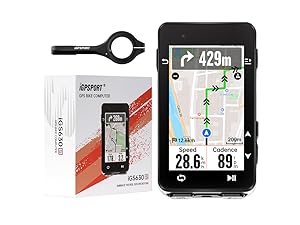
Figure 3: Mounting Method A for BSC200S
3.3 Initial Device Pairing with iGPSPORT APP
To unlock full functionality and manage settings, pair your BSC200S with the iGPSPORT APP.
- Download the "iGPSPORT Ride" app from your smartphone's app store.
- Open the iGPSPORT APP.
- Navigate to the "Device" section within the app.
- Select "Add Device" and choose "Cycling Products".
- Select your product model, "BSC200S", from the list.
- Tap "Connect" and confirm the Bluetooth pairing request on your phone.
- Allow notifications when prompted to receive smart notifications on your device.
Video 1: Demonstrates how to pair the iGPSPORT BSC200S with the iGPSPORT app for smart notifications.
3.4 Sensor Pairing
The BSC200S supports various sensors via Bluetooth and ANT+ protocols. To pair a sensor:
- Ensure the sensor is active and within range of the BSC200S.
- On the BSC200S, navigate to the sensor pairing menu (refer to the device's on-screen interface).
- Select the type of sensor you wish to pair (e.g., speed sensor, cadence sensor, heart rate monitor, power meter, iGPSPORT front light, radar light).
- Confirm pairing when the sensor is detected.

Figure 4: Wide Riding Devices Compatibility
4. Operating Instructions
4.1 Basic Operation
The BSC200S features 6 buttons for navigation and control. Familiarize yourself with their functions (refer to the quick start guide for button layout).
- Power On/Off: Press and hold the power button.
- Start/Stop Recording: Press the designated button to begin or pause a ride recording.
- Page Switching: Use the up/down buttons to cycle through different data display pages.
- Menu Navigation: Use the selection and back buttons to navigate menus.
4.2 Route Navigation
The BSC200S offers advanced route navigation capabilities:
- Creating Routes: Routes can be created directly on the official iGPSPORT app.
- Importing Routes: Import routes from third-party platforms such as Strava, Ride with GPS, or Komoot.
- Customizing Display: Customize the route navigation color module for better visibility.
- Turn Reminders: The device provides turn reminders, yaw reminders, and yaw direction guidance.

Figure 5: Accurate Route Navigation
Video 2: Guide on how to use the navigation function on the iGPSPORT BSC200S.
4.3 One-Touch Navigation
For quick starts, utilize the one-touch navigation feature:
- Save location points within the iGPSPORT app.
- Select "one-touch navigation" in the app to send the route directly to your BSC200S.
- The device also supports "Back to Start" navigation and riding record navigation, allowing you to retrace previous routes.

Figure 6: One-touch navigation for easy travel
4.4 Smart Notifications
Stay connected while riding with smart notifications:
- Receive incoming call reminders.
- Get SMS reminders.
- Receive notifications from various apps directly on your BSC200S display.

Figure 7: Smart Notifications
4.5 Continue Last Ride Function
The BSC200S allows you to seamlessly continue a paused ride activity, ensuring no data interruption for long rides.

Figure 8: Motion detection & Continue riding
4.6 Data Display and Customization
The device offers over 100 riding data points, including speed, distance, grade, cadence, calories, time, temperature, and FTP. You can customize the page display module via the iGPSPORT app to show the data most relevant to you.

Figure 9: 9-Color UI interface & 130+ Data
5. Maintenance
- Cleaning: Wipe the device with a soft, damp cloth. Avoid harsh chemicals or abrasive materials.
- Storage: Store the BSC200S in a cool, dry place when not in use. Avoid extreme temperatures.
- Water Resistance: The device is IPX7 waterproof, meaning it can withstand immersion in up to 1 meter of water for 30 minutes. However, it is not designed for prolonged underwater use. Ensure the Type-C port cover is securely closed to maintain water resistance.
- Battery Care: To prolong battery life, avoid fully discharging the device frequently. Charge it regularly, especially if storing for extended periods.
6. Troubleshooting
| Problem | Possible Cause | Solution |
|---|---|---|
| Device not turning on | Low battery; device frozen. | Charge the device. If frozen, press and hold the power button for 10-15 seconds to force restart. |
| GPS signal lost/inaccurate | Obstructed view of sky; device moved indoors. | Move to an open area with clear sky view. Wait for GPS acquisition. |
| Sensors not connecting | Sensor battery low; sensor out of range; incorrect pairing. | Check sensor battery. Ensure sensor is close to the device. Re-attempt pairing through the device settings. |
| Smart notifications not received | Bluetooth disconnected; notifications disabled in app/phone settings. | Ensure Bluetooth is active and connected. Check notification settings in the iGPSPORT app and your phone's system settings. |
| Data not syncing to app | Bluetooth disconnected; app not open; internet connectivity issues. | Ensure device is connected to the app via Bluetooth. Open the iGPSPORT app to initiate sync. Check your phone's internet connection. |
7. Specifications
| Feature | Specification |
|---|---|
| Screen | 2.4 inch, Semi-transparent and semi-reflective color display |
| Dimensions | 82 x 53 x 14.1 mm (3.23 x 2.09 x 0.56 inches) |
| Weight | 66g (2.33 ounces) |
| Battery Life | 25 hours |
| Charging Interface | Type-C USB |
| Data Storage | 400H Riding Data |
| Waterproof Grade | IPX7 |
| Buttons | 6 Buttons |
| Connectivity | Bluetooth, ANT+ |
| Compatible Sensors | Speed sensor, Cadence sensor, Heart rate sensor, Power meter, iGPSPORT front light, Radar light |
| Languages | English, Spanish, Portuguese, French, German, Italian, etc. |
8. Warranty Information
The iGPSPORT BSC200S GPS Bike Computer comes with a 1 Year Warranty from the date of purchase. This warranty covers manufacturing defects and malfunctions under normal use. It does not cover damage caused by misuse, accidents, unauthorized modifications, or improper maintenance.
Please retain your proof of purchase for warranty claims.
9. Customer Support
For any questions, concerns, or technical assistance, please contact iGPSPORT customer service. Your satisfaction is our top pursuit.
- Online Support: Visit the official iGPSPORT website for FAQs, software updates, and additional resources.
- Email Support: Refer to your product packaging or the official website for direct email contact information.
- Response Time: Our customer service team aims to respond within 24 hours.
You can also visit the iGPSPORT Store on Amazon for more information and products.
Documents and downloads
Ask a question about this manual
Ask about setup, troubleshooting, compatibility, parts, safety, or missing instructions. Manuals+ will review the question and use this page’s manual context to help answer it.