
1. Introduction
Thank you for choosing the Picun B9 Wireless Bluetooth 5.0 Headphones. This manual provides detailed instructions for setting up, operating, and maintaining your headphones to ensure optimal performance and longevity. Please read this manual thoroughly before use.
2. Package Contents
Please check the package for the following items:
- Picun B9 Wireless Headphones
- USB Charging Cable
- 3.5mm Audio Cable
- User Guide (this manual)

Image: Contents of the Picun B9 headphone package, including the foldable headphones, a 3.5mm audio cable, a user guide, and a USB charging cable.
3. Setup
3.1 Charging the Headphones
Before first use, fully charge your headphones. Connect the USB charging cable to the charging port on the headphones and the other end to a USB power source (e.g., computer, wall adapter). The LED indicator will show charging status.
- A 5-minute charge provides approximately 3 hours of playback.
- A full charge provides up to 40 hours of playtime.

Image: Illustration showing the fast charging capability (5 minutes charge for 3 hours playback) and the option to use the headphones in wired mode when battery is low.
3.2 Bluetooth Pairing
- Ensure the headphones are charged and powered off.
- Press and hold the Power button until the LED indicator flashes blue and red, indicating pairing mode.
- On your device (smartphone, tablet, computer), enable Bluetooth and search for available devices.
- Select "Picun B9" from the list of devices.
- Once connected, the LED indicator will show a steady blue light or flash slowly.
3.3 Wired Mode Connection
You can use the headphones in wired mode even if the battery is depleted. Connect one end of the 3.5mm audio cable to the audio input port on the headphones and the other end to your audio source's 3.5mm jack.
4. Operating Instructions
4.1 Power On/Off
- Power On: Press and hold the Power button for 3 seconds. The LED indicator will light up.
- Power Off: Press and hold the Power button for 3 seconds. The LED indicator will turn off.
4.2 Music Playback Control

Image: Close-up of the Picun B9 headphone earcup highlighting the unique touch control area.
- Play/Pause: Tap the touch control area once.
- Next Song: Double-tap the touch control area.
- Volume Up/Down: Use the dedicated volume control buttons on the headphones (if present) or your connected device.
4.3 Call Management
The Picun B9 headphones include a built-in microphone for hands-free calling.
- Answer/End Call: Tap the touch control area once.
- Reject Call: Press and hold the touch control area for 2 seconds.
5. Ergonomics and Adjustments
The Picun B9 headphones are designed for comfort and portability.

Image: Diagram illustrating the ergonomic features of the Picun B9 headphones, including a padded headband, adjustable sliders, and soft ear cushions for comfort.
- Padded Headband: Adjust the headband for a secure and comfortable fit.
- Adjustable Slider: Extend or retract the earcups to fit your head size.
- Soft Ear Cushions: The earcups are designed with soft material for extended listening comfort.
- 90° Swiveling Earcups: The earcups can swivel 90 degrees to find the most comfortable angle for wearing.
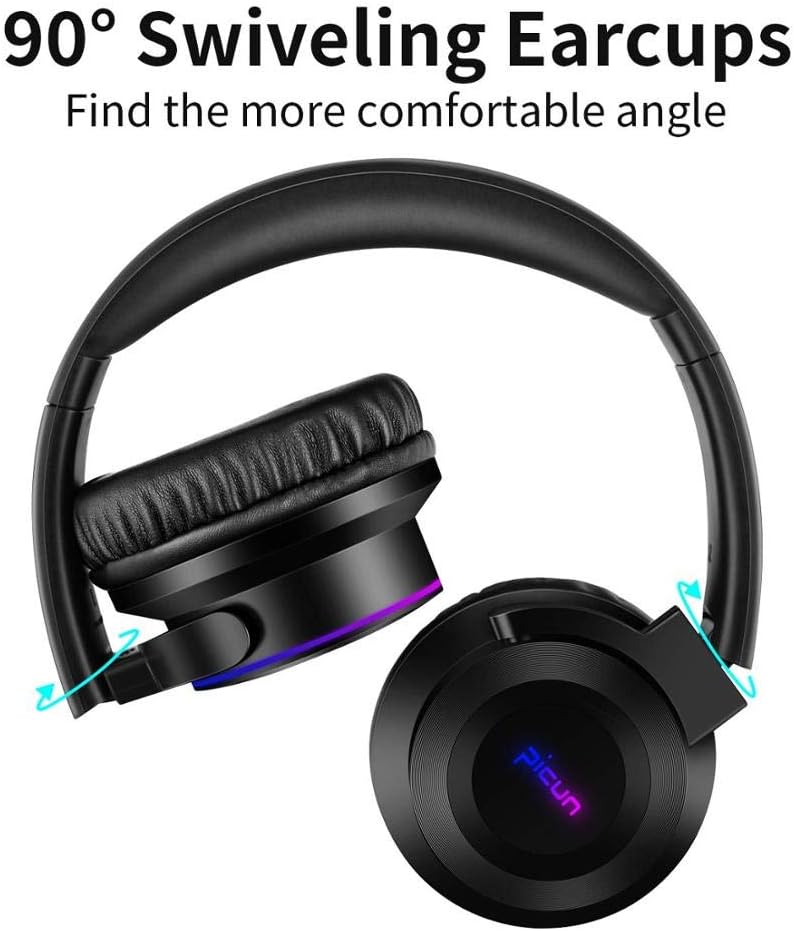
Image: The Picun B9 headphones demonstrating their 90-degree swiveling earcups for improved fit and comfort.
- Foldable Design: The headphones can be folded for compact storage and portability.
6. Maintenance
- Clean the headphones regularly with a soft, dry cloth.
- Avoid exposing the headphones to extreme temperatures, humidity, or direct sunlight.
- Do not use abrasive cleaners or solvents.
- Store the headphones in a cool, dry place when not in use.
- Keep away from water and liquids as the headphones are not waterproof.
7. Troubleshooting
| Problem | Solution |
|---|---|
| Headphones do not power on. | Ensure the headphones are fully charged. Connect to a power source using the USB charging cable. |
| Cannot pair with device. |
|
| No sound in wireless mode. |
|
| No sound in wired mode. |
|
8. Specifications
- Model: B9
- Connectivity: Bluetooth 5.0, 3.5mm Audio Input
- Playtime: Up to 40 hours
- Charging: Fast Charging (5 minutes charge for 3 hours playback)
- Microphone: Yes
- Impedance: 32 Ohm
- Sensitivity: 103±3 dB
- Control Type: Touch control, Volume control
- Features: Foldable design, 90° Swiveling earcups, Padded headband, Soft over-ear cushions
- Compatibility: TV, Computer, Mobile Phones
- Water Resistance: Not waterproof
9. Warranty and Support
Picun provides a 12-month warranty for all products. If you encounter any quality issues with your Picun B9 headphones, please do not hesitate to contact our customer support. We are committed to ensuring customer satisfaction and will offer a full refund or a new replacement product.
For support, please refer to the contact information provided with your purchase or visit the official Picun website.


