
Introduction
Thank you for choosing Arikasen Bluetooth 5.0 Wireless Earbuds. This manual provides essential information for setting up, operating, and maintaining your new earbuds. Please read it carefully before use to ensure optimal performance and longevity of your device.
These earbuds feature Bluetooth 5.0 connectivity, IPX5 water resistance, and comfortable protein earpads, designed for an enhanced audio experience.
Package Contents
Please check the package for the following items:
- Arikasen Bluetooth 5.0 Wireless Earbuds
- USB Charging Cable
- User Manual
- (Optional) Detachable Microphone for Gaming (if purchased separately)
Product Overview
Familiarize yourself with the components of your Arikasen Wireless Earbuds.

Image: Arikasen Bluetooth Wireless Earbuds. This image displays the overall design of the earbuds, highlighting their compact and ergonomic form factor.

Image: Earbud positioned on an ear. This illustrates how the earbud sits comfortably and securely over the ear, designed to minimize pressure during extended use.
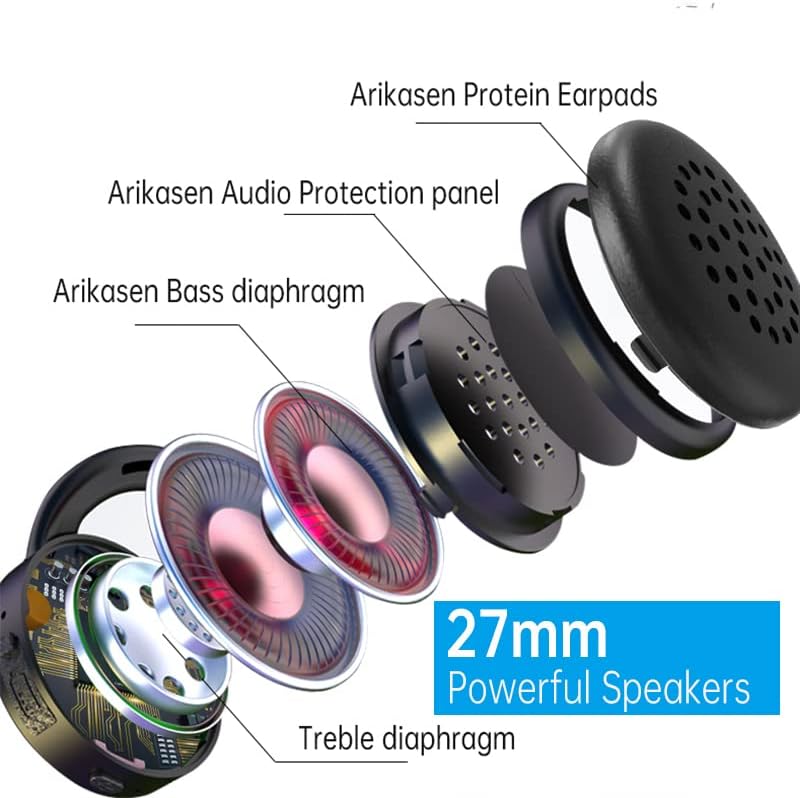
Image: Exploded view of the earbud speaker. This diagram shows the internal components, including the Arikasen Protein Earpads, Audio Protection panel, Bass diaphragm, and Treble diaphragm, emphasizing the 27mm powerful speakers.

Image: Earbuds shown with an optional detachable microphone. This highlights the accessory for enhanced voice communication, particularly useful for gaming.

Image: Earbud held in a hand with a ruler for scale. This image demonstrates the compact size of the earbud and indicates its Bluetooth 5.0 compatibility for low-latency transmission.
Setup
1. Charging the Earbuds
- Connect the USB charging cable to the charging port on the earbuds.
- Connect the other end of the cable to a USB power source (e.g., computer, wall adapter).
- The indicator light will show charging status (e.g., red for charging, blue for fully charged).
- Allow approximately 1-2 hours for a full charge.
2. Bluetooth Pairing
- Ensure the earbuds are fully charged before initial pairing.
- Power on the earbuds by pressing and holding the multi-function button until the indicator light flashes red and blue, indicating pairing mode.
- On your device (smartphone, tablet, computer), enable Bluetooth.
- Search for available Bluetooth devices and select "Arikasen Earbuds" from the list.
- Once connected, the indicator light will turn solid blue or flash slowly.
- If prompted for a password, enter "0000".
Operating Instructions
Basic Controls
| Action | Button Press |
|---|---|
| Power On | Press and hold Multi-function button for 3 seconds |
| Power Off | Press and hold Multi-function button for 5 seconds |
| Play/Pause Music | Single press Multi-function button |
| Volume Up | Short press Volume + button |
| Volume Down | Short press Volume - button |
| Next Track | Long press Volume + button |
| Previous Track | Long press Volume - button |
Call Functions
- Answer/End Call: Single press the Multi-function button.
- Reject Call: Press and hold the Multi-function button for 2 seconds.
- Redial Last Number: Double press the Multi-function button.
Maintenance
- Clean the earbuds regularly with a soft, dry cloth.
- Avoid using harsh chemicals or abrasive materials.
- Store the earbuds in a cool, dry place away from direct sunlight and extreme temperatures.
- Do not expose the earbuds to water beyond their IPX5 rating (splash-proof, not submersible).
- Keep charging ports free of dust and debris.
Troubleshooting
| Problem | Solution |
|---|---|
| Earbuds won't turn on | Ensure they are fully charged. Connect to a power source and check the charging indicator. |
| Cannot pair with device |
|
| No sound or low volume |
|
| Intermittent connection |
|
Specifications
| Feature | Detail |
|---|---|
| Bluetooth Version | 5.0 |
| Water Resistance Rating | IPX5 |
| Earpad Material | Soft Protein Foam |
| Playtime | Up to 18 hours (actual time may vary) |
| Speaker Size | 27mm |
| Microphone | Built-in (Optional detachable microphone available) |
Warranty Information
Arikasen provides a 12-month warranty for all products. This warranty covers manufacturing defects and ensures the possibility of a full refund or replacement within the warranty period. Please retain your proof of purchase for warranty claims.
For warranty service, please contact our customer support team with your product details and a description of the issue.
Support
If you encounter any issues or have questions not covered in this manual, please contact our customer support:
- Email: support@arikasen.com (Example email, replace with actual if available)
- Website: www.arikasen.com (Example website, replace with actual if available)
Our support team is available to assist you with any product-related inquiries.


