
Introduction
Welcome to your new jiehome X1-660 Laser Rangefinder. This manual provides comprehensive instructions for the safe and effective use of your device. Please read it thoroughly before operation to ensure optimal performance and longevity of your rangefinder.
Product Overview
Key Features
- High-Precision Measurement: Measures distances from 3 to 660 yards with an accuracy of ±1 yard and a measuring speed of less than 0.5 seconds.
- Rechargeable Battery: Equipped with a 750mAh lithium-ion battery, providing approximately 20,000 measurements per full charge via a Type-C interface.
- Slope Compensation Technology: Automatically calculates angle-compensated distance for uphill and downhill situations, aiding in accurate shot planning.
- Multi-functional Modes: Includes continuous scanning, flagpole lock with vibration, slope compensation, horizontal and vertical distance measurement, and speed measurement.
- Clear Vision Optics: Features multi-layer coated optical lenses, an LCD digital display, 6X magnification, and an adjustable diopter for bright and clear images.
- Durable Design: IP54 water-resistant and ergonomically designed for comfortable handling.
Package Contents
The following items are included in your product package:
- 1 x jiehome X1-660 Laser Rangefinder
- 1 x Protective Pouch
- 1 x USB Type-C Charging Cable
- 1 x User Manual
- 1 x Printed Box
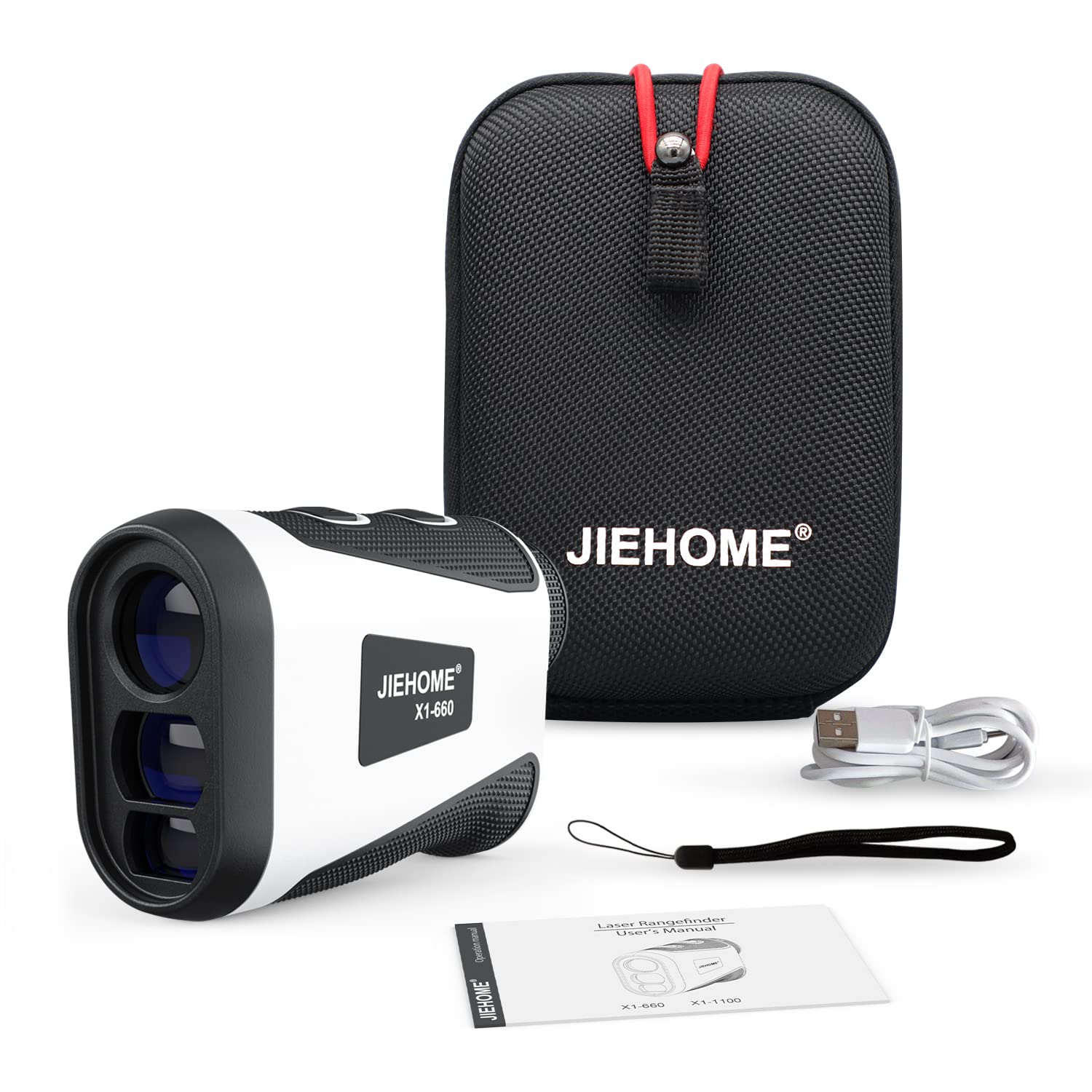
Image: The complete package contents of the jiehome X1-660 Laser Rangefinder, showing the device, its protective carrying pouch, a USB Type-C charging cable, and the user manual.
Setup
Charging the Device
The X1-660 rangefinder is equipped with a 750mAh rechargeable lithium-ion battery. Before initial use, and whenever the battery is low, fully charge the device.
- Locate the Type-C charging port on the side of the rangefinder.
- Connect the provided USB Type-C cable to the charging port and to a compatible USB power source (e.g., wall adapter, computer USB port).
- The charging indicator will show the charging status. A full charge allows for approximately 20,000 measurements.

Image: An internal view illustrating the rechargeable lithium-ion battery and the Type-C charging interface of the rangefinder, highlighting its power source.
Powering On/Off
- To Power On: Press the power button once. The display will illuminate.
- Automatic Power Off: The device will automatically power off after 20 seconds of inactivity to conserve battery life.
Operating Instructions
Diopter Adjustment and Focusing
To ensure a clear view of the display and target, adjust the diopter:
- Look through the eyepiece.
- Rotate the eyepiece ring (diopter adjustment) until the reticle and numbers on the display appear sharp and in focus to your eye.

Image: A visual representation of the 6X magnification and the rotary focusing feature, demonstrating how to adjust the eyepiece for a high-definition and clear view without needing glasses.
Measurement Modes
The X1-660 offers several measurement modes. Press the 'Mode' button to cycle through them and select the desired function.

Image: An overview of the six distinct measurement modes of the rangefinder, including straight line distance, flagpole locking, golf trajectory compensation, horizontal and vertical distance, speed measurement, and continuous scan.
- 1. Straight Line Distance Measurement: This is the default mode, providing the direct line-of-sight distance to your target.
- 2. Flagpole Locking Mode: Designed for golf, this mode helps to isolate the flagpole from background objects. Scan the area around the flag, and the device will lock onto the nearest target, providing its distance. The rangefinder will vibrate twice upon successful flagpole lock.

Image: A close-up demonstrating the Flagpole Lock Mode, where the rangefinder identifies and locks onto a flagpole, providing a visual confirmation and a two-time vibration alert.
- 3. Golf Trajectory Compensation (Slope Mode): This mode calculates the angle-compensated distance, which is the actual playing distance adjusted for elevation changes. This feature can be toggled on or off, making the device compliant for tournament play when off.

Image: A graphic explaining the Slope Compensation feature, illustrating how the rangefinder measures the golf ballistic compensation distance by accounting for elevation changes between the user and the target.
- 4. Horizontal & Vertical Distance Measurement: Provides both the horizontal distance from your position to the target and the vertical height difference.
- 5. Speed Measurement: Allows you to measure the speed of a moving object.
- 6. Continuous Scan Measurement: Hold down the measurement button to continuously scan multiple targets and receive real-time distance updates as you pan across the landscape.
Maintenance
Cleaning
- Use a soft, clean, lint-free cloth to gently wipe the lenses and the body of the rangefinder.
- Do not use abrasive materials, harsh chemicals, or solvents, as these can damage the optical coatings and the device's finish.
- For stubborn dirt or smudges on the lenses, use a lens cleaning solution specifically designed for optical devices and a microfiber lens cloth.
Storage
- Always store the rangefinder in its protective pouch when not in use to prevent scratches and impacts.
- Store the device in a cool, dry place, away from direct sunlight, high humidity, and extreme temperatures.
- Avoid placing heavy objects on top of the rangefinder during storage.
Water Resistance
The jiehome X1-660 is rated IP54 water-resistant. This means it is protected against dust ingress and splashing water from any direction. It is not designed for submersion in water. Avoid exposing the device to heavy rain or prolonged wet conditions.
Troubleshooting
If you encounter any issues with your rangefinder, please refer to the following common troubleshooting steps:
- Device Not Powering On: Ensure the battery is sufficiently charged. Connect the device to a charger and attempt to power it on again.
- Inaccurate Readings:
- Check for any obstructions between the rangefinder and the target.
- Ensure the lenses are clean and free from smudges or debris.
- Verify that the correct measurement mode is selected for your application.
- Adjust the diopter for a clear view of the target and display.
- Display Unclear or Blurry: Adjust the diopter by rotating the eyepiece until the display appears sharp. Clean the eyepiece and objective lenses if necessary.
- No Vibration Feedback: Ensure the flagpole lock mode is active and that the device has successfully acquired the target. The vibration only occurs in specific modes upon target lock.
If these steps do not resolve the issue, please contact customer support for further assistance.
Specifications
| Feature | Specification |
|---|---|
| Brand | jiehome |
| Model | X1-660 |
| Measuring Range | 3 to 660 yards |
| Accuracy | ±1 yard |
| Magnification | 6X |
| Battery Type | 750mAh Rechargeable Lithium-Ion |
| Charging Interface | USB Type-C |
| Water Resistance | IP54 |
| Item Weight | 124 Grams |
| Material | Plastic |
| Applicable Sports | Archery, Golf, Hunting |
| UPC | 723735448977 |
Warranty and Support
The jiehome X1-660 Laser Rangefinder is backed by a 1-year warranty, ensuring coverage for manufacturing defects and malfunctions under normal use. Additionally, lifetime technical support is provided to assist you with any operational questions or issues you may encounter.
For warranty claims, technical assistance, or any other inquiries, please contact jiehome customer service through the contact information provided with your purchase or on the official jiehome website.