
1. Introduction
Thank you for purchasing the Godox DP600IIIV Professional Studio Flash Kit. This powerful 600Ws monolight is designed for professional studio portrait photography, offering advanced features such as a high guide number, fast recycle times, and precise power control. This manual provides essential information for the safe and effective use of your flash kit, including setup, operation, maintenance, and troubleshooting. Please read this manual carefully before use to ensure optimal performance and longevity of your equipment.
2. What's in the Box
The Godox DP600IIIV Professional Studio Flash Kit includes the following components:
- 2 x Godox DP600IIIV Studio Flash Units
- 2 x Softbox SB-BW6090 with Bowens Speed Ring and Grid
- 1 x Godox XT-16 Wireless Power-Control Flash Trigger (Transmitter)
- 1 x Godox CB-04 Hard Carrying Case with Wheels
- Power Cords

Image: The complete Godox DP600IIIV Professional Studio Flash Kit, showing two flash units, two softboxes, an XT-16 transmitter, and a CB-04 trolley bag.
3. Product Overview
The Godox DP600IIIV is a high-performance studio monolight featuring a robust design and versatile functionality. It offers a guide number of 106 meters (at ISO 100) and a stable color temperature of 5600K ±200K.
3.1 Key Features
- Power Output: 600Ws, adjustable from 1/64 to full power.
- Recycle Time: Fast 0.1-1 second at full power.
- Flash Duration: Short durations from 1/800 to 1/2000 second for freezing action.
- Modeling Lamp: Integrated 30W LED modeling lamp for continuous lighting and focus assist.
- Wireless Control: Built-in Godox 2.4G X System for wireless power control and triggering.
- Mount: Standard Bowens mount for compatibility with a wide range of accessories.
- Triggering Options: Sync cord, optical slave, test button, and wireless control port.
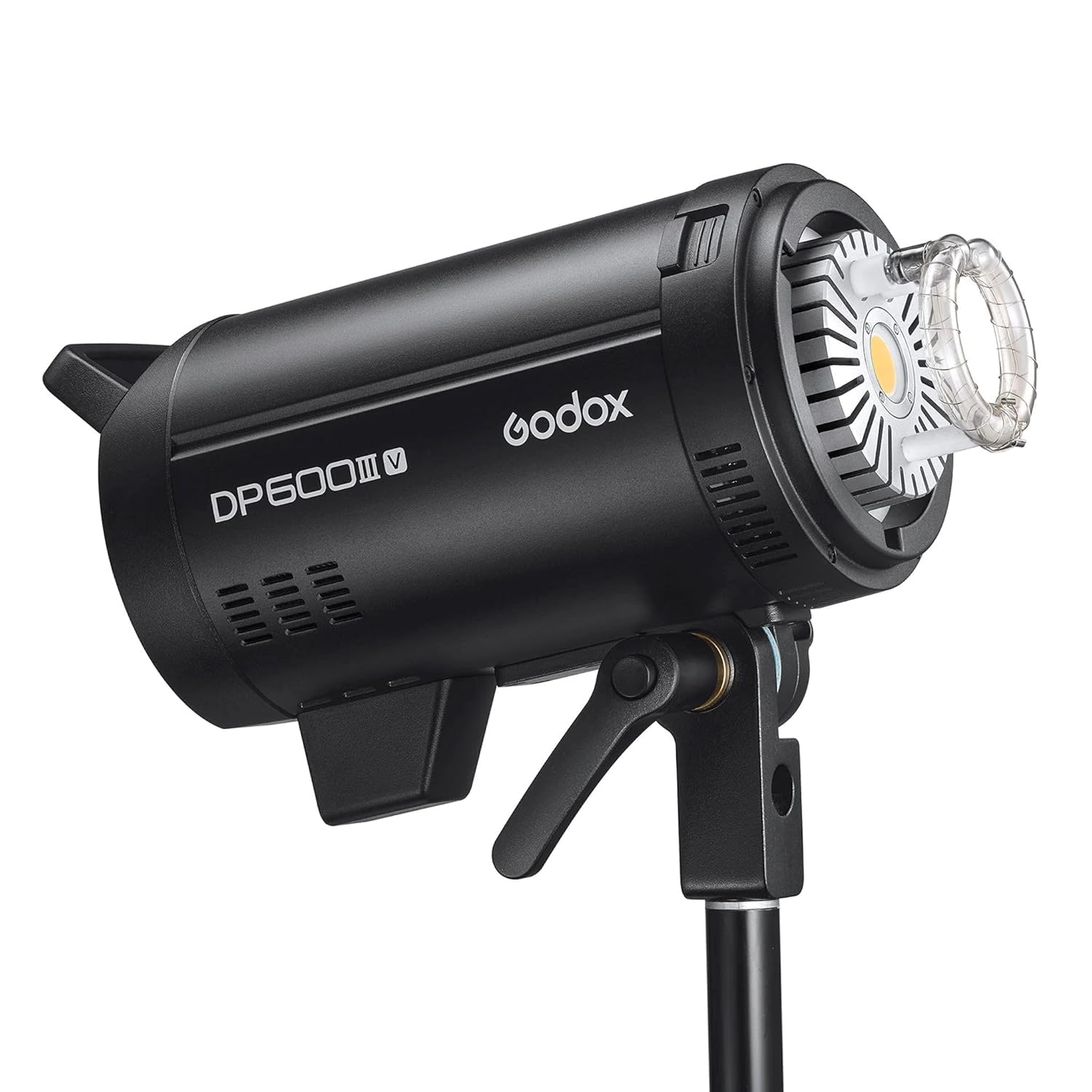
Image: Front view of the Godox DP600IIIV Studio Flash with a standard reflector attached, showcasing its robust design.

Image: Rear view of the Godox DP600IIIV Studio Flash, highlighting the control panel with LCD screen, adjustment dial, and various buttons for settings.

Image: A close-up view of the flash tube and the central LED modeling lamp, demonstrating the light source components.
4. Setup
4.1 Mounting the Flash Unit
- Attach the DP600IIIV flash unit to a sturdy light stand using the integrated mounting bracket.
- Secure the flash unit by tightening the locking knob on the light stand adapter.
- Adjust the tilt angle of the flash head using the tilt locking handle.
4.2 Attaching Light Modifiers (Softbox)
- Assemble the SB-BW6090 softbox according to its specific instructions, ensuring the Bowens speed ring is correctly installed.
- Align the Bowens mount on the softbox with the mount on the front of the DP600IIIV flash unit.
- Insert the softbox into the flash mount and rotate it clockwise until it clicks securely into place.
- To remove, press the release button on the flash mount and rotate the softbox counter-clockwise.
4.3 Power Connection
- Ensure the flash unit's power switch is in the "OFF" position.
- Connect the provided power cord to the power input socket on the rear of the flash unit.
- Plug the other end of the power cord into a suitable AC power outlet (100-240V).
4.4 Wireless Trigger Setup (XT-16)
- Insert batteries into the XT-16 transmitter.
- Mount the XT-16 transmitter onto your camera's hot shoe.
- Ensure the flash unit's wireless function is enabled (refer to Section 5.3).
- Set the same channel and group on both the XT-16 transmitter and the DP600IIIV flash unit for wireless communication.
5. Operating Instructions
5.1 Powering On/Off
- To power on, flip the power switch located on the rear panel to the "ON" position. The LCD display will illuminate.
- To power off, flip the power switch to the "OFF" position.
5.2 Adjusting Flash Power
- Rotate the adjustment dial on the control panel to increase or decrease the flash output.
- The power output ranges from 1/64 to 1/1 (full power) in precise increments.
- The current power setting is displayed on the LCD screen.
5.3 Modeling Lamp Control
- Press the MODEL button to cycle through modeling lamp modes: OFF, PROP (proportional to flash power), and FULL (full brightness).
- The 30W LED modeling lamp provides consistent illumination for previewing lighting effects.
5.4 Triggering Modes
- Test Button: Press the TEST button to manually fire the flash.
- Sync Cord: Connect a standard PC sync cord to the sync port on the flash unit and your camera.
- Optical Slave (S1/S2): Press the SLAVE button to activate optical slave mode.
- S1 Mode: The flash will fire in response to the first flash from another unit.
- S2 Mode: The flash will ignore the pre-flash of another unit and fire on the main flash.
- 2.4G Wireless X System:
- Press the GR/CH button to set the channel and group. Ensure these match your XT-16 transmitter.
- The flash unit will automatically receive signals from the XT-16 transmitter for remote power control and triggering.
6. Maintenance
- Cleaning: Use a soft, dry cloth to clean the flash unit. For stubborn dirt, a slightly damp cloth can be used, followed by a dry cloth. Do not use solvents or abrasive cleaners.
- Storage: Store the flash unit in a cool, dry place away from direct sunlight and excessive humidity. When not in use for extended periods, disconnect it from power.
- Flash Tube: The flash tube is a consumable part. If it needs replacement, contact authorized service personnel. Avoid touching the flash tube directly with bare hands.
- Handling: Handle the unit with care. Avoid dropping or subjecting it to strong impacts.
7. Troubleshooting
| Problem | Possible Cause | Solution |
|---|---|---|
| Flash does not fire. |
|
|
| Flash output is inconsistent. |
|
|
| Modeling lamp not working. |
|
|
8. Specifications
| Feature | Detail |
|---|---|
| Model | DP600IIIV |
| Brand | GODOX |
| Power Output | 600Ws |
| Guide Number (GN) | 106 (meters at ISO 100, with standard reflector) |
| Color Temperature | 5600K ±200K |
| Recycle Time | 0.1 - 1 second (at full power) |
| Flash Duration | 1/800 - 1/2000 second |
| Power Adjustment | 1/64 to 1/1 (full power) |
| Modeling Lamp | 30W LED |
| Wireless Control | Godox 2.4G X System |
| Mount Type | Bowens Mount |
| Triggering Methods | Sync cord, Test button, Optical slave (S1/S2), Wireless control port |
| Power Input | AC 100-240V ~ 50/60Hz |
| Product Dimensions | 30 x 30 x 40 cm |
| Item Weight | 2.8 kg (per unit) |
9. Warranty and Support
For detailed warranty information, please refer to the warranty card included with your product or visit the official Godox website. Warranty terms and conditions may vary by region and retailer.
If you encounter any issues or require technical assistance, please contact your authorized Godox dealer or the Godox customer support team. Provide your product model number (DP600IIIV) and purchase details when seeking support.
- Manufacturer: GODOX Photo Equipment Co. Ltd
- Country of Origin: China


