
Introduction
Thank you for choosing MOUNTUP TV Wall Mounts. This manual provides detailed instructions for the safe and correct installation and operation of your MU0028 and MU0018 full motion TV wall mounts. Please read this manual thoroughly before installation to ensure proper setup and to prevent damage or injury. Keep this manual for future reference.
Safety Information
- Weight Capacity: Do not exceed the maximum weight capacity specified for each mount (MU0028: 100 lbs / 45.5 kg; MU0018: 77 lbs / 35 kg). Exceeding this limit may result in serious injury or property damage.
- TV Size: Ensure your TV's screen size falls within the recommended range for the respective mount (MU0028: 42-82 inches; MU0018: 26-60 inches).
- Wall Type: These mounts are designed for installation on solid wood studs, concrete, or brick walls. DO NOT install on drywall alone. If installing on concrete or brick, concrete anchors are required (not included, but can be requested).
- VESA Compatibility: Verify your TV's VESA mounting pattern is compatible with the mount.
- Tools: Use appropriate tools for installation.
- Assistance: Two people are recommended for installation to ensure safety.
- Children: Keep children away during installation.
Package Contents
Please check that all components are present and undamaged before installation. If any parts are missing or damaged, contact customer support.
Included in the Bundle:
- 1 x MOUNTUP MU0028 Full Motion TV Wall Mount
- 1 x MOUNTUP MU0018 Full Motion TV Wall Mount
- Necessary hardware kit for installation (screws, washers, spacers, etc.)
- Installation instructions
Setup and Installation
This section outlines the general steps for installing both MU0028 and MU0018 mounts. Specific hardware and VESA patterns will vary by TV and mount model.
Before You Begin:
- Check TV Compatibility: Verify your TV's weight and VESA pattern are within the limits of the chosen mount.
- Identify Wall Type: Determine if your wall is solid wood stud, concrete, or brick. Do not install on drywall alone.
- Gather Tools: You will need a drill, stud finder (for wood studs), level, tape measure, pencil, and a screwdriver.
General Installation Steps:
- Mark Wall Plate Position: Determine the desired height for your TV. Use a stud finder to locate the center of wood studs or mark the desired drilling points for concrete/brick. Use the wall plate as a template and a level to ensure it is straight.
- Drill Pilot Holes: Drill pilot holes at the marked locations. For wood studs, drill appropriate size holes. For concrete/brick, use a masonry drill bit and insert concrete anchors (if applicable).
- Attach Wall Plate: Secure the wall plate to the wall using the provided lag bolts and washers. Ensure it is firmly attached and level.
- Attach TV Brackets to TV: Carefully place your TV face down on a soft, clean surface. Attach the vertical TV brackets to the back of your TV using the appropriate screws, washers, and spacers from the hardware kit. Ensure the brackets are centered and securely fastened.
- Hang TV on Wall Plate: With assistance, carefully lift the TV and hook the TV brackets onto the wall plate. Ensure the TV is securely seated on the mount.
- Secure TV to Mount: Tighten any safety screws or locking mechanisms on the TV brackets to prevent accidental dislodging.

Image: The MOUNTUP MU0028 full motion TV wall mount, showing its robust construction and included accessories like a level and cable ties.

Image: Detailed view of the MOUNTUP MU0028 mount highlighting its features: a maximum weight capacity of 100 lbs (45.5 kg), heavy-duty steel wall plate, easy tilting adjustment, and an ultra-strong six-arm structure for stability.

Image: The MOUNTUP MU0018 full motion TV wall mount, designed for smaller to medium-sized televisions.

Image: Key specifications for the MOUNTUP MU0018 mount, indicating compatibility with 26-60 inch screens, a weight capacity of 77 lbs (35 kg), and VESA compatibility ranging from 100x100mm to 400x400mm.
Operating the Mount (Adjustments)
Both MU0028 and MU0018 mounts offer full motion capabilities, allowing you to adjust your TV for optimal viewing.
Tilt Adjustment:
The MU0028 mount allows for a tilt range of -13° to +5°. To adjust the tilt, loosen the tilt knobs or bolts on the side of the TV brackets, adjust the TV to the desired angle, and then securely tighten the knobs/bolts.
Swivel Adjustment:
The MU0028 mount offers a swivel range of ±45°, while the MU0018 mount offers a wider swivel range of ±90°. Gently push or pull the TV to the desired left or right angle. The articulating arms will allow smooth movement.
Level Adjustment:
Both mounts feature a post-installation level adjustment of ±3°. If your TV appears slightly unlevel after installation, you can make minor adjustments by loosening the leveling screws, rotating the TV slightly, and then re-tightening the screws.

Image: A television mounted with the MOUNTUP MU0028, demonstrating its tilt (-13°/+5°) and swivel (±45°) capabilities for achieving a perfect viewing angle from any seat.
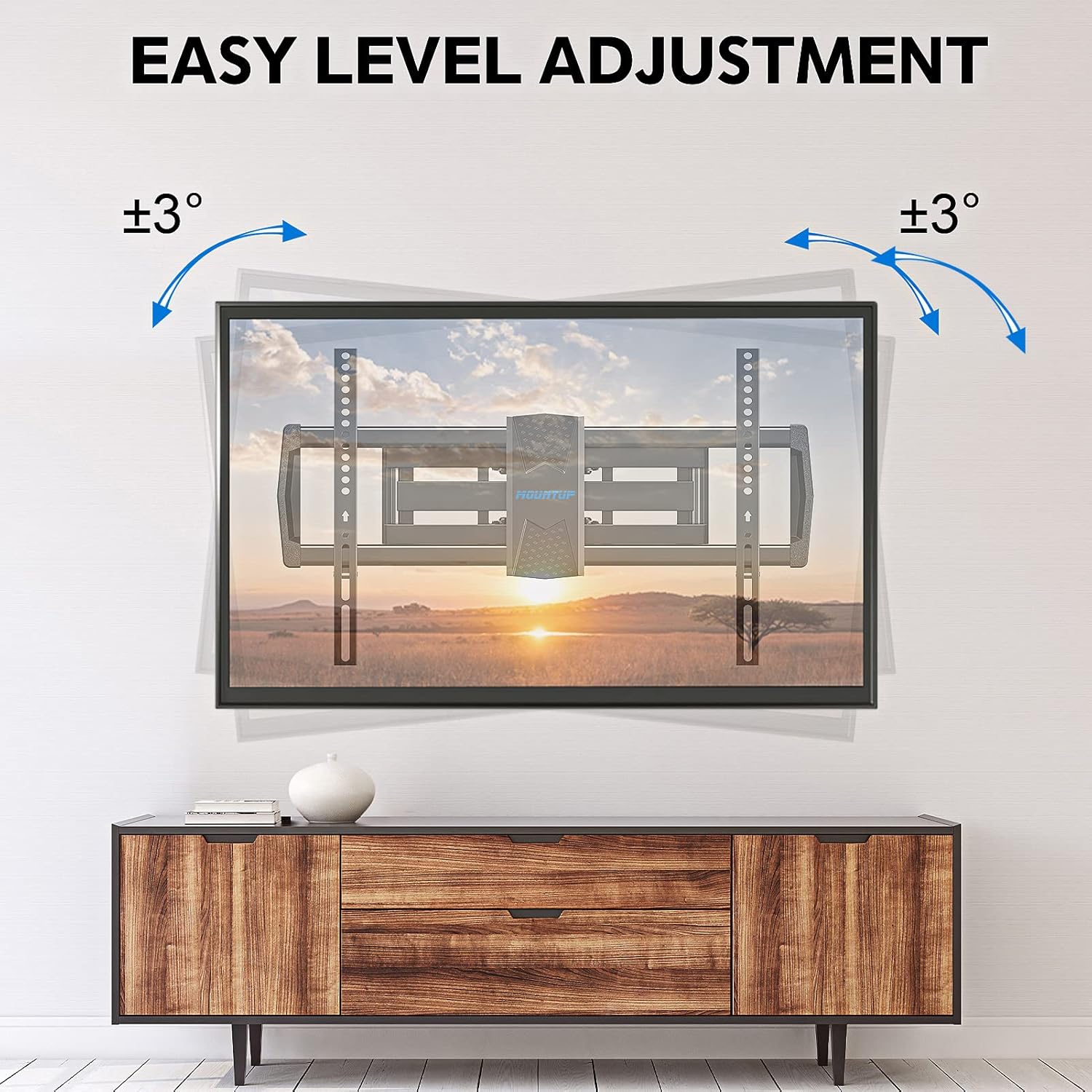
Image: The MOUNTUP MU0028 mount illustrating its easy level adjustment feature, allowing for a ±3° rotation to ensure the TV is perfectly horizontal after installation.

Image: A television mounted with the MOUNTUP MU0018, showcasing its wide swivel range of ±90° for optimal viewing from various positions in a room.
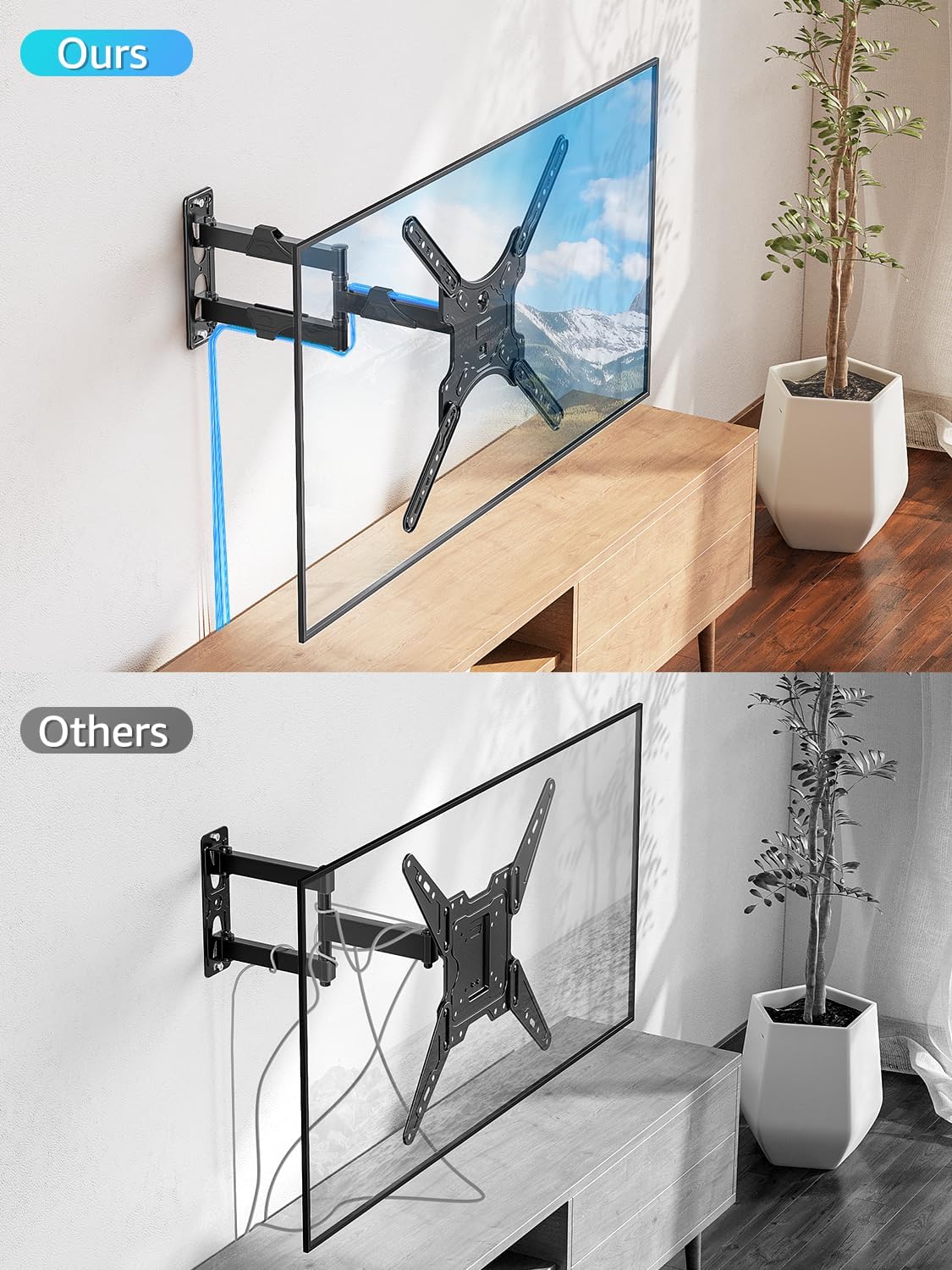
Image: A comparison showing the MOUNTUP MU0018 mount with integrated cable management (blue outline) versus a generic mount without, highlighting the cleaner aesthetic provided by proper cable routing.
Maintenance
- Cleaning: Wipe the mount with a soft, dry cloth. Do not use abrasive cleaners or solvents.
- Periodic Checks: Periodically check all screws and connections to ensure they remain tight and secure. Re-tighten if necessary.
- Movement: Ensure the articulating arms and joints move smoothly. If movement becomes stiff, check for any obstructions or debris.
Troubleshooting
- TV is not level: Use the post-installation level adjustment feature (±3°) as described in the Operating section. Ensure the wall plate was installed level initially.
- Mount feels loose: Re-check all wall plate mounting bolts and TV bracket screws. Ensure they are securely tightened. Verify the wall type is appropriate for installation.
- Difficulty moving TV: Ensure no cables are snagged. Check that all adjustment knobs/bolts are sufficiently loosened before attempting to move the TV.
- Missing parts: Contact MOUNTUP customer support for assistance.
Specifications
| Feature | MOUNTUP MU0028 | MOUNTUP MU0018 |
|---|---|---|
| TV Size Range | 42 - 82 inches | 26 - 60 inches |
| Weight Capacity | 100 lbs (45.5 kg) | 77 lbs (35 kg) |
| VESA Compatibility (Max) | 600x400 mm | 400x400 mm |
| Tilt Range | -13° to +5° | Not specified (typically similar to MU0028 or slightly less) |
| Swivel Range | ±45° | ±90° |
| Level Adjustment | ±3° | ±3° |
| Wall Type Compatibility | Solid wood studs, concrete, or brick walls (Not for drywall alone) | |
| Material | Heavy-Duty Steel | |
Warranty and Support
MOUNTUP products are designed for durability and reliability. For warranty information, technical support, or to request replacement parts, please refer to the contact information provided on the product packaging or visit the official MOUNTUP website. Please have your model number (MU0028 or MU0018) and purchase details ready when contacting support.


