
1. Introduction and Overview
The UGREEN PowerRoam 1200 is a versatile portable power station designed to provide reliable power for various applications, including outdoor camping, home backup, and RV use. It features a 1024Wh LiFePO4 battery, capable of delivering up to 1200W of AC output, with a fast charging capability that reaches 80% in just 50 minutes.

Figure 1: Front view of the UGREEN PowerRoam 1200 Portable Power Station, showcasing its display and various output ports.
This manual provides essential information for the safe and efficient operation of your PowerRoam 1200. Please read it thoroughly before first use and retain it for future reference.
2. Setup
2.1 Initial Activation and Charging
Upon receiving your PowerRoam 1200, it requires activation and a full charge before its first use. This ensures optimal battery performance and longevity.
- Activation: Use the included AC charging cable to connect the power station to a standard AC wall outlet. The power station will activate successfully when its screen lights up.
- Initial Charge: Fully recharge the power station to 100% before its first use. This process typically takes approximately 1.5 hours from 0% via AC input using PowerZip technology.
Video 1: Demonstrates the initial activation and charging process of the UGREEN PowerRoam 1200. (Relevant segment: 0:04 - 0:20)

Figure 2: The PowerRoam 1200 connected to a wall outlet for fast charging, illustrating its PowerZip technology.
3. Operating Instructions
3.1 Powering Your Devices
The PowerRoam 1200 offers multiple output ports to power a wide range of electronic devices and appliances.
- AC Outlets: Connect appliances requiring up to 1200W AC output. The unit features 6 AC outlets.
- USB Ports: Utilize the 2 USB-C ports (100W each) and 2 USB-A ports (22.5W each) for charging smartphones, tablets, laptops, and other USB-powered devices.
- Car Socket/DC5521 Ports: Provides up to 120W max output for compatible 12V devices.
Video 2: Demonstrates connecting various devices to the UGREEN PowerRoam 1200's AC, USB, and DC ports. (Relevant segment: 0:24 - 0:35)

Figure 3: The PowerRoam 1200 demonstrating its capability to power devices up to 2500W, including a refrigerator, coffee maker, microwave, and TV.
3.2 Calculating Usage Time
To estimate how long the PowerRoam 1200 can power a specific device, use the following formula:
Usage Time (Hours) = [PowerRoam Capacity (Wh) / Device Parameter (W)] × 85% Conversion Rate
Example: For a coffee maker with 700W power consumption:
1024Wh / 700W × 85% ≈ 1.2 Hours
Video 3: Explains how to calculate the usage time or charging times for various appliances using the PowerRoam 1200. (Relevant segment: 0:36 - 0:50)
3.3 UGREEN App Control
The UGREEN App allows for remote control and monitoring of your power station. Download the app from the Apple App Store or Google Play Store.
- Open the UGREEN App on your smartphone.
- Double-click the IoT button on the power station. The Wi-Fi/Bluetooth indicator will begin to flash.
- Follow the in-app instructions to connect your device.
- Once connected, you can control outputs, monitor power usage, and check battery status remotely.

Figure 4: A smartphone displaying the UGREEN App interface, showing remote control capabilities for the PowerRoam 1200.
Video 4: Demonstrates how to connect and use the UGREEN App to control and monitor the power station remotely. (Relevant segment: 0:51 - 1:15)
4. Maintenance
4.1 Storage Guidelines
Proper storage is crucial for maintaining the health and lifespan of your PowerRoam 1200's LiFePO4 battery.
- Turn off all outputs: Before storing, ensure all outputs are turned off to prevent battery draining.
- Storage Location: Store the unit in a cool, dry area, away from direct sunlight, heat sources, and moisture.
- Recharge Frequency: Fully recharge the Power Station once every 3 months, even if not in use, to maintain battery health.
Video 5: Provides instructions on how to properly store the PowerRoam 1200 when not in use, including turning off outputs and recommended recharge frequency. (Relevant segment: 1:16 - 1:29)
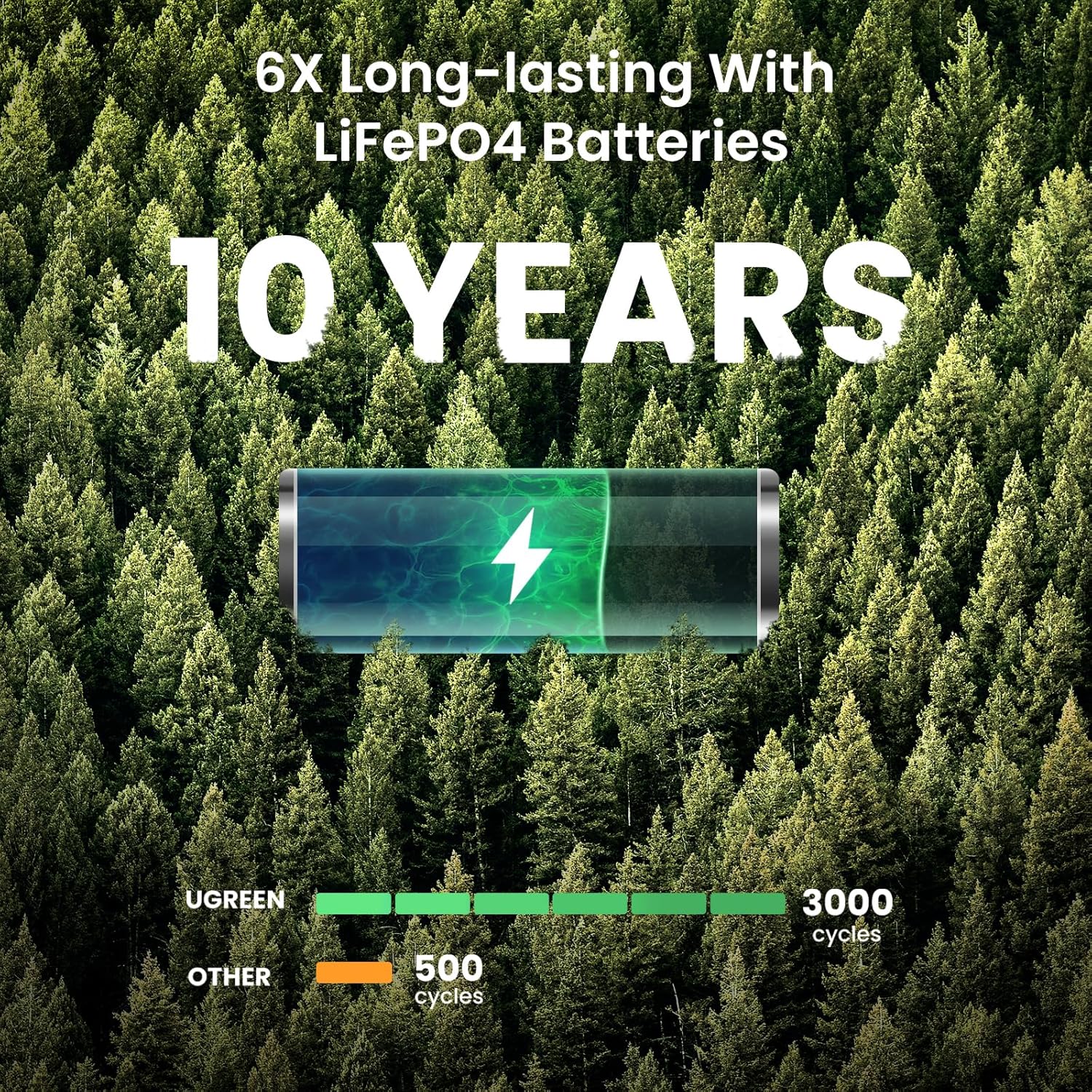
Figure 5: Illustrates the long-lasting nature of the LiFePO4 batteries used in the PowerRoam 1200, highlighting a 10-year lifespan and 3000 battery cycles.
5. Troubleshooting
This section addresses common issues you might encounter with your UGREEN PowerRoam 1200. For problems not listed here, please contact UGREEN customer support.
| Problem | Possible Cause | Solution |
|---|---|---|
| Power station does not turn on. | Battery is completely depleted. | Connect the power station to an AC outlet for activation and charging. |
| No output from AC/USB/DC ports. | Output port is not activated or overloaded. | Ensure the specific output (AC, USB, DC) is turned on. Check the device's power consumption against the power station's output limits. Reduce load if overloaded. |
| Slow charging speed. | Using a low-power charger or non-optimal charging method. | Ensure you are using the original AC charging cable for fast charging. For solar charging, ensure panels are optimally positioned and not obstructed. |
| App connection issues (Bluetooth/Wi-Fi). | Incorrect pairing process or interference. | Ensure Bluetooth and Wi-Fi are enabled on your phone and the power station. Double-click the IoT button to initiate pairing. Try restarting both the app and the power station. |
6. Specifications
Detailed technical specifications for the UGREEN PowerRoam 1200.
| Feature | Detail |
|---|---|
| Brand | UGREEN |
| Model Name | PowerRoam 1200 |
| Part Number | GS1200 |
| Battery Type | LiFePO4 |
| Wattage (Capacity) | 1024 Watt-hours |
| Output Wattage (AC) | 1200 Watts (Boost up to 2500W with U-Turbo) |
| Voltage | 120 Volts (AC) |
| Total Power Outlets | 13 (6 AC, 2 USB-C, 2 USB-A, 3 Car/DC) |
| USB-C Output | 100W each |
| USB-A Output | 22.5W each |
| Car Socket/DC5521 Output | 120W Max |
| Product Dimensions (LxWxH) | 13.4"L x 8.7"W x 10.6"H |
| Weight | 25.4 Pounds |
| Charging Time (AC) | 1.5 hours (0-100%) |
| Solar Input | Up to 400W Max |
| Battery Cycles | 3000 cycles |
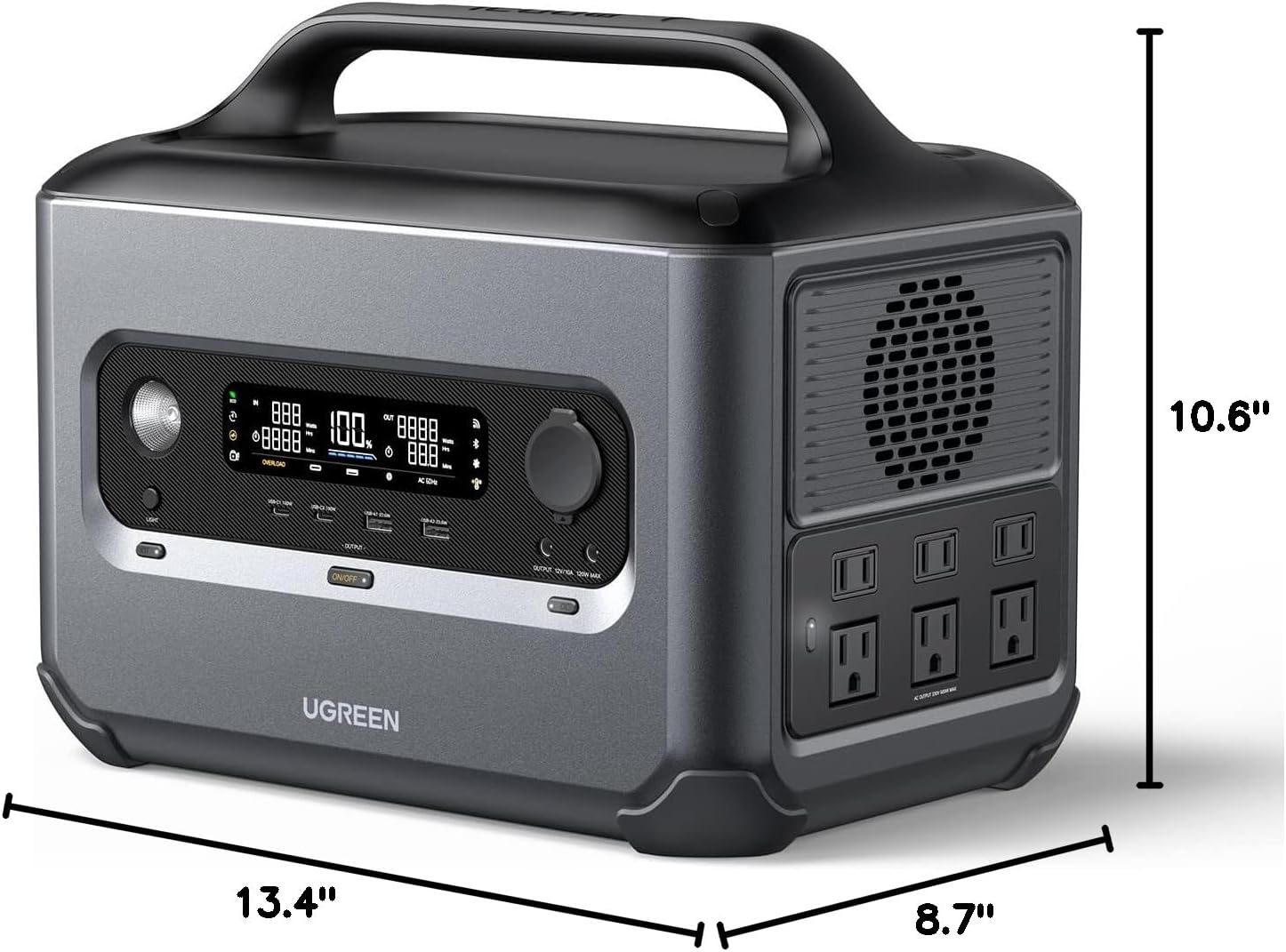
Figure 6: Detailed dimensions of the UGREEN PowerRoam 1200 Portable Power Station.
7. Warranty and Support
UGREEN provides comprehensive support for its products.
- Warranty: The UGREEN PowerRoam 1200 comes with a 5-year warranty. Please refer to the official UGREEN website or your purchase documentation for full warranty terms and conditions.
- User Manual (PDF): A detailed PDF user manual is available for download here.
- Customer Support: For technical assistance, troubleshooting, or warranty claims, please contact UGREEN customer support through their official website or the contact information provided with your product.