1. Introduction
The CATCHWELL LIFE CX PRO Magic Tower is an advanced cordless vacuum cleaner designed for comprehensive home cleaning. It features an innovative self-emptying dust tower, automatic battery charging, and powerful suction for various surfaces including carpets, hardwood floors, and pet hair. Its versatile design offers both cordless and corded cleaning solutions, along with a range of specialized brushes to meet diverse cleaning needs.
Video: Overview of the CX PRO Magic Tower's features and capabilities.
2. What's Included
Upon unboxing your CX PRO Magic Tower, please ensure all components listed below are present:
- Main Vacuum Unit
- Magic Tower (Self-Emptying and Charging Station)
- Telescopic Pipe Tube
- Hard Floor Brush (with LED lights)
- Carpet Brush
- Multi Brush
- Bedding Brush
- Crevice Brush
- Flexible Hose
- Dust Bag (1 installed, 1 extra)
- Eco Bag (for accessories storage)
- Lithium-Ion Battery
- Mop Brush (Optional, if purchased separately)

Image: All components included with the CX PRO Magic Tower.
3. Setup and Initial Use
3.1 Assembly
- Unpack all components from the packaging.
- Insert the telescopic pipe tube into the main vacuum unit until it clicks securely.
- Attach the desired brush (e.g., Hard Floor Brush or Carpet Brush) to the end of the telescopic pipe tube, ensuring it clicks into place.
- Place the Magic Tower in a convenient location near a power outlet.
- Ensure a dust bag is correctly installed in the Magic Tower. (Refer to Section 5.3 for dust bag replacement).
3.2 Initial Charging
Before first use, fully charge the vacuum's battery. Place the assembled vacuum onto the Magic Tower. The tower will automatically begin charging the battery. The battery indicator lights on the vacuum unit will show charging progress. A full charge typically takes approximately 3-4 hours.
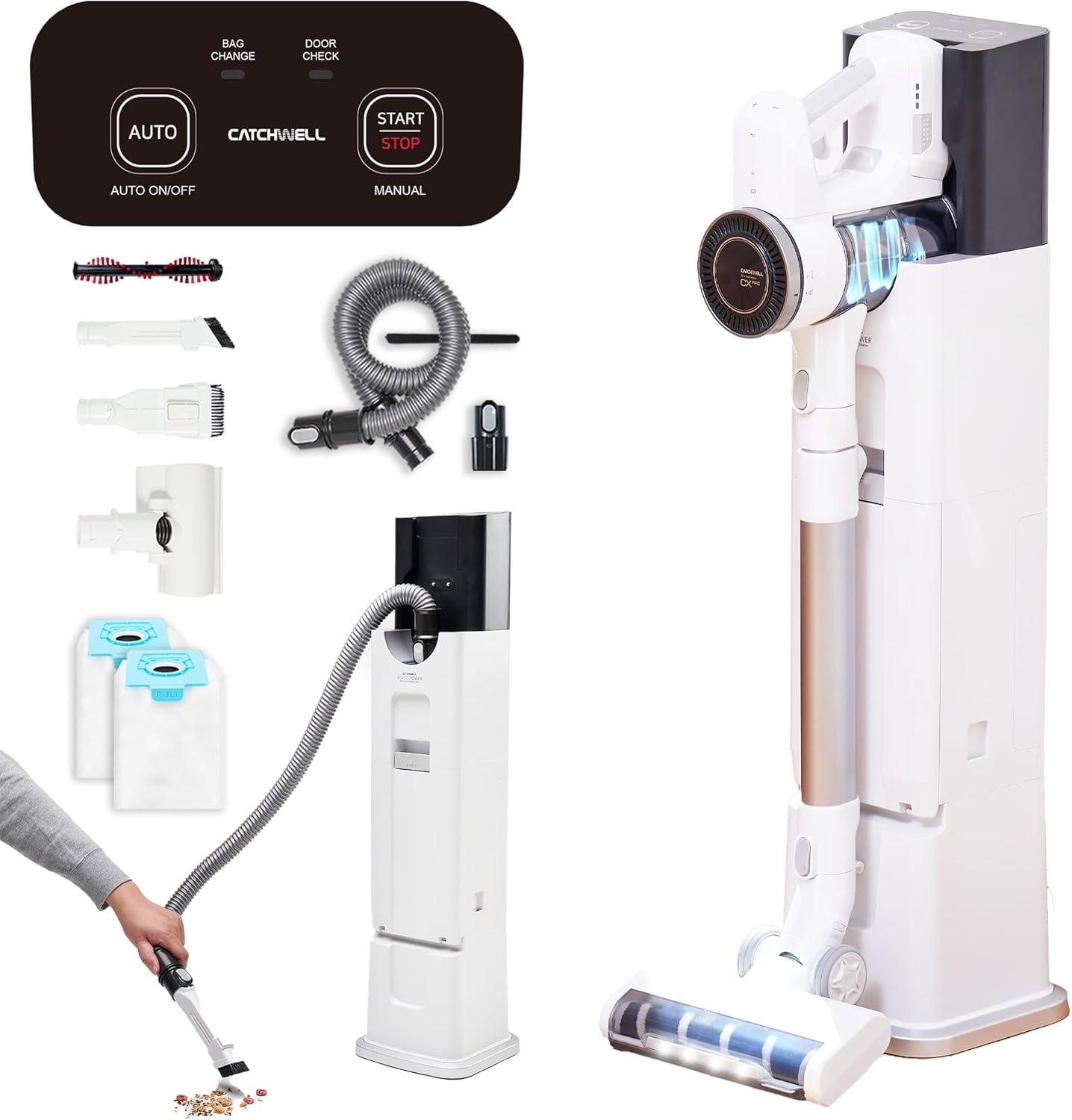
Image: CX PRO Magic Tower fully assembled and docked for charging.
4. Operating Instructions
4.1 Power Modes
The CX PRO Magic Tower offers three power modes for varying cleaning needs:
- Eco Mode: Up to 60 minutes runtime, ideal for light cleaning and extended use.
- Normal Mode: Up to 30 minutes runtime, suitable for daily cleaning tasks.
- Turbo Mode: Up to 12 minutes runtime, provides maximum suction for stubborn dirt and deep cleaning.
Switch between modes using the touch panel on the main vacuum unit.

Image: Visual representation of the three power modes and their battery indicators.
4.2 Self-Emptying Function
The Magic Tower automatically empties the vacuum's dust bin and charges the battery when the vacuum is docked. This hands-free solution ensures hygienic disposal of collected debris.
- After cleaning, place the vacuum unit onto the Magic Tower.
- The tower will detect the vacuum and initiate the self-emptying process, transferring dust from the vacuum's bin to the tower's dust bag.
- The tower also charges the vacuum's battery simultaneously.
Video: Demonstration of the automatic dust emptying process when the vacuum is docked in the Magic Tower.

Image: Visual explanation of the self-emptying and filter care system.
4.3 Flexible Hose Utilization (Corded Vacuum Mode)
For extended cleaning sessions or specific tasks requiring continuous power, the Magic Tower can be used as a corded vacuum with the flexible hose.
- Remove the main vacuum unit from the Magic Tower.
- Connect the flexible hose to the designated port on the Magic Tower.
- Attach any desired accessory brush to the other end of the flexible hose.
- The Magic Tower will provide continuous power for cleaning.
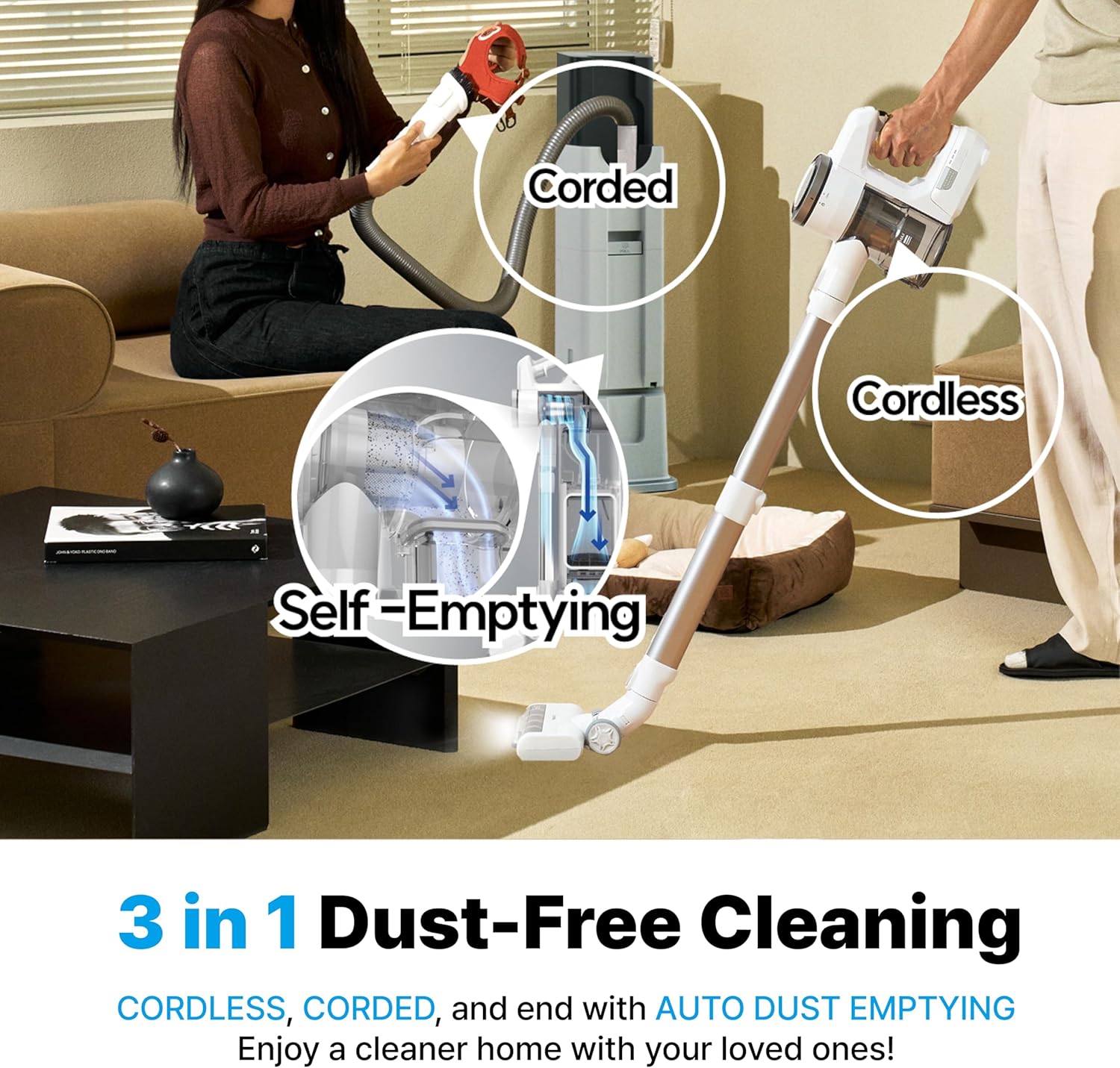
Image: Demonstrating the 3-in-1 cleaning capabilities, including corded use with the flexible hose.
4.4 LED Wide Brush
The Hard Floor Brush is equipped with LED lights that illuminate the cleaning path, making hidden dust and debris visible, especially in dimly lit areas or under furniture.

Image: The LED light feature on the brush head for enhanced visibility.
5. Maintenance
Regular maintenance ensures optimal performance and longevity of your CX PRO Magic Tower.
5.1 Dust Bin Cleaning (Main Unit)
While the self-emptying feature handles most dust, occasional manual cleaning of the vacuum's dust bin and internal filters is recommended.
- Detach the dust bin from the main vacuum unit.
- Open the dust bin and empty any remaining debris.
- Remove the internal filters (mesh filter, dust filter, HEPA filter) and tap them gently to dislodge dust.
- Rinse washable filters under running water. Ensure they are completely dry before reassembling.
- Reassemble all components and reattach the dust bin to the main unit.
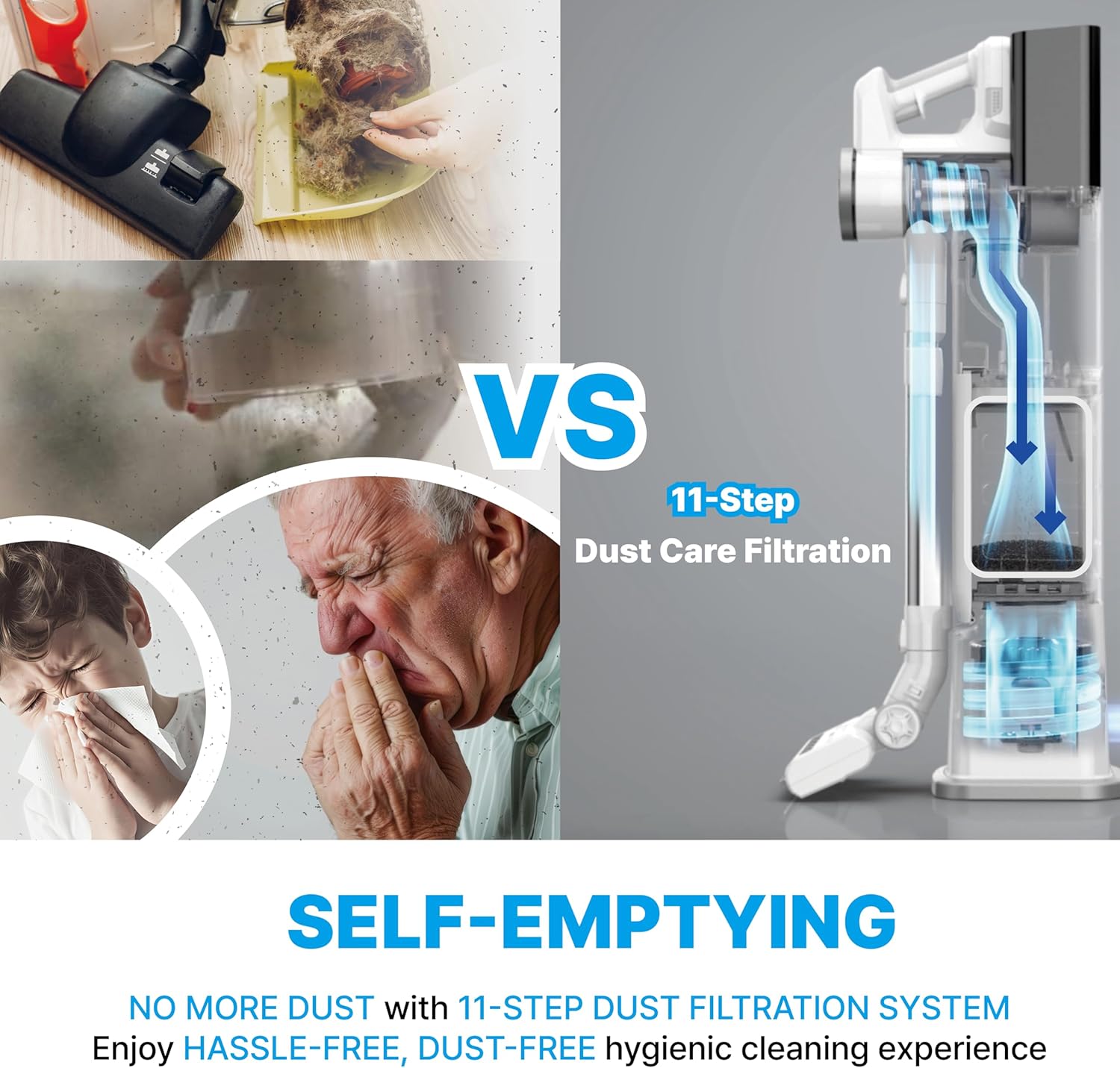
Image: Illustration of the multi-stage filtration system within the vacuum.
5.2 Brush Roll Cleaning
Periodically check the brush rolls for tangled hair or debris. The brush rolls are designed for easy removal.
- Press the release button on the brush head to detach the brush roll.
- Remove any tangled hair or fibers using scissors or a cleaning tool.
- Reinsert the brush roll until it clicks into place.
5.3 Dust Bag Replacement (Magic Tower)
The Magic Tower uses disposable dust bags. Replace the dust bag when the "BAG CHANGE" indicator light illuminates on the tower's control panel.
- Open the dust bag compartment door on the Magic Tower.
- Pull the blue tab to seal the opening of the full dust bag.
- Carefully pull the full dust bag upwards to remove it.
- Dispose of the used dust bag responsibly.
- Insert a new dust bag into the compartment, ensuring it is fully seated.
- Close the dust bag compartment door securely.
Video: Step-by-step guide on how to change the dust bag in the Magic Tower.

Image: The 3L large dust bag and its secure disposal feature.
6. Troubleshooting
If you encounter issues with your CX PRO Magic Tower, refer to the table below for common problems and solutions.
| Problem | Possible Cause | Solution |
|---|---|---|
| Vacuum not turning on/charging. | Battery not properly inserted or discharged. Power adapter not connected to tower/outlet. | Ensure battery is securely clicked into place. Verify power adapter is firmly connected to both the tower and a working electrical outlet. Allow sufficient charging time. |
| Low suction power. | Dust bin full. Filters clogged. Brush roll tangled. Obstruction in nozzle/tube. | Empty the dust bin. Clean or replace filters (refer to Section 5.1). Clear any tangles from the brush roll (refer to Section 5.2). Check for and remove any blockages in the nozzle or telescopic tube. |
| Magic Tower not emptying dust bin. | Dust bag full or improperly installed. Vacuum not correctly docked. Obstruction in tower's emptying path. | Replace the dust bag (refer to Section 5.3). Ensure the dust bag is fully inserted. Re-dock the vacuum, ensuring it is firmly seated. Check for any large debris blocking the emptying port in the tower. |
| Brush roll not spinning. | Tangled debris. Brush head not properly attached. | Remove any tangled hair or debris from the brush roll. Ensure the brush head is securely attached to the telescopic tube. |
7. Specifications
| Brand | CATCHWELL LIFE |
| Model Name | CX PRO |
| Power (Vacuum) | 300W (Max) |
| Dust Bin Capacity | 0.8 Gallons |
| Battery Type | Lithium-Ion |
| Max Runtime | Up to 60 minutes (Eco Mode) |
| Noise Level | 70 dB |
| Filter Type | HEPA Filter (5-Step Filtration System) |
| Product Dimensions | 7 x 11 x 33 inches |
| Item Weight | 4.6 pounds |
8. Warranty and Support
8.1 Warranty Information
The CATCHWELL LIFE CX PRO Magic Tower comes with a standard manufacturer's warranty. Please refer to the warranty card included in your product packaging for specific terms, conditions, and duration. Keep your purchase receipt as proof of purchase for warranty claims.
8.2 Customer Support
For technical assistance, troubleshooting beyond this manual, or warranty inquiries, please contact CATCHWELL LIFE customer support:
- Website: Visit the CATCHWELL LIFE Store on Amazon
- Email: support@catchwelllife.com (Example email, as specific support email was not provided in data)
- Phone: 1-800-XXX-XXXX (Example phone, as specific support phone was not provided in data)
You can also download the full User Manual PDF for more detailed information: Download User Manual (PDF)


