
1. Introduction
Thank you for purchasing the Monte Carlo Generation Lighting Alma Smart Ceiling Fan. This 52-inch indoor/outdoor damp-rated ceiling fan features three light grey weathered oak carved wood blades and a brushed steel finish, designed to provide efficient air circulation and enhance your living space. This manual provides essential information for safe installation, operation, and maintenance of your new ceiling fan. Please read all instructions carefully before beginning installation and retain this manual for future reference.
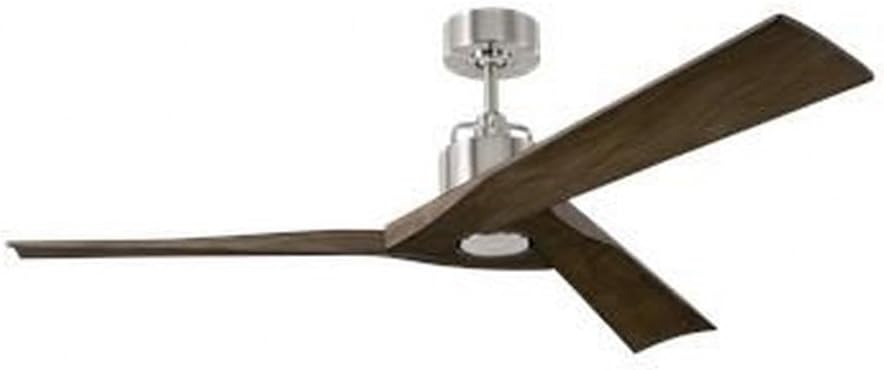
Image 1.1: Monte Carlo Alma Smart Ceiling Fan (Model 3ALMSM52BS)
2. Safety Information
WARNING: To reduce the risk of fire, electric shock, or personal injury, always follow these instructions:
- Read all instructions and safety information before installing your fan and save these instructions.
- All wiring must be in accordance with national and local electrical codes. Installation should be performed by a qualified licensed electrician.
- The fan must be mounted to an outlet box marked "Acceptable for Fan Support of 35 lbs (15.9 kg) or less" and use mounting screws provided with the outlet box.
- Do not operate the fan with damaged blades or housing.
- Ensure the fan is turned off and power is disconnected at the circuit breaker before servicing or cleaning.
- Avoid placing objects in the path of the blades.
- This fan is damp-rated for indoor and outdoor covered use. Do not expose to direct water spray.
3. Package Contents
Carefully unpack your fan and inspect the contents. You should have the following items:
- Fan Motor Assembly
- Fan Blades (3)
- Downrod (6 inches)
- Mounting Bracket
- Canopy
- Remote Control with Wall Mount
- Hardware Pack (screws, washers, wire nuts)
- Instruction Manual
4. Setup and Installation
Important: Before installation, ensure the power is turned off at the circuit breaker and the wall switch.
4.1 Mounting the Fan
- Attach the mounting bracket to the ceiling outlet box using the screws provided with the outlet box. Ensure the bracket is securely fastened and can support the fan's weight.
- Feed the electrical wires from the outlet box through the center hole of the mounting bracket.
4.2 Assembling the Fan
- Insert the downrod through the canopy and then through the fan motor assembly. Secure the downrod to the motor housing with the provided pin and screw.
- Carefully lift the fan assembly and hang it from the mounting bracket using the ball joint in the downrod. Ensure the ball joint is seated correctly in the bracket's opening.
4.3 Electrical Connections
Connect the fan's electrical wires to the household wiring according to the following:
- Connect the green/bare copper wire from the fan to the household ground wire (green or bare copper).
- Connect the white wire from the fan to the household neutral wire (white).
- Connect the black wire from the fan to the household hot wire (black).
- Secure all connections with wire nuts and ensure no loose strands of wire are exposed.
4.4 Attaching Blades
- Attach each blade to the fan motor housing using the screws and washers provided. Ensure all screws are tightened securely.
4.5 Securing the Canopy
- Slide the canopy up against the ceiling and secure it to the mounting bracket with the provided screws.
5. Operating Instructions
Your Alma Smart Ceiling Fan is operated via the included remote control and can also be controlled via a smart app.
5.1 Remote Control Functions
The remote control allows you to adjust fan speed, turn the fan on/off, change fan direction, and control the optional light kit.
- Power Button: Turns the fan on or off.
- Fan Speed Buttons: Adjusts fan speed (typically 6 speeds).
- Fan Direction Button: Reverses blade rotation for summer (downward airflow) or winter (upward airflow) operation.
- Light On/Off Button: Controls the optional light kit.
- Light Dimming Buttons: Adjusts the brightness of the optional light kit.
5.2 Smart App Control
For smart control features, download the compatible Monte Carlo smart app from your device's app store. Follow the in-app instructions to pair your fan with your smart device. This allows for advanced control, scheduling, and integration with smart home systems.
6. Maintenance
Regular maintenance ensures optimal performance and extends the life of your ceiling fan.
- Cleaning: Clean the fan periodically with a soft, damp cloth. Do not use abrasive cleaners or solvents, as these can damage the finish or blades.
- Blade Care: The light grey weathered oak carved wood blades should be cleaned gently. Avoid excessive moisture.
- Tighten Fasteners: Periodically check all screws and fasteners on the fan and mounting hardware to ensure they are secure.
- Lubrication: The fan motor is permanently lubricated and does not require additional oiling.
Caution: Always turn off the power at the circuit breaker before cleaning or performing any maintenance.
7. Troubleshooting
If you experience issues with your fan, refer to the following troubleshooting guide:
| Problem | Possible Cause | Solution |
|---|---|---|
| Fan does not start | No power to the fan Loose wire connections Remote control not paired | Check circuit breaker and wall switch Verify all wire connections are secure (power off first) Refer to remote pairing instructions in the smart app or separate remote manual. |
| Fan wobbles | Loose blade screws Improperly balanced blades Loose mounting bracket | Ensure all blade screws are tight Use a blade balancing kit (sold separately) to balance blades Tighten mounting bracket screws |
| Noisy operation | Loose screws Motor housing rubbing Incorrect installation | Check and tighten all screws Ensure canopy is not touching the ceiling Re-check installation steps |
| Remote control not working | Dead batteries Remote not paired Obstruction between remote and receiver | Replace batteries Re-pair remote with fan Ensure clear line of sight |
8. Specifications
| Feature | Detail |
|---|---|
| Model Number | 3ALMSM52BS |
| Brand | Monte Carlo |
| Product Dimensions | 52"D x 52"W x 13.1"H |
| Blade Span | 52 inches |
| Number of Blades | 3 |
| Blade Material | Wood (Light Grey Weathered Oak Carved) |
| Finish | Brushed Steel |
| Indoor/Outdoor Usage | Outdoor (Damp Rated) |
| Power Source | Corded Electric |
| Motor Type | DC |
| Number of Speeds | 6 |
| Air Flow Capacity | 5955 cfm |
| Wattage | 60 watts |
| Controller Type | Remote Control |
| Control Method | App |
| Downrod Length | 6 inches |
| Special Feature | Heavy Duty |
| Certifications | cETL Approved, Energy Star |
9. Warranty Information
This Monte Carlo Generation Lighting Alma Smart Ceiling Fan (Model 3ALMSM52BS) comes with a 1 Year Manufacturer Warranty. Please retain your proof of purchase for warranty claims. The warranty covers defects in materials and workmanship under normal use. For specific terms and conditions, please refer to the warranty card included with your product or contact Monte Carlo customer support.
10. Customer Support
For technical assistance, troubleshooting, or warranty inquiries, please contact Monte Carlo customer support. You can find contact information on the official Monte Carlo website or on the packaging of your product. Please have your model number (3ALMSM52BS) and proof of purchase ready when contacting support.
Online Resources: For additional information, FAQs, and product registration, visit the official Monte Carlo website: www.montecarlofans.com


