
1. Product Overview
The DOINOW T1 Electric Cordless Screwdriver is a versatile and compact tool designed for various household and office repair tasks. It features an intelligent LCD screen displaying real-time information, precise torque control, and a comprehensive set of magnetic bits. Its ergonomic design and integrated LED light enhance usability in diverse environments.
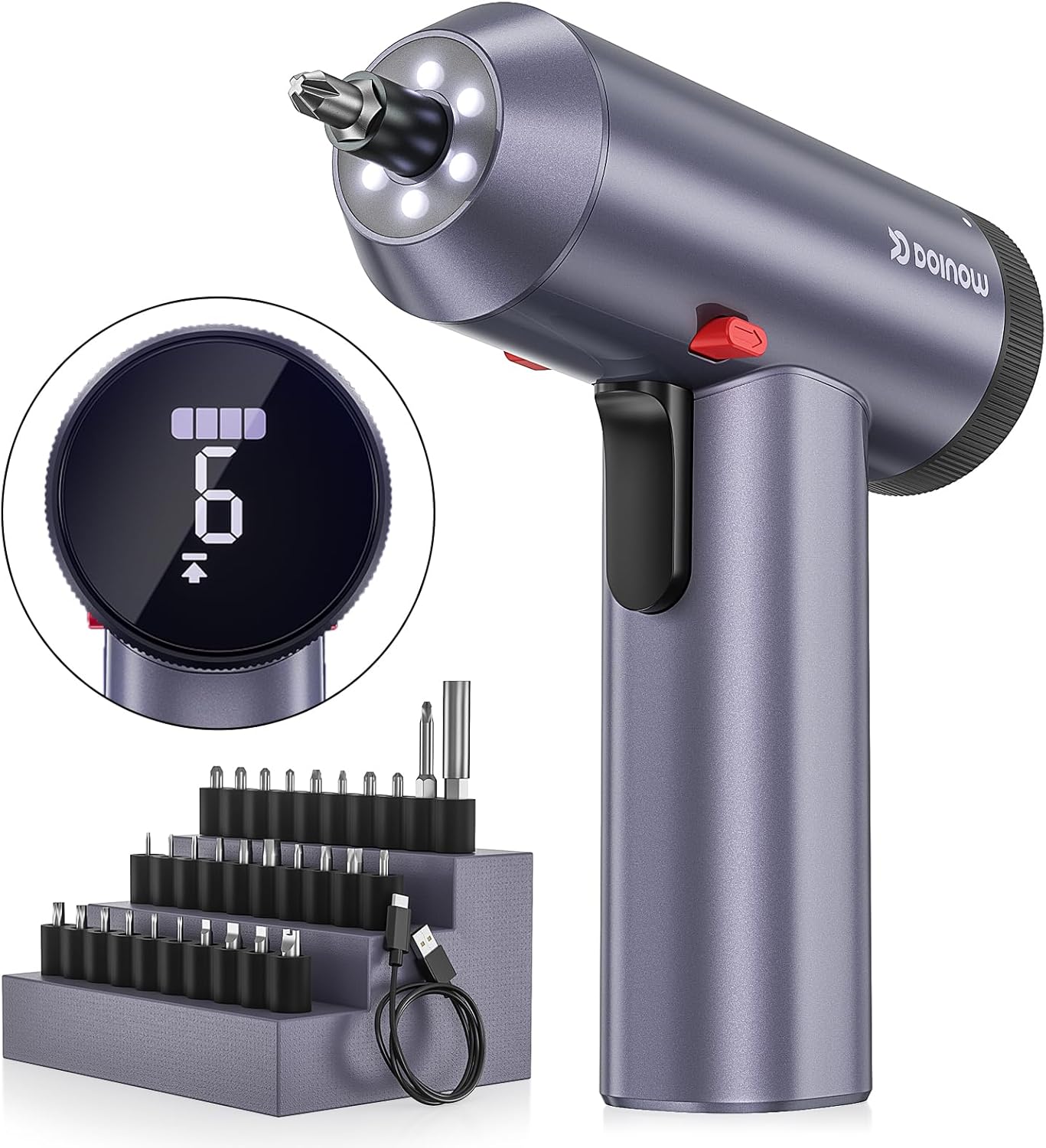
Figure 1: DOINOW T1 Electric Cordless Screwdriver with its included magnetic bit set and charging cable.
2. Package Contents
Verify that all items listed below are included in your package:
- 1x Cordless Electric Screwdriver
- 1x Portable Case
- 1x USB-C Charging Cable
- 1x User Manual
- 30x Screwdriver Bits (various types and sizes)

Figure 2: All components included in the DOINOW T1 Electric Cordless Screwdriver package.
3. Setup
3.1. Charging the Battery
The screwdriver is equipped with a built-in 2200mAh Lithium-ion battery. Before first use, or when the battery is low, charge the device using the provided USB-C charging cable. The LCD screen will display the battery status, indicating charging progress.
- Connect the USB-C cable to the charging port on the screwdriver.
- Connect the other end of the cable to a compatible USB power adapter (not included).
- A full charge takes approximately 120 minutes. The battery indicator on the LCD screen will show full bars when charging is complete.

Figure 3: The screwdriver's USB-C charging port and battery life indicator on the LCD screen.
3.2. Inserting Screwdriver Bits
The screwdriver uses 1/4" (6.35mm) magnetic bits. Select the appropriate bit for your task and insert it firmly into the chuck.
- Choose the desired magnetic bit from the 30 included accessories.
- Push the bit firmly into the hexagonal chuck at the front of the screwdriver until it is securely seated. The magnetic connection will hold the bit in place.
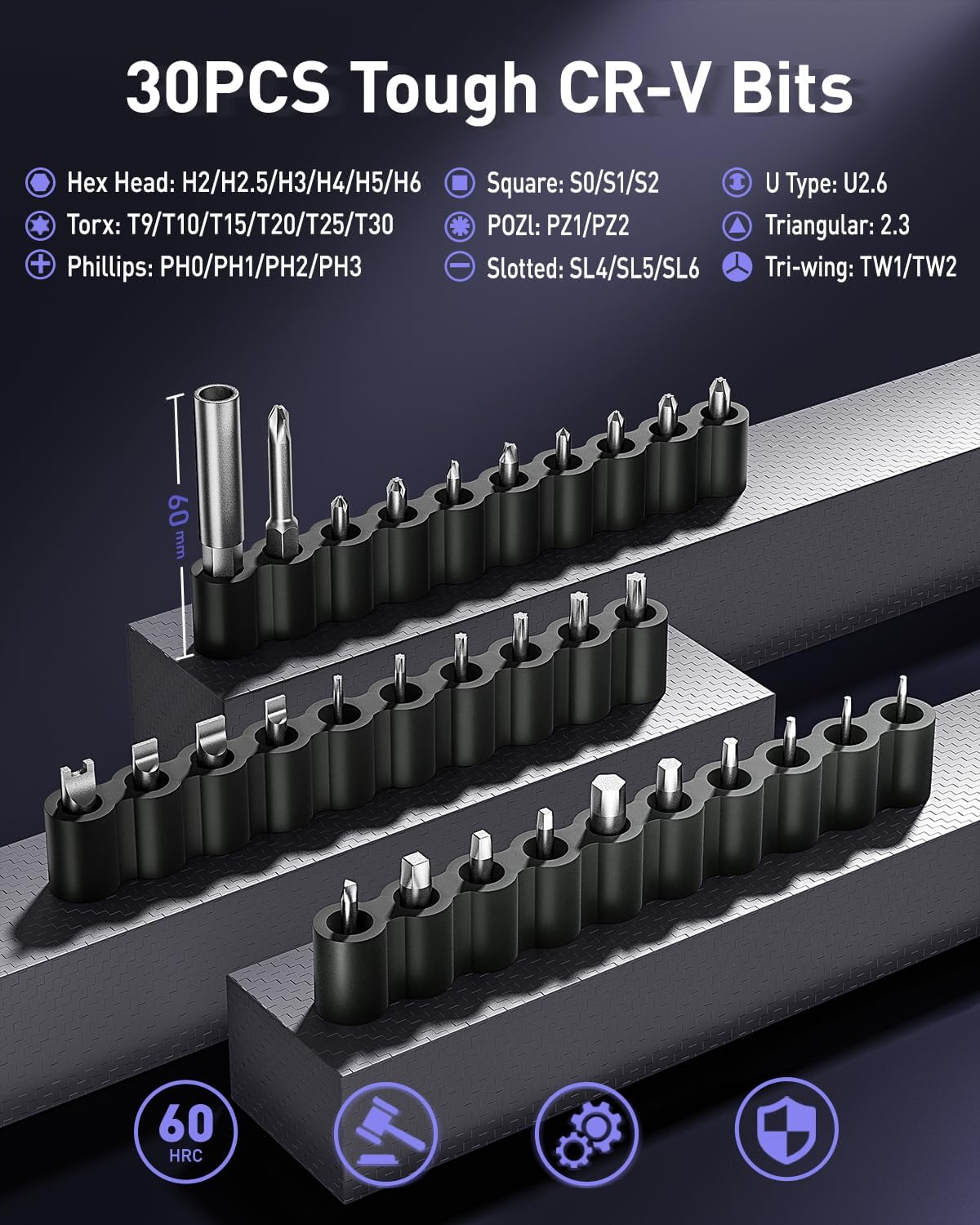
Figure 4: A selection of the 30 magnetic CR-V bits provided with the screwdriver.
4. Operating Instructions
4.1. Powering On/Off and Direction Control
The screwdriver is activated by pressing the trigger. A red button on the top allows for easy direction changes.
- To activate the screwdriver, press the main trigger located on the handle.
- To select the rotation direction (forward for screwing, reverse for unscrewing), use the red direction push button located near the top of the handle. The LCD screen will indicate the selected direction.
- Release the trigger to stop operation.

Figure 5: The red button for switching between screw (forward) and unscrew (reverse) modes.
4.2. Adjusting Torque
The DOINOW T1 offers 6 electric torque settings, ranging from 1.5 to 4.0 N.m, and a manual torque option of 6 N.m. This allows for precise control suitable for various materials and tasks.
- Rotate the adjustment knob at the rear of the screwdriver to cycle through the 6 torque levels.
- The selected torque level will be displayed on the LCD screen.
- Choose a lower torque setting for delicate materials or small screws to prevent damage. Use higher torque for larger screws or tougher materials.

Figure 6: Internal view of the adjustable torque mechanism and its display.
4.3. Using the LED Light
The screwdriver features an auto-on, shadow-free round LED light to illuminate your work area, ensuring visibility even in dimly lit spaces.
- The LED light automatically activates when the trigger is pressed.
- The light will remain on for approximately 10 seconds after the trigger is released to provide continued illumination.
4.4. Applicable Scenarios
This screwdriver is ideal for a wide range of tasks, including:
- Furniture assembly and disassembly.
- Installing and repairing air conditioners, faucets, and light fixtures.
- Working on desktop computers and other electronics.
- General home, office, and apartment repairs.

Figure 7: Examples of the screwdriver being used for furniture assembly, appliance repair, and general household tasks.
5. Maintenance
Proper maintenance ensures the longevity and optimal performance of your DOINOW T1 Electric Cordless Screwdriver.
- Cleaning: Regularly wipe the screwdriver body with a soft, dry cloth to remove dust and debris. Do not use abrasive cleaners or immerse the device in water.
- Bit Care: Keep the magnetic bits clean and dry. Store them in the provided portable case to prevent loss and corrosion.
- Battery Storage: If storing the screwdriver for an extended period, ensure the battery is partially charged (around 50%) to maintain battery health. Recharge it every 3-6 months.
- General Storage: Store the screwdriver in a cool, dry place, away from direct sunlight and extreme temperatures.
6. Troubleshooting
If you encounter issues with your screwdriver, refer to the following common problems and solutions:
| Problem | Possible Cause | Solution |
|---|---|---|
| Screwdriver does not turn on. | Low or depleted battery. | Charge the battery fully using the USB-C cable. |
| Screwdriver lacks power/torque. | Incorrect torque setting; Low battery. | Adjust torque to a higher setting; Recharge the battery. |
| Bit slips or does not engage screw. | Incorrect bit type/size; Worn bit; Bit not fully inserted. | Ensure correct bit for screw head; Replace worn bits; Re-insert bit firmly into chuck. |
| LED light not working. | Device malfunction. | Contact customer support if charging and trigger activation do not resolve the issue. |
If the problem persists after trying the suggested solutions, please contact DOINOW customer support for further assistance.
7. Specifications
| Feature | Specification |
|---|---|
| Brand | DOINOW |
| Model Name | T1 |
| Material | Aluminum Alloy; CRV-Steel |
| Color | Maountain Gray |
| Power Source | Battery Powered (Lithium Ion) |
| Battery Capacity | 2200mAh |
| Rated Voltage | 3.6 Volts |
| Wattage | 7.4 Watt-hours |
| Max Torque | 6 N.m (Manual); 1.5-4.0 N.m (Electric) |
| No-load Speed | 220 RPM |
| Head Size | 1/4" (6.35mm) Hex |
| LED Screen | Digital display for power and torque setting |
| LED Light | 6-ring shadowless LED lights |
| Item Dimensions (L x W x H) | 6.89 x 2.17 x 6.89 inches |
| Item Weight | 1.83 Pounds |
| Included Components | 1x Cordless Electric Screwdriver, 1x Portable Case, 1x USB-C Charging Cable, 1x User Manual, 30x Screwdriver Bits |
8. Warranty and Support
DOINOW provides a 2-year free warranty and replacement for this product. For any inquiries, technical support, or warranty claims, please contact DOINOW customer service through the following channels:
- Email: support@doinowtools.com
- Online Support: Visit the official DOINOW website for FAQs and additional resources.
Please retain your purchase receipt as proof of purchase for warranty purposes.