Introduction
This manual provides instructions for the ZdalaMit AKB76037002 replacement remote control. This remote is designed to function with various RCA 4K UHD webOS Smart TV models, offering a direct replacement for your original remote without requiring complex programming.
Compatible RCA TV models include: RWOSU5549, RWOSU5549-B, RWOSU7049, RWOSU6547-B, RWOSU7047, RWOSU5847, RWOSBU5048, RWOSU8250, RWOSU7547, RWOSU5047, RWOSU5049, RWOSU6547, RWOSU6047, RWOSU5547, RWOSU8549, RWOSU6054, RWOSU7054.
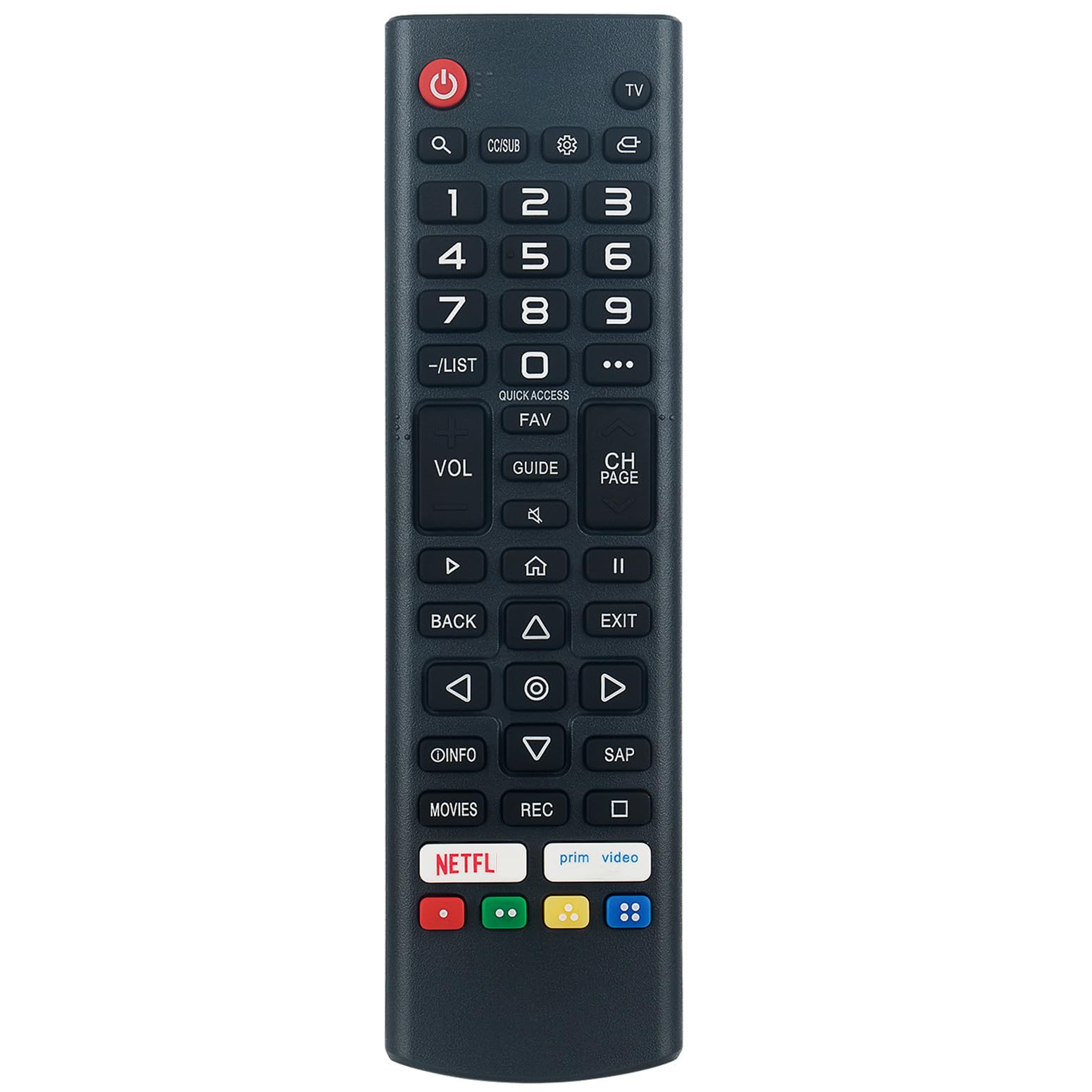
Image: Angled view of the ZdalaMit AKB76037002 replacement remote control, showing its button layout.
Setup
The ZdalaMit AKB76037002 remote control is pre-programmed and does not require any additional setup or coding. Simply install the batteries, and it will be ready for immediate use with your compatible RCA TV.
Battery Installation
- Locate the battery compartment on the back of the remote control.
- Slide the battery cover downwards or press the latch and lift to open.
- Insert two (2) 1.5V AAA alkaline batteries, ensuring the positive (+) and negative (-) terminals align correctly with the markings inside the compartment.
- Replace the battery cover by sliding it back into position until it clicks securely.

Image: Rear view of the remote control, indicating the location for battery insertion.
Note: Batteries are not included with the remote control. Always use new alkaline batteries for optimal performance.
Operating Instructions
Point the remote control directly at your RCA TV's infrared receiver. Ensure there are no obstructions between the remote and the TV.
Key Functions
- Power (⏻): Turns the TV on or off.
- TV: Switches the input source to TV mode.
- Number Buttons (0-9): Directly select channels.
- VOL (+/-): Adjusts the volume level.
- CH (Page Up/Down): Changes channels sequentially.
- Mute (🔇): Mutes or unmutes the TV sound.
- Navigation Buttons (Up, Down, Left, Right, OK): Navigate through menus and confirm selections.
- Back: Returns to the previous screen or menu.
- Exit: Exits the current menu or application.
- Home (🏠): Accesses the TV's main home screen or smart features.
- Quick Access: Provides quick access to frequently used functions or apps.
- FAV: Accesses favorite channels list.
- GUIDE: Displays the electronic program guide.
- INFO: Displays information about the current program or input.
- Netflix, Prime Video: Dedicated buttons for direct access to these streaming services.
- Colored Buttons (Red, Green, Yellow, Blue): Functionality varies by application or TV menu.

Image: Front view of the remote control, highlighting the layout of all buttons and overall dimensions.
Maintenance
Battery Replacement
If the remote control becomes unresponsive or its range decreases, it is likely time to replace the batteries. Follow the battery installation steps outlined in the "Setup" section.
- Always replace both batteries at the same time.
- Do not mix old and new batteries, or different types of batteries.
- Remove batteries if the remote will not be used for an extended period to prevent leakage.
Cleaning
To clean the remote control, gently wipe it with a soft, dry cloth. Do not use liquid cleaners, sprays, or abrasive materials, as these can damage the remote's surface or internal components.
Troubleshooting
If you encounter issues with your remote control, refer to the following common troubleshooting steps:
- Remote not responding:
- Ensure new AAA alkaline batteries are correctly installed.
- Check if the batteries are depleted and replace them if necessary.
- Verify there are no obstructions between the remote control and the TV's infrared sensor.
- Ensure you are within the effective operating range of the TV.
- Specific buttons not working:
- Clean the remote control, especially around the unresponsive buttons, to remove any dirt or debris.
- If only certain buttons are affected, the remote may be damaged.
- TV not compatible:
- Confirm your RCA TV model is listed in the "Introduction" section as a compatible model. This remote is specifically designed for RCA 4K UHD webOS Smart TVs.
Specifications
| Model Number | AKB76037002 |
| Compatible Devices | RCA 4K UHD webOS Smart Televisions |
| Power Supply | 2 x 1.5V AAA Alkaline Batteries (not included) |
| Product Dimensions | Approximately 5 x 1.5 x 0.5 inches (12.7 x 3.8 x 1.3 cm) |
| Item Weight | Approximately 2 ounces (56.7 grams) |
| Color | Black |
Warranty Information
Specific warranty details for this ZdalaMit replacement remote control may vary. Please refer to the purchase documentation or contact your seller directly for information regarding warranty coverage and terms.
Support
For any questions or assistance regarding your ZdalaMit AKB76037002 replacement remote control, please contact the seller or manufacturer. They can provide further support and guidance.


