
FORTINET 108F-FPOE
Contents
Fortinet FortiSwitch 108F-FPOE User Manual
Model: 108F-FPOE | Brand: FORTINET
Introduction
The FortiSwitch Secure Access Family delivers outstanding security, performance, and manageability. Secure, simple, and scalable, FortiSwitch is the right choice for threat-conscious businesses of all sizes. Tightly integrated into the Fortinet Security Fabric via FortiLink, FortiSwitch can be managed directly from the familiar FortiGate interface. This single-pane-of-glass management provides complete visibility and control of users and devices on the network regardless of how they connect. This makes the FortiSwitch ideal for SD-Branch and campus deployments with applications that range from desktop to data center aggregation, enabling businesses to converge their security and network access.
Key Features
- Optimal for converged network environments; enabling voice, data, and wireless traffic to be delivered across a single network.
- Supports non-FortiLink deployments through onboard GUI, API, or command line configuration.
- Centralized security and access management from FortiGate interfaces with FortiLink.
- Zero-Touch Provisioning: Auto-discovery and configuration of Ethernet ports and security policies.
- Entry level switch with 8 GE ports, PoE+ capable, suitable for desktop to wiring closet deployments. Includes 2 GE SFP uplink ports and 4x 10GE SFP+ uplink ports.
Setup
Package Contents
Verify that all components are present in the package:
- FortiSwitch 108F-FPOE Unit
- Power Cord
- Rackmount Kit (if applicable)
- Documentation (Quick Start Guide, Safety Information)
Physical Installation
The FortiSwitch 108F-FPOE is designed for desktop or rackmount installation. Ensure adequate ventilation around the unit.

Figure 1: Front Panel Overview
This image displays the front panel of the FortiSwitch 108F-FPOE, showing the console port, 8 GE PoE+ ports (ports 1-8), and 2 SFP uplink ports (ports 9-10). LED indicators for Power, Alarm, and PoE Max are also visible.
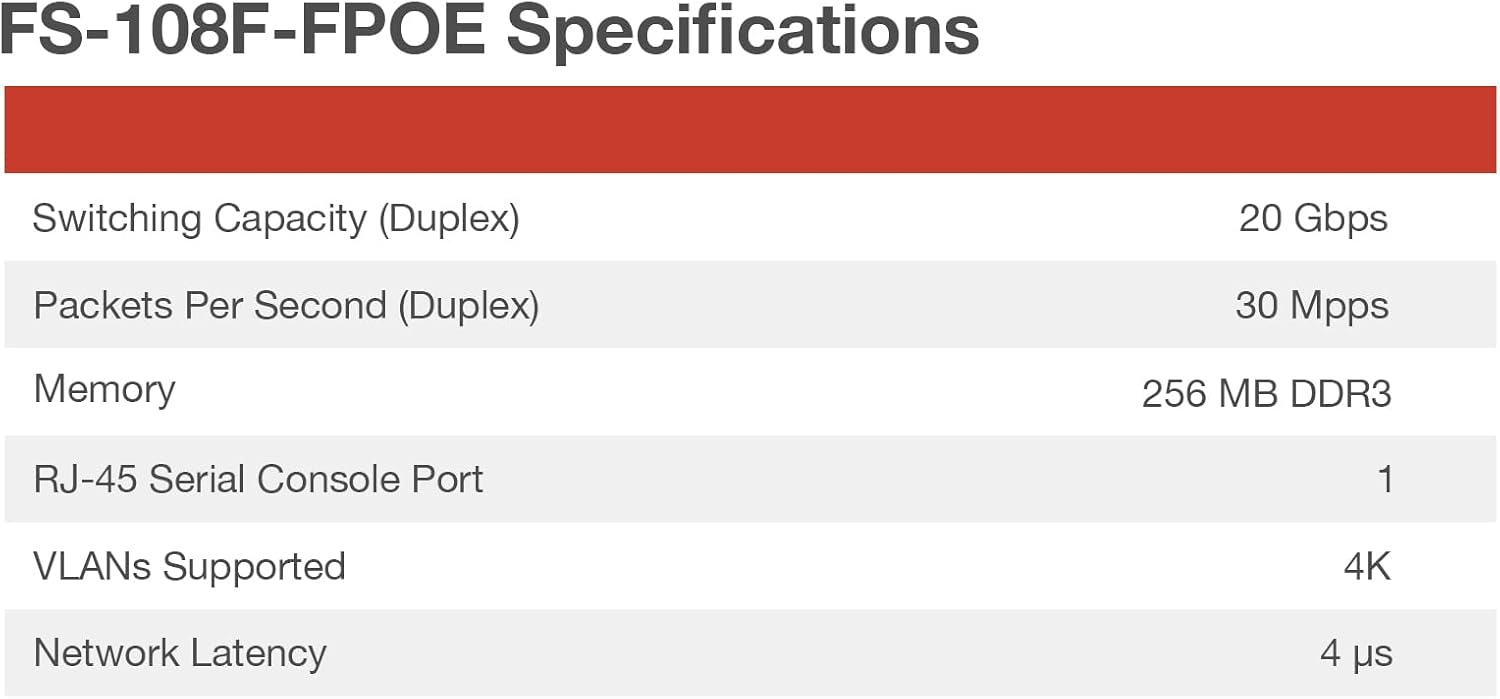
Figure 2: Rear Panel Overview
This image shows the rear panel of the FortiSwitch 108F-FPOE, highlighting the AC power input connector and grounding screw. The serial number and model information label are also visible.
Connecting Power
Connect the provided power cord to the AC power input on the rear panel of the FortiSwitch and then to a suitable power outlet. The device will power on automatically.
Network Connections
- Data Ports (1-8): Connect your network devices (e.g., computers, IP phones, wireless access points) to these RJ45 ports. These ports support Power over Ethernet (PoE+) for compatible devices.
- Uplink Ports (9-10): Use these SFP ports to connect the FortiSwitch to your core network or other switches using appropriate SFP transceivers and fiber optic cables.
- Console Port: For initial configuration or troubleshooting, connect a console cable from your management workstation to the RJ45 console port.
Operating the FortiSwitch
The FortiSwitch 108F-FPOE can be managed in several ways:
- FortiLink Integration: For seamless management and centralized security, integrate the FortiSwitch with a FortiGate firewall using FortiLink. This provides a single-pane-of-glass management interface.
- Onboard GUI: Access the web-based graphical user interface (GUI) by connecting a computer to a data port and navigating to the default IP address of the switch (refer to the Quick Start Guide for default IP).
- Command Line Interface (CLI): For advanced configuration and scripting, use the CLI via the console port or SSH/Telnet (once configured).
- API: The switch supports API for programmatic control and automation.
Refer to the FortiSwitch Administration Guide for detailed configuration instructions for each management method.
Maintenance
To ensure optimal performance and longevity of your FortiSwitch 108F-FPOE, follow these maintenance guidelines:
- Ventilation: Ensure that the ventilation openings are not blocked. Maintain adequate airflow around the unit to prevent overheating.
- Cleaning: Periodically clean the exterior of the unit with a soft, dry cloth. Do not use liquid or aerosol cleaners.
- Firmware Updates: Regularly check the Fortinet support website for the latest firmware updates. Keeping the firmware up-to-date ensures access to new features, performance improvements, and security patches.
- Environmental Conditions: Operate the switch within the specified temperature and humidity ranges to prevent damage.
Troubleshooting
This section provides solutions to common issues you might encounter with your FortiSwitch 108F-FPOE.
No Power
- Check Power Cord: Ensure the power cord is securely connected to both the switch and the power outlet.
- Verify Outlet: Test the power outlet with another device to confirm it is functional.
- Power LED: Check if the Power LED on the front panel is illuminated. If not, contact Fortinet support.
No Network Connectivity
- Cable Connections: Ensure all Ethernet and SFP cables are properly connected to the correct ports on the switch and connected devices.
- Link/Act LEDs: Check the Link/Act LEDs on the front panel for the connected ports. A solid green or blinking light indicates a valid link and activity.
- IP Configuration: Verify the IP address configuration of the switch and connected devices. Ensure they are on the same subnet or have proper routing configured.
- FortiLink Status: If using FortiLink, check the status on the FortiGate to ensure the switch is authorized and connected.
PoE Not Working
- PoE Max LED: Check the PoE Max LED. If it's illuminated, the switch may be exceeding its PoE power budget. Disconnect some PoE devices or use external power for them.
- Device Compatibility: Ensure the connected device is PoE or PoE+ compatible.
- Cable Quality: Use high-quality Ethernet cables (Cat5e or higher) for PoE connections.
For more complex issues, consult the FortiSwitch troubleshooting guide or contact Fortinet technical support.
Specifications
The following table provides detailed technical specifications for the FortiSwitch 108F-FPOE.

Figure 3: FortiSwitch 108F-FPOE Key Specifications
This image presents a table detailing key performance specifications such as Switching Capacity (Duplex), Packets Per Second (Duplex), Memory, RJ-45 Serial Console Port count, VLANs Supported, and Network Latency.

Figure 4: FortiSwitch 108F-FPOE Detailed Hardware Specifications
This image shows a comprehensive table of hardware specifications, including Total Network Interfaces, Dedicated Management Port, Form Factor, Power over Ethernet (PoE) Ports, PoE Power Budget, Mean Time Between Failures, System Specifications, Dimensions, Weight, Power Requirements, Operating Temperature, Humidity, and Air-Flow Direction.
| Attribute | Value |
|---|---|
| Brand | FORTINET |
| Model | 108F-FPOE |
| Switch Type | Layer 2 Managed |
| Number of Ports | 8 GE PoE+ ports, 2 SFP uplink ports |
| Data Transfer Rate | 8 Gigabits Per Second (per port) |
| Interface Type | PoE, SFP |
| Product Dimensions | 8 x 5 x 2 inches (approximate) |
| Item Weight | 4.05 pounds (1.84 Kilograms) |
| Case Material | Metal |
| Voltage | 44 Volts (Operating) |
| Maximum Power | 130 Watts (PoE Power Budget) |
| Upper Temperature Rating | 40 Degrees Celsius |
| Manufacturer | Fortinet |
| UPC | 195875035247 |
| Date First Available | February 26, 2023 |
Warranty and Support
Product Warranty
The FortiSwitch 108F-FPOE comes with a limited lifetime warranty. For specific details regarding the warranty policy, please refer to the official Fortinet website or the documentation included with your product.
Extended protection plans may also be available for purchase:
- 3-Year Protection Plan
- 4-Year Protection Plan
- Complete Protect (monthly subscription)
Technical Support
For technical assistance, product registration, or to download the latest firmware and documentation, please visit the official Fortinet support portal. Ensure you have your product's serial number ready when contacting support.
Documents and downloads
Ask a question about this manual
Ask about setup, troubleshooting, compatibility, parts, safety, or missing instructions. Manuals+ will review the question and use this page’s manual context to help answer it.