
Introduction
This manual provides comprehensive instructions for the setup, operation, and maintenance of your DigiKuber TK16 Smartwatch. Please read this manual thoroughly before using the device to ensure proper function and to maximize your user experience.
Product Overview
Key Features
- Health Monitoring: ECG, PPG, AI Diagnosis, 24-hour Heart Rate, Blood Pressure, Blood Oxygen (SpO2), Body Temperature, Sleep Tracking, Body Fat Monitor.
- Fitness Tracking: Pedometer, Calorie Consumption, Distance Tracking, 7 Multi-Sport Modes (Badminton, Basketball, Running, Cycling, Fitness Training).
- Communication: Bluetooth Phone Calls, Call and Message Notifications (SMS, Messenger, Snapchat, Telegram, Facebook, WhatsApp, Twitter, Instagram, Email).
- Smart Functions: AI Voice Control, Weather Display, Sedentary Reminder, Stopwatch, Breathing Training, Camera Control, SOS Button.
- Display: 2.04-inch AMOLED Retina Screen with 368x448 pixels resolution, 1000 NIT maximum brightness.
- Durability: IP68 Waterproof (5 ATM / 50 meters).
- Battery Life: 650 mAh battery, 3-4 hours charging time, 5-13 days usage time, up to 30 days standby time.
- Compatibility: iOS 11.0 / Android OS 6.0 or later, Bluetooth 4.0 or later.
What's in the Box
- DigiKuber TK16 Smartwatch
- Watch Strap (Black Silicone)
- USB Charging Cable
- User Manual (this document)
Setup
1. Download and Connect to the App
The DigiKuber TK16 Smartwatch requires the Deepfit application for full functionality and data synchronization. Follow these steps to connect your smartwatch:
- Ensure your smartphone's Bluetooth is enabled.
- Scan the QR code provided in the watch packaging or search for "Deepfit" in the App Store (iOS) or Google Play Store (Android) to download the application.
- Open the Deepfit app and follow the on-screen instructions to create an account and set up your profile.
- Within the Deepfit app, navigate to the device connection section and search for your smartwatch. Select "TK16" from the list of available devices.

Image: Visual guide for connecting the smartwatch to the Deepfit application, showing app store icons and device selection.
2. Connect the Watch via Bluetooth
After connecting through the Deepfit app, establish a direct Bluetooth connection for call and notification features:
- On your smartwatch, confirm the prompt to allow the app to pair the device.
- On your smartphone, go to Bluetooth settings.
- Locate and select "TK16_audio" (or similar) from the list of available Bluetooth devices.
- Confirm the pairing request on both your phone and smartwatch. A "Paired Successfully" message will appear.

Image: Visual guide for establishing a Bluetooth connection between the smartwatch and a smartphone for audio and call functions.
Operating Instructions
Basic Navigation
- Touchscreen: Swipe left, right, up, or down to navigate through menus and functions. Tap to select.
- Side Button/Crown: Press to return to the home screen or wake the device. Rotate the crown for scrolling through lists or adjusting settings.
Health Monitoring
The TK16 Smartwatch offers comprehensive health tracking features. For accurate readings, ensure the watch is worn snugly on your wrist.
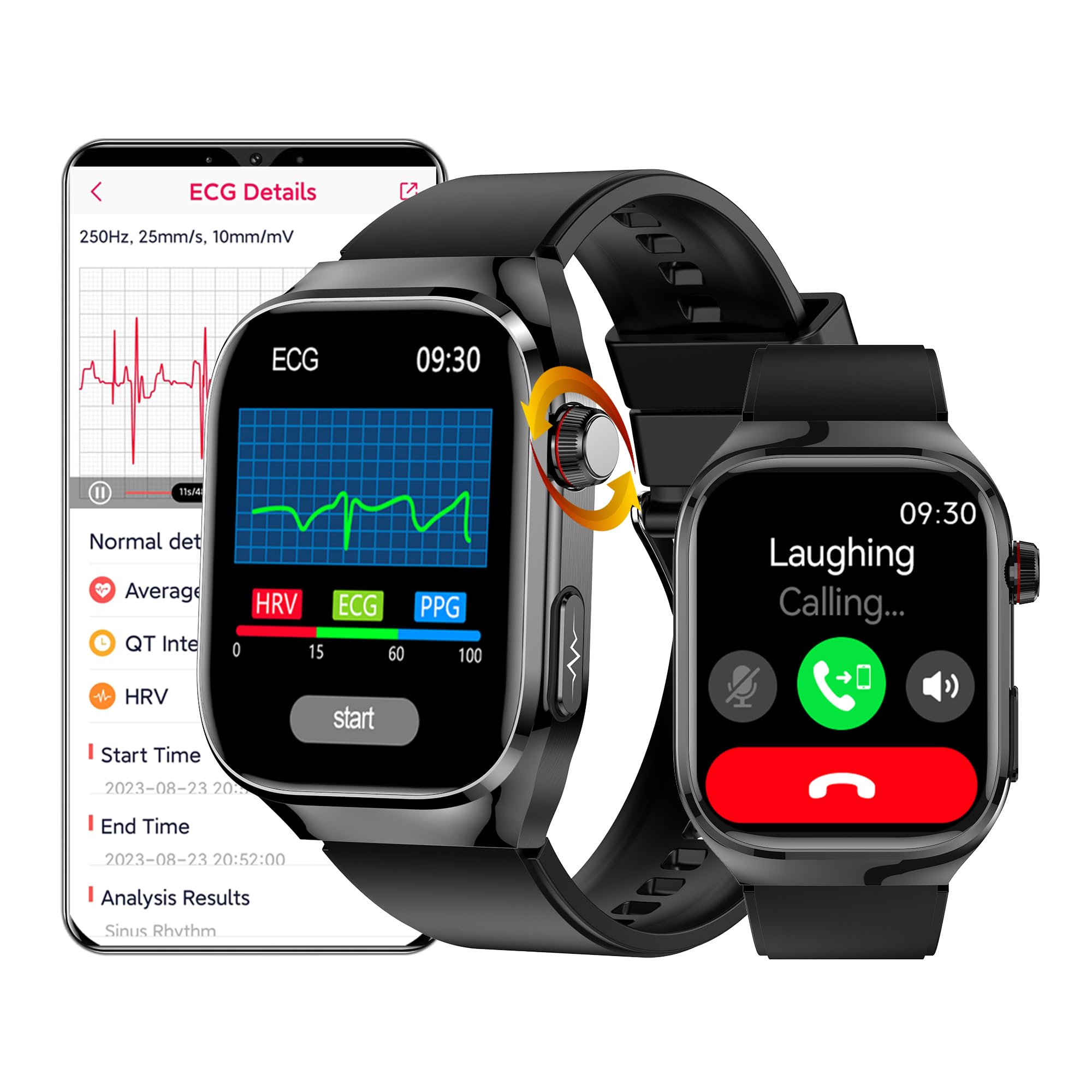
Image: The smartwatch interface showing icons for ECG, Blood Oxygen, Blood Pressure, Sleep Monitor, Heart Rate, and Temperature tracking.
- Heart Rate (HR): Monitors your heart rate continuously throughout the day.
- Blood Oxygen (SpO2): Measures the oxygen saturation level in your blood.
- Blood Pressure: Provides an estimate of your blood pressure.
- ECG/PPG/AI Diagnosis: Conducts an electrocardiogram (ECG) and photoplethysmography (PPG) for detailed heart health analysis. The AI diagnosis feature provides insights based on these readings.
- Body Temperature: Measures your body temperature.
- Sleep Monitor: Automatically tracks your sleep patterns, including deep sleep, light sleep, and wake times. Data is synchronized with the Deepfit app for detailed analysis.
- Body Fat Monitor: Provides an estimate of your body fat percentage and other body composition metrics.
Important Note: The health data provided by this smartwatch is for reference purposes only and should not be used for medical diagnosis or treatment. Always consult a medical professional for health-related concerns.

Image: The smartwatch displaying an ECG waveform, with a corresponding detailed graph shown on a smartphone screen within the Deepfit app.

Image: The smartwatch and app interfaces showing sleep tracking data and body fat percentage measurements.
Sport Modes
The smartwatch supports 7 different sport modes to track your physical activities. Select your desired mode before starting an exercise to record relevant metrics such as steps, distance, calories burned, and heart rate.

Image: A visual representation of various sport icons available on the smartwatch, alongside a display of detailed running activity data on the watch and a smartphone.
Bluetooth Phone Calls and Notifications
Once connected via Bluetooth, the TK16 Smartwatch allows you to make and receive calls directly from your wrist. It also displays notifications from various messaging and social media applications.
- Incoming Calls: Answer or reject calls directly from the watch.
- Notifications: Receive alerts for SMS, Messenger, Snapchat, Telegram, Facebook, WhatsApp, Twitter, Instagram, and Email.
- SOS Function: The smartwatch features an SOS button for emergency situations. Configure emergency contacts in the Deepfit app.

Image: The smartwatch displaying an incoming call interface and the SOS emergency function, with various app icons for notifications.
AI Voice Control
Utilize the integrated AI voice assistant for hands-free control of various functions. This feature allows you to initiate phone calls, play music, consult maps, and open sport modes using voice commands.

Image: A smartphone screen showing a voice assistant interface, with examples of voice commands for making calls, playing music, consulting maps, and opening sports modes.
Customization and Other Functions
The smartwatch offers various other functions and customization options:
- Watch Faces: Personalize your watch by uploading pictures from your phone via the Deepfit app or downloading additional interfaces.
- Weather Display: Get real-time weather updates directly on your wrist.
- Sedentary Reminder: Receive alerts to move if you've been inactive for too long.
- Stopwatch & Timer: Essential tools for timing activities.
- Breathing Training: Guided breathing exercises for relaxation.
- Camera Control: Remotely control your smartphone's camera.
- Music Control: Play, pause, skip tracks, and adjust volume for music playing on your connected smartphone.
- Calculator: A basic calculator function is available.
- Women's Health: Specific tracking features for women's physiological periods.

Image: A collage of smartwatch screens showing various functions including Blood Pressure, Uric Acid, Music Player, Calculator, Women's Health, and Pressure monitoring.
Image: Instructions on how to upload a custom picture to the smartwatch interface via the Deepfit app, along with examples of different watch faces.
Maintenance
Charging the Smartwatch
The DigiKuber TK16 Smartwatch uses magnetic charging. Connect the provided USB charging cable to the charging points on the back of the watch and to a standard USB power source (e.g., computer USB port, wall adapter).
- Charging Time: Approximately 3 to 4 hours for a full charge.
- Battery Life: Up to 5-13 days of typical usage, and up to 30 days on standby, depending on usage patterns and enabled features.
- Battery Capacity: 650 mAh Lithium-polymer battery.

Image: An internal view of the smartwatch highlighting the 650mAh battery, with text indicating 10 days usage time and 30 days standby time.
Water Resistance
The smartwatch is rated IP68 waterproof, meaning it is resistant to dust and can withstand immersion in water up to 50 meters (5 ATM) for a limited time. It is suitable for daily use, such as hand washing, rain, and swimming in shallow water. However, it is not recommended for hot showers, saunas, or diving, as steam and high water pressure can compromise the seals.
Specifications
| Feature | Specification |
|---|---|
| Model Name | TK16 |
| Brand | DigiKuber |
| Display Type | AMOLED |
| Screen Size | 2.04 Inches |
| Resolution | 368 x 448 Pixels |
| Max Brightness | 1000 NIT |
| Operating System | Smart Watch OS |
| Memory Storage | 128 MB |
| Connectivity | Bluetooth 4.0+ |
| GPS | No GPS |
| Battery Capacity | 650 mAh (Lithium-polymer) |
| Charging Time | 3-4 Hours |
| Average Battery Life | 7-13 Days (Usage), 30 Days (Standby) |
| Water Resistance | IP68 (5 ATM / 50 Meters) |
| Case Material | Stainless Steel |
| Band Material | Silicone |
| Band Width | 22 mm |
| Dimensions (L x W x H) | 24.5 x 4.3 x 1 cm |
| Special Features | SOS Button, AI Voice Control |
| Compatible Devices | Smartphones (iOS 11.0+, Android 6.0+) |

Image: Diagram illustrating the physical dimensions of the smartwatch (55.2mm height, 40.8mm width, 11.8mm thickness) and the 22mm strap width.
Troubleshooting
If you encounter issues with your DigiKuber TK16 Smartwatch, please refer to the following common troubleshooting steps:
- Watch not turning on: Ensure the watch is fully charged. Connect it to the charging cable and a power source for at least 30 minutes.
- Cannot pair with phone:
- Ensure Bluetooth is enabled on your phone and the watch.
- Make sure the Deepfit app is installed and running.
- Check if the watch is within Bluetooth range of your phone.
- Restart both your phone and the smartwatch.
- Forget the device in your phone's Bluetooth settings and try pairing again through the Deepfit app.
- Inaccurate health data:
- Ensure the watch is worn snugly on your wrist, not too loose or too tight.
- Clean the sensors on the back of the watch.
- Avoid excessive movement during measurements.
- Notifications not appearing:
- Verify that notification permissions are granted for the Deepfit app in your phone's settings.
- Ensure the Deepfit app is running in the background.
- Check notification settings within the Deepfit app to ensure desired apps are enabled.
- Short battery life:
- Reduce screen brightness.
- Disable continuous heart rate monitoring or other intensive features if not needed.
- Limit the number of active notifications.
For further assistance, please refer to the Deepfit app's help section or contact customer support.
Warranty and Support
The DigiKuber TK16 Smartwatch comes with a Limited Warranty. Spare parts availability is guaranteed for 1 year from the date of purchase.
For warranty claims, technical support, or inquiries regarding spare parts, please contact DigiKuber customer service through the contact information provided with your purchase or on the official DigiKuber website.
