
1. Product Overview
The Horticulture Lighting Group HLG 200 Rspec is an advanced LED grow light designed for indoor plant cultivation. It features Samsung plant-centric white and 18 deep red LEDs, providing a full spectrum of light suitable for both vegetative and flowering stages. With a system PPF efficacy of 2.52 µmol/joule and a power output of 196 watts, this light is engineered for efficient plant growth. Its passive cooling design ensures optimal temperature control without the need for active fans.

Image 1.1: HLG 200 Rspec LED Grow Light, showing the LED board from below.
2. What's in the Box
Upon unpacking, verify that all components are present:
- HLG 200 Rspec LED Grow Light
- Hanging equipment (cables, carabiners, rope ratchet)
- Power supply (includes dimming control)

Image 2.1: Contents of the HLG 200 Rspec package, including the light fixture, hanging hardware, and power supply.
3. Setup Instructions
- Unpack Components: Carefully remove the LED grow light, hanging equipment, and power supply from the packaging. Inspect all items for any signs of damage.
- Choose Location: Select an indoor location for your grow light. Ensure the area is dry and has adequate ventilation. The light is designed for indoor use only and is not water resistant.
- Attach Hanging Equipment: Securely attach the provided hanging cables to the designated points on the HLG 200 Rspec fixture. Use the carabiners and rope ratchet to suspend the light from a sturdy support structure in your grow area. Ensure the light is level and stable.
- Connect Power Supply: Connect the power supply to the LED grow light. Ensure the connection is firm. The power supply includes the dimming control.
- Positioning: Adjust the hanging height of the light according to your plant's growth stage and specific needs. For general guidance, start with the light positioned at a distance that prevents heat stress to your plants, typically 18-24 inches above the canopy for vegetative growth and 12-18 inches for flowering, adjusting as needed.
4. Operating Instructions
The HLG 200 Rspec is designed for ease of use with its integrated dimming feature.
- Power On/Off: Plug the power supply into a standard 120 Volt electrical outlet. The light will illuminate. To turn off, unplug the unit or use an external timer (not included).
- Dimming Control: The power supply includes a dimmer switch. Rotate the knob on the power supply to adjust the light intensity from minimum to maximum output. This allows you to customize the light levels for different growth stages or plant requirements.
- Light Cycle: Implement an appropriate light cycle for your plants. For vegetative growth, a common cycle is 18 hours on / 6 hours off. For flowering, a common cycle is 12 hours on / 12 hours off. Adjust based on specific plant species and desired outcomes.

Image 4.1: Spectral output graph of the HLG 200 Rspec, illustrating its full spectrum with peaks in blue and deep red for optimal plant growth.
5. Maintenance
The HLG 200 Rspec is designed for low maintenance due to its passive cooling system.
- Cleaning: Ensure the light is unplugged and cool before cleaning. Gently wipe the LED board and housing with a soft, dry cloth to remove dust or debris. Do not use liquid cleaners directly on the LEDs or electrical components.
- Connection Check: Periodically inspect all electrical connections to ensure they are secure and free from corrosion or damage.
- Ventilation: Maintain good airflow around the fixture to support its passive cooling design and prevent heat buildup in your grow space.
6. Troubleshooting
If you encounter issues with your HLG 200 Rspec, refer to the following common troubleshooting steps:
- Light Not Turning On:
- Verify the power cord is securely plugged into both the wall outlet and the power supply.
- Check if the wall outlet is functional by plugging in another device.
- Ensure the dimmer knob on the power supply is not set to the minimum (off) position.
- Light Flickering or Dimming Unexpectedly:
- Check all connections between the light fixture and the power supply for looseness.
- Ensure the power supply is not overheating. Provide adequate ventilation.
- Reduced Light Output:
- Confirm the dimmer knob is set to the desired brightness level.
- Clean the LED board surface to remove any dust or residue that might be obstructing light.
If these steps do not resolve the issue, please contact Horticulture Lighting Group customer support for further assistance.
7. Specifications
| Model Name | HLG 200 Rspec |
| Brand | Horticulture Lighting Group |
| Wattage | 196 Watts |
| Light Source Type | LED (Samsung LM301H with Deep Red) |
| Light Color | White, Deep Red (Full Spectrum) |
| Special Feature | Dimmable, Passive Cooling Design |
| Product Dimensions | 1.75"D x 13"W x 1.75"H |
| Item Weight | 5.24 pounds |
| Material | Aluminum (Powder Coated) |
| Power Source | Corded Electric |
| Indoor/Outdoor Usage | Indoor |
| Water Resistance Level | Not Water Resistant |
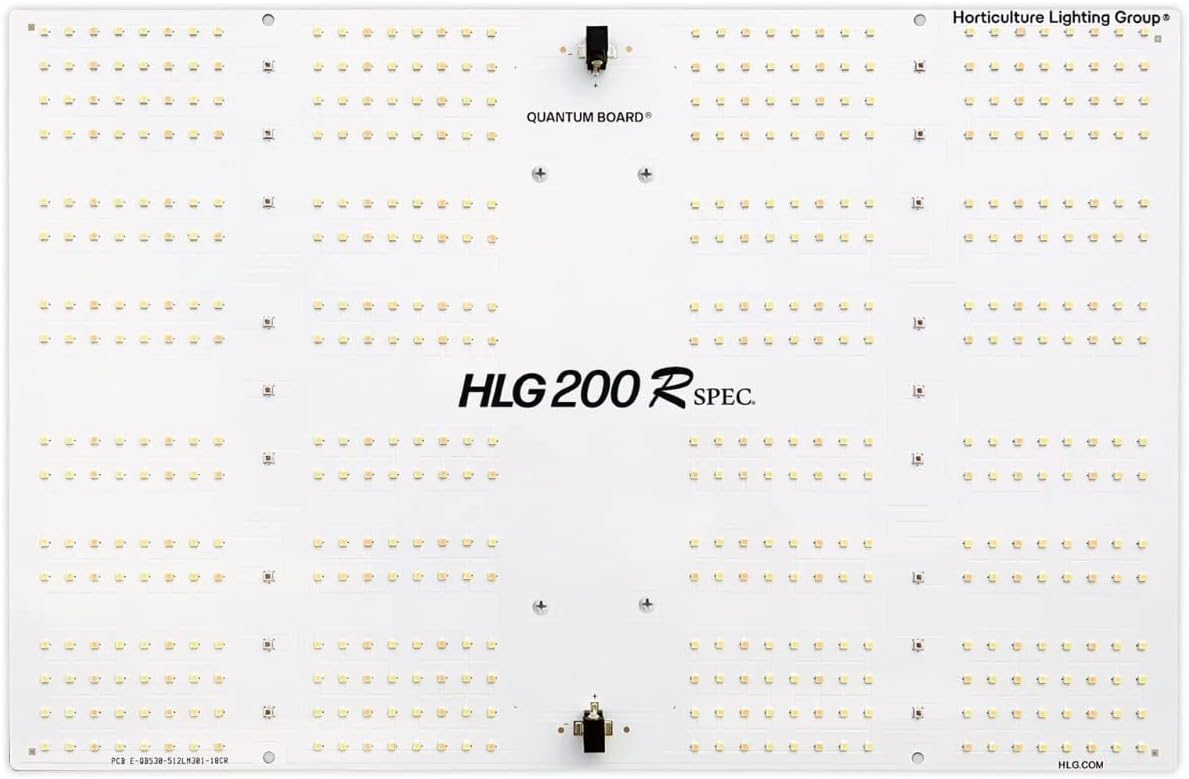
Image 7.1: Detailed view of the HLG 200 Rspec LED board, highlighting the arrangement of the Samsung LM301H and deep red LEDs.
8. Warranty and Support
The Horticulture Lighting Group HLG 200 Rspec typically comes with a manufacturer's warranty. For specific warranty details and duration, please refer to the documentation included with your purchase or visit the official Horticulture Lighting Group website.
For technical support, troubleshooting assistance, or warranty claims, please contact Horticulture Lighting Group directly. You can often find contact information on their official website or through the retailer where the product was purchased.
Manufacturer: Horticulture Lighting Group
Model Number: HLG-200-R


