Introduction
The ZeroWater 32-Cup Ready-Read 5-Stage Water Filter Dispenser is designed to provide clean, great-tasting water by removing virtually all total dissolved solids (TDS). This manual provides essential information for setting up, operating, maintaining, and troubleshooting your new water filter dispenser, ensuring optimal performance and longevity.

Figure 1: ZeroWater 32-Cup Ready-Read 5-Stage Water Filter Dispenser
Product Features
- Integrated TDS Meter: Instantly check the levels of dissolved solids in your water to know when to change your filter. Change filter when meter reads 006.
- 5-Stage Filtration System: Removes virtually all total dissolved solids (TDS), including organic and inorganic materials, metals, minerals, salts, and ions.
- IAPMO Certified and BPA Free: Filter is certified to reduce PFOA/PFOS, lead, chromium, and mercury. All materials are BPA free.
- High Capacity: 32-cup capacity reduces the frequency of refills.
- Eco-Friendly: Helps save up to 110 single-use plastic bottles per filter, contributing to environmental sustainability.

Figure 2: 5-Stage Filtration System Overview

Figure 3: IAPMO Certification Details
Setup Guide
- Unpack Components: Carefully remove all parts from the packaging. Ensure you have the dispenser, one 5-stage filter, and the TDS meter.
- Initial Cleaning: Wash the dispenser, lid, and reservoir with warm water and mild soap. Rinse thoroughly and dry completely.
- Install Filter: Twist the 5-stage filter into the bottom of the reservoir. Tighten until there is a complete seal between the filter, blue O-ring, and reservoir. Do not drop the filter into place.
- Assemble Dispenser: Place the reservoir with the installed filter onto the dispenser base. Ensure it is seated correctly.
- Fill Reservoir: Fill the top reservoir with cold tap water. Allow all the water to pass through the filter before filling again.
- Test Tap Water (Optional): Use the included TDS meter to test your tap water before filtration to see the initial TDS reading.

Figure 4: Filter Installation
Operating Instructions
- Filling: Open the lid and pour cold tap water into the top reservoir. The water will slowly filter through the 5-stage filter into the lower chamber.
- Dispensing: To dispense water, simply push the spigot lever. The integrated TDS meter will display the water quality as it dispenses.
- Storage: The compact design allows the dispenser to fit conveniently on your countertop or inside most refrigerators.
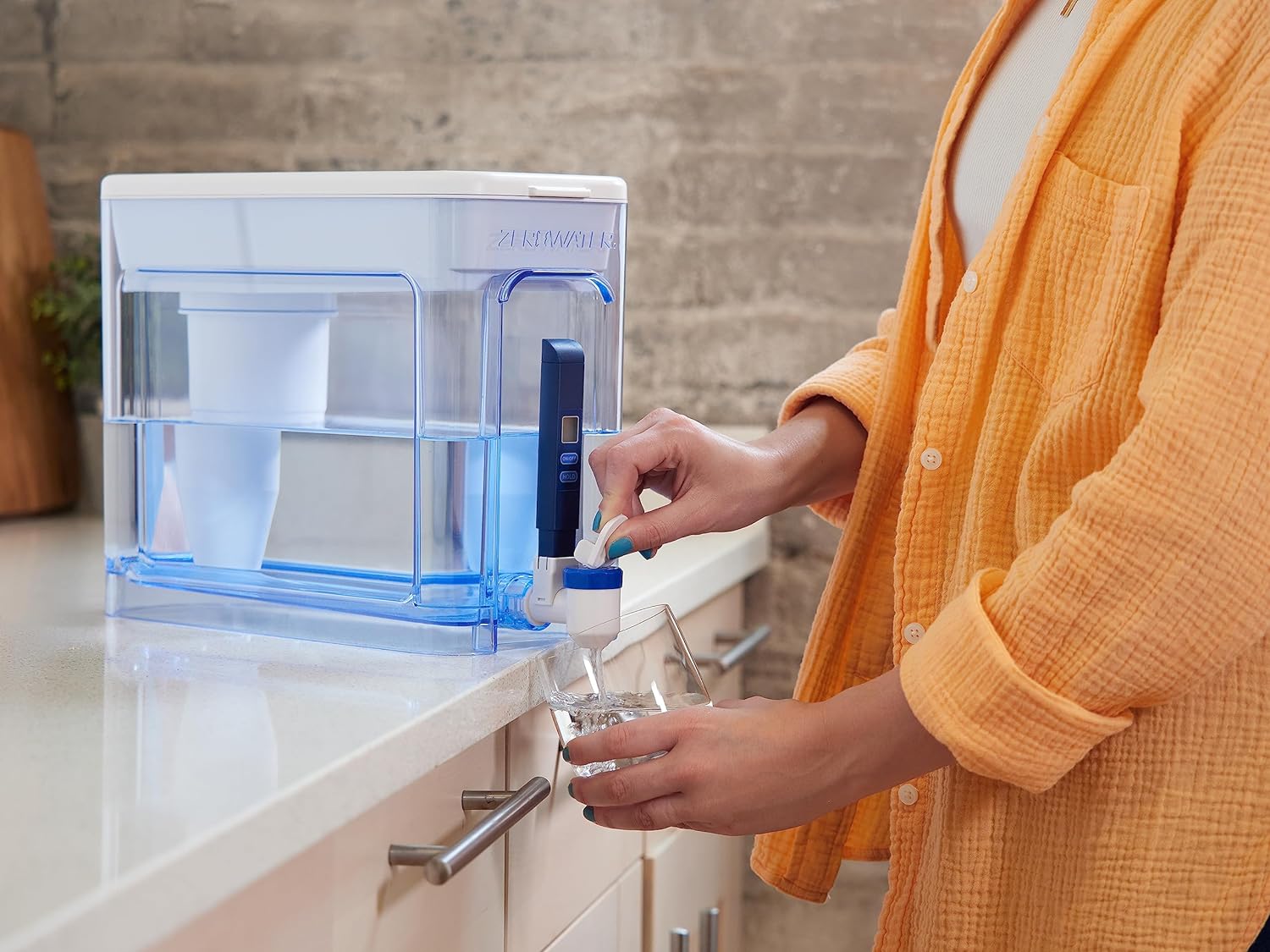
Figure 5: Dispensing Water

Figure 6: Dispenser in Refrigerator
Maintenance
- Filter Replacement: The integrated TDS meter will indicate when the filter needs to be replaced. When the meter reads 006 or higher, it is time for a new filter.
- Cleaning: Regularly clean the dispenser and reservoir with warm water and mild soap. Avoid abrasive cleaners. The filter itself should not be cleaned; it should be replaced.

Figure 7: TDS Meter Indicating Filter Replacement
Troubleshooting
- Slow Filtration: If water filters slowly, the filter may be nearing the end of its life due to high levels of dissolved solids in your tap water. Replace the filter.
- Water Leaking: Ensure the filter is screwed in tightly and correctly into the reservoir, and that the blue O-ring is properly seated to create a complete seal.
- Unpleasant Taste (Fishy/Metallic): This indicates that the filter is saturated and no longer effectively removing impurities. Replace the filter immediately.
- TDS Meter Reading Not 000: If your filtered water does not read 000 (or close to it) on the TDS meter, the filter may be faulty or improperly installed. Re-install the filter or replace it if the issue persists.
Specifications
| Feature | Detail |
|---|---|
| Brand | ZeroWater |
| Model Name | ZeroWater 32-Cup Ready-Read 5-Stage Water Filter Dispenser - 0 TDS for Improved Tap Water Taste NSF Certified to Reduce Lead, Chromium, and PFOA/PFOS |
| Product Dimensions | 13.13"L x 6"W x 10.38"H |
| Capacity | 32-Cup |
| Filtration Stages | 5-Stage Ion Exchange Technology |
| Certifications | IAPMO Certified (reduces PFOA/PFOS, Lead, Chromium, Mercury) |
| Included Accessories | 1 ZeroWater 5-Stage Filter, 1 Free TDS Meter |
| Item Weight | 4.07 pounds |
| Installation Type | Countertop |

Figure 8: Product Dimensions
Warranty and Support
For warranty information or product support, please contact ZeroWater Technologies directly. Details regarding specific protection plans may be available at the point of purchase or through the manufacturer's official channels.
Manufacturer: ZeroWater Technologies


