
Sanus Sonos Era 100 Speaker Stands
Sanus Height-Adjustable Speaker Stands for Sonos Era 100 - Instruction Manual
Model: Sonos Era 100 Speaker Stands
Introduction
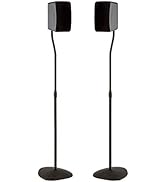
This instruction manual provides detailed guidance for the assembly, operation, and maintenance of your Sanus Height-Adjustable Speaker Stands, specifically designed for the Sonos Era 100 speakers. These stands offer 17 inches of height adjustment, integrated cable management, and a durable design to optimize your audio experience and complement your home aesthetics.
Package Contents
Please verify that all components are present before beginning assembly.
- Base (2 units)
- Pillar (2 units)
- Speaker Brackets (2 units)
- Hardware Kit (screws, rubber feet, carpet spikes)
- Cable Management Clips
- Instruction Manual
Tools Needed
- Phillips Screwdriver
Setup and Installation
Follow these steps for a quick and easy assembly. A Phillips screwdriver is required.
Step 1: Route Power Cord Through Base and Pillar
Begin by routing the power cord for your Sonos Era 100 speaker through the designated channel in the stand's base and up through the pillar. This ensures a clean, concealed cable path.

A hand guides the speaker's power cord through the internal channel of the stand's pillar, demonstrating the integrated cable management feature.
Step 2: Attach Pillar to Base
Securely attach the pillar to the base using the provided screws and a Phillips screwdriver. Ensure the pillar is firmly seated in the base for stability.

A close-up of a hand using a Phillips screwdriver to fasten the pillar to the base of the speaker stand, part of the 15-minute assembly process.
Step 3: Attach Top Bracket
Attach the top bracket to the upper section of the pillar. This bracket will hold your Sonos Era 100 speaker.
A hand positions the top bracket onto the speaker stand's pillar, preparing for speaker attachment.
Step 4: Install Speaker Bracket to Speaker
Install the dedicated speaker bracket onto the bottom of your Sonos Era 100 speaker. This bracket ensures a secure fit to the stand.
A hand uses a Phillips screwdriver to secure the speaker bracket to the base of the Sonos Era 100 speaker.
Step 5: Connect Power to Speaker
Connect the power cable to your Sonos Era 100 speaker before placing it on the stand. Ensure the cable is properly routed through the stand's internal channels.
Step 6: Slide Speaker onto Top Bracket
Carefully slide your Sonos Era 100 speaker, with the attached bracket, onto the top bracket of the stand. Ensure it clicks into place for a secure connection.
Step 7: Attach with Securement Screw
Use the securement screw to firmly attach the speaker to the top bracket, preventing accidental dislodgement.
Step 8: Secure Cables
Utilize the provided cable management clips to secure any excess power cord along the back of the stand's pillar. This maintains a clean and organized appearance.
A hand presses the power cord into the cable management channel on the back of the stand, ensuring a tidy setup.
Step 9: Adjust Height
The stand offers 17 inches of tool-free height adjustment, allowing you to position your Sonos Era 100 speaker between 25 and 42 inches from the floor. To adjust, locate the height adjustment mechanism on the pillar, press the release button, and slide the upper section to your desired height. Release the button to lock it in place.

A visual representation of the stand's adjustable height feature, demonstrating the range from 25 inches to 42 inches.
Operating Instructions
Once assembled and your Sonos Era 100 speaker is securely mounted, ensure the speaker is connected to a power source and configured according to Sonos's instructions. The stand itself does not require any operational steps beyond initial setup and height adjustment.
Maintenance
- Cleaning: Use a soft, dry cloth to wipe down the stand. Avoid abrasive cleaners or solvents that may damage the finish.
- Stability Check: Periodically check all screws and connections to ensure they remain tight and secure.
- Cable Management: Ensure cables remain neatly tucked into the management channels to prevent damage or tripping hazards.
Troubleshooting
- Stand Wobbles: Ensure all screws are tightened. Verify the stand is placed on a flat, stable surface. Use the included rubber feet for hard floors or carpet spikes for carpeted areas to enhance stability.
- Difficulty Adjusting Height: Ensure the release button is fully pressed when attempting to adjust the pillar height. Do not force the adjustment.
- Cables Not Concealed: Re-route the power cord through the internal channels and use the cable management clips as instructed.

The stand's base is equipped with interchangeable rubber feet for hard surfaces and carpet spikes for carpeted floors, ensuring optimal stability.
Specifications
| Brand | Sanus |
| Model Compatibility | Sonos Era 100 |
| Material | Alloy Steel |
| Adjustable Height Range | 17 inches (from 25 to 42 inches) |
| Maximum Height | 42.74 inches (108.6 cm) |
| Base Dimensions (Approx.) | 10.9 inches (width) x 11 inches (depth) |
| Item Weight (per stand) | Approximately 11.5 pounds (23 pounds for the pair) |
| Color | Black |

A technical drawing illustrating the full dimensions of the speaker stand, including its maximum height of 42.74 inches and base measurements.
Warranty Information
Sanus products are backed by a 5-year limited warranty. For specific details regarding your warranty coverage, please refer to the warranty documentation included with your purchase or visit the official Sanus website.
A badge highlighting the 5-year limited warranty provided with the product.
Customer Support
Should you have any questions, require assistance with assembly, or encounter any issues, our customer care team is available to help.
- Phone: 1-800-359-5520
- Availability: 7 days a week
An instructional video demonstrating the assembly and features of the Sanus Height-Adjustable Speaker Stand for Sonos Era 100, including contact information for customer support.
Related documentsSonos Era 100 Speaker Stands


Ask a question about this manual
Ask about setup, troubleshooting, compatibility, parts, safety, or missing instructions. Manuals+ will review the question and use this page’s manual context to help answer it.