
1. Introduction
This manual provides detailed instructions for the setup, operation, maintenance, and troubleshooting of your ELP 16MP Wide Angle USB Camera, Model ELP-USB16MP01-BL180. This camera features a 16-megapixel IMX298 sensor, a 180-degree fisheye lens, and UVC compliance for broad compatibility across various operating systems and applications.

Figure 1: ELP 16MP Wide Angle USB Camera with box housing.
2. What's in the Box
Please check the package contents to ensure all items are present:
- 1 x ELP 16MP USB Camera
- 1 x 3-meter USB Cable
- 1 x Box Housing
- 1 x User Manual
3. Setup Instructions
The ELP 16MP USB Camera is UVC compliant, offering a plug-and-play experience without the need for additional driver installations on most compatible systems.
- Unpack the Camera: Carefully remove the camera and its accessories from the packaging.
- Connect the USB Cable: Insert one end of the provided 3-meter USB cable into the camera's USB port.
- Connect to Device: Plug the other end of the USB cable into an available USB 2.0 port on your PC, laptop, Android device, or Raspberry Pi.
- Automatic Recognition: Your operating system should automatically detect and install the necessary drivers for the camera. This process may take a few moments.
- Verify Installation: Open a compatible camera application (e.g., Windows Camera App, OBS, VLC Player) to confirm the camera is recognized and displaying video.

Figure 2: The ELP 16MP USB Camera connected to various compatible devices, including laptops, tablets, and smartphones.
4. Operating the Camera
The ELP 16MP USB Camera is designed for high-resolution video and image capture with a wide field of view.
4.1. Video and Image Capture
The camera supports a maximum still picture resolution of 4656 x 3496 pixels. For video, it supports 4656x3496 MJPEG at 10 frames per second (fps) and 2048x1536 MJPEG at 30fps, ensuring smooth capture for most requirements.

Figure 3: The ELP 16MP Fisheye USB Camera demonstrating its wide field of view, capturing a broad scene with a fisheye effect.
4.2. Adjustable Parameters
Depending on the software used, you may be able to adjust various parameters to optimize image quality, including Brightness, Contrast, Color saturation, Definition, Gamma, and White Balance (WB).
4.3. Fisheye Lens
The camera is equipped with a 180-degree wide-view fisheye lens, providing a horizontal angle greater than 180 degrees and a vertical angle of 152 degrees. This allows for comprehensive coverage of a scene.
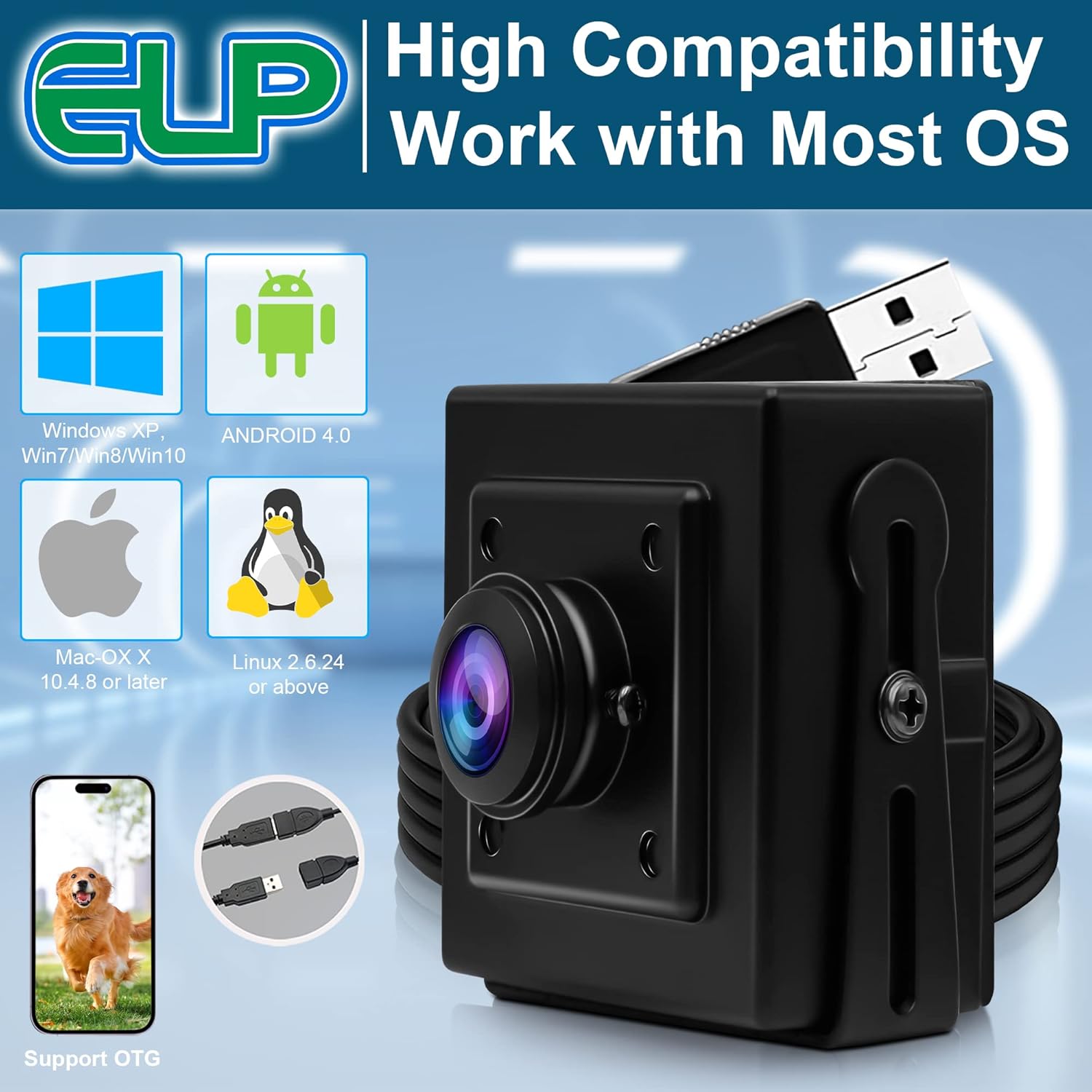
Figure 4: The ELP 16MP USB Camera highlighting its 180-degree fisheye lens and key features like IMX298 sensor, OTG support, USB connectivity, and 30fps capability.
4.4. Official Product Video
Video 1: An official product video demonstrating the ELP 16MP wide angle USB fisheye camera in use with a computer, showcasing its capabilities and field of view.
5. Applications
The ELP 16MP Wide Angle USB Camera is suitable for a wide range of applications due to its high resolution and broad field of view:
- Document and Object Scanning: Ideal for customs scans, scanning documents, passports, advertisements, and textile samples.
- 3D Scanning and Printing: Useful for 3D scanner applications and monitoring 3D printers.
- Industrial Vision: Suitable for industrial measurements, medical correction, and printed board inspection.
- Home Surveillance: Can be used as a baby camera or for general home security.
- Robotics: Applicable in robot machine vision systems.
- Video Conferencing & Streaming: Compatible with platforms like Skype, OBS, Zoom, GoToMeeting, Facebook LIVE, and YouTube Live.

Figure 5: Various applications of the ELP 16MP USB Camera, including capturing photographs, drawings, textile samples, signage panels, and printed boards.

Figure 6: Additional applications of the ELP 16MP USB Camera, such as human graphics, industrial measurement, scanning pictures, customs scanning, 3D printing, and scanning test papers.
6. Compatibility
The ELP 16MP USB Camera offers broad compatibility with various operating systems and software applications:
6.1. Supported Operating Systems
- WinXP / Vista / WIN7 / WIN8 / WIN10
- Linux with UVC (including Ubuntu, Chrome OS)
- Mac-OS X 10.4.8 or later
- Wince with UVC
- Android 4.0 or above (with OTG support)
6.2. General Software Compatibility
The camera works with a wide range of general USB camera software and video conferencing platforms, including but not limited to:
- OPENCV
- Blue Iris
- ContaCam
- Yawcam
- iSpy
- Motion Eye OS
- AMCAP
- Webcam Viewer
- IP Camera Viewer
- ZoneMinder
- V4L2 video for Linux
- Camerafi
- VLC Player
- USB Camera APP
- Photo Booth
- Facetime
- Zoom
- Quick Time
- Skype
- OBS

Figure 7: The ELP 16MP USB Camera demonstrating high compatibility with various operating systems including Windows, Android, Mac, and Linux, with support for OTG.
6.3. Official Product Video
Video 2: An official product video showcasing the ELP USB camera as a smart embedded webcam board compatible with most operating systems, highlighting its versatility.
7. Specifications
| Feature | Specification |
|---|---|
| Brand | ELP |
| Model Number | ELP-USB16MP01-BL180 |
| Photo Sensor Technology | CMOS (IMX298) |
| Effective Still Resolution | 16 MP (4656 x 3496 Max) |
| Video Capture Resolution | 4656x3496 MJPEG@10fps, 2048x1536 MJPEG@30fps |
| Lens Type | Fisheye lens |
| Field of View | Horizontal: >180°, Vertical: 152° |
| Maximum Focal Length | 1.67 Millimeters |
| Minimum Focal Length | 1.67 Millimeters |
| Maximum Aperture | 2 f |
| Minimum Aperture | 2 Millimeters |
| Focus Type | Fixed Focus |
| Connectivity Technology | USB 2.0 |
| Video Capture Format | MJPEG/YUY2 |
| Supported Image Format | JPEG, YUY2 |
| Operating System Compatibility | WinXP/Vista/WIN7/WIN8/Linux with UVC/Mac-OS X 10.4.8 or later/Wince with UVC/Android 4.0 or above |
| Color | Black |
| Item Weight | 0.21 Kilograms |
| Manufacturer | ShenZhen Ailipu Technology Co., Ltd |
8. Maintenance
To ensure the longevity and optimal performance of your ELP 16MP USB Camera, follow these maintenance guidelines:
- Cleaning: Use a soft, dry cloth to clean the camera body. For the lens, use a specialized lens cleaning cloth and solution to avoid scratches.
- Storage: Store the camera in a cool, dry place away from direct sunlight and extreme temperatures.
- Handling: Avoid dropping the camera or subjecting it to strong impacts. Handle the USB cable carefully to prevent damage to the connectors.
- Environmental Conditions: Do not expose the camera to water or excessive humidity as it is not water-resistant.
9. Troubleshooting
If you encounter issues with your ELP 16MP USB Camera, refer to the following common problems and solutions:
- Camera Not Detected:
- Ensure the USB cable is securely connected to both the camera and your computer/device.
- Try connecting the camera to a different USB port.
- Restart your computer/device.
- Verify that your operating system is compatible (refer to Section 6.1).
- Check your device's privacy settings to ensure camera access is enabled for applications.
- No Video/Black Screen:
- Ensure the correct camera is selected in your application's settings if multiple cameras are connected.
- Close and reopen the camera application.
- Test the camera with a different compatible application (e.g., AMCAP, VLC Player).
- Poor Image Quality:
- Ensure the lens is clean and free from dust or smudges.
- Check lighting conditions; adequate lighting is crucial for optimal image quality.
- Adjust camera parameters like brightness, contrast, and white balance within your software if available.
- Fisheye Distortion:
- The 180-degree fisheye lens inherently produces a wide-angle, distorted image. This is a normal characteristic of the lens.
- Some software applications may offer de-warping features to correct fisheye distortion, if desired.
10. Warranty Information
The ELP 16MP Wide Angle USB Camera comes with a 1-year warranty from the date of purchase. This warranty covers manufacturing defects and issues arising from normal use. It does not cover damage caused by misuse, accidents, unauthorized modifications, or improper maintenance.
For warranty claims or service, please retain your proof of purchase and contact ELP customer support.
11. Customer Support
For further assistance, technical support, or inquiries regarding your ELP 16MP Wide Angle USB Camera, please visit the official ELP website or contact their customer service department. Refer to the product packaging or the ELP brand store on Amazon for the most current contact information.
ELP Brand Store: https://www.amazon.com/stores/ELP/page/3BD16983-6F21-4DD2-8BDD-92C91FB108C1


