Introduction
This manual provides essential information for the safe and efficient operation of your AROEVE Air Purifier MK06. Please read it thoroughly before using the appliance and retain it for future reference. The AROEVE MK06 air purifier is designed to improve indoor air quality by filtering various airborne particles and odors.

Image: The AROEVE Air Purifier MK06 unit shown alongside two replacement filters, highlighting the product's main components.
Important Safety Instructions
To reduce the risk of fire, electric shock, or injury, please observe the following safety precautions:
- Always unplug the air purifier before moving it, opening the grille, changing filters, cleaning, or whenever it is not in use.
- Do not operate the unit if the cord or plug is damaged, or if the power outlet is loose.
- Keep the power cord away from heated surfaces.
- Do not use the air purifier in wet environments or near water.
- Do not insert fingers or foreign objects into the air inlets or outlets.
- Ensure the air purifier is placed on a stable, level surface.
- This appliance is not intended for use by persons (including children) with reduced physical, sensory or mental capabilities, or lack of experience and knowledge, unless they have been given supervision or instruction concerning use of the appliance by a person responsible for their safety.
- Do not block air openings.
- Use only AROEVE original replacement filters.
Product Components and Filtration System
The AROEVE MK06 air purifier utilizes a multi-layer filtration system to effectively clean the air.
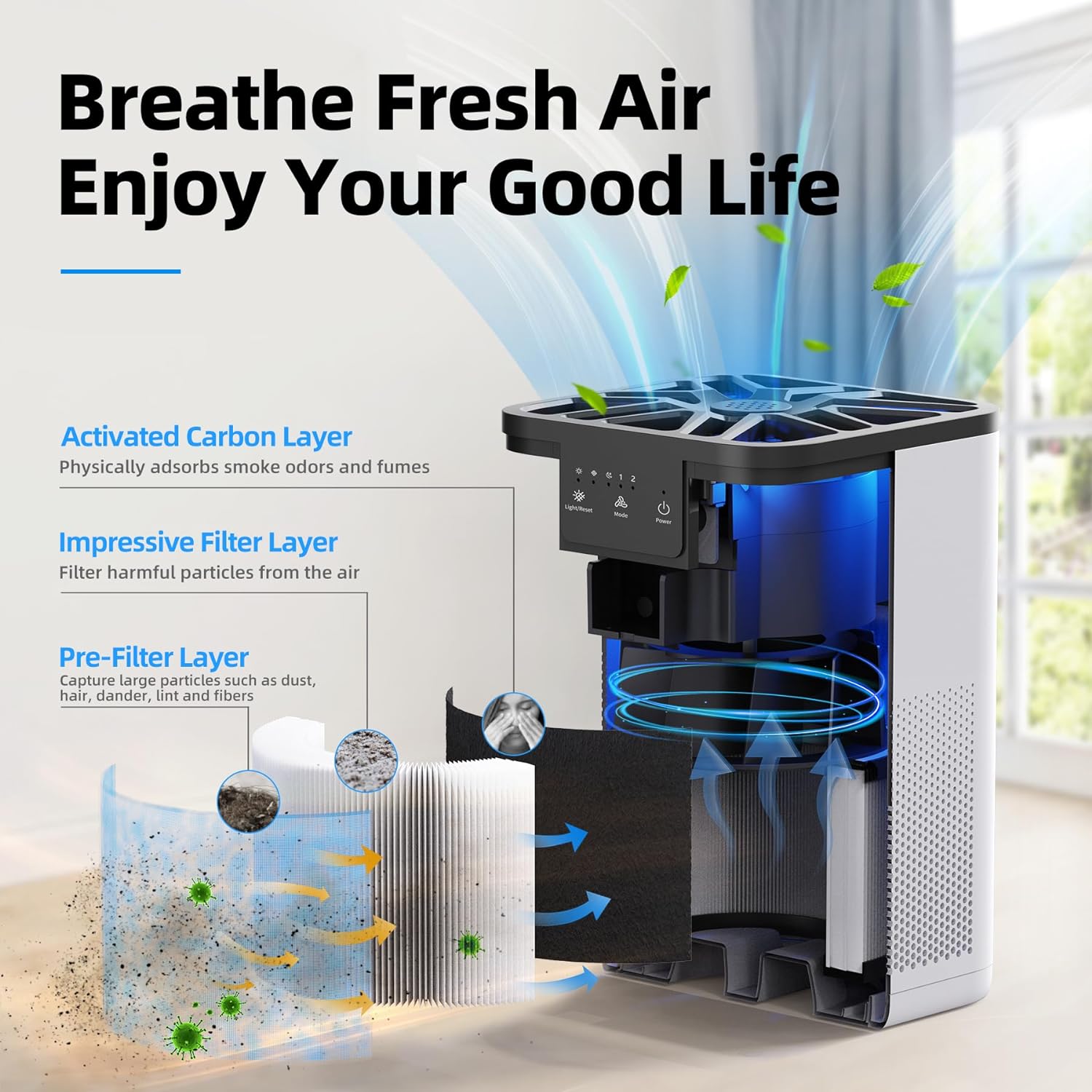
Image: An exploded view diagram illustrating the air purifier's internal components and the three-stage filtration process.
- Pre-Filter Layer: Captures large particles such as dust, hair, pet dander, lint, and fibers. This layer helps extend the life of subsequent filters.
- Impressive Filter Layer: Designed to filter harmful particles from the air, including PM2.5, pollen, and other fine particulates.
- Activated Carbon Layer: Physically adsorbs smoke odors, cooking fumes, pet odors, and other volatile organic compounds (VOCs), providing fresh and clean air.

Image: A visual representation of the pre-filter layer effectively capturing larger particles like hair and pet dander.

Image: An illustration depicting the filter's ability to capture microscopic allergy-causing particles like pollen.
Setup Guide
- Unpack the Air Purifier: Carefully remove the air purifier and all packaging materials from the box.
- Install the Filter:
- Turn the air purifier upside down.
- Twist the base cover counter-clockwise to unlock and remove it.
- Remove the plastic packaging from the filter.
- Insert the filter into the air purifier.
- Replace the base cover and twist clockwise to lock it securely.
- Position the Unit: Place the air purifier on a firm, level surface. Ensure there is at least 15 cm (6 inches) of space around all sides for optimal air circulation. Avoid placing it directly against walls or furniture.
- Connect to Power: Plug the power cord into a standard electrical outlet.
Operating Instructions
The control panel is located on the top of the unit.

Image: The air purifier operating in a living room, illustrating its 360-degree air circulation capability.
- Power Button (Power): Press to turn the air purifier ON or OFF.
- Mode Button (Mode): Press to cycle through fan speeds (1, 2, 3) and Sleep Mode.
- Speed 1-3: Adjusts the fan speed for different purification needs.
- Sleep Mode: Reduces fan speed to the lowest setting (20dB) for quiet operation during rest.

Image: The air purifier positioned in a bedroom, demonstrating its quiet operation in sleep mode at 20dB.
- Light/Reset Button (Light/Reset):
- Press once to turn the ambient light ON/OFF.
- Press and hold for 3 seconds to reset the filter replacement indicator after changing the filter.
- Aromatherapy Function: Add 4-5 drops of your favorite essential oil (not included) to the aromatherapy pad located on the top of the unit. The fragrance will circulate with the purified air.

Image: A hand carefully adding essential oil to the designated aromatherapy pad on the top of the air purifier.
Maintenance
Regular maintenance ensures optimal performance and extends the lifespan of your air purifier.
- Filter Replacement:
The "Replacement" light will illuminate after approximately 2000 hours of use, indicating that the filter needs to be replaced. For optimal performance and health, it is recommended to replace the filter every 3-6 months, depending on usage and air quality.
- Unplug the air purifier from the power outlet.
- Turn the unit upside down and remove the base cover.
- Remove the old filter and dispose of it properly.
- Unpack the new AROEVE replacement filter and insert it into the unit.
- Replace the base cover and lock it.
- Plug in the air purifier and press and hold the "Light/Reset" button for 3 seconds to reset the filter replacement indicator.
- Cleaning the Unit:
- Always unplug the air purifier before cleaning.
- Wipe the exterior of the unit with a soft, dry cloth.
- Do not use abrasive cleaners or solvents.
- The pre-filter can be gently vacuumed to remove large dust particles between replacements, but the main filter should not be washed.
Troubleshooting
| Problem | Possible Cause | Solution |
|---|---|---|
| Unit does not turn on. | Not plugged in; power outlet malfunction; filter not installed correctly. | Ensure the power cord is securely plugged into a working outlet. Check if the filter is installed and the base cover is locked. |
| Airflow is weak. | Filter is dirty or clogged; air inlets/outlets are blocked. | Check and replace the filter if necessary. Ensure nothing is obstructing the air inlets or outlets. |
| Unusual noise. | Foreign object inside; unit not on a stable surface; filter not seated correctly. | Unplug and check for any foreign objects. Place the unit on a stable surface. Re-install the filter. |
| "Replacement" light remains on after filter change. | Filter reset not performed. | Press and hold the "Light/Reset" button for 3 seconds to reset the indicator. |
Specifications
- Model: MK06
- Brand: AROEVE
- Color: White
- Noise Level: 20 dB (in Sleep Mode)
- Controller Type: Button Control
- Coverage Area: Up to 215 sq ft / 20 sq meters (refreshes air 5 times per hour)
- Filtration: Multi-layer filter (Pre-filter, Impressive Filter, Activated Carbon)
- Filter Replacement Reminder: Approximately every 2000 hours
Warranty and Support
AROEVE products are designed and manufactured to the highest quality standards. For warranty information or technical support, please refer to the warranty card included with your purchase or visit the official AROEVE website. Please have your model number (MK06) and purchase details ready when contacting support.
For further assistance, you may visit the AROEVE Store on Amazon.


