
1. Introduction
The amiciSmart WiFi Energy Meter (Model: 1xWIFI-MUL-PRO) is a multi-functional device designed for comprehensive electrical protection and smart home automation. It integrates over/under voltage protection, leakage protection, over current/load protection, and a timer switch, all controllable via the SmartLife App. This device also functions as an energy meter, providing real-time and historical energy consumption data. It is designed for DIN rail mounting and enhances the safety and efficiency of your electrical system.

Figure 1: Front view of the amiciSmart WiFi Energy Meter, showing the display and control buttons.
2. Safety Information
WARNING: Electrical installation should only be performed by qualified personnel. Failure to follow these instructions may result in electric shock, fire, or serious injury.
- Ensure power is disconnected at the main circuit breaker before installation or maintenance.
- Verify correct wiring connections (Live and Neutral) as indicated on the device.
- Do not exceed the maximum current rating of the device (63A).
- This product operates exclusively on a 2.4GHz WiFi network and is not compatible with 5GHz WiFi.
- Keep the device away from water and excessive humidity.
- Do not attempt to repair or modify the device. Contact support for assistance.
3. Product Features
The amiciSmart WiFi Energy Meter offers a comprehensive suite of features for electrical protection and smart control:
- All-in-One Protection: Combines over/under voltage, leakage, and over current/load protection.
- Adjustable Protection Values: Customize voltage, current, and leakage protection thresholds.
- kWh Meter: Monitors and displays energy consumption in kilowatt-hours.
- Instant Power Off: Automatically disconnects power in case of electrical anomalies to prevent damage.
- Voltage Protection: Adjustable over-voltage range (110~300V) and under-voltage range (85~220V).
- Over Current Protection: Adjustable range from 1~63A.
- Leakage Protection: Adjustable range from 10~99mA, with an option to disable.
- Remote Control: Manage the device and monitor activity via the SmartLife App from anywhere.
- Real-Time Monitoring: View real-time and historical energy consumption, voltage, and current readings through the app.
- Scheduling: Automate power on/off times using the timer switch function within the app.
- Bright LED Display: Provides clear readings of voltage, current, power, and energy consumption.

Figure 2: Overview of the device's display and control elements.
- V: Over/Under Voltage Alarm Indicator
- A: Over Current Alarm Indicator
- L: Leakage Alarm Indicator
- WiFi: WiFi Indicator
- Pulse: Kilo Watt Hour Meter Pulse Indicator
- Power Button: Manual Switch
- SET Button: Long press for 3 seconds to enter setting interface
- Up/Test Button: Long press for 3 seconds to test leakage
- Down/WiFi Button: Long press for 3 seconds to configure WiFi

Figure 3: The easy-to-read display panel showing Kilo Watt Hour, Kilo Watt, and Power Factor readings.
4. Package Contents
Upon opening the package, you should find the following item:
- 1 x amiciSmart WiFi Energy Meter (Model: 1xWIFI-MUL-PRO)
5. Specifications
| Feature | Specification |
|---|---|
| Model Number | 1xWIFI-MUL-PRO |
| Dimensions (LxWxH) | 9.6 x 6.8 x 5 cm |
| Item Weight | 270 g |
| Over Voltage Protection Range | Adjustable from 110V to 300V |
| Under Voltage Protection Range | Adjustable from 85V to 220V |
| Over Current Protection Range | Adjustable from 1A to 63A |
| Leakage Protection Range | Adjustable from 10mA to 99mA (can be turned off) |
| WiFi Compatibility | 2.4GHz only (not compatible with 5GHz) |
| App Compatibility | SmartLife App |
| Mounting Type | DIN Rail Mounted |

Figure 4: Physical dimensions of the amiciSmart WiFi Energy Meter.
6. Setup & Installation
Follow these steps for safe and proper installation of your amiciSmart WiFi Energy Meter:
- Power Disconnection: Before beginning any electrical work, ensure the main power supply to your distribution board is completely switched off. Use a voltage tester to confirm no power is present.
- Mounting: Mount the amiciSmart WiFi Energy Meter onto a standard DIN rail within your electrical distribution box.
- Wiring Connections:

Figure 5: Wiring diagram showing input (IN) and output (OUT) connections for Neutral (N) and Live (L) wires.
- Connect the incoming Neutral (N) wire to the 'N IN' terminal.
- Connect the incoming Live (L) wire to the 'L IN' terminal.
- Connect the outgoing Neutral (N) wire (to your load) to the 'N OUT' terminal.
- Connect the outgoing Live (L) wire (to your load) to the 'L OUT' terminal.
- Ensure all connections are secure and properly tightened.
- Power Restoration: Once all wiring is complete and verified, restore power to the main circuit. The device display should light up.
- App Download & Installation:
- Download the "SmartLife" app from the Google Play Store (for Android) or Apple App Store (for iOS).
- Register for a new account or log in if you already have one.
- WiFi Configuration:
- Ensure your smartphone is connected to a 2.4GHz WiFi network. The device is not compatible with 5GHz networks.
- Long press the 'Down/WiFi' button on the device for 3 seconds until the WiFi indicator starts blinking rapidly, indicating pairing mode.
- Open the SmartLife app, tap '+' to add a new device, and follow the on-screen instructions to connect your energy meter to your WiFi network.
7. Operation
Operating your amiciSmart WiFi Energy Meter involves both direct interaction with the device and control via the SmartLife App.
7.1. Device Controls
- Manual Switch (Power Button): Press briefly to manually turn the power ON or OFF.
- SET Button: Long press for 3 seconds to enter the device's local setting interface for adjusting parameters directly on the unit.
- Up/Test Button: Long press for 3 seconds to perform a leakage test.
- Down/WiFi Button: Long press for 3 seconds to enter WiFi configuration mode.
7.2. SmartLife App Functions
Once connected to the SmartLife App, you can access the following features:
- Remote ON/OFF: Switch the power supply on or off from anywhere.
- Real-Time Monitoring: View live data for voltage (V), current (A), power (W), and energy consumption (kWh).
- Historical Data: Access graphs and logs of past energy consumption.
- Adjustable Protection Settings:
- Voltage Protection: Set custom thresholds for over-voltage and under-voltage alarms and automatic power cutoff.
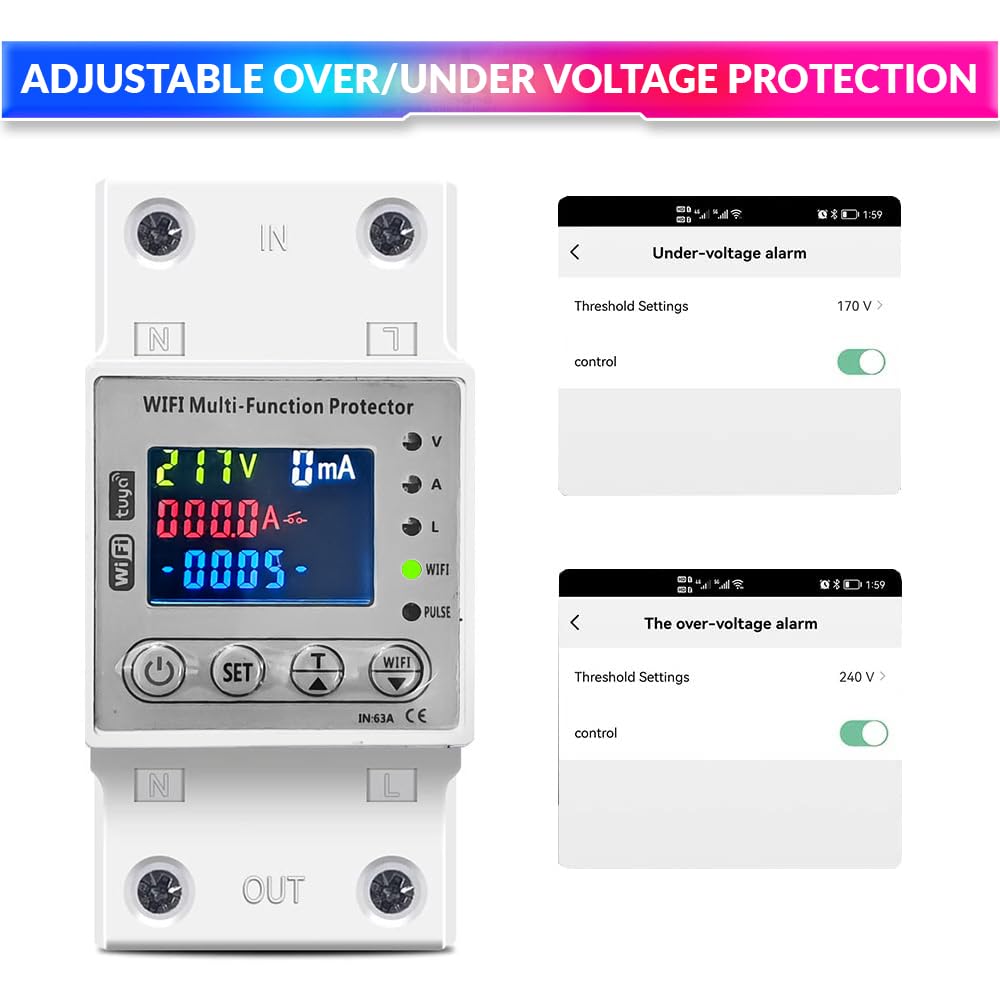
Figure 6: SmartLife App interface for setting under-voltage and over-voltage thresholds.
- Over Current Protection: Define the maximum allowable current before the device trips.
- Leakage Protection: Set the leakage current threshold (10-99mA) or disable this feature.

Figure 7: SmartLife App interface for setting leakage alarm thresholds.
- Voltage Protection: Set custom thresholds for over-voltage and under-voltage alarms and automatic power cutoff.
- Scheduling & Timer: Create schedules for automatic power on/off at specific times or after a set duration.
- Event Logs: Review records of power cutoffs and their reasons (e.g., over-voltage, over-current).
8. Maintenance
The amiciSmart WiFi Energy Meter is designed for minimal maintenance. However, regular checks can ensure its longevity and optimal performance:
- Regular Cleaning: Periodically wipe the device with a dry, soft cloth to remove dust. Do not use liquid cleaners or solvents.
- Connection Checks: Annually, or if you suspect an issue, ensure all wiring connections are still secure and free from corrosion. Always disconnect main power before checking connections.
- Firmware Updates: Check the SmartLife App periodically for any available firmware updates for your device. Install updates to ensure you have the latest features and security enhancements.
- Leakage Test: Perform the leakage test function (long press Up/Test button) periodically to ensure the leakage protection mechanism is functional.
9. Troubleshooting
If you encounter issues with your amiciSmart WiFi Energy Meter, refer to the following common problems and solutions:
| Problem | Possible Cause | Solution |
|---|---|---|
| Device not powering on. | No power supply; incorrect wiring; device fault. |
|
| Unable to connect to WiFi. | Incorrect WiFi band; wrong password; device too far from router; router issues. |
|
| Device trips frequently. | Over-voltage, under-voltage, over-current, or leakage detected; sensitive settings. |
|
| Remote control not working. | No internet connection; app issues; device offline. |
|
10. Warranty & Support
The amiciSmart WiFi Energy Meter (Model: 1xWIFI-MUL-PRO) comes with a standard manufacturer's warranty. Additionally, an optional 1-Year Extended Warranty by Onsitego may be available for purchase.
For technical support, warranty claims, or any product-related inquiries, please contact:
Amicikart Online Services Pvt Ltd
A-28B, Sector-58, Noida
Contact No.: +91 9809709898
Please have your product model number (1xWIFI-MUL-PRO) and purchase details ready when contacting support.