
Introduction
This manual provides detailed instructions for the setup, operation, and maintenance of your Bonsaii SF003 Steel Safe Box. Please read this manual thoroughly before using the safe to ensure proper function and security.

Image: The Bonsaii SF003 Steel Safe Box with its door open, revealing a spacious interior with a removable shelf. Various items such as stacks of money, gold coins, passports, and a camera are stored inside, demonstrating its capacity for valuables.
Package Contents
Verify that all components are present in the package:
- 1 x Bonsaii Safe Box
- 2 x Emergency Keys
- 2 x Expansion Bolts (for mounting)
- 1 x Removable Shelf
- 1 x Floor Mat
- 1 x User Manual (this document)

Image: A visual representation of the package contents for the Bonsaii safe box. It shows the safe itself, two emergency keys, two expansion bolts, a removable shelf, a floor mat, and the user manual.
Safety Information
- Always keep the emergency keys in a secure location away from the safe.
- Do not store the emergency keys inside the safe.
- Ensure the safe is placed on a stable, level surface or securely mounted.
- Keep the digital keypad clean and dry.
- Replace batteries promptly when the low battery indicator appears.
Setup
1. Initial Opening with Emergency Keys
- Locate the emergency lock cover on the digital keypad.
- Remove the emergency lock cover.
- Insert one of the emergency keys into the keyhole and turn it clockwise.
- While the key is turned, rotate the knob on the keypad counter-clockwise to open the safe door.

Image: Step 1 of safe setup, illustrating how to remove the emergency lock cover to access the keyhole.

Image: Step 2 of safe setup, demonstrating the use of the emergency key to unlock and open the safe door.
2. Battery Installation
- With the safe door open, locate the battery compartment on the inside of the door.
- Insert 4 x AA batteries (not included) into the compartment, ensuring correct polarity (+/-).
- Close the battery compartment cover.

Image: Step 3 of safe setup, illustrating the correct insertion of 4 AA batteries into the internal battery compartment.
3. Setting Your Passcode
- With the safe door open, press the red reset button located inside the safe, near the hinge. You will hear a beep.
- On the digital keypad, enter a new 3-8 digit passcode.
- Press the "#" button to confirm your new passcode. You will hear a confirmation beep.
- Test the new passcode with the door open to ensure it works correctly before closing the safe.

Image: Step 4 of safe setup, showing the location of the red reset button and the digital keypad for programming a new 3-8 digit passcode.
Operation
1. Opening with Digital Passcode
- Enter your 3-8 digit passcode on the digital keypad.
- Press the "#" button.
- Within 5 seconds, rotate the knob counter-clockwise to open the safe door.

Image: A diagram detailing the two methods of opening the safe: using a password and knob, or using backup keys and knob. The digital keypad, USB Type-C port, and intelligent indicators are labeled.
2. Opening with Emergency Keys
This method is used if you forget your passcode or if the batteries are dead.
- Remove the emergency lock cover.
- Insert an emergency key into the keyhole and turn it clockwise.
- While the key is turned, rotate the knob counter-clockwise to open the safe door.
3. Emergency Power Supply (USB Type-C)
If the batteries are completely drained and you cannot open the safe with the digital keypad, you can use an external 5V power source (e.g., a power bank) via the USB Type-C port.
- Connect a 5V external power source to the USB Type-C port on the keypad.
- Once powered, enter your digital passcode and press "#".
- Rotate the knob counter-clockwise to open the safe door.

Image: A diagram illustrating the use of the USB Type-C interface for emergency power. A power bank is connected to the safe's Type-C port, allowing the digital keypad to function even with dead internal batteries.
Installation
The Bonsaii SF003 safe box can be mounted to a wall or floor for added security. Pre-drilled holes are provided on both the back and bottom of the safe.
Mounting Steps:
- Choose a suitable location for mounting.
- Mark the drilling points through the pre-drilled holes on the safe onto the wall or floor.
- Drill pilot holes at the marked points.
- Align the safe with the drilled holes.
- Insert the expansion bolts through the safe's holes and into the wall/floor.
- Tighten the expansion bolts securely.

Image: A visual guide demonstrating the three steps for installing the safe by mounting it. It shows marking the wall, drilling, and securing the safe with expansion bolts.
Removable Shelf:
The safe includes a removable shelf to organize your items. You can adjust or remove it based on your storage needs.

Image: Two views of the safe's interior, one demonstrating the use of the removable shelf to create two compartments, and the other showing the safe without the shelf for larger items.
Maintenance
- Regularly check the battery level and replace batteries when needed to avoid being locked out.
- Keep the safe's exterior clean with a soft, dry cloth. Avoid abrasive cleaners.
- Do not lubricate the lock mechanism or keypad.
- Ensure the safe door closes completely and the bolts engage properly after each use.
Troubleshooting
| Problem | Possible Cause | Solution |
|---|---|---|
| Safe does not open with passcode. | Incorrect passcode entered, dead batteries, or knob not turned within 5 seconds. | Re-enter passcode carefully. Replace batteries. Ensure knob is turned immediately after entering passcode. Use emergency key if necessary. |
| Keypad is unresponsive. | Dead batteries. | Replace batteries. Use the USB Type-C emergency power feature with an external 5V power source. |
| Door does not close properly. | Obstruction in the door frame or bolts. | Check for any items blocking the door or bolts. Ensure the safe is on a level surface. |
| Forgot passcode. | Passcode forgotten. | Use the emergency keys to open the safe. Once open, reset the passcode using the red reset button. |
Specifications
| Feature | Detail |
|---|---|
| Brand | Bonsaii |
| Model Number | SF003 |
| Exterior Dimensions (D x W x H) | 12.99" x 12.99" x 14.17" |
| Interior Dimensions (D x W x H) | 12.87" x 12.87" x 14.05" |
| Capacity | 1.2 Cubic Feet |
| Lock Type | Digital Keypad, Emergency Key |
| Material | SPHC Steel |
| Mounting Type | Floor Mount, Wall Mount |
| Special Features | Removable Shelf, USB Type-C Emergency Power |
| Item Weight | 23.4 pounds |
| Batteries Required | 4 x AA (not included) |
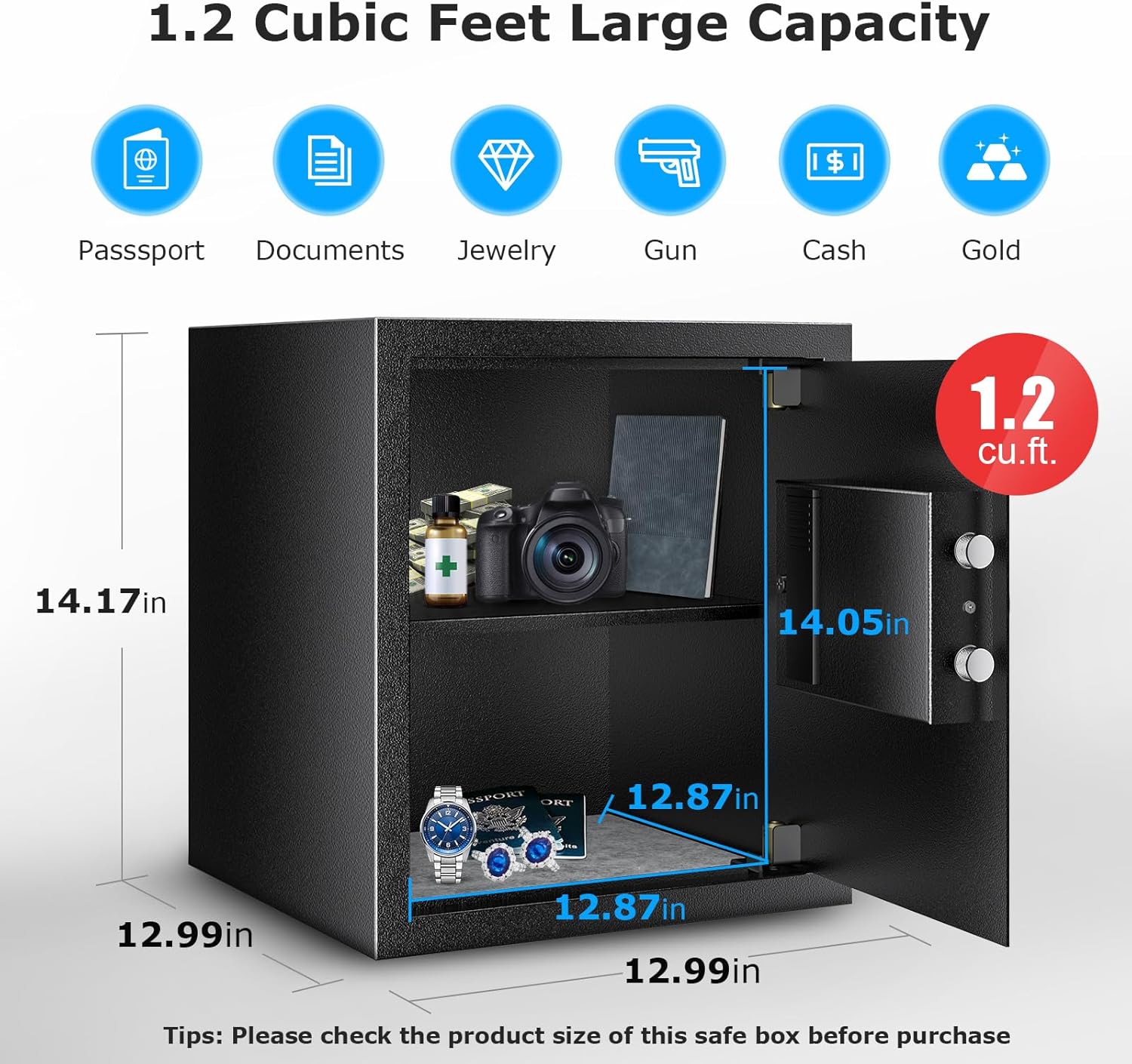
Image: A detailed diagram illustrating the exterior dimensions (12.99 x 14.17 inches) and interior dimensions (12.87 x 14.05 inches) of the 1.2 cubic feet Bonsaii safe, along with icons representing items it can store.
Warranty and Support
Bonsaii provides professional customer service and offers a one-year warranty for this product. If you encounter any issues or have questions, please contact Bonsaii customer support.
For support, please refer to the contact information provided on the Bonsaii official website or your purchase documentation.