
DEPSTECH DC08-CA
DEPSTECH DC08 Cordless Rotary Tool Kit User Manual
Model: DC08-CA
1. Introduction
The DEPSTECH DC08 Cordless Rotary Tool Kit is a versatile and powerful tool designed for various DIY and home improvement projects. Featuring an 8V 2.0Ah rechargeable battery and 5 variable speeds up to 30,000 RPM, it offers cordless convenience and precise control for tasks such as carving, sanding, polishing, cutting, and drilling. This kit includes 127 accessories to support a wide range of applications.

This image displays the DEPSTECH DC08 cordless rotary tool, its black carrying case with orange latches, a USB-C charging cable, and a wide array of 127 accessories spread out, including various sanding discs, grinding stones, cutting wheels, drill bits, and polishing pads. Also shown are the shield attachment and drill locator.
2. Setup and Initial Use
2.1 Charging the Battery
The DEPSTECH DC08 rotary tool is equipped with an 8V 2.0Ah rechargeable battery and a Type-C charging interface. Before first use, fully charge the tool. The battery indicator lights will show the charging progress.

This image shows the DEPSTECH DC08 rotary tool being charged via a USB Type-C cable. The battery indicator lights on the tool are illuminated, indicating the charging status. The tool features a 5-minute level memory function for gear settings and a 2.0Ah battery capacity.
2.2 Installing Accessories
To install or change accessories:
- Press and hold the spindle lock button located on the tool.
- Loosen the collet nut at the tip of the tool.
- Insert the desired accessory bit into the collet.
- While still holding the spindle lock button, tighten the collet nut securely with the provided wrench.
- Release the spindle lock button.
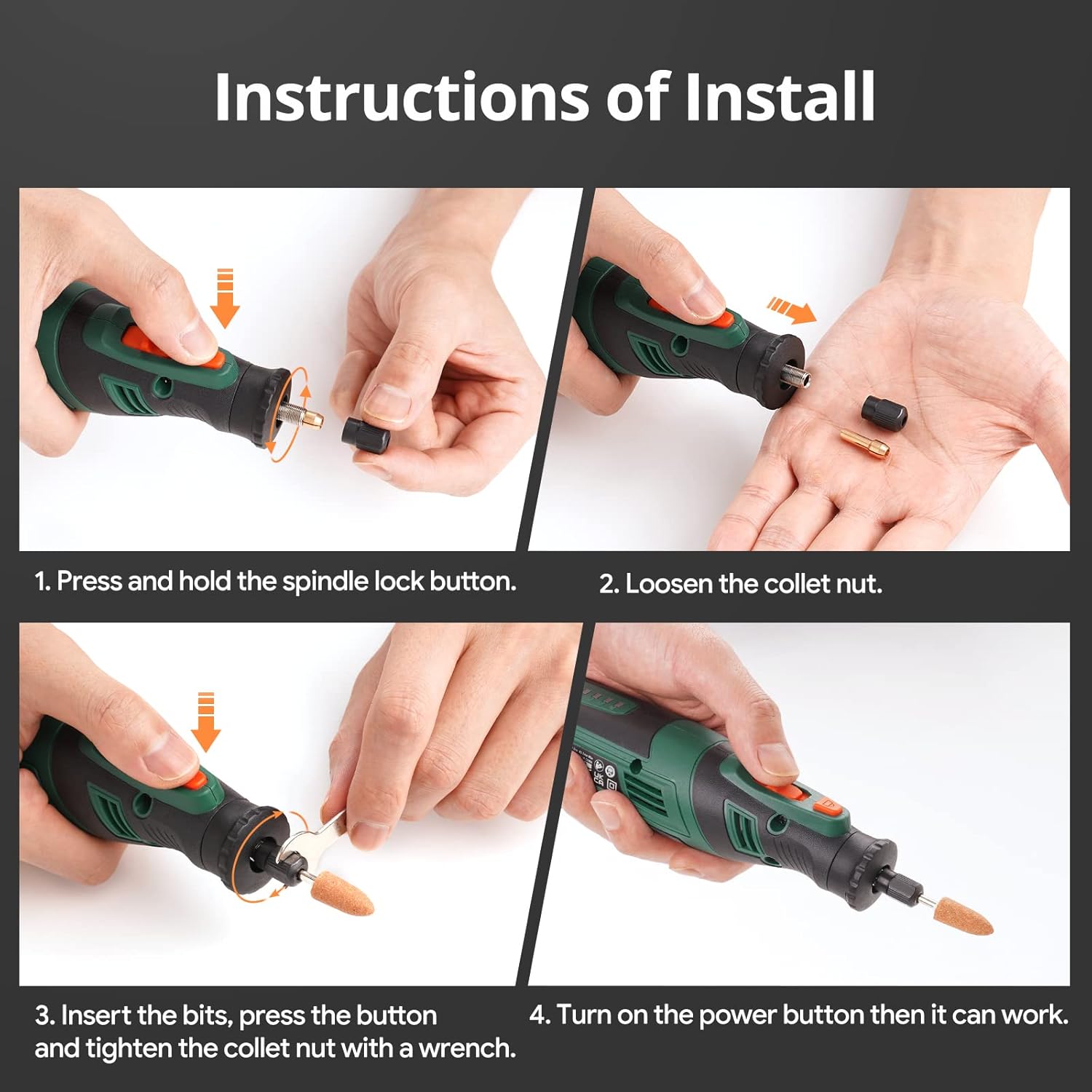
This image provides a four-panel visual guide demonstrating the process of installing an accessory bit into the DEPSTECH DC08 rotary tool. It shows pressing the spindle lock button, loosening the collet nut, inserting the bit, and then tightening the collet nut with a wrench before turning on the power.
3. Operating Instructions
3.1 Power On/Off and Speed Adjustment
To turn on the tool, press the power button. The tool features 5 variable speeds ranging from 5,000 to 30,000 RPM. Use the speed adjustment buttons (+ and -) to select the appropriate speed for your task. The tool remembers the last gear setting for 5 minutes after being turned off, reverting to the default setting after this period.

This image illustrates the speed adjustment feature of the DEPSTECH DC08 rotary tool. It shows the tool in hand with the speed indicator lights illuminated, demonstrating how to cycle through the 5 variable speeds from 5,000 RPM to 30,000 RPM. The text highlights the 5-minute gear memory function.
3.2 Anti-Blocking System
The DEPSTECH DC08 incorporates an advanced anti-blocking system to prevent unexpected stops caused by accidental contact with the chuck during operation. This enhances safety and maintains consistent performance.

This image focuses on the anti-blocking system of the DEPSTECH DC08 rotary tool, showing the tool being used to drill into wood. An inset highlights the mechanism designed to prevent unexpected stops if the chuck accidentally touches the workpiece, ensuring smoother operation.
3.3 Applications
The DEPSTECH DC08 is suitable for a variety of tasks:
- Carving/Engraving: Ideal for intricate designs on wood, glass, and other materials.
- Sanding: Smooth surfaces and edges with precision.
- Polishing/Cleaning: Restore shine to various items.
- Cutting: Cut through thin materials with appropriate cutting wheels.
- Drilling: Create precise holes in wood, plastic, and soft metals.

This image is a collage showcasing the versatility of the DEPSTECH DC08 rotary tool. It depicts the tool being used for various applications: drilling into wood with a drill locator, cutting a metal pipe with a cutting wheel and shield, sanding a wooden object, carving intricate details, and polishing a ring. This highlights its suitability for light jobs.
3.4 Official Product Video
This video provides a comprehensive overview of the DEPSTECH DC08 Cordless Rotary Tool Kit. It demonstrates key features such as Type-C fast charging, the inclusion of 127 accessories for multi-purpose use, and various applications like carving, sanding, cutting, drilling, and engraving. The video also highlights the 5 variable speed settings and the 5-minute gear memory function.
4. Maintenance
Regular maintenance ensures the longevity and optimal performance of your DEPSTECH DC08 rotary tool.
- Cleaning: After each use, wipe down the tool with a clean, dry cloth to remove dust and debris. Ensure ventilation slots are clear.
- Accessory Care: Clean accessories after use and store them in the provided storage box to prevent damage and loss.
- Battery Care: Charge the battery regularly, even if not in frequent use, to maintain battery health. Avoid fully discharging the battery for extended periods.
- Storage: Store the tool and accessories in their original packing case in a dry, cool place away from direct sunlight and extreme temperatures.

This image provides a close-up view of the DEPSTECH DC08 rotary tool, specifically highlighting its ventilation design. Arrows indicate airflow through the vents, emphasizing the tool's cooling system which is crucial for maintaining performance during extended use.
5. Troubleshooting
| Problem | Possible Cause | Solution |
|---|---|---|
| Tool does not turn on. | Battery is depleted. | Charge the tool fully using the provided USB-C cable. |
| Tool stops frequently during use. | Overload or chuck contact (Anti-Blocking System activated). | Reduce pressure on the workpiece. Ensure the chuck is not making contact with the material. |
| Accessory bit is loose or wobbles. | Collet nut not tightened sufficiently or incorrect collet size. | Ensure the collet nut is tightened securely. Use the correct collet size for the accessory shank. |
| Reduced performance/power. | Low battery charge or excessive wear on accessory. | Recharge the battery. Replace worn-out accessories. |
6. Specifications
- Brand: DEPSTECH
- Model: DC08-CA
- Voltage: 8 Volts
- Power Source: Battery Powered
- Battery: 2.0Ah Lithium Ion (included)
- Maximum Rotational Speed: 30000 RPM
- Minimum Rotational Speed: 5000 RPM
- Speed Settings: 5 variable speeds
- Item Weight: 0.82 Pounds (approx. 13.1 ounces)
- Product Dimensions: 8.86 x 1.81 x 1.85 inches
- Material: Metal, Soft Plastic
- Special Features: Cordless, Anti-Blocking System, 5-Minute Gear Memory, Type-C Fast Charging
- Included Components: DC08 Cordless Rotary Tool x1, Packing Case x1, Storage Box x1, USB-C Cable x1, Drill Locator x1, Cover Shield x1, Sanding Paper Disc x40, Sanding Paper Band x10, Sanding Shank x1, Diamond Burr Bit x3, Woodworking Milling Cutter x1, HSS Drill x4, Grinding wheel Cutting Disc x30, Double Mesh Cutting Disc x6, Diamond Cutting Disc x1, Cut-off Wheel Mandrel x3, Abrasive Stone x6, Rubber grinder with shank x1, Felt Wheel x8, Felt Wheel Mandrel x1, Stainless steel brushes x1, Bristle brushes x1, Wrench x1, Collet x3 (1/8-Inch Collet, 1/16-Inch Collet, 3/32-Inch Collet)

This diagram labels the various parts and controls of the DEPSTECH DC08 rotary tool, including the ON/OFF button, speed control buttons, speed indicator lights, shaft lock button, collet nut, collet, cooling vent, battery charge light, and charging terminals.

This chart details the compatibility of various accessories included with the DEPSTECH DC08 rotary tool across different materials (Wood, Plastic, Steel, Aluminum, Stone, Ceramic, Glass) and functions (Sanding, Carving, Drilling, Grinding, Cutting, Polishing/Cleaning). It lists accessories like Sanding Paper Discs, Diamond Burr Bits, HSS Drills, Cutting Discs, Felt Wheels, and brushes, indicating which materials they are suitable for.
7. Warranty and Support
DEPSTECH is committed to providing high-quality products and exceptional customer service.
- Warranty: The DEPSTECH DC08 rotary tool comes with a one-year warranty against manufacturing defects. A 30-day free return policy is also available.
- Customer Support: If you encounter any issues with your product, please do not hesitate to contact DEPSTECH customer service. They aim to respond within 24 hours.
- Contact Email: Support@depstech.com
Related documentsDC08-CA


Ask a question about this manual
Ask about setup, troubleshooting, compatibility, parts, safety, or missing instructions. Manuals+ will review the question and use this page’s manual context to help answer it.