
1. Introduction
The Smart Air SA600 Air Purifier is designed to provide clean, filtered air for large indoor spaces. Utilizing a dual-inlet system and advanced multi-stage filtration, it effectively removes airborne particles, harmful gases, and odors, contributing to a healthier environment. This manual provides essential information for the safe and efficient operation and maintenance of your SA600 Air Purifier.

Image 1.1: Front view of the Smart Air SA600 Air Purifier.
2. Safety Information
Please read all safety instructions before operating the appliance to prevent injury to yourself or others and to avoid damage to the product. Keep this manual for future reference.
- Ensure the appliance is connected to a power supply that matches the voltage specified on the rating label.
- Do not operate the appliance with a damaged cord or plug.
- Keep the appliance away from water or other liquids. Do not immerse it in water.
- Do not block air inlets or outlets. Maintain at least 20 cm (8 inches) clearance from walls or furniture.
- This appliance is not intended for use by persons (including children) with reduced physical, sensory or mental capabilities, or lack of experience and knowledge, unless they have been given supervision or instruction concerning use of the appliance by a person responsible for their safety.
- Children should be supervised to ensure that they do not play with the appliance.
- Unplug the air purifier before cleaning or performing any maintenance.
3. Package Contents
Verify that all items are present in the package:
- 1 x Smart Air SA600 Air Purifier (Dimensions: 20.1” x 13.8” x 9.1”)
- 2 x H13 99.97% HEPA Filters
- 2 x Activated Carbon (VOC) Filters
- 2 x Permanent Pre-filters
- 1 x Power Cord
- 1 x Smart Air Handbook (this manual)
4. Setup
4.1 Unpacking and Placement
- Carefully remove the SA600 Air Purifier and all components from the packaging.
- Place the air purifier on a firm, level surface. Ensure there is at least 20 cm (8 inches) of clear space around all sides for optimal airflow.
- Connect the power cord to the air purifier and then to a suitable electrical outlet.
4.2 Filter Installation
The SA600 uses a triple-layer filtration system. Ensure all filters are correctly installed before first use.
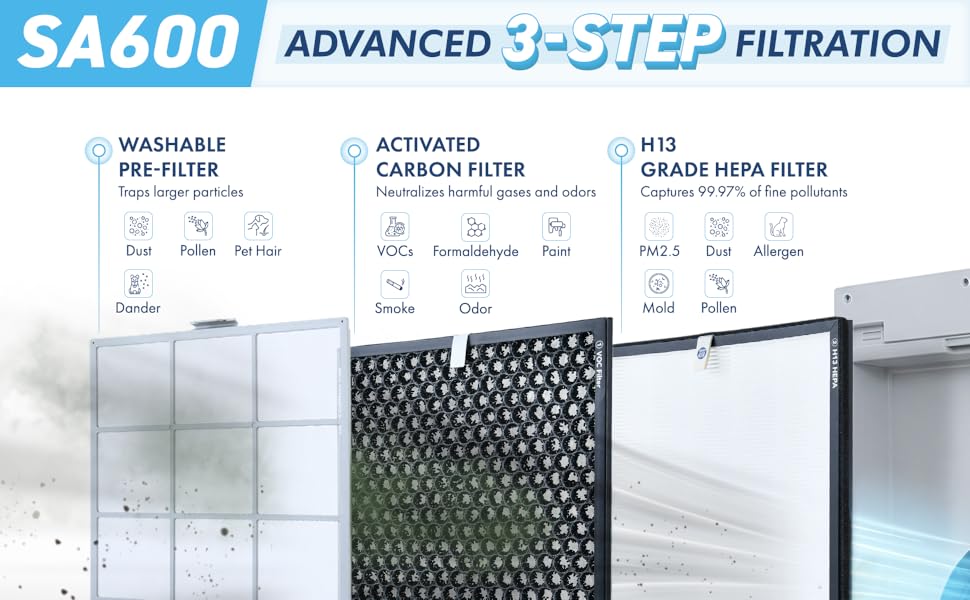
Image 4.1: Advanced 3-Step Filtration System.
- Locate the filter compartments on both sides of the air purifier.
- Open the filter covers.
- Install the filters in the correct order: first the permanent pre-filter, then the activated carbon filter, and finally the H13 HEPA filter. Ensure they are seated properly.
- Close the filter covers securely.
Video 4.1: This video demonstrates the filter installation process and highlights key features of the Smart Air SA600 Air Purifier, including its dual-inlet design and quiet operation.
5. Operating Instructions
The control panel is located on the top of the unit. Refer to the icons on the panel for specific functions.
5.1 Power On/Off
- Press the Power button once to turn the air purifier on.
- Press the Power button again to turn the air purifier off.
5.2 Fan Speed Control
The SA600 offers multiple fan speed settings to adjust airflow and noise levels.
- Press the Fan Speed button to cycle through available speeds (e.g., Low, Medium, High, Auto).
- The selected speed will be indicated on the display or by corresponding LED lights.
5.3 Child Safety Lock
To prevent accidental changes to settings, activate the child safety lock.
- Press and hold the Child Lock button for 3 seconds to activate. A lock icon will appear.
- Repeat the action to deactivate the child lock.
5.4 Automatic 'Do Not Disturb' Mode
This mode automatically adjusts settings for minimal disturbance during nighttime hours.
- The air purifier will automatically enter a low-noise, low-light mode when the ambient light decreases.
- It will return to its previous settings when ambient light increases.
6. Maintenance
Regular maintenance ensures optimal performance and extends the lifespan of your air purifier.
6.1 Pre-filter Cleaning
The permanent pre-filters should be cleaned regularly to remove larger particles like pet hair and lint.
- Unplug the air purifier from the power outlet.
- Open the filter covers and remove the pre-filters.
- Clean the pre-filters by vacuuming, wiping them down, or washing them with water. If washing, ensure they are completely dry before reinstallation.
- Reinstall the dry pre-filters and close the covers.
6.2 HEPA and Activated Carbon Filter Replacement
The H13 HEPA filters and Activated Carbon (VOC) filters are not washable and must be replaced periodically.
- HEPA Filters: Replace approximately every 2 years. Replacement ASIN: B0BWGQBV78.
- Activated Carbon (VOC) Filters: Replace approximately every 18-24 months. Replacement ASIN: B0BWLHDSMF.
To replace:
- Unplug the air purifier.
- Open the filter covers and remove the old HEPA and/or Activated Carbon filters.
- Dispose of used filters responsibly.
- Insert new filters, ensuring correct orientation and seating.
- Close the filter covers.
6.3 Filter Replacement Indicator
The air purifier is equipped with an indicator that will illuminate when it is time to check or replace the filters. Follow the replacement instructions and reset the indicator as per the device's specific instructions (usually by pressing and holding a button for a few seconds after replacement).
7. Features
7.1 Dual-Inlet Design
The SA600 features a unique dual-inlet design, drawing air from both sides of the unit. This engineering allows for maximum air purification performance at lower noise levels compared to single-inlet systems.

Image 7.1: Dual-Inlet for Enhanced Performance.
7.2 Advanced 3-Step Filtration
The SA600 employs a comprehensive three-stage filtration system:
- Permanent Pre-filters: Capture large particles such as pet hair, dander, pollen, and dust. These are washable and reusable.
- Activated Carbon Filters: Effectively remove harmful gases and odors, including Volatile Organic Compounds (VOCs) like formaldehyde, as well as smoke and other chemical pollutants.
- H13 Grade HEPA Filters: Filter 99.97% of airborne particles as small as 0.3 microns, including PM2.5, allergens, mold spores, and fine dust.

Image 7.2: Detailed view of the H13 HEPA, Activated Carbon, and Pre-filters.
7.3 Coverage and Performance
The SA600 is designed for large spaces, cleaning up to 1,200 square feet in 30 minutes or 600 square feet four times per hour. Its Clean Air Delivery Rate (CADR) is 265 CFM, with a filtered airflow of 330 CFM.
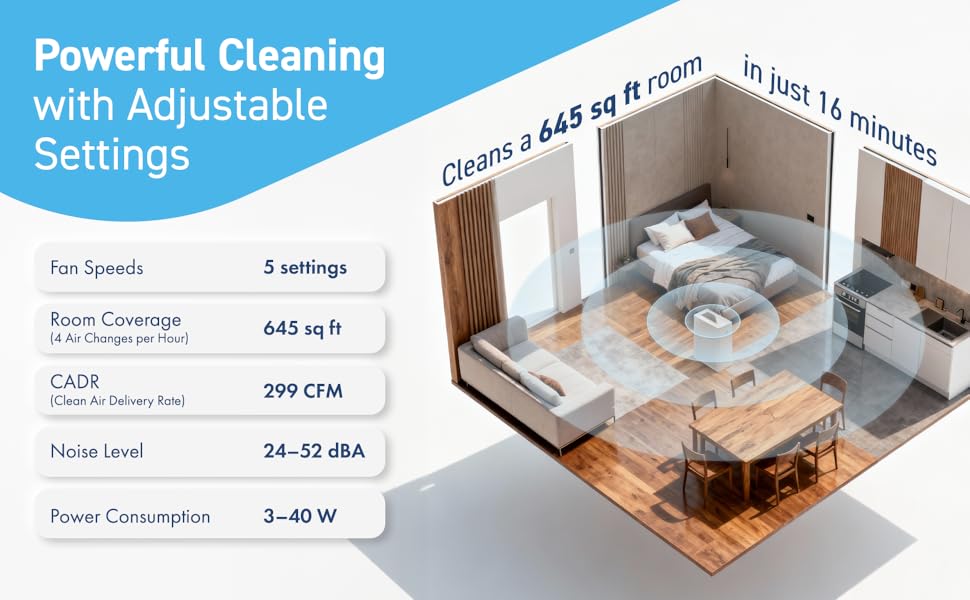
Image 7.3: Room coverage and performance metrics.
7.4 Quiet Operation
Engineered for quiet performance, the SA600 operates at a maximum noise level of 52dB, making it suitable for bedrooms, offices, and classrooms without significant auditory disturbance.

Image 7.4: Healthy and Safe Design with quiet operation.
7.5 Child-Safe and Pet-Friendly Design
The SA600 includes a child safety lock to prevent unintended operation. It is also designed to be ozone-free and does not use an ionizer. The permanent pre-filters are effective at trapping pet hair and fur, while the HEPA filter captures pet dander, making it suitable for homes with pets.
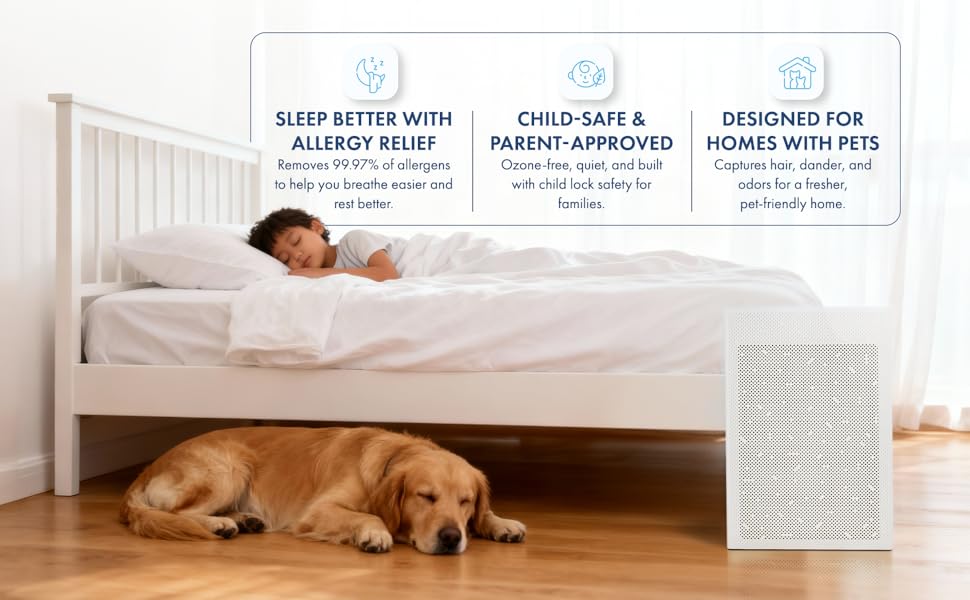
Image 7.5: Designed for allergy relief, child safety, and pet-friendly homes.
7.6 Energy Efficiency
The SA600 is Energy Star certified, consuming significantly less energy than traditional fans. It uses as little as 9 watts of electricity when run on medium speed, contributing to lower electricity bills.

Image 7.6: Energy efficiency details.
8. Specifications

Image 8.1: Product Dimensions.
| Specification | Detail |
|---|---|
| Model Number | SA600 |
| Product Dimensions | 9.1"D x 13.8"W x 20.1"H |
| Weight | 15.5 Pounds |
| Floor Area Coverage | Up to 1200 sq ft |
| Clean Air Delivery Rate (CADR) | 265 CFM |
| Filtration Type | H13 HEPA, Activated Carbon, Permanent Pre-filter |
| Noise Level | Max 52 dB |
| Certifications | AHAM Certified, CARB Certified, Energy Star Certified, UL Certified |
| Manufacturer | Smart Air |
9. Troubleshooting
If you encounter issues with your Smart Air SA600 Air Purifier, please refer to the following common problems and solutions:
- Appliance does not turn on: Ensure the power cord is securely plugged into both the unit and a working electrical outlet. Check if the outlet has power.
- Reduced airflow: Check if the filters are clogged. Clean the pre-filters or replace the HEPA and Activated Carbon filters if necessary. Ensure no air inlets or outlets are blocked.
- Unusual noise: Verify that all filters are correctly installed and seated. Check for any foreign objects inside the unit.
- Filter replacement indicator remains on after replacement: Consult the specific instructions in your Smart Air Handbook for resetting the filter indicator. This usually involves pressing and holding a designated button for a few seconds.
If the problem persists, please contact customer support.
10. Warranty and Support
The Smart Air SA600 Air Purifier comes with a manufacturer's warranty. Please refer to the warranty card included in your package for specific terms and conditions. For technical support, replacement parts, or any inquiries, please contact Smart Air customer service through their official website or the contact information provided in your product documentation.


