
Introduction
This manual provides essential information for the safe and efficient use of your LG 475 L Frost Free Inverter Wi-Fi Double Door Refrigerator, model GN-H602HLHM. Please read these instructions thoroughly before operating the appliance and retain them for future reference.
Important Safety Information
Always follow basic safety precautions to reduce the risk of fire, electric shock, or injury when using your refrigerator.
- Ensure the refrigerator is properly grounded.
- Do not use electrical appliances inside the food storage compartments unless they are of the type recommended by the manufacturer.
- Unplug the refrigerator before cleaning or performing any maintenance.
- Keep ventilation openings clear of obstruction.
- Do not store explosive substances such as aerosol cans with a flammable propellant in this appliance.
- This appliance is intended for household use only.
Product Overview
The LG GN-H602HLHM is a 475 L Frost Free Inverter Wi-Fi Double Door Refrigerator designed for efficient food preservation. Key features include:
- Frost Free Operation: Automatic defrost function to prevent ice build-up.
- Capacity: Total 475 L (130 L freezer, 345 L fresh food).
- Smart Inverter Compressor: Provides efficient, quiet operation and energy savings.
- Door Cooling+: Ensures rapid cooling of the interior after door opening.
- Wi-Fi Connectivity (LG ThinQ App): Control key features remotely via smartphone.
- Hygiene Fresh+: Removes up to 99.999% of bacteria for enhanced food freshness.
- Multi Air Flow: Maintains ideal temperature levels throughout the refrigerator.
- Smart Diagnosis: Facilitates quick troubleshooting of issues.
- Anti-Bacterial Gasket: Prevents fungi and bacteria build-up.
- Stabilizer Free Operation: Operates within 100-310V without an external stabilizer.
- Toughened Glass Shelves: Durable and capable of holding heavy items.

Figure 1: Front view of the LG 475 L Frost Free Inverter Wi-Fi Double Door Refrigerator.

Figure 2: Interior layout highlighting 130 L freezer capacity and 345 L fresh food capacity, along with 2-liter bottle storage.

Figure 3: Interior view showcasing features such as the Anti-Bacterial Gasket, large vegetable basket, single twist ice tray, silent operation, and Smart Diagnosis.
Setup and Installation
- Unpacking: Carefully remove all packaging materials. Inspect the refrigerator for any damage.
- Placement:
- Place the refrigerator on a firm, level floor.
- Ensure adequate clearance around the appliance for proper ventilation.
- Avoid direct sunlight or heat sources.
- Leveling: Adjust the leveling feet to ensure the refrigerator is stable and the doors close properly.
- Power Connection:
- Connect the power cord to a dedicated 230V AC outlet.
- Allow the refrigerator to stand for at least 2-3 hours before plugging it in to allow refrigerants to settle.
- Initial Cooling: After plugging in, allow the refrigerator to cool for several hours (e.g., 4-6 hours) before storing food.

Figure 4: Refrigerator dimensions (73D x 78W x 172H cm) and energy efficiency label.
Operating Instructions
Temperature Control (E Micom Touch)
The refrigerator features an E Micom Touch control panel for easy temperature adjustments.
- Use the temperature control buttons to set the desired temperature for the refrigerator and freezer compartments.
- Refer to the display for current temperature settings.

Figure 5: E Micom Touch control panel for temperature and feature settings.
Wi-Fi Control (LG ThinQ App)
Connect your refrigerator to the LG ThinQ app for remote control and monitoring.
- Download the LG ThinQ app from your smartphone's app store.
- Follow the in-app instructions to register your appliance and connect it to your home Wi-Fi network.
- Once connected, you can control temperature, activate Express Freeze, and receive notifications.
Special Features
- Door Cooling+: This feature helps maintain consistent temperatures, especially near the door, by providing additional airflow. It activates automatically.
- Hygiene Fresh+: This air purification system helps reduce bacteria and odors inside the refrigerator. It operates continuously to keep the interior fresh.
- Multi Air Flow: Strategically placed vents ensure even cooling throughout all compartments, preserving food freshness.
- Express Freeze: Use this function to rapidly freeze items in the freezer compartment. Activate it via the control panel or LG ThinQ app.
- Fresh O Zone: A dedicated compartment designed to keep specific items fresher for longer.
- Ice Maker: The movable, single twist ice maker produces 12 ice cubes per tray.
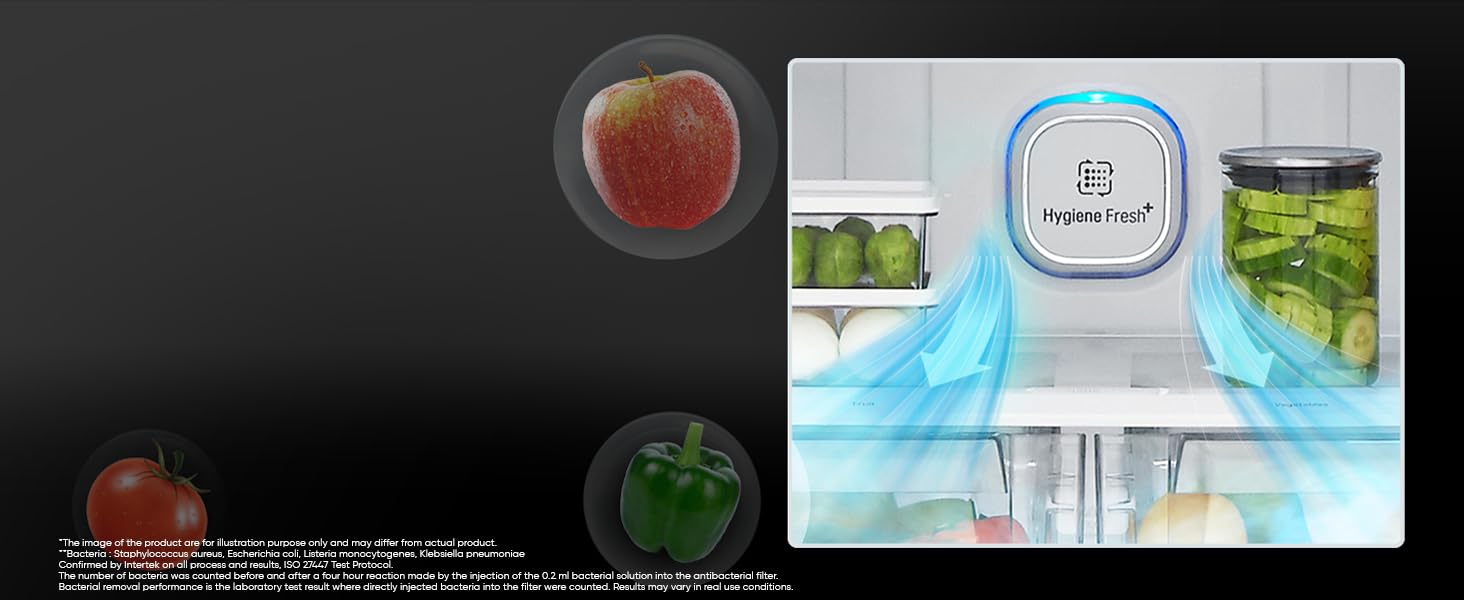
Figure 6: The Hygiene Fresh+ filter system, designed to reduce bacteria and odors.

Figure 7: The Fresh Zone compartment, ideal for storing fruits and vegetables.
Maintenance and Care
- Cleaning the Interior:
- Unplug the refrigerator before cleaning.
- Use a soft cloth with a mild detergent and warm water to clean interior surfaces, shelves, and door bins.
- Rinse with clean water and dry thoroughly.
- The Anti-Bacterial Gasket should be wiped clean regularly to prevent mold and mildew growth.
- Cleaning the Exterior:
- Wipe the exterior with a soft, damp cloth. For stainless steel finishes, use a specialized stainless steel cleaner.
- Avoid abrasive cleaners or solvents.
- Defrosting: This is a frost-free model, so manual defrosting is not required. The automatic defrost cycle will manage ice build-up.
- Power Outage: In case of a power outage, keep the refrigerator doors closed to maintain internal temperature for as long as possible.
Troubleshooting
Before contacting service, review the following common issues and solutions. For more complex problems, utilize the Smart Diagnosis feature via the LG ThinQ app.
| Problem | Possible Cause | Solution |
|---|---|---|
| Refrigerator not cooling | Power cord unplugged; temperature setting too high; door left open. | Check power connection; adjust temperature; ensure door is fully closed. |
| Unusual noises | Refrigerator not level; items rattling inside; normal compressor operation. | Level the appliance; rearrange items; some sounds are normal. |
| Water on floor | Drain tube clogged; excessive humidity. | Clear drain tube (refer to full manual); ensure proper ventilation. |
| Door not closing properly | Obstruction; refrigerator not level; door gasket dirty or damaged. | Remove obstruction; level appliance; clean or inspect gasket. |

Figure 8: The Smart Diagnosis feature, accessible via the LG ThinQ app, for quick issue identification.
Specifications
| Feature | Detail |
|---|---|
| Brand | LG |
| Model Name | GN-H602HLHM |
| Capacity | 475 Liters (Freezer: 130 L, Fresh Food: 345 L) |
| Product Dimensions (D x W x H) | 73D x 78W x 172H Centimeters |
| Configuration | Freezer-on-Top, Double Door |
| Defrost System Type | Frost Free |
| Energy Efficiency | 1 Star BEE Rating |
| Compressor Type | Smart Inverter Compressor |
| Voltage | 230 Volts (Stabilizer Free Operation 100-310V) |
| Shelf Type | Toughened Glass (2 shelves) |
| Refrigerant | R-600A |
| Connectivity | Wi-Fi (LG ThinQ App) |
| Item Weight | 78 Kilograms |
| Included Components | 1 Refrigerator Unit, 1 User Manual |
Warranty and Support
Warranty Information
Your LG refrigerator model GN-H602HLHM comes with a comprehensive warranty:
- Product Warranty: 1 Year on the entire product.
- Compressor Warranty: 10 Years on the Smart Inverter Compressor (Terms and Conditions apply).
Please retain your purchase receipt for warranty claims.
Customer Support
For service, technical assistance, or warranty inquiries, please contact LG Customer Service:
- Telephone: 08069379999
- WhatsApp: 9711709999
- Manufacturer/Importer: LG Electronics India Pvt. Ltd., Regd. Office: A-26, Mohan Cooperative industrial Estate, Mathura Road, New Delhi - 110044
You can also visit the official LG India website for more support resources.


