
Newbealer NB603C
Newbealer Steam Mop Instruction Manual
Brand: Newbealer
Model: NB603C
Introduction
The Newbealer Steam Mop is a versatile cleaning appliance designed for effective and chemical-free cleaning of various sealed hard floor surfaces, including hardwood, tile, stone, laminate, and marble. It also features a carpet glider attachment for refreshing carpets. With its powerful 1200W heating element, it achieves a maximum temperature of 248°F (120°C) and is ready to use in just 15 seconds. The 500ml water tank provides 20-35 minutes of continuous steam, and its lightweight design (3.75 lbs) combined with a swivel-steer mop head ensures easy maneuverability and access to hard-to-reach areas. The mop offers 3 adjustable steam modes to suit different cleaning needs.
What's in the Box
Your Newbealer Steam Mop package includes all the necessary components for immediate use:
- 1 Main Body
- 1 Water Tank
- 1 Alum. Pole
- 1 Handle Grip
- 1 Filling Flask
- 1 Carpet Glider
- 2 Mop Pads
- 1 Screw Driver and Screw for Tank

Setup
- Assemble the Steam Mop: Connect the main body to the water tank, then attach the aluminum pole and handle grip. Secure all connections firmly. A screwdriver and screw are provided for the water tank connection.
- Attach Mop Pad: Place one of the washable microfiber mop pads onto the bottom of the mop head. The pad attaches securely with hook-and-loop fasteners. Ensure it is properly aligned.
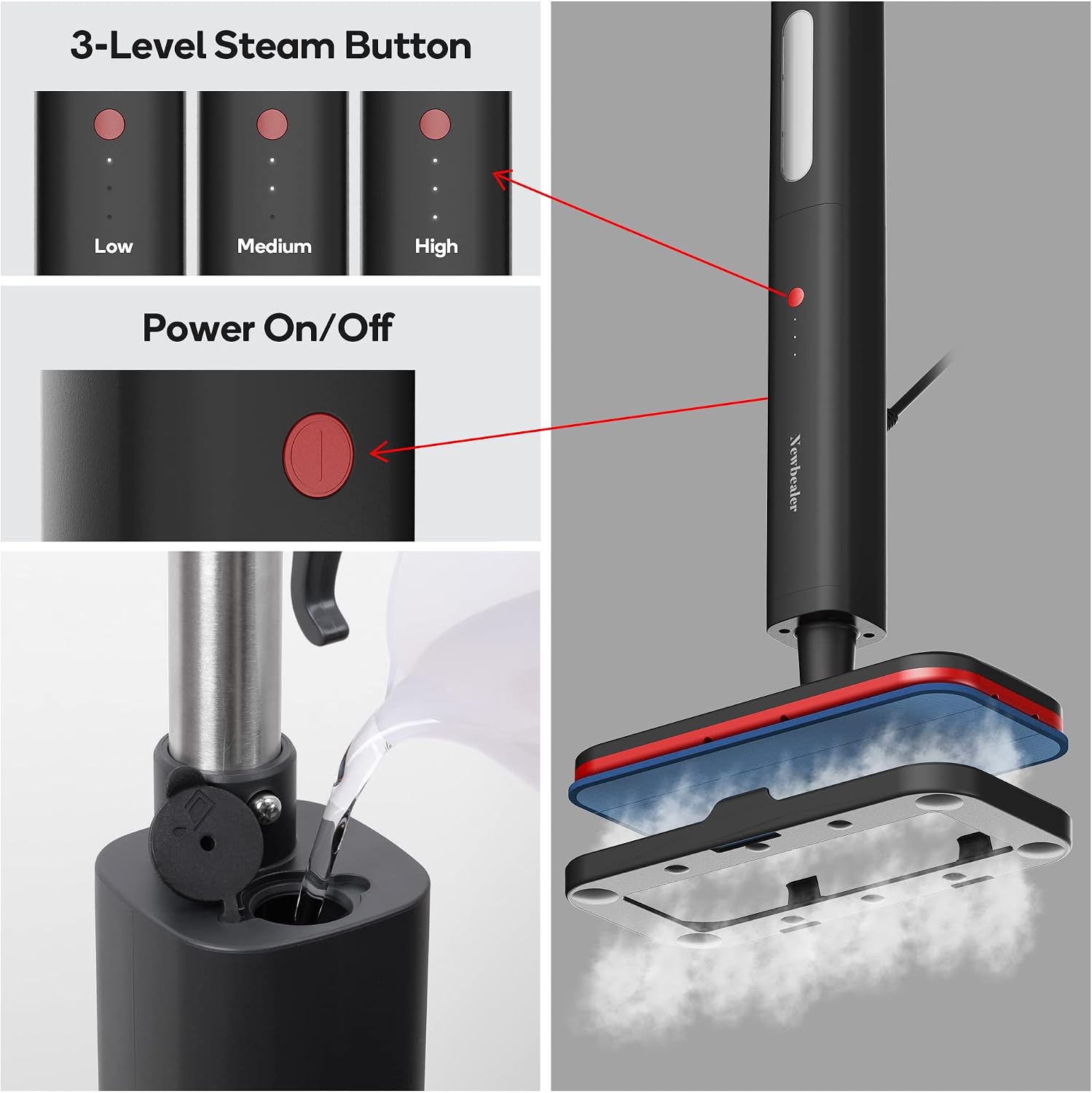
- Fill Water Tank: Open the water tank lid and use the provided filling flask to pour distilled water into the tank. Do not overfill. The maximum water capacity is 500ml. Warning: Never put descaling, alcoholic, or detergent products into the steam mop, as this may damage it or make it unsafe for use.
- Optional: Attach Carpet Glider: For carpet refreshing, place the carpet glider on the carpet with the smooth side down. Then, place the mop head (with the cleaning pad attached) on top of the carpet glider, ensuring it clicks into place.

Setup Video Guide
Video: This video demonstrates the assembly process of the Newbealer Steam Mop, including attaching the pole, handle, and water tank, as well as securing the mop pad.
Video: Learn how to correctly attach the mop pad and carpet glider for optimal cleaning performance on different surfaces.
Operation
- Connect Power: Plug the steam mop into a standard electrical outlet. Ensure the power supply voltage matches the nominal voltage calibrated on the steam mop.
- Power On: Locate the power switch at the backside of the main body. Press the power switch firmly to boot up the unit. You will hear a distinct click sound confirming it is securely in place.
- Heat-up: The device will begin to heat up. The three lights below the steam control button will begin a cycling glow. After approximately 15 seconds, these lights will blink to indicate standby mode.
- Start Steaming & Select Steam Level: Press the steam button on the front to start working. For the first use, the medium steam level is selected by default. Short press the steam button briefly to switch between the three steam levels:
- Minimum Level (One light): Low steam, ideal for delicate floors.
- Middle Level (Two lights): Medium steam, suitable for regular cleaning.
- Maximum Level (Three lights): High steam, for deep cleaning and heavy traffic areas.
- Begin Cleaning: Slowly pass the unit over the floor surface. The swivel-steer mop head allows for easy cleaning around furniture and in hard-to-reach areas.
- Stop Steam Flow: To stop the flow of steam, hold the steam button for two to three seconds.

Operation Video Guides
Video: This video illustrates the streamlined cleaning process with the button-enabled steam mop, showing how to power on and select steam levels.
Video: Witness the efficient deep cleaning capabilities of the Newbealer Steam Mop on various floor types.
Video: A short demonstration showing the powerful steam mop in action, effectively cleaning surfaces.
Video: Experience the magic of steam cleaning as the mop effortlessly cleans various surfaces.
Maintenance
- After Cleaning: After finishing cleaning, you can short press the power button on the backside to power off the unit or unplug the steam mop from the outlet.
- Empty Water Tank: It is recommended to empty any remaining water from the tank after each use to prevent mineral buildup and ensure longevity of the device.
- Clean Mop Pads: The microfiber mop pads are washable. Remove them from the mop head and wash them according to their care instructions. Allow them to air dry completely before storing or reusing.
- Storage: The Newbealer Steam Mop features a self-standing buckle, allowing it to stand on its own for easy storage in any corner of your home. The 16-foot power cord comes with a handy storage hook for neat organization. Ensure the unit is cool before storing.

Troubleshooting
| Problem | Possible Cause | Solution |
|---|---|---|
| Unit does not turn on or heat up. | Not properly plugged in; Power switch not fully engaged; Internal malfunction. | Ensure the power cord is securely plugged into a working electrical outlet. Press the power switch firmly until it clicks. If the issue persists, contact customer support. |
| No steam or insufficient steam. | Water tank empty; Unit not heated up; Steam button not pressed or held correctly; Mineral buildup. | Refill the water tank with distilled water. Allow 15 seconds for the unit to heat up (lights will blink). Press the steam button to activate steam. If mineral buildup is suspected, follow descaling instructions (refer to full user guide PDF). |
| Leaves too much water on the floor. | Mop pad is oversaturated or dirty; Incorrect steam level for surface. | Replace with a clean, dry mop pad. Use a lower steam setting for delicate or less soiled floors. Ensure you are moving the mop slowly enough for the steam to evaporate. |
| Unit does not have suction. | This product is a steam mop, not a vacuum cleaner. | The Newbealer Steam Mop is designed for steam cleaning and does not feature a suction function. For debris removal, a vacuum cleaner should be used prior to steam mopping. |
If you encounter any issues not listed here or if troubleshooting steps do not resolve the problem, please refer to the full User Guide PDF or contact Newbealer customer support through Amazon.
Specifications
| Feature | Detail |
|---|---|
| Brand | Newbealer |
| Model Name | NB603C |
| Wattage | 1200 watts |
| Maximum Temperature | 248 Degrees Fahrenheit (120°C) |
| Heat Time | 15 seconds |
| Tank Volume | 500 Milliliters |
| Continuous Steam Time | 20-35 minutes (approx.) |
| Item Weight | 3.75 pounds |
| Product Dimensions | 13"D x 5.7"W x 17"H |
| Power Cord Length | 16 feet |
| Surface Recommendation | Carpet, Floor, Tiles, Hardwood, Stone, Laminate, Marble |
| Special Features | 3 Adjustable Steam Modes, Swivel-steer mop head, Self-standing buckle, Carpet Glider, Child & Pet Safe (chemical-free) |
Warranty & Support
The Newbealer Steam Mop typically comes with a 1-year warranty from the date of purchase. For any issues, questions, or support needs, please contact Newbealer customer service directly through the Amazon platform. You may also refer to the comprehensive User Guide PDF for more detailed information and instructions.
User Guide PDF: Download User Guide (PDF)
Related documentsNB603C


Ask a question about this manual
Ask about setup, troubleshooting, compatibility, parts, safety, or missing instructions. Manuals+ will review the question and use this page’s manual context to help answer it.