
1. Introduction
This manual provides essential information for the setup, operation, and maintenance of your Roland FP-60X 88-Key Digital Piano. The FP-60X is a versatile digital piano designed for both performance and practice, featuring Roland's SuperNATURAL Piano sound engine and PHA-4 Standard keyboard. Please read this manual thoroughly to ensure proper use and to maximize your enjoyment of this instrument.
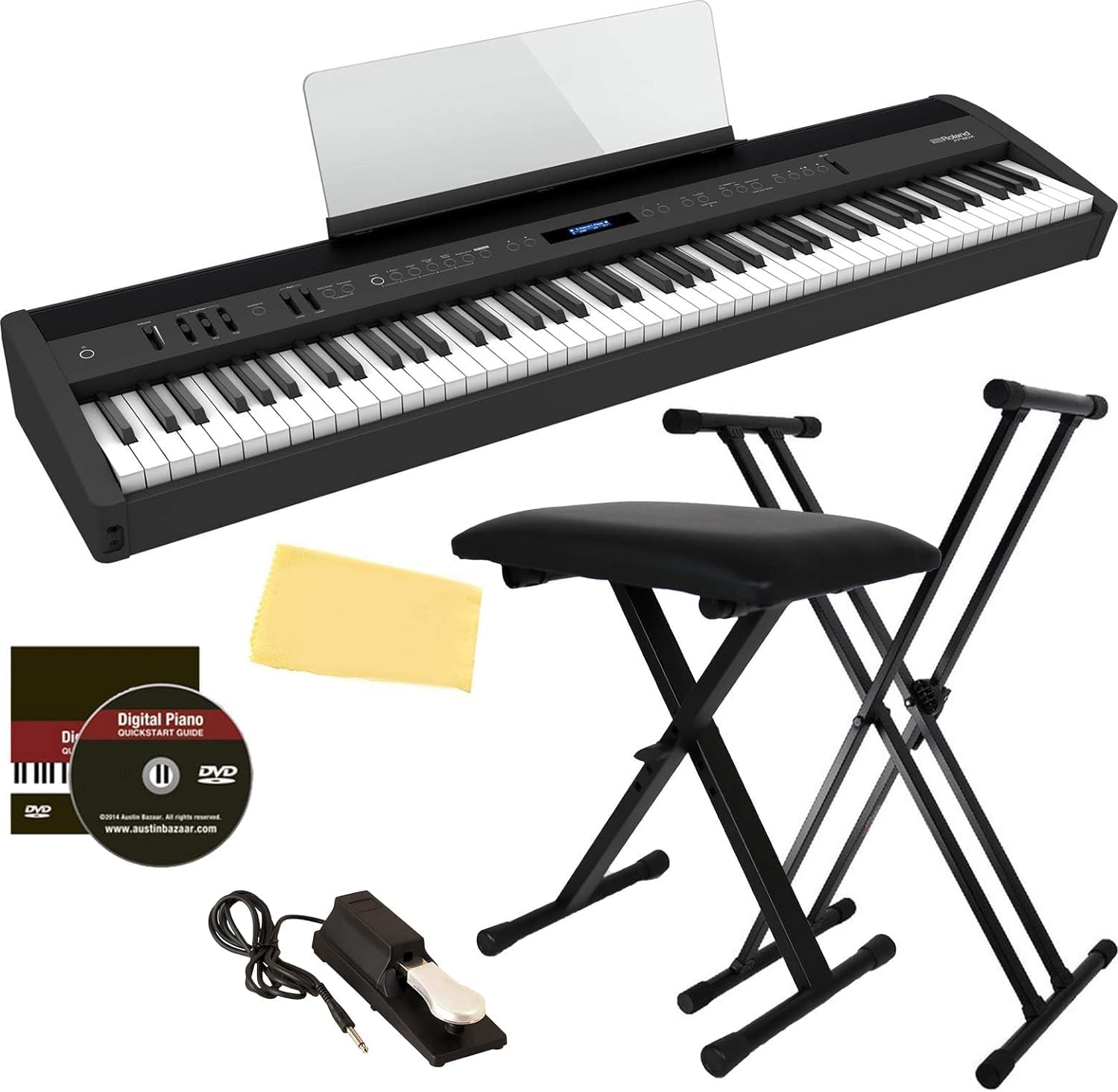
Figure 1.1: The Roland FP-60X Digital Piano with included adjustable stand, bench, and sustain pedal. This image displays the complete bundle, highlighting the main components for immediate use.
2. What's in the Box
Upon opening the packaging, please verify that all the following items are present:
- Roland FP-60X Digital Piano Unit
- Adjustable Piano Stand
- Piano Bench
- Sustain Pedal (DP-10, capable of continuous detection)
- AC Adaptor
- Power Cord
- Music Rest
- Austin Bazaar Instructional DVD
- Austin Bazaar Polishing Cloth
- Owner's Manual (this document)
- Leaflet "USING THE UNIT SAFELY"

Figure 2.1: Visual representation of the Roland FP-60X bundle contents. This image shows the digital piano, adjustable stand, bench, sustain pedal, instructional DVD, and polishing cloth, along with other included accessories.
3. Setup
Follow these steps to set up your Roland FP-60X Digital Piano:
- Assemble the Stand and Bench: Carefully assemble the adjustable stand and piano bench according to their respective instructions. Ensure all screws are tightened securely for stability.
- Place the Piano: Gently place the FP-60X digital piano unit onto the assembled stand. Ensure it is centered and stable.
- Connect the Sustain Pedal: Plug the sustain pedal cable into the "DAMPER" jack on the rear panel of the piano.
- Connect Power:
- Connect the AC adaptor to the DC IN jack on the rear of the piano.
- Plug the power cord into the AC adaptor.
- Plug the other end of the power cord into a standard AC outlet.
- Attach Music Rest: Slide the music rest into the designated slots on the top panel of the piano.
- Initial Power On: Press the POWER button to turn on the instrument.

Figure 3.1: Rear panel of the FP-60X, illustrating the various input and output jacks, including the DC IN for power and pedal connections.
4. Operating Instructions
4.1. SuperNATURAL Piano Sound Engine
The FP-60X utilizes Roland's acclaimed SuperNATURAL Piano sound engine, which accurately captures the nuances of an acoustic grand piano. This technology allows for a wide dynamic range, from subtle pianissimo to powerful fortissimo, responding precisely to your playing touch.
4.2. PHA-4 Standard Keyboard
The PHA-4 Standard keyboard provides a realistic acoustic piano feel with its hammer action and escapement mechanism. This design replicates the subtle "click" sensation of an acoustic piano's keys, enhancing expressive control. The 88 ivory-feel keys offer a full range for complex musical pieces.

Figure 4.1: Overhead view of the FP-60X keyboard and control panel, showing the layout of keys and buttons for sound selection and adjustments.
4.3. Sound Customization (EQ & Piano Designer)
You can tailor the piano's sound to your preference using the onboard equalizer (EQ) and Piano Designer functions.
- Equalizer: Adjust the low, mid, and high-range tones directly from the panel to shape the overall sound.
- Piano Designer: For more in-depth customization, use the Piano Designer to fine-tune the tone of individual notes, adjust string resonance, damper resonance, and other acoustic characteristics. Refer to the detailed Owner's Manual for specific instructions on using the Piano Designer.

Figure 4.2: An image illustrating the core technologies of the FP-60X, including the SuperNATURAL Piano sound engine and the Piano Designer function for detailed sound shaping.
4.4. Headphones 3D Ambience
When practicing with headphones, the Headphones 3D Ambience feature creates an immersive sound field, making it feel as though the sound is emanating from the piano itself rather than directly from the headphones. Connect your headphones to the 3.5mm headphone jack.
4.5. Connectivity
The FP-60X offers various connectivity options:
- USB Type A: For connecting USB memory devices to save/load data or play audio files.
- USB Type B: For connecting to a computer for MIDI communication or audio recording.
- 3.5mm Headphone Jack: For private practice with headphones.
- Auxiliary Input/Output: For connecting external audio devices.
5. Maintenance
Proper care will ensure the longevity and optimal performance of your digital piano.
- Cleaning: Use a soft, dry cloth to wipe the surface of the piano. For stubborn dirt, slightly dampen the cloth with water and a mild, non-abrasive cleaner, then wipe dry immediately. Avoid using harsh chemicals, solvents, or abrasive materials. The included Austin Bazaar polishing cloth is ideal for general cleaning.
- Dust Protection: When not in use, cover the piano with a dust cover to prevent dust accumulation on the keys and control panel.
- Temperature and Humidity: Store and operate the piano in a stable environment, away from direct sunlight, extreme temperatures, and high humidity, which can damage electronic components and the finish.
- Transport: When moving the piano, ensure it is powered off and all cables are disconnected. Handle with care to avoid impacts.
6. Troubleshooting
If you encounter issues with your FP-60X, refer to the following common problems and solutions:
| Problem | Possible Cause | Solution |
|---|---|---|
| No sound from speakers/headphones. | Volume is too low; headphones are connected; cables are loose. | Increase the volume. Disconnect headphones if using speakers. Check all cable connections (power, audio). |
| Keys do not produce sound or sound is incorrect. | Incorrect sound selected; local control off (MIDI setting). | Select a different sound. Check the local control setting in the utility menu (refer to full manual). |
| Sustain pedal not working. | Pedal not connected properly; pedal polarity issue. | Ensure the pedal is fully inserted into the "DAMPER" jack. Some pedals have a polarity switch; check if it's set correctly. |
| Piano does not power on. | Power cord not connected; AC adaptor faulty; power outlet issue. | Verify power cord and AC adaptor connections. Try a different power outlet. |
For more detailed troubleshooting, please consult the comprehensive Owner's Manual provided with your instrument or visit the official Roland support website.
7. Specifications
Key specifications for the Roland FP-60X Digital Piano:
- Model Name: FP-60X
- Keyboard: 88 keys, PHA-4 Standard Keyboard with Escapement and Ivory Feel
- Sound Engine: SuperNATURAL Piano
- Connectivity: USB Type A, USB Type B, 3.5mm Headphone Jack, Auxiliary Input/Output
- Dimensions (Piano Unit): Approximately 50.78" (W) x 13.51" (D) x 5" (H) (1290 mm x 343 mm x 127 mm)
- Weight (Piano Unit): Approximately 42 pounds (19.05 kg)
- Power Supply: AC Adaptor
- Included Accessories: Adjustable Stand, Bench, Sustain Pedal, Music Rest, AC Adaptor, Power Cord, Owner's Manual, Austin Bazaar Instructional DVD, Austin Bazaar Polishing Cloth.

Figure 7.1: Detailed dimensions of the Roland FP-60X digital piano unit. This image provides precise measurements for width, depth, and height.
8. Warranty and Support
For warranty information and technical support, please refer to the warranty card included with your product or visit the official Roland website. Roland provides comprehensive support for its products, including FAQs, driver downloads, and service center information.
You can also visit the Roland Store on Amazon for additional product information and resources.

Figure 8.1: An overview of the Roland brand, highlighting its diverse product range and commitment to musical instrument and multimedia markets.