
havit MS959W
Havit MS959W Gaming Series Wireless Mouse User Manual
Model: MS959W
Introduction
This manual provides comprehensive instructions for the setup, operation, maintenance, and troubleshooting of your Havit MS959W Gaming Series Wireless Mouse. Please read this manual thoroughly before using the product to ensure optimal performance and longevity.
The Havit MS959W is an ergonomic wireless gaming mouse designed for comfort during prolonged use. It features a 6-stage resolution adjustment up to 10,000 DPI, a professional PMW3325 chip, and customizable RGB backlighting. Its non-slip surface ensures a secure grip.
Package Contents
- Havit MS959W Gaming Series Wireless Mouse
- USB Receiver
- USB Charging Cable (Type-C)
- User Manual
Setup
1. Charging the Mouse
Before first use, it is recommended to fully charge the mouse. Connect the provided USB charging cable to the USB-C port on the front of the mouse and the other end to a USB power source (e.g., computer USB port, USB wall adapter).
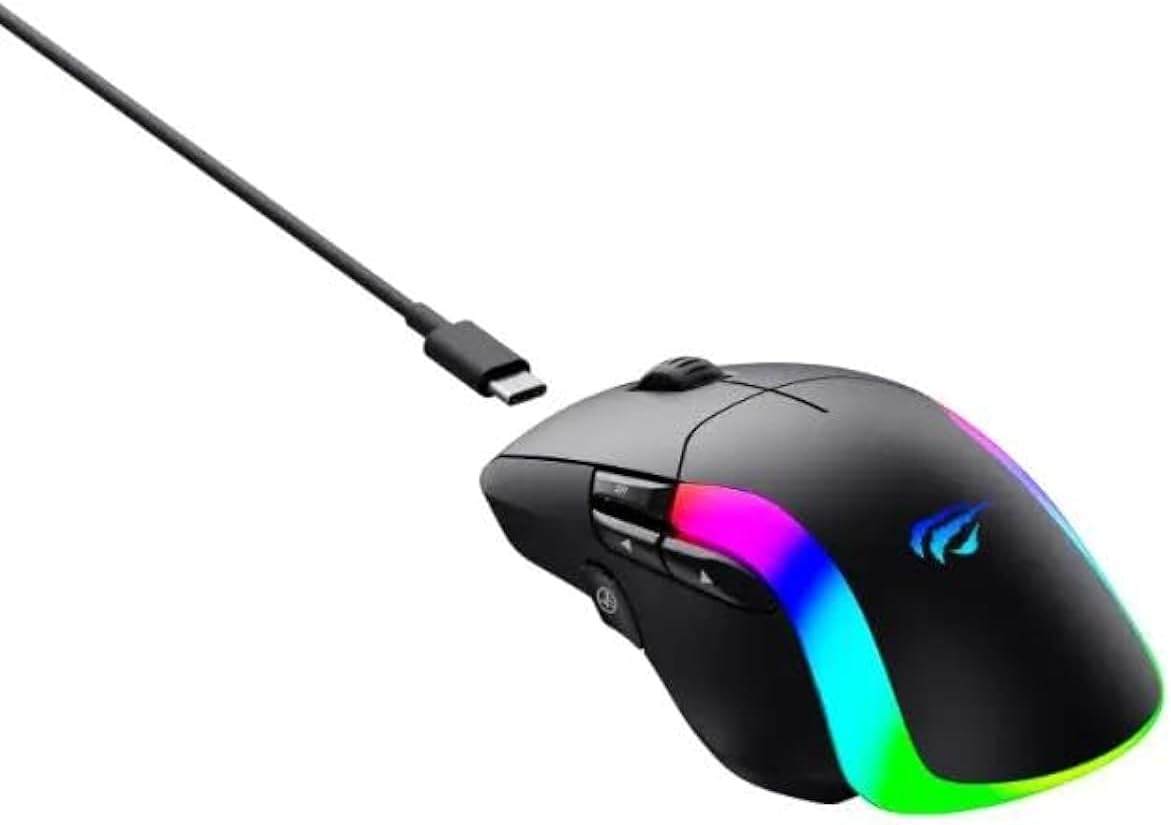
Figure 1: Havit MS959W mouse with USB-C charging cable connected. The mouse features RGB lighting along its sides.
The RGB lighting may indicate charging status. Refer to the operating section for specific light indicators.
2. Connecting the USB Receiver
Locate the USB receiver, usually stored in a compartment on the underside of the mouse. Remove the receiver and insert it into an available USB port on your computer.

Figure 2: Top-down view of the Havit MS959W mouse, showing the USB-C cable connected at the front. The mouse has a scroll wheel and two main buttons, with additional side buttons visible.
The computer should automatically detect and install the necessary drivers. This process may take a few moments.
3. Powering On the Mouse
On the underside of the mouse, locate the power switch. Slide the switch to the "ON" position. The mouse should now be connected and ready for use.
Operating Instructions
DPI Adjustment
The Havit MS959W mouse features 6-stage DPI adjustment, allowing you to change cursor sensitivity on the fly. Use the dedicated DPI button, typically located near the scroll wheel or on the side, to cycle through the available DPI settings (up to 10,000 DPI).

Figure 3: Angled view of the Havit MS959W mouse, showing the ergonomic shape and the vibrant RGB lighting along the base. Side buttons are visible for additional functionality.
RGB Backlighting Customization
The mouse features colorful RGB backlighting. Specific software or button combinations may be required to customize the lighting effects. Refer to the official Havit website or included software for detailed instructions on RGB customization.
Ergonomic Design and Grip
The ergonomic design and non-slip surface ensure comfort and a secure grip during extended gaming sessions or work. Position your hand naturally over the mouse for optimal comfort and control.

Figure 4: Side view of the Havit MS959W mouse, illustrating its ergonomic curve designed for comfortable hand placement. The USB-C charging cable is shown extending from the front.
Maintenance
- Cleaning: Use a soft, dry cloth to clean the mouse. For stubborn dirt, a slightly damp cloth can be used, ensuring no liquid enters the mouse.
- Storage: Store the mouse in a cool, dry place away from direct sunlight and extreme temperatures.
- Battery Care: To prolong battery life, avoid fully discharging the mouse frequently. Charge it when the battery indicator suggests low power.
Troubleshooting
| Problem | Possible Cause | Solution |
|---|---|---|
| Mouse not responding | Low battery; USB receiver disconnected; Power switch off; Driver issue. | Charge the mouse; Reconnect the USB receiver; Turn on the power switch; Try a different USB port; Reinstall drivers. |
| Cursor erratic or jumpy | Dirty optical sensor; Unsuitable surface; Low battery. | Clean the optical sensor; Use on a clean, non-reflective mouse pad; Charge the mouse. |
| RGB lighting not working | Software setting; Low battery. | Check software settings; Ensure mouse is charged. |
Specifications
| Feature | Detail |
|---|---|
| Brand | Havit |
| Model Number | MS959W |
| DPI Adjustment | 6-stage, up to 10,000 DPI |
| Chip | Professional PMW3325 |
| Backlighting | Colorful RGB |
| Ergonomics | Ergonomic design, non-slip surface |
| Connectivity | Wireless (USB Receiver) |
| Dimensions | 15 x 8 x 5.2 cm |
| Weight | 230 g |
| Batteries Included | Yes |
Warranty and Support
For warranty information and technical support, please refer to the official Havit website or contact Havit customer service. Keep your purchase receipt for warranty claims.
Official Website: www.havit.com
Related documentsMS959W


Ask a question about this manual
Ask about setup, troubleshooting, compatibility, parts, safety, or missing instructions. Manuals+ will review the question and use this page’s manual context to help answer it.