1. Introduction
The eppfun AK8675 Pro is a versatile Bluetooth 5.2 audio adapter designed to enhance your audio experience. It functions as both a transmitter (TX) and a receiver (RX), and includes a bypass mode, allowing seamless integration with various audio systems. Featuring aptX Low Latency and aptX HD codecs, it ensures high-fidelity sound with minimal delay, perfect for TV, home stereo systems, and Bluetooth headphones.

Figure 1: Front view of the eppfun AK8675 Pro device, showing control buttons and indicator lights.
2. Package Contents
Please check the box for the following items:
- eppfun AK8675 Pro Bluetooth 5.2 Transmitter Receiver
- USB-C Charging Cable
- 3.5mm Audio Cable
- RCA Audio Cable
- Optical Audio Cable
- User Manual
3. Product Overview
Familiarize yourself with the device's components and controls:
3.1. Front Panel Controls & Indicators
- RX/TX/Bypass Indicators: Show current operating mode.
- OPT/AUX Indicators: Indicate active audio input/output type (Optical or Auxiliary).
- LL/HD Indicators: Show active audio codec (Low Latency or High Definition).
- A/B/AD Indicators: Indicate connected Bluetooth devices (A, B, or Adaptive).
- Bluetooth Button: For pairing and connection management.
- Volume - / + Buttons: Adjust volume.
- Power Button: Turns the device on/off.
3.2. Side Panel Ports

Figure 2: Side view of the device highlighting the various input and output ports.
- 3.5mm Stereo Output: Connects to wired speakers or headphones.
- Optical Fiber Port Output: Digital audio output.
- Type-C 5V Input: Power input for charging and operation.
- Optical Fiber Port Input: Digital audio input.
- 3.5mm Stereo Input: Connects to audio sources via auxiliary cable.
3.3. Mode Switch

Figure 3: Close-up of the physical switch for selecting Receive (RX), Transmit (TX), or Bypass mode.
A physical switch on the side allows you to easily toggle between Receive (RX), Transmit (TX), and Bypass modes.
4. Setup
- Charge the Device: Connect the USB-C charging cable to the device's Type-C port and a 5V power source. The device can be used while charging.
- Position Antennas: Ensure both antennas are upright for optimal signal range and stability.
- Select Mode: Use the RX/TX/Bypass switch on the side to select your desired operating mode.
- Connect Audio Cables: Based on your chosen mode and audio setup, connect the appropriate audio cables (3.5mm, RCA, or Optical) to your source/destination devices.
5. Operating Modes

Figure 4: Visual representation of the three operating modes and their typical connections.
5.1. Transmission Mode (TX)
In TX mode, the AK8675 Pro transmits audio from a non-Bluetooth source (e.g., TV, PC, projector) to Bluetooth-enabled headphones or speakers. This allows you to enjoy audio wirelessly from devices that lack built-in Bluetooth functionality.
- Set the mode switch to TX.
- Connect your audio source (e.g., TV, PC) to the AK8675 Pro's input port (Optical or 3.5mm AUX).
- Turn on your Bluetooth headphones or speakers and set them to pairing mode.
- Press the Bluetooth button on the AK8675 Pro to initiate pairing. The TX indicator will flash.
- Once connected, the TX indicator will become solid, and audio will transmit to your Bluetooth device.
5.2. Receive Mode (RX)
In RX mode, the AK8675 Pro receives Bluetooth audio from your smartphone, tablet, or other Bluetooth-enabled devices and outputs it to wired speakers, headphones, or a home stereo system. This transforms your traditional audio equipment into a wireless streaming system.

Figure 5: Example of the device in Receive (RX) mode, streaming music from a smartphone to a home stereo.
- Set the mode switch to RX.
- Connect your wired audio device (e.g., speakers, headphones) to the AK8675 Pro's output port (Optical or 3.5mm AUX).
- Enable Bluetooth on your smartphone or tablet and search for available devices.
- Select "YK-69" (or similar device name) from the list to connect. The RX indicator will become solid upon successful connection.
- Play audio from your device, and it will be streamed to your connected wired system.
5.3. Bypass Mode
Bypass mode allows audio to pass directly through the AK8675 Pro without Bluetooth transmission or reception. This is useful when you want to use your wired audio setup without disconnecting the adapter.
- Set the mode switch to Bypass.
- Connect your audio source to the input port and your audio output device to the output port.
- Audio will flow directly from the input to the output.
6. Pairing Instructions
To pair the eppfun AK8675 Pro with a Bluetooth device:
- Ensure the AK8675 Pro is in the correct mode (TX for transmitting, RX for receiving).
- Press and hold the Power button for 2 seconds to turn on the device.
- Press the Bluetooth button on the AK8675 Pro to enter pairing mode. The corresponding mode indicator (TX or RX) will flash rapidly.
- On your Bluetooth device (headphones, speaker, smartphone), enable Bluetooth and search for new devices.
- Select "YK-69" (or similar device name) from the list of found devices.
- Once connected, the mode indicator on the AK8675 Pro will become solid, indicating a successful pairing.
6.1. Dual-Link Functionality
The AK8675 Pro supports dual-link, allowing you to connect two Bluetooth headphones or speakers simultaneously in TX mode. This enables two people to listen to the same audio source at their preferred volumes without disturbing others.

Figure 6: Illustrates the dual-link feature, enabling two users to enjoy audio simultaneously.
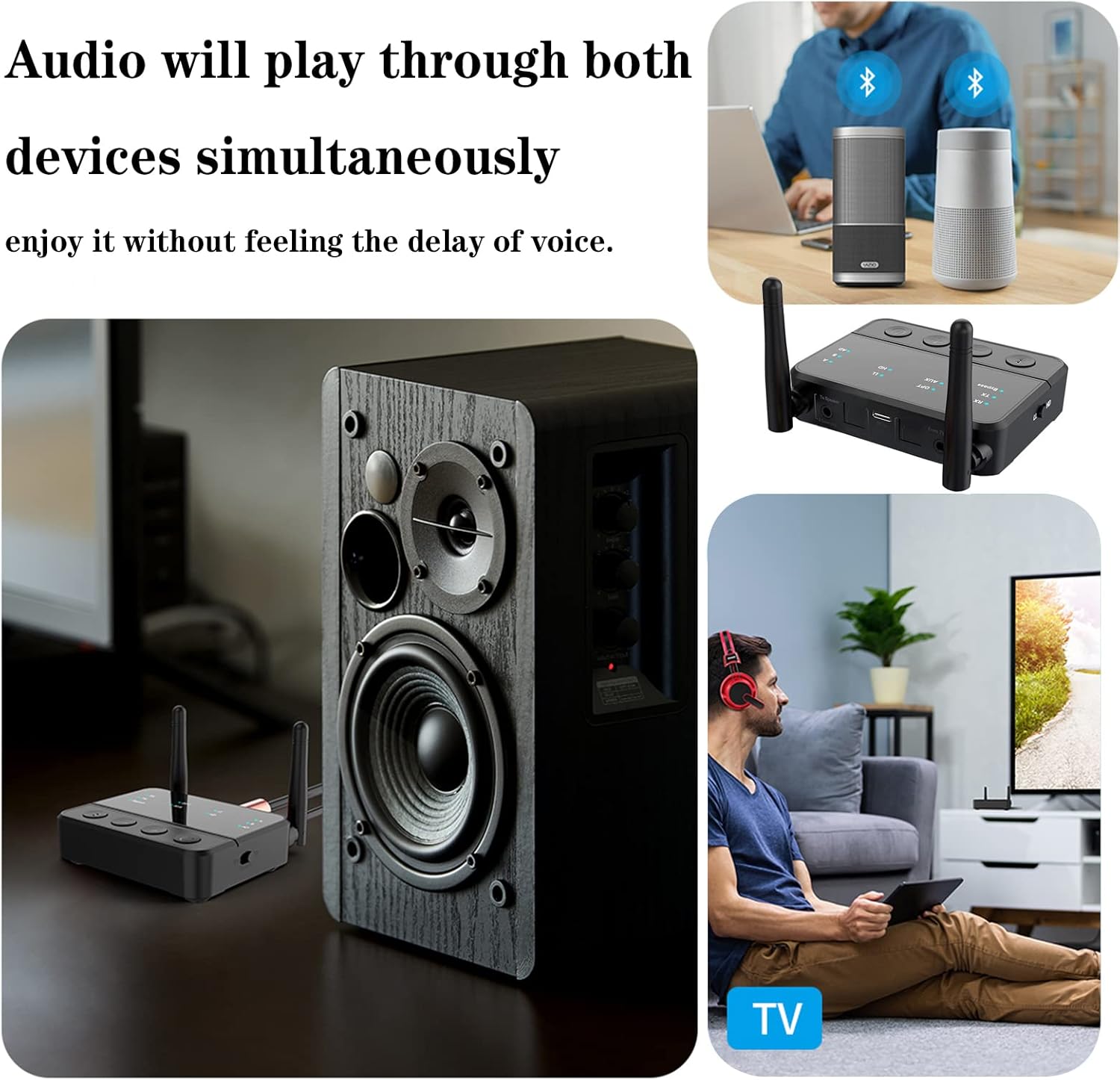
Figure 7: The device connected to two separate Bluetooth speakers, demonstrating simultaneous audio output.
- Connect the first Bluetooth device following the TX mode pairing instructions. The 'A' indicator will light up.
- Once the first device is connected, press the Bluetooth button again to enter pairing mode for the second device. The 'B' indicator will flash.
- Put your second Bluetooth device into pairing mode.
- The AK8675 Pro will automatically search and connect to the second device. Once connected, both 'A' and 'B' indicators will be solid.
7. Maintenance
To ensure the longevity and optimal performance of your eppfun AK8675 Pro:
- Keep the device dry and away from moisture.
- Avoid extreme temperatures.
- Clean with a soft, dry cloth. Do not use harsh chemicals or abrasive cleaners.
- Do not attempt to disassemble or repair the device yourself.
8. Troubleshooting
If you encounter issues with your eppfun AK8675 Pro, refer to the following common problems and solutions:
| Problem | Solution |
|---|---|
| Device does not power on. | Ensure the device is charged. Connect it to a 5V power source using the provided USB-C cable. |
| Cannot pair with a Bluetooth device. | Ensure the AK8675 Pro is in the correct TX/RX mode and pairing mode (indicator flashing). Make sure your Bluetooth device is also in pairing mode and within range. Try restarting both devices. |
| No audio output/input. | Check all cable connections (3.5mm, RCA, Optical) are secure and connected to the correct input/output ports. Verify the correct input/output type (OPT/AUX) is selected on the device. Ensure volume levels are adequate on both the AK8675 Pro and the connected audio devices. |
| Audio delay or poor quality. | Ensure both the AK8675 Pro and your connected Bluetooth device support aptX Low Latency (LL) or aptX HD for optimal performance. Reduce interference by moving away from Wi-Fi routers or other wireless devices. Ensure line of sight between devices. |
| Bluetooth connection drops frequently. | Check for physical obstructions (walls, metal objects) between the device and the connected Bluetooth accessory. Ensure devices are within the specified 20m range. Interference from other wireless devices can also cause drops. |
9. Specifications
| Feature | Detail |
|---|---|
| Model Number | AK8675 Pro |
| Bluetooth Version | 5.2 |
| Supported Codecs (TX) | aptX, aptX LL, aptX HD, SBC |
| Supported Codecs (RX) | aptX, aptX HD, SBC, AAC |
| Operating Modes | Transmitter (TX), Receiver (RX), Bypass |
| Connectivity | Optical (Input/Output), 3.5mm AUX (Input/Output), RCA (via adapter) |
| Wireless Range | Up to 20 meters (65 feet) in open air (may vary with environment) |
| Power Input | Type-C 5V |
| Product Dimensions | 6 x 5 x 1 inches |
| Item Weight | 8.8 ounces |
10. Official Product Video
This video provides a visual guide to the eppfun AK8675 Pro, demonstrating its features, unboxing, and basic operation in various modes (TX, RX, Bypass). It highlights the different ports and controls, offering a comprehensive overview of the device's capabilities and ease of use.
11. Warranty & Support
eppfun values customer satisfaction and offers a 12-month warranty for the AK8675 Pro. If you have any questions, experience issues, or require support, please contact us through the official eppfun seller page on Amazon. We are committed to addressing your concerns promptly.
- Warranty Period: 12 Months
- Contact Support: Visit the official eppfun seller page on Amazon for assistance.
- 60-Day Return: All products are eligible for a full hassle-free refund within 60 days of purchase if you are dissatisfied or unable to resolve an issue through support.