1. Introduction
This manual provides essential information for the safe and efficient operation, assembly, and maintenance of your HEZZO M4 Electric Bike. Please read this manual thoroughly before your first ride and retain it for future reference. Understanding the features and functions of your e-bike will ensure a safe and enjoyable experience.

Image 1.1: The HEZZO M4 Electric Bike, shown with the included cable lock and basic toolkit. This image provides an overview of the bike's design and accessories.
2. Safety Information
Your safety is paramount. Always wear a helmet and appropriate safety gear when riding. Observe all local traffic laws and regulations. Regular maintenance checks are crucial for safe operation.
- Pre-Ride Check: Before each ride, inspect brakes, tire pressure, battery charge, and ensure all quick releases are securely fastened.
- Helmet Use: Always wear a certified bicycle helmet.
- Visibility: Use the integrated LED headlight and taillight, especially in low-light conditions. Reflective tire walls enhance side visibility.
- Weather Conditions: Exercise caution when riding in wet or slippery conditions. Disc brakes provide effective stopping power even in rain, but stopping distances may increase.
- Weight Limit: Do not exceed the maximum recommended weight for the rider and cargo.
3. Package Contents
Upon unpacking, verify that all components are present:
- HEZZO M4 Electric Bike (partially assembled)
- Battery Charger
- Lock
- Tool Kit
- User Manual (this document)
4. Setup and Assembly
The HEZZO M4 Electric Bike arrives approximately 95% pre-assembled. Final assembly primarily involves attaching the front wheel and handlebar.
4.1. Unpacking
- Carefully remove the bike and all components from the packaging.
- Remove all protective wrapping and ties.
- Inspect the bike for any visible damage that may have occurred during transit. Contact customer support immediately if damage is found.
4.2. Attaching the Front Wheel
- Position the bike upright, preferably with assistance or using a bike stand.
- Align the front wheel with the front fork dropouts. Ensure the brake rotor slides correctly into the disc brake caliper.
- Insert the quick-release skewer through the wheel hub and secure it according to the manufacturer's instructions. Ensure it is tightened firmly.
4.3. Installing the Handlebar
- Loosen the bolts on the stem faceplate.
- Position the handlebar in the stem, ensuring it is centered and at a comfortable angle.
- Tighten the stem faceplate bolts evenly and securely.
4.4. Attaching Pedals
- Identify the left (L) and right (R) pedals.
- The right pedal threads clockwise into the right crank arm.
- The left pedal threads counter-clockwise into the left crank arm.
- Tighten both pedals firmly with a wrench.
4.5. Adjusting Seat Height
- Loosen the seat post quick-release lever.
- Adjust the seat height so that your leg has a slight bend at the knee when the pedal is at its lowest point.
- Securely close the quick-release lever.
5. Operating Instructions
5.1. Battery and Charging
The HEZZO M4 features a removable 36V 10.4Ah lithium battery. It can be charged both on or off the bike frame.

Image 5.1: The 36V 10.4Ah lithium battery, integrated into the bike's downtube. This battery is removable for convenient charging.
- Charging: Connect the charger to the battery charging port and then to a standard power outlet. The indicator light on the charger will show charging status (typically red for charging, green for fully charged).
- Battery Management System (BMS): The integrated BMS protects the battery, increasing its service life.
- Range: A full charge provides an endurance of 30-45 KM (18.64-30.55 miles), depending on the usage of pedal assist versus throttle.
- Removal: Consult the specific mechanism for battery removal, usually involving a key and a latch, to charge it off the bike.
5.2. Powering On/Off and Display
The bike features a backlit color display for monitoring various parameters.

Image 5.2: The control panel and backlit color display. This display provides real-time information such as battery level, speed, assist level, riding distance, and can indicate malfunctions.
- Power On: Press and hold the power button on the display unit.
- Power Off: Press and hold the power button again.
- Display Information: The display shows speed, range, pedal assist level, distance, battery level, light status, push mode, brake status, and potential malfunctions.
5.3. Riding Modes: Pedal Assist and Throttle
The HEZZO M4 offers flexible riding options with both pedal assist and a throttle.
- Pedal Assist (PAS): This mode provides motor assistance as you pedal. Use the '+' and '-' buttons on the control panel to adjust the assist level. Lower levels provide less assistance, requiring more effort, while higher levels offer significant boost, making hills easier.
- Throttle: The throttle allows you to propel the bike without pedaling. Simply twist the throttle grip to engage the motor. This is useful for quick acceleration or when you prefer not to pedal.
5.4. Gears (Shimano 21-Speed)
The Shimano 21-speed gear system provides a wide range of gearing options for various terrains and inclines.
- Shifting: Use the trigger shifters on the handlebar to change gears. The left shifter controls the front derailleur (3 speeds), and the right shifter controls the rear derailleur (7 speeds).
- Optimal Use: Shift gears smoothly and anticipate terrain changes. Lower gears are for climbing hills, while higher gears are for flat terrain and speed.
5.5. Brakes
The bike is equipped with front and rear mechanical disc brakes for reliable stopping power.

Image 5.3: Detailed view of the dual mechanical disc brakes. These brakes provide consistent and powerful stopping performance in various conditions.
- Operation: Squeeze the brake levers on the handlebar to engage the brakes. The left lever typically controls the front brake, and the right lever controls the rear brake.
- Braking Technique: Apply both brakes simultaneously for controlled stopping. Avoid sudden, hard braking, especially with the front brake, to prevent skidding.
- All-Weather Performance: Disc brakes are designed to perform effectively even in wet conditions.
5.6. Front Suspension
The upgraded hydraulic shock absorber in the front suspension enhances riding comfort.
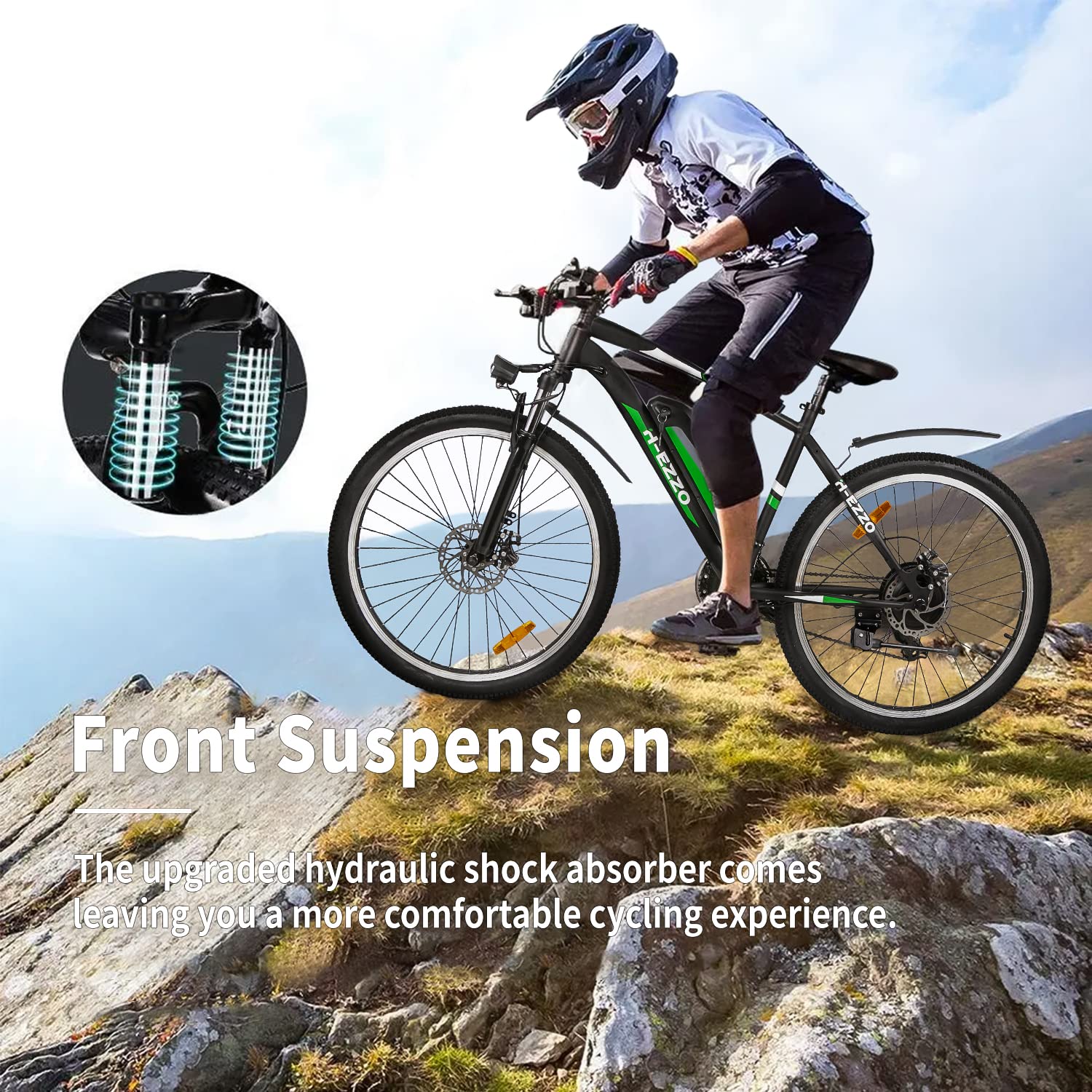
Image 5.4: The front suspension system, featuring an upgraded hydraulic shock absorber. This system is designed to absorb shocks and provide a smoother ride over varied terrain.
- Function: The front suspension absorbs impacts from uneven terrain, providing a more comfortable and controlled ride.
- Adjustment: Some suspension forks allow for adjustment of preload or lockout. Refer to the specific fork manufacturer's instructions if applicable.
6. Maintenance
Regular maintenance ensures the longevity and safe operation of your HEZZO M4 Electric Bike.
- Cleaning: Clean the bike regularly with a damp cloth. Avoid high-pressure washing directly on electrical components.
- Lubrication: Keep the chain and moving parts of the drivetrain clean and lubricated.
- Tire Pressure: Maintain recommended tire pressure (usually indicated on the tire sidewall) for optimal performance and puncture resistance.
- Brake Inspection: Regularly check brake pads for wear and brake cables for tension. Adjust or replace as needed.
- Battery Care: Store the battery in a cool, dry place and charge it periodically even if not in use to maintain its health.
- Fastener Check: Periodically check all bolts and fasteners for tightness.
7. Troubleshooting
This section addresses common issues you might encounter with your HEZZO M4 Electric Bike.
| Problem | Possible Cause | Solution |
|---|---|---|
| Motor not assisting | Battery low or off; PAS level set to 0; loose connection. | Check battery charge and ensure it's powered on; increase PAS level; inspect connections. |
| Bike not turning on | Battery not inserted correctly; battery discharged; power button not pressed correctly. | Ensure battery is fully seated; charge battery; press and hold power button firmly. |
| Brakes feel weak | Worn brake pads; loose brake cable; contaminated rotors. | Inspect and replace brake pads; adjust cable tension; clean rotors with disc brake cleaner. |
| Gears not shifting smoothly | Derailleur out of adjustment; dirty or dry chain; bent hanger. | Adjust derailleur; clean and lubricate chain; consult a bike mechanic for bent hanger. |
| Puncture | Sharp object in tire; low tire pressure. | Inspect tire for foreign objects; repair or replace inner tube; maintain correct tire pressure. |
For issues not listed here or if problems persist, please contact HEZZO customer support.
8. Specifications
Key technical specifications for the HEZZO M4 Electric Bike:
| Feature | Specification |
|---|---|
| Bike Type | Mountain Bike |
| Motor | 350W Rear-Hub Motor |
| Battery | 36V 10.4Ah Removable Lithium-ion |
| Max Speed (Assisted) | Up to 23 MPH (36 KM/H) |
| Range per Charge | 30-45 KM (18.64-30.55 Miles) |
| Gears | Shimano 21-Speed |
| Brakes | Front and Rear Mechanical Disc Brakes |
| Wheel Size | 26 Inches |
| Frame Material | Aluminum |
| Suspension | Front (Hydraulic Shock Absorber) |
| Display | Backlit Color Digital Display |
| Tires | Puncture Resistant with Reflective Sidewalls |
| Item Weight | 22.7 kg (50 Pounds) |
| Model Name | M4 |
| Model Number | NH02B |
| UPC | 723735447994 |
8.1. Dimensions

Image 8.1: A diagram illustrating the key dimensions of the HEZZO M4 Electric Bike. This includes total length, handlebar height, wheelbase, minimum and maximum seat height, standover height, effective top tube length, and wheel size.
- Total Length: 70.5"
- Handlebar Height: 41"
- Wheelbase: 43"
- Min Seat Height: 33.5"
- Max Seat Height: 41.5"
- Standover Height: 30.6"
- Effective Top Tube: 23.4"
- Wheel Size: 26"
9. Warranty and Support
HEZZO provides a limited warranty for its products.
- E-bike and Battery Warranty: 1-year warranty from the date of purchase.
- E-bike Parts: Free replacement parts during the quality assurance period.
- Contact Support: For warranty claims, technical assistance, or any questions, please refer to the contact information provided with your purchase documentation or visit the official HEZZO website.


