
1. Introduction
Thank you for choosing the Outwell Arctic Chill 50L Portable Refrigerator. This manual provides essential information for the safe and efficient operation, maintenance, and troubleshooting of your new appliance. Please read it thoroughly before first use and keep it for future reference.
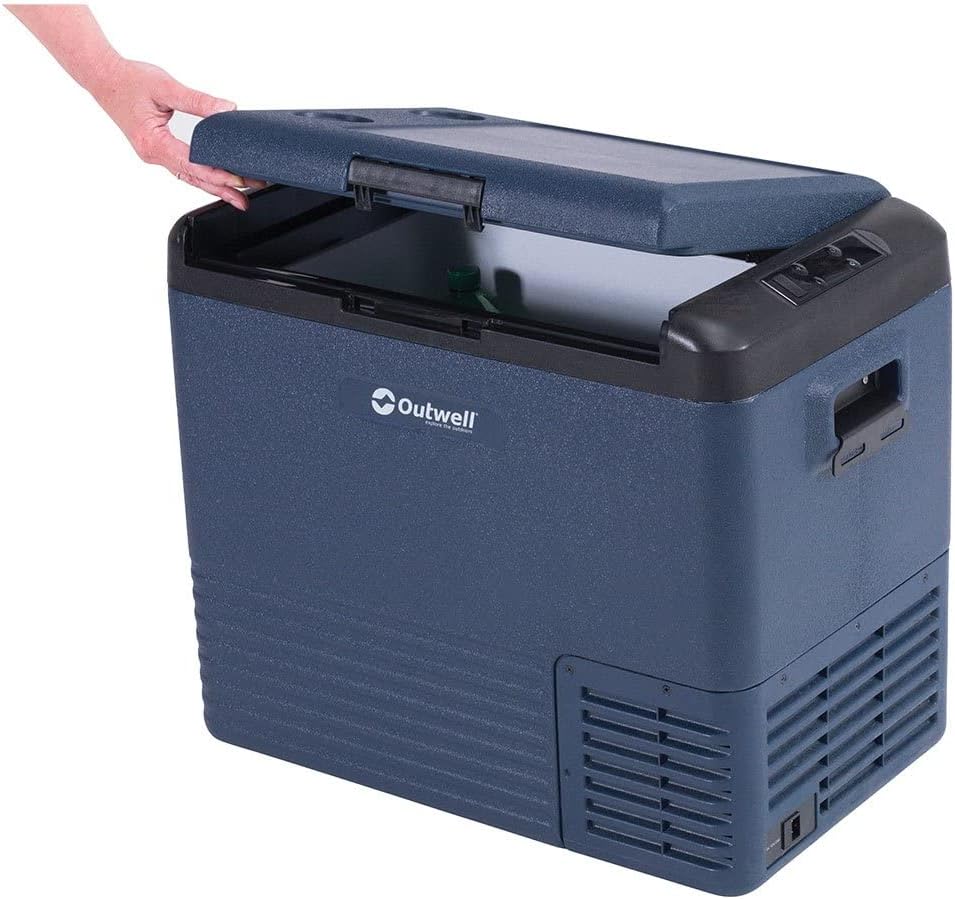
This image displays the Outwell Arctic Chill 50L portable refrigerator in a dark blue color, with its lid partially open, revealing the spacious interior suitable for storing food and beverages.
2. Safety Instructions
- Ensure the power supply voltage matches the rating label on the appliance.
- Do not operate the refrigerator if the power cord is damaged. Contact qualified service personnel.
- Keep ventilation openings clear of obstructions.
- Do not use electrical appliances inside the food storage compartments unless they are of the type recommended by the manufacturer.
- Avoid placing the refrigerator in direct sunlight or near heat sources.
- This appliance is not intended for use by persons (including children) with reduced physical, sensory or mental capabilities, or lack of experience and knowledge, unless they have been given supervision or instruction concerning use of the appliance by a person responsible for their safety.
- Children should be supervised to ensure that they do not play with the appliance.
3. Package Contents
Please check that all items are present and in good condition:
- Outwell Arctic Chill 50L Portable Refrigerator Unit
- AC Power Adapter (230V)
- DC Power Cable (12V)
- User Manual

This image illustrates the power accessories included with the refrigerator, featuring an AC adapter for household outlets and a 12V DC cable for vehicle power sources, ensuring versatile connectivity.
4. Setup
4.1 Unpacking
- Remove all packaging materials and inspect the refrigerator for any damage.
- Clean the interior and exterior with a damp cloth before first use.
- Place the refrigerator on a stable, level surface, ensuring adequate ventilation around all sides.
4.2 Connecting to Power
The Arctic Chill 50L can be powered by either 12V DC (car/vehicle) or 230V AC (household mains).
- For 12V DC: Connect the DC power cable to the refrigerator's DC input port and then to your vehicle's 12V socket.
- For 230V AC: Connect the AC power adapter to the refrigerator's AC input port, then plug the adapter into a standard 230V wall outlet.
Ensure the power connection is secure before turning on the unit.
5. Operating Instructions
5.1 Control Panel Overview

This close-up image highlights the digital control panel of the refrigerator, showing temperature display, battery indicator, and buttons for adjusting settings like ECO mode.
The control panel features a digital display and several buttons for operation:
- Power Button: Turns the unit ON/OFF.
- Temperature Adjustment Buttons (+/-): Increases or decreases the target temperature.
- Mode Button: Cycles through cooling modes (e.g., ECO, MAX).
- Display: Shows current temperature, battery level, and selected mode.
5.2 Setting Temperature
- Press the Power button to turn on the refrigerator.
- Use the '+' or '-' buttons to set your desired temperature. The display will show the target temperature briefly, then revert to the current internal temperature.
5.3 Cooling Modes
- MAX Mode: Provides maximum cooling power for rapid temperature reduction.
- ECO Mode: Optimizes power consumption for energy efficiency, suitable for maintaining temperature over longer periods.
Press the Mode button to switch between available cooling modes.
5.4 Smartphone App Connectivity
The Outwell Arctic Chill 50L may feature Bluetooth connectivity, allowing you to control and monitor the refrigerator via a dedicated smartphone app.
- Download the 'Outwell Arctic Cooler' app from your device's app store.
- Ensure Bluetooth is enabled on your smartphone.
- Follow the in-app instructions to pair your refrigerator.

This image shows a user interacting with the Outwell Arctic Cooler mobile application on a smartphone, which allows for remote control and monitoring of the refrigerator's temperature and settings.
6. Maintenance
6.1 Cleaning
- Always disconnect the power before cleaning.
- Clean the interior and exterior surfaces with a damp cloth and mild detergent.
- Do not use abrasive cleaners or harsh chemicals.
- Ensure the unit is completely dry before reconnecting power.
6.2 Storage
When not in use for extended periods, ensure the refrigerator is clean, dry, and stored in a well-ventilated area. Leave the lid slightly ajar to prevent odors and mildew.
7. Troubleshooting
| Problem | Possible Cause | Solution |
|---|---|---|
| Refrigerator does not turn on | No power supply; Damaged power cord; Blown fuse (vehicle) | Check power connection; Try a different outlet/socket; Inspect power cord; Check vehicle fuse. |
| Insufficient cooling | Ventilation blocked; Door not sealed properly; Ambient temperature too high; Overloaded with warm items | Clear vents; Ensure lid is closed tightly; Move to a cooler location; Allow time for cooling. |
| Unusual noise | Unit not level; Fan obstruction | Place on a level surface; Check for debris near the fan. |
8. Specifications
| Feature | Detail |
|---|---|
| Brand | Outwell |
| Model Name | Arctic Chill 50L |
| Model Number | 590205 |
| Capacity | 50 Liters |
| Power Input | 12V DC / 230V AC |
| Color | Grey |
| Material (Exterior) | Polyester |
| Insulation Material | Polyvinyl chloride |
| Product Weight | 2.7 Kilograms |
| Special Feature | Easy to use |
9. Warranty and Support
For warranty information and technical support, please refer to the warranty card included with your product or visit the official Outwell website. Keep your proof of purchase for any warranty claims.


