
Introduction
Thank you for choosing the BALILA CM100 Wireless Conference Speakerphone. This device is designed to enhance your conferencing experience with its 360° voice pickup, AI noise reduction, and versatile USB-C connectivity. This manual provides essential information for proper setup, operation, and maintenance to ensure optimal performance.
Package Contents
Please verify that all items listed below are included in your package:
- 1 x BALILA CM100 Speakerphone Unit
- 5 x Wireless Microphones (Transmitters)
- 5 x Wireless Microphone Receivers (3.5mm jack)
- 1 x USB-C Charging Cable (multi-head for mics)
- 1 x USB-C to USB-A Adapter
- 1 x User Manual

Image: Complete package contents including the speakerphone and five wireless microphones.
Video: Demonstrates the unboxing and initial setup of the BALILA CM100 system.
Product Overview
The BALILA CM100 system consists of a central speakerphone unit and five individual wireless microphones. Each component is designed for ease of use and high-quality audio transmission.
Speakerphone Unit
- USB-C Charging Port: For power and data connection to your computer.
- 3.5mm Sockets: For connecting wireless microphone receivers.
- Mute/Unmute Button: Central button to control microphone input.
- Volume +/- Buttons: Adjust speaker output volume.
- 360° Voice Pickup: Integrated microphones capture sound from all directions.
- AI Noise Reduction: Filters out background noise for clear audio.
Wireless Microphones (Transmitters & Receivers)
- Transmitter (TX): Clip-on microphone with USB-C charging port and power indicator.
- Receiver (RX): Plugs into the speakerphone's 3.5mm socket, with power button and indicator.
- Pre-paired: Microphones and receivers are pre-paired from the factory for immediate use.
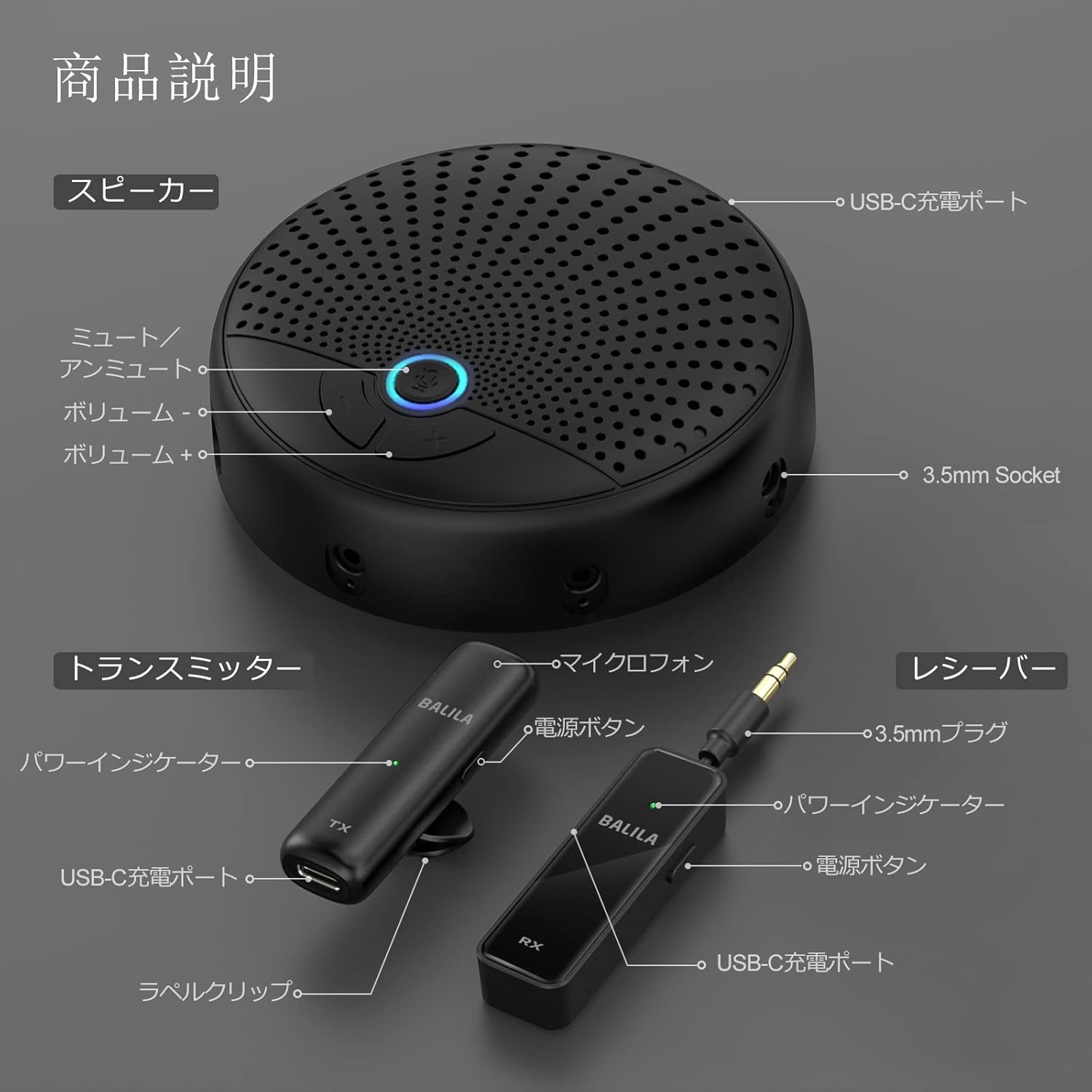
Image: Detailed view of the speakerphone and individual microphone components with labeled ports and controls.
Setup Guide
Follow these steps to set up your BALILA CM100 system for your conference:
1. Connect the Speakerphone to Your Computer
- Connect the provided USB-C cable to the USB-C port on the BALILA CM100 speakerphone.
- Connect the other end of the USB-C cable to an available USB-C port on your computer. If your computer only has USB-A ports, use the included USB-C to USB-A adapter.
- The speakerphone will power on automatically.

Image: Speakerphone connected to a laptop via USB-C, ready for use in a meeting setting.
2. Connect Wireless Microphone Receivers
- Insert the 3.5mm jack of each wireless microphone receiver (RX) into the available 3.5mm sockets around the perimeter of the speakerphone unit.
- You can use one, some, or all five receivers depending on your meeting needs.
3. Power On Wireless Microphones (Transmitters)
- Press and hold the power button on each wireless microphone transmitter (TX) until the indicator light turns green.
- The transmitters and receivers are pre-paired. A solid green light on both the transmitter and its corresponding receiver indicates a successful connection.
- Clip the transmitters to your clothing, ideally close to your mouth for optimal voice pickup.


Image: Close-up of a wireless microphone transmitter (TX) and receiver (RX).
4. Software Configuration (e.g., Zoom)
For video conferencing applications like Zoom, ensure the BALILA CM100 is selected as your audio input and output device.
- Join your Zoom meeting.
- Select "Join Audio by Computer".
- Go to Zoom Settings > Audio.
- For both "Speaker" and "Microphone", select "USB PHONE".
- Ensure your microphone is unmuted within the Zoom application.
Video: Demonstrates how to configure the BALILA CM100 as the audio device in Zoom settings.
Operating Instructions
Basic Controls
- Mute/Unmute: Press the central button on the speakerphone to mute or unmute all connected microphones. The indicator light will change to reflect the mute status.
- Volume Adjustment: Use the '+' and '-' buttons on the speakerphone to increase or decrease the speaker output volume. The system supports 15 levels of volume adjustment.


Image: Close-up of the speakerphone's volume and mute controls.
Wireless Microphone Usage
- The wireless microphones offer flexibility, allowing presenters to move up to 20 meters from the speakerphone while maintaining clear audio.
- For best results, ensure the microphone is clipped securely to your clothing, ideally close to your mouth for optimal voice pickup.
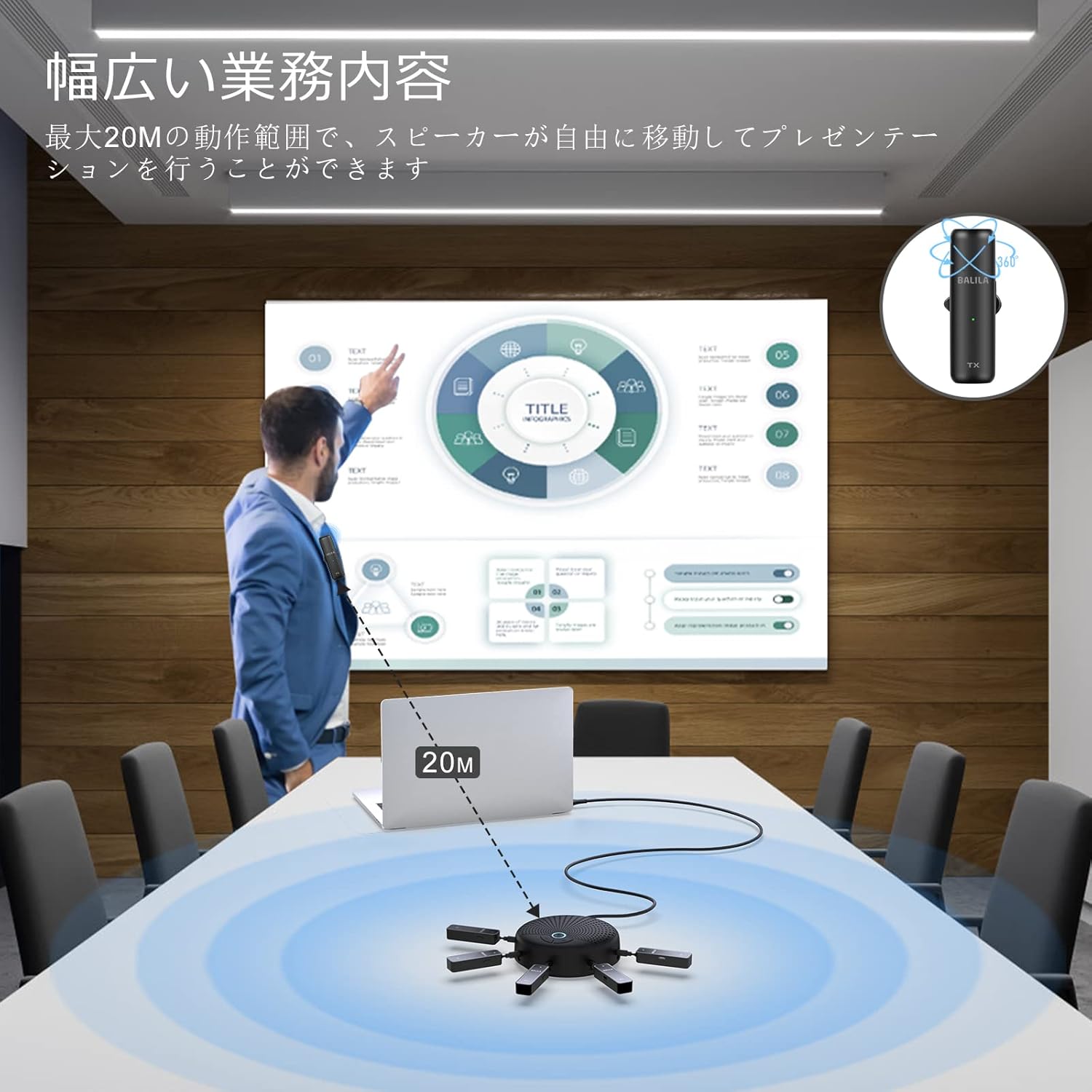
Image: Demonstrates the operational range of the wireless microphones in a conference setting.
AI Noise Reduction
The integrated AI noise reduction technology actively minimizes ambient background noise, ensuring that your voice is transmitted clearly to remote participants. This feature operates automatically to provide optimal sound quality.

Image: Visual representation of AI noise reduction, showing how background noise is filtered out.
Battery Life
The wireless microphones provide up to 10 hours of talk time on a full charge. The speakerphone unit can operate for up to 24 hours when connected to a power source.

Image: Illustrates the one-key mute function and built-in battery for extended use.
Maintenance
- Cleaning: Use a soft, dry cloth to clean the surfaces of the speakerphone and microphones. Avoid using harsh chemicals or abrasive materials.
- Storage: Store the device in a cool, dry place away from direct sunlight and extreme temperatures when not in use.
- Battery Care: For optimal battery longevity, avoid fully discharging the microphones frequently. Charge them regularly.
Troubleshooting
If you encounter issues with your BALILA CM100, please refer to the following common problems and solutions:
| Problem | Possible Cause | Solution |
|---|---|---|
| No sound from speakerphone or microphones not picking up audio. | Incorrect audio settings in conferencing software (e.g., Zoom). Microphones are muted. Loose connections. |
|
| Volume adjustment buttons on speakerphone do not function. | Software volume control overriding hardware. | Adjust volume directly within your computer's operating system or the conferencing software. Ensure the speakerphone is recognized as the primary audio output. |
| Sound is low or unclear when microphone is clipped to collar. | Microphone placement too far from mouth or obstructed. | Reposition the microphone closer to your mouth. Consider holding it like a handheld microphone if necessary for clearer pickup. |
| Audio delay or poor sound quality. | Interference or weak signal. Software/system issues. |
|
| Windscreen foam missing from package. | Manufacturing oversight. | Contact BALILA customer support for assistance. |
Specifications
| Feature | Detail |
|---|---|
| Model Name | CM100 |
| Brand | BALILA |
| Connectivity Technology | USB (2.4GHz Wireless for Microphones) |
| Recommended Uses | Computer, Home Office, Web/TV/Video Conferencing |
| Compatible Devices | PC, Laptops |
| Special Features | Wireless Conference, 360° Voice Pickup, AI Noise Reduction |
| Control Method | Voice (via microphones), Buttons on speakerphone |
| Power Source | Power Cord (USB-C) |
| Continuous Use Time | 24 Hours (Speakerphone), 10 Hours (Microphones) |
| Batteries Included | Yes (for microphones) |
| Material | Acrylonitrile Butadiene Styrene (ABS) |
| Product Dimensions | 10 x 10 x 2 cm; 480 g |
| Frequency Response | 120 KHz |
Warranty and Support
BALILA products are designed for reliability and performance. For warranty information, technical support, or customer service inquiries, please refer to the contact details provided on the product packaging or visit the official BALILA website.
For frequently asked questions, you may also refer to the BALILA Brand Store on Amazon.

