
1. Introduction
The PROVISION ISR DAI-340IPEN-28 is a 4MP fixed lens dome camera designed for high-security surveillance in both indoor and outdoor environments. Featuring a 2.8mm fixed lens, it is optimized for short-distance monitoring up to 20 meters. This camera incorporates advanced DDA2 Analytics for object recognition, counting, and detailed classification, significantly reducing false alarms. Its robust IK10 vandal-proof and IP67 waterproof ratings ensure durability and reliable performance in challenging conditions.

Figure 1: Front view of the PROVISION ISR DAI-340IPEN-28 Dome Camera, showing the lens and microphone.
2. Product Features
The DAI-340IPEN-28 camera is equipped with a range of features to enhance security and monitoring capabilities:
- Sensor: 1/3″ CMOS (16:9) with 2592×1520 resolution at 25/30FPS (4MP).
- Lens: 2.8mm fixed lens providing a 100° viewing angle.
- Night Vision: True Day&Night with ICR and 20m illumination from 3 High-Power IR LEDs.
- Compression: Supports H.265+/ H.264+ / H.265 / H.264 / MJPEG.
- General Analytics: Camera Tampering detection.
- AI (Object Recognition): DDA Sterile Area, DDA Line Crossing, DDA Object Counting (Line), DDA Object Counting (Area), DDA Loitering Detection, DDA Illegal Parking Detection.
- AI (Face Detection): Capable of detecting up to 10 faces per frame.
- Advanced Analytics: DDA2 for advanced object classification, including age, color, gender, and vehicle brand.
- Audio: Built-in Microphone and Audio input.
- Image Enhancement: True WDR (120dB), BLC, HLC, ROI.
- Storage: SD Card slot for event/schedule recording (Up to 128GB).
- Connectivity: Alarm in + Alarm out.
- Durability: IP67 waterproof and IK10 vandal-proof ratings.
- Power: DC12V/~415mA / PoE/~5W.

Figure 2: Key features and specifications represented by icons, including 4MP resolution, IP67, IK10, 20m IR, DC12V/PoE, Audio IN, and SD card support.
3. Package Contents
Please verify that all items are present in the package:
- PROVISION ISR DAI-340IPEN-28 Camera Body
- Instruction Manual (this document)
4. Safety Information
To ensure safe operation and prevent damage, please observe the following safety guidelines:
- Power Supply: Use only the specified power supply (DC12V or PoE). Ensure the power source is stable and meets the camera's requirements.
- Installation: Installation should be performed by qualified personnel. Ensure the mounting surface can support the camera's weight.
- Environment: Do not expose the camera to extreme temperatures, humidity, or corrosive environments beyond its specified operating conditions.
- Cleaning: Disconnect power before cleaning. Use a soft, dry cloth. Avoid harsh chemicals or abrasive cleaners.
- Disassembly: Do not attempt to disassemble or modify the camera. This will void the warranty and may cause damage or injury.
5. Setup and Installation
The DAI-340IPEN-28 is designed for ceiling mount installation. Follow these steps for proper setup:
5.1 Mounting the Camera
- Choose a suitable ceiling location that provides the desired viewing angle and is within reach of power and network cables.
- Use the provided mounting template (if applicable) to mark drill holes on the ceiling.
- Drill pilot holes and insert appropriate anchors if necessary.
- Secure the camera base to the ceiling using screws.
5.2 Wiring Connections
Refer to the wiring diagram for proper connections:

Figure 3: Dimensions of the camera (119mm diameter, 87.8mm height) and wiring connections including Power In, RJ-45 (+PoE), Audio In, COM, Alarm Out, Alarm In, and GND.
- Power In: Connect the DC12V power adapter or use Power over Ethernet (PoE) via the RJ-45 port.
- RJ-45 (+PoE): Connect an Ethernet cable from your network switch or NVR. If using PoE, this cable will also provide power.
- Audio In: Connect an external microphone if desired (the camera also has a built-in microphone).
- Alarm In/Out: Connect external alarm devices or sensors as required for integration with security systems.
5.3 Initial Configuration
After physical installation and wiring, connect the camera to your NVR or network. Refer to your NVR's manual or PROVISION ISR's software documentation for initial network configuration, IP address assignment, and password setup.
6. Operation
Once the camera is installed and configured on your network, you can access its features through a compatible NVR or client software.
6.1 Live View and Recording
Access the live video feed through your NVR or client software. Configure recording schedules, motion detection recording, or continuous recording as per your surveillance needs. The camera supports SD card recording up to 128GB for local storage.
6.2 DDA2 Analytics
The DAI-340IPEN-28 features advanced DDA2 Analytics. These can be configured via the camera's web interface or compatible NVR software:
- Sterile Area: Define specific zones where any unauthorized entry triggers an alert.
- Line Crossing: Set virtual lines, and an alert is triggered when an object crosses the line in a specified direction.
- Object Counting: Count objects (e.g., people, vehicles) crossing a line or entering/exiting an area.
- Loitering Detection: Detect individuals or objects remaining in a defined area for an unusual duration.
- Illegal Parking Detection: Identify vehicles parked in restricted zones.
- Face Detection: Detect and identify faces within the camera's field of view.
- Advanced Object Classification: Utilize DDA2 to classify objects by age, color, gender, and vehicle brand for more granular analysis.
Proper calibration and definition of detection rules are crucial for accurate analytics and to minimize false alarms.
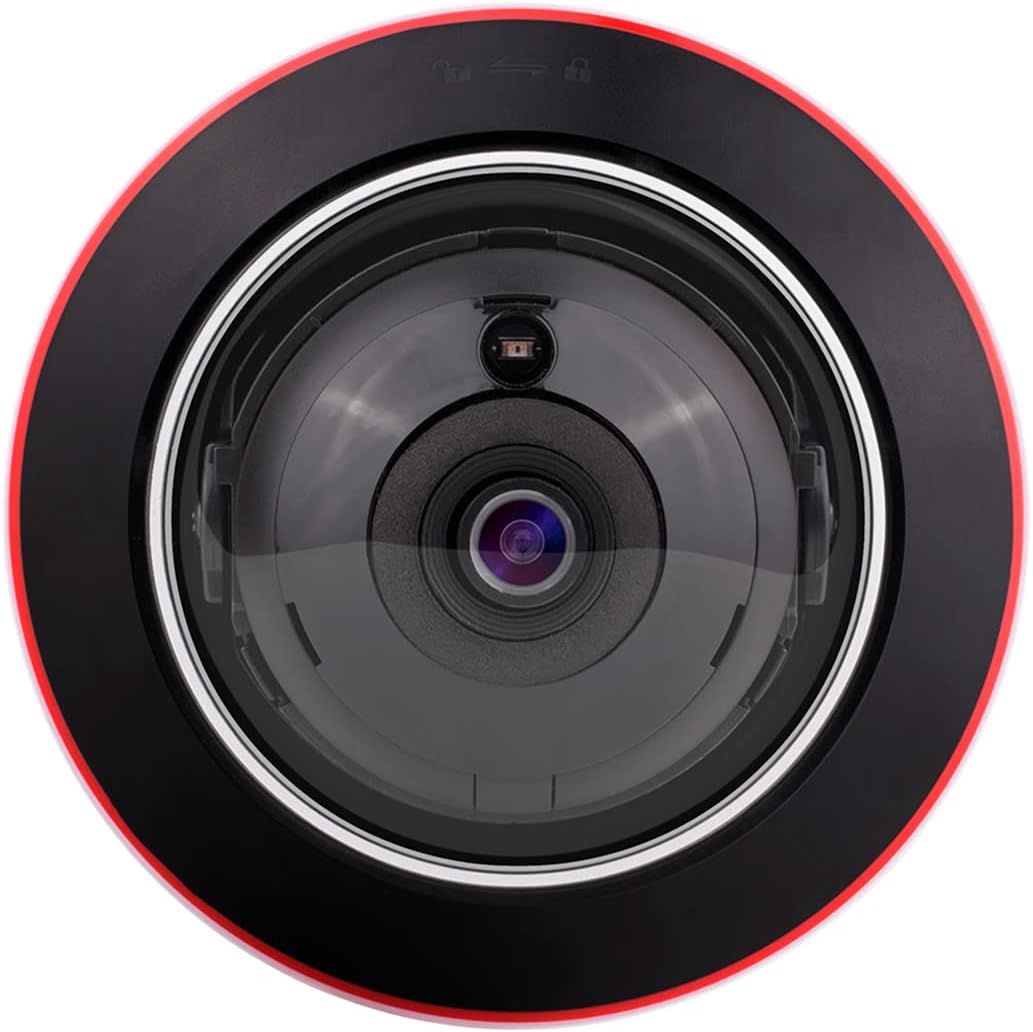
Figure 4: Top-down view of the camera's lens, showing the IR illuminators and light sensor.
7. Maintenance
Regular maintenance helps ensure the longevity and optimal performance of your camera:
- Lens Cleaning: Gently wipe the lens with a soft, lint-free cloth. For stubborn dirt, use a lens cleaning solution designed for optical surfaces.
- Housing Cleaning: Clean the camera housing with a damp cloth. Avoid harsh chemicals.
- Firmware Updates: Periodically check the PROVISION ISR website for firmware updates. Keeping the firmware updated can improve performance, add features, and enhance security.
- Cable Inspection: Regularly inspect all cables for signs of wear or damage. Replace damaged cables immediately.
8. Troubleshooting
If you encounter issues with your camera, refer to the following common problems and solutions:
- No Power:
- Check power connections (DC12V adapter or PoE).
- Ensure the power source is active and providing the correct voltage.
- No Video Output:
- Verify network cable connection to the RJ-45 port.
- Check network settings (IP address, subnet mask, gateway) on the camera and NVR/client software.
- Ensure the camera is added correctly to the NVR or monitoring software.
- Restart the camera and NVR/client software.
- Poor Image Quality:
- Clean the camera lens.
- Check lighting conditions. Ensure IR illumination is active in low light.
- Adjust image settings (brightness, contrast, WDR) in the camera's configuration.
- Analytics Not Triggering:
- Review the analytics rule configurations (sterile areas, lines, sensitivity).
- Ensure the camera's firmware is up to date.
- Check for environmental factors (e.g., strong light, moving objects outside the detection zone) that might interfere.
If problems persist, contact PROVISION ISR technical support.
9. Specifications
| Feature | Specification |
|---|---|
| Model Name | DAI-340IPEN-28 |
| Video Capture Resolution | 4MP (2592x1520) |
| Lens | 2.8mm Fixed Lens |
| Viewing Angle | 100 Degrees |
| Night Vision Range | 20 Meters |
| Connectivity Technology | Wired (Ethernet) |
| Power Source | Corded Electric (DC12V) / PoE |
| Indoor/Outdoor Usage | Indoor, Outdoor |
| International Protection Rating | IP67, IK10 |
| Mounting Type | Ceiling Mount |
| Dimensions (L x W x H) | 6.25 x 5.5 x 5.5 inches (119mm x 87.8mm) |
| Included Components | Camera Body, Instruction Manual |
| Special Features | HD Resolution, Night Vision, Portable, Vandal Proof, Weather Proof, DDA2 Analytics, Built-in Microphone |
10. Warranty and Support
This product is manufactured by PROVISION ISR. For warranty information, technical support, or service inquiries, please refer to the official PROVISION ISR website or contact your authorized dealer.
You can visit the official PROVISION ISR store for more information: PROVISION ISR Store on Amazon


