
1. Product Overview
The ApisQueen AQ1020 is a 48V underwater thruster set designed for propulsion in various aquatic applications such as ROVs, kayaks, RC boats, and other robotics. Constructed from aviation aluminum alloy, it offers high strength and light weight. The system features high thruster efficiency, low current draw, and low power consumption to maximize battery life. An Electronic Speed Controller (ESC) is built into the base for effective heat dissipation and stable, long-term output. The thruster enables forward, backward, left, and right turns, providing versatile control.
Key Features:
- Durable Construction: Made of aviation aluminum alloy for high strength and light weight.
- Efficient Performance: High thruster efficiency, low current, and low power consumption for extended battery life.
- Integrated ESC: ESC built into the base for timely heat dissipation and stable output.
- Versatile Control: Enables forward, backward, left, and right turns.
- Wide Voltage Compatibility: 48V version supports 48V marine batteries (up to 50.4V).
- Environmental Suitability: Suitable for use in both fresh and salt water environments.
- High Thrust Output: Single thruster maximum thrust up to 24KG (53LB), with a total thrust of 48KG (106LB) for two thrusters.
- Simplified Wiring: Integration of power and signal cables for user convenience.
2. Package Contents
Please verify that all items listed below are included in your package:
- 2 x Thrusters (with integrated ESC)
- 1 x Remote Control (RC)
- 1 x Waterproof Control Box
- 2 x Mounting Bases

Image: ApisQueen AQ1020 Underwater Thruster Set components including two thrusters, remote control, and control box.
3. Setup and Installation
Follow these steps to properly set up and install your AQ1020 Underwater Thruster Set:
- Mounting the Thrusters: Secure the thrusters to your ROV, kayak, or RC boat using the provided mounting bases. Ensure the mounting location is stable and allows for optimal water flow. The thrusters slide into the paddle plate mounts. If the pin is difficult to insert, gently tap it in with a tool. Secure the latch with M3X8 socket head cap screws.
- Connecting the Control Box: Place the waterproof control box in a secure location. Connect the thruster cables to the corresponding ports on the control box. Ensure connections are firm and waterproof.
- Power Connection: Connect your 48V marine battery (up to 50.4V) to the control box. Ensure correct polarity.
- Remote Control Activation: Turn on the remote control first, then rotate the battery power switch on the control box to activate the system.

Image: ApisQueen AQ1020 underwater thruster with its mounting base.

Image: ApisQueen AQ1020 underwater thruster with its mounting base and cable.

Image: Waterproof control box for the thruster system.
Video: AQ1020 Underwater Thruster Set Installation and Operation Demonstration. This video provides a visual guide for connecting the thrusters, remote, and power supply.
4. Operating Instructions
Once the thruster system is installed and powered on, use the remote control to operate the thrusters:
- Forward/Backward Movement: Push the remote control rocker forward to move the vessel forward. Pull the rocker backward to move the vessel in reverse.
- Turning: Push the rocker to the left to turn the vessel left. Push the rocker to the right to turn the vessel right. The bi-directional ESC allows for precise control of each thruster for effective maneuvering.
- Fixed Speed Cruise Mode: Press the dedicated fixed speed cruise button on the remote control to activate this mode. The thrusters will maintain a constant speed. Press the button again to exit fixed speed cruise mode.
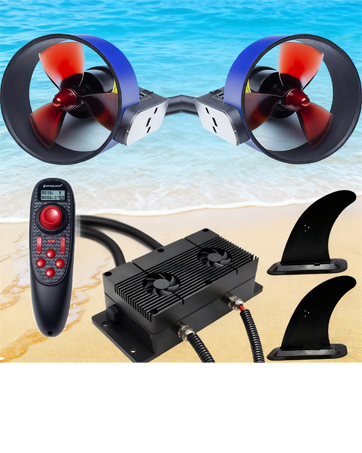
Image: Bi-directional ESC functionality for precise control.
Refer to the embedded video in the Setup section for a visual demonstration of the thruster's operation.

Image: Remote control unit for the AQ1020 thruster set.
5. Maintenance
Regular maintenance ensures the longevity and optimal performance of your AQ1020 thruster set:
- Cleaning: After each use, especially in saltwater, rinse the thrusters and control box with fresh water to remove salt, sand, and debris.
- Inspection: Periodically inspect the propellers for any damage, entanglement, or wear. Check all cables and connections for signs of corrosion or damage.
- Storage: Store the thruster set in a dry, cool place away from direct sunlight when not in use. Ensure all components are dry before storage.
- Battery Care: Follow the manufacturer's guidelines for your 48V marine battery regarding charging, discharging, and storage to maximize its lifespan.
6. Troubleshooting
If you encounter issues with your AQ1020 thruster set, refer to the following common troubleshooting steps:
- No Power:
- Ensure the battery is fully charged and properly connected to the control box.
- Verify that the battery power switch on the control box is in the 'ON' position.
- Check all cable connections for looseness or damage.
- Thruster Not Responding:
- Confirm the remote control is powered on and paired with the control box.
- Inspect the thruster propellers for any obstructions or damage.
- Ensure the thruster cables are securely connected to the control box.
- Reduced Thrust:
- Check for debris or marine growth on the propellers.
- Verify the battery charge level; low battery can reduce performance.
- Ensure the thrusters are correctly positioned for optimal water flow.
If the issue persists after following these steps, please contact customer support.
7. Technical Specifications
| Feature | Specification |
|---|---|
| Model Name | AQ1020 |
| Brand Name | ApisQueen |
| Material | Aluminum |
| Color | BLACK |
| Voltage | 48V (supports up to 50.4V marine batteries) |
| Max Thrust (Single Thruster) | 24KG (53LB) |
| Total Thrust (Two Thrusters) | 48KG (106LB) |
| Item Package Dimensions L x W x H | 12.6 x 11.3 x 7.28 inches |
| Package Weight | 4.74 Kilograms |
| Size | 166*120mm |
| Suggested Users | unisex-adult |

Image: ApisQueen AQ1020 thruster with power and signal cables.

Image: ApisQueen AQ1020 thruster with mounting base and cable.
8. Warranty and Support
The ApisQueen AQ1020 Underwater Thruster Set comes with a 1-month warranty from the date of purchase, covering manufacturing defects. Please retain your proof of purchase for warranty claims.
Customer Support:
For technical assistance, troubleshooting, or warranty inquiries, please contact ApisQueen customer support through the retailer where the product was purchased or visit the official ApisQueen website for contact information.
