
1. Introduction
Thank you for choosing the UMI LX-300C Step Up Voltage Converter. This device is designed to safely convert 100-120V AC input voltage to 220-240V AC output voltage, enabling you to use your 220-240V rated electrical appliances from regions like Europe or Asia in countries with 100-120V power outlets, such as the United States, Canada, or Mexico.
The LX-300C features a compact design, dual universal outlets, and multiple built-in safety protections to ensure reliable and efficient operation for your compatible devices.

Image 1.1: Visual representation of voltage conversion from 100-120V to 220-240V.
2. Important Safety Instructions
WARNING: Failure to follow these safety instructions may result in fire, electric shock, or injury.
- Do Not Overload: The UMI LX-300C has a maximum rated power of 300 Watts. Ensure the total power consumption of all connected appliances does not exceed 300 Watts. Overloading will trigger an alarm or automatic shutdown and can damage the converter or connected devices.
- Check Appliance Wattage: Before connecting any appliance, verify its power consumption (wattage) on its nameplate or instruction manual. The appliance's wattage must be less than 300W.
- Indoor Use Only: This converter is designed for indoor use in dry environments. Do not expose it to rain, moisture, or extreme temperatures.
- Ventilation: Ensure adequate ventilation around the converter. Do not block ventilation openings.
- Proper Grounding: Always plug the converter into a properly grounded 100-120V AC outlet.
- Children and Pets: Keep the converter out of reach of children and pets.
- Handling: Do not drop, disassemble, or attempt to repair the converter yourself. Contact qualified service personnel for any repairs.
- Power Cord: Use only the provided power cord. Do not use damaged cords or plugs.
3. Package Contents
Please check the package for the following items:
- UMI LX-300C Step Up Voltage Converter
- Power Cord
- Instruction Manual
If any items are missing or damaged, please contact UMI customer support.
4. Product Overview
The UMI LX-300C features a sleek, compact design with clearly labeled ports and controls.
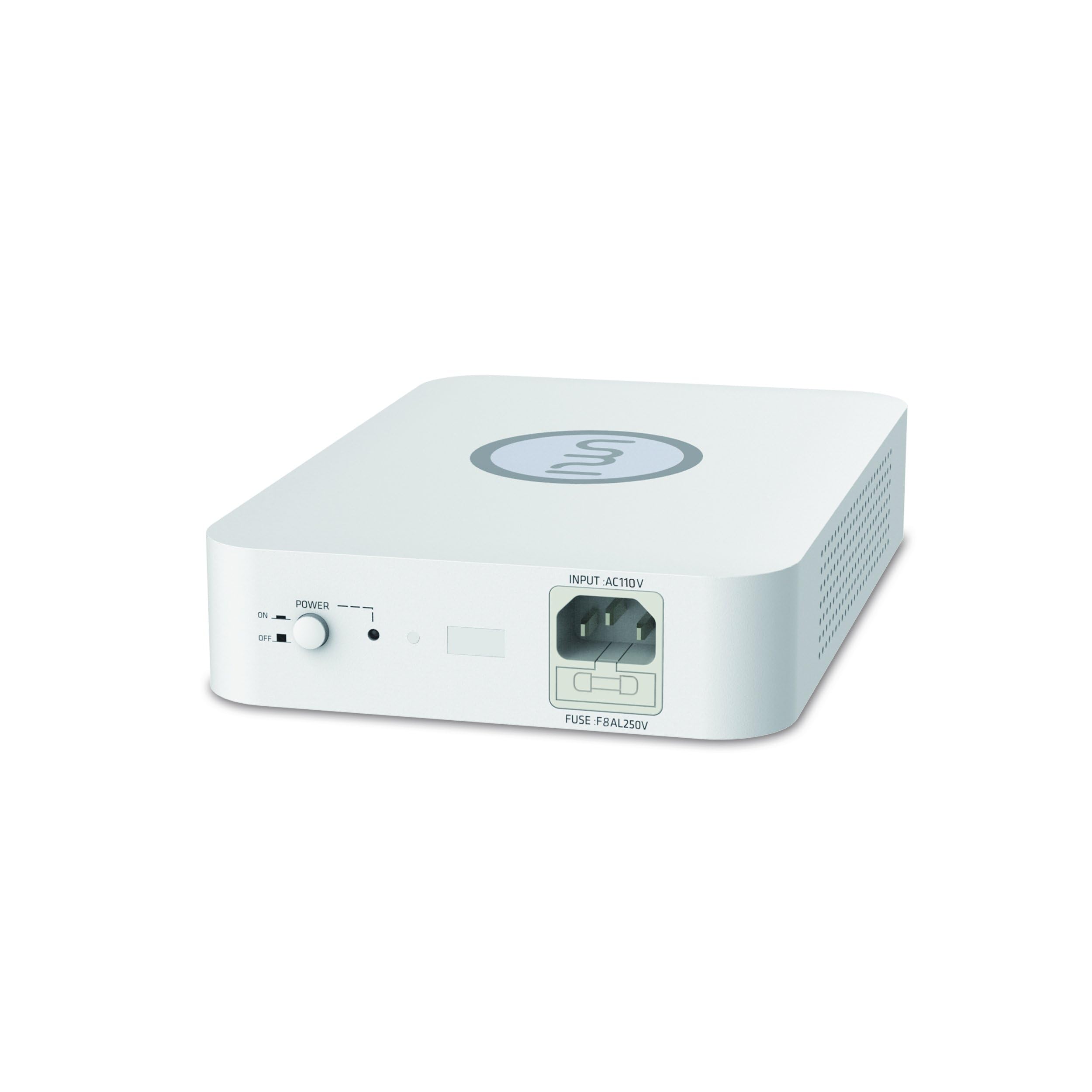
Image 4.1: Front view of the UMI LX-300C Voltage Converter.
Front Panel:
- Power Switch: Toggles the converter ON/OFF.
- Power Indicator Light: Illuminates when the converter is powered ON.
- Input AC110V Port: Connects the converter to the main power supply (100-120V).
- Fuse: Provides overload protection.
Rear Panel:
- Output AC220V Sockets (x2): Connect your 220-240V appliances here. These are universal sockets compatible with various plug types (e.g., European, Chinese, Korean).
Video 4.2: An official UMI video demonstrating the features and usage of the UMI Voltage Converter Transformer, showing its compact size, dual outlets, non-slip design, and power controls. This video highlights the product's design and functionality.
5. Setup
- Placement: Place the UMI LX-300C converter on a stable, flat surface. Ensure there is sufficient space around the unit for proper ventilation. Avoid placing it near heat sources or in direct sunlight.
- Connect to Power: Insert the provided power cord into the Input AC110V port on the converter. Then, plug the other end of the power cord into a standard 100-120V AC wall outlet.
- Connect Appliance: Ensure your 220-240V appliance is turned OFF. Plug your appliance's power cord into one of the Output AC220V sockets on the rear panel of the converter. If using multiple appliances, ensure their combined wattage does not exceed 300W.
6. Operating Instructions
- Power On: Once the converter and your appliance are connected, switch the power button on the front panel of the converter to the "ON" position. The power indicator light will illuminate.
- Use Appliance: Turn on your 220-240V appliance. It should now operate normally.
- Power Off: When you are finished using your appliance, first turn off the appliance, then switch the power button on the converter to the "OFF" position. The power indicator light will turn off.
- Disconnect: Unplug the appliance from the converter, and then unplug the converter from the wall outlet.
Important Considerations:
- Always ensure the total wattage of connected devices does not exceed the converter's 300W capacity.
- For optimal performance and safety, it is recommended to use a converter with a wattage rating at least 20-30% higher than your appliance's maximum power consumption.
- The converter is designed for continuous use but avoid running it at full load for extended periods.
7. Specifications
| Feature | Detail |
|---|---|
| Model Number | LX-300C |
| Input Voltage | AC 100-120V |
| Output Voltage | AC 220-240V |
| Maximum Power | 300 Watts |
| Product Dimensions (L x W x H) | 8.46 x 6.02 x 2.05 inches (21.5 x 15.3 x 5.2 cm) |
| Item Weight | 6 pounds (2.7 kg) |
| Power Source | Corded Electric |
| Mounting Type | Desktop Mount |
| Certifications | CE, CQC |
8. Troubleshooting
- No Power / Converter Not Turning On:
- Ensure the power cord is securely plugged into both the converter and the wall outlet.
- Check if the wall outlet is functional by plugging in another device.
- Verify the power switch on the converter is in the "ON" position.
- Check the fuse. If the fuse is blown, replace it with a fuse of the same rating (T15AL250V).
- Appliance Not Working / Converter Alarms or Shuts Off:
- This indicates an overload. Immediately turn off the converter and unplug the appliance(s).
- Verify the wattage of your appliance(s). The total wattage must not exceed 300W.
- If using multiple appliances, disconnect some to reduce the load.
- Allow the converter to cool down before attempting to use it again with a reduced load.
- Unusual Noise (Humming):
- A slight hum is normal for transformers. However, if the hum is excessively loud or accompanied by heat or burning smell, immediately disconnect power and contact customer support.
- Ensure the converter is placed on a stable surface and not vibrating against other objects.
9. Maintenance
- Cleaning: Disconnect the converter from the power outlet before cleaning. Use a soft, dry cloth to wipe the exterior. Do not use liquid cleaners or abrasive materials.
- Storage: When not in use for extended periods, store the converter in a cool, dry place, away from direct sunlight and moisture.
- Fuse Replacement: If the fuse blows, replace it with a fuse of the exact same type and rating (T15AL250V). Refer to the product overview for the fuse location.
10. Warranty and Support
UMI products are manufactured to high-quality standards. For warranty information, technical support, or service inquiries, please refer to the warranty card included with your product or visit the official UMI website. Please have your model number (LX-300C) and purchase details ready when contacting support.