
1. Introduction and Overview
The LILYGO T5 4.7 Inch E-Paper V2.3 ESP32-S3 Development Board is a versatile module designed for projects requiring a low-power display and robust wireless connectivity. It integrates an ESP32-S3 microcontroller with a 4.7-inch e-paper display, offering Wi-Fi and Bluetooth V5.0 capabilities. This board is ideal for applications such as IoT devices, smart home systems, and custom display solutions where power efficiency and clear visual output are crucial.

Image: Top-down view of the LILYGO T5 4.7 Inch E-Paper V2.3 ESP32-S3 Development Board, showcasing its components and layout.
2. What's in the Box
Upon unboxing your LILYGO T5 4.7 Inch E-Paper V2.3 ESP32-S3 Development Board, please ensure all the following components are present:
- 1 x LILYGO T5 4.7 Inch E-Paper V2.3 ESP32-S3 Development Board
- 1 x 4.7-inch E-Paper Display
- 1 x TF Card
- 1 x User Manual (this document)
- Additional cables or connectors as specified by the manufacturer.

Image: A visual representation of the main components included in the product package, such as the development board, e-paper display, and connecting cables.
3. Product Features
The LILYGO T5 4.7 Inch E-Paper V2.3 ESP32-S3 Development Board boasts a range of features designed for advanced embedded development:
- Microcontroller: ESP32-S3-WROOM-1-N1 6R8
- Display: 4.7-inch E-Paper, 540(H)x960(V) Resolution, 16 Gray levels, ultra-low power consumption, wide viewing angle. Note: The screen does not feature touch functionality.
- Memory: 16MB Flash, 8MB PSRAM
- Wireless Connectivity: Wi-Fi, Bluetooth V5.0
- Storage: Supports TF card for expanded storage.
- Real-Time Clock (RTC): Integrated PCF8563 RTC for accurate timekeeping.
- Power Management: Features battery capacity detection.
- Programming Environment: Compatible with Arduino-IDE, VS Code.
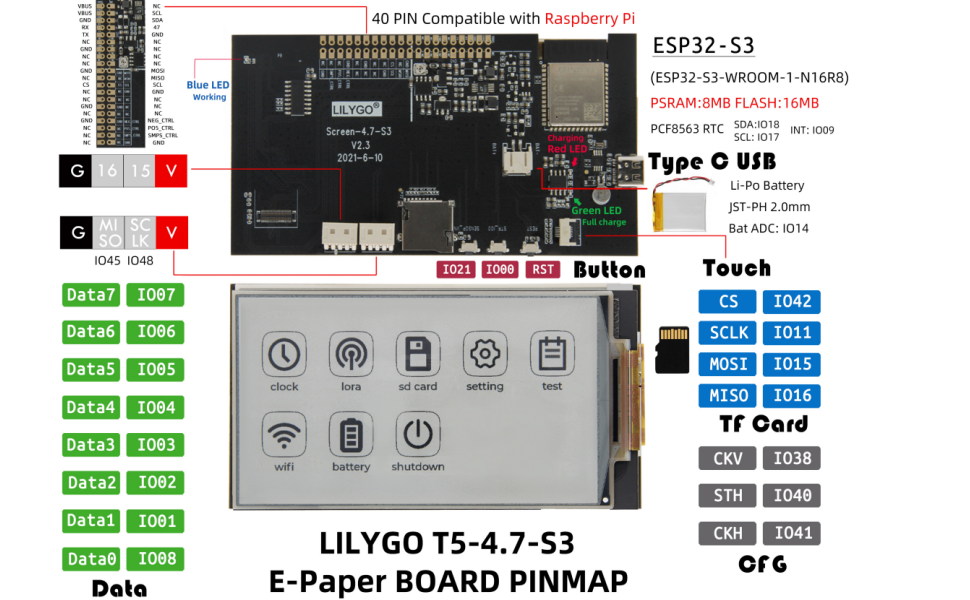
Image: A diagram highlighting key features and components of the LILYGO T5 4.7 Inch E-Paper V2.3 ESP32-S3 Development Board, including MCU, wireless connectivity, memory, and display specifications.
4. Setup Instructions
Follow these steps to set up your LILYGO T5 4.7 Inch E-Paper V2.3 ESP32-S3 Development Board:
- Connect the E-Paper Display: Carefully connect the 4.7-inch e-paper display to the designated connector on the development board. Ensure proper alignment to avoid damage to the pins.
- Insert TF Card (Optional): If your application requires external storage, insert a compatible TF card into the TF card slot on the board.
- Power Connection: Connect the board to a power source using a USB-C cable. The board can be powered via the USB-C port.
- Driver Installation: Depending on your operating system and development environment, you may need to install specific USB-to-serial drivers for the ESP32-S3. Refer to the official ESP32-S3 documentation for detailed instructions.
- Development Environment Setup: Install your preferred Integrated Development Environment (IDE), such as Arduino IDE or VS Code with PlatformIO. Configure the IDE to support the ESP32-S3 board.
- Firmware Upload: Download example code or your custom firmware from the LILYGO GitHub repository (github.com/Xinyuan-LilyGO/LilyGo-EPD47) and upload it to the board.
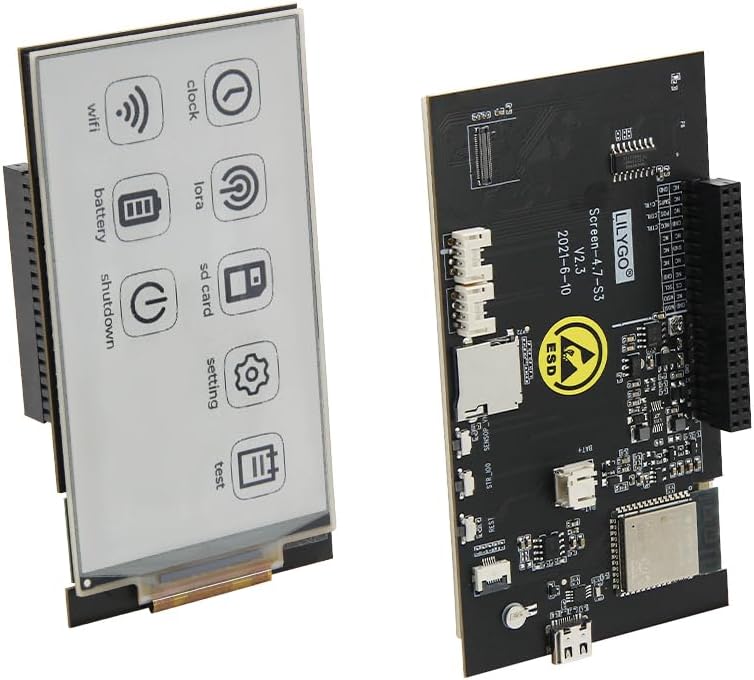
Image: The LILYGO T5 4.7 Inch E-Paper V2.3 ESP32-S3 Development Board with the e-paper display module connected, illustrating the assembled unit.
Product Application Instructions Video
Video: A short instructional video demonstrating the application and basic setup of the LILYGO T5 4.7 Inch E-Paper V2.3 ESP32-S3 Development Board.
5. Operating Instructions
Operating the LILYGO T5 4.7 Inch E-Paper V2.3 ESP32-S3 Development Board primarily involves running custom firmware and interacting with the e-paper display. Since it is a development board, specific operational steps will depend on the code loaded onto the ESP32-S3.
- Power On: Once powered via USB-C, the board will execute the loaded firmware.
- Display Interaction: The e-paper display will show information as programmed. E-paper displays are known for their low power consumption and high readability in ambient light.
- Wireless Communication: Utilize the integrated Wi-Fi and Bluetooth V5.0 for data transmission and reception as defined by your application.
- TF Card Access: If a TF card is inserted and supported by your firmware, it can be used for logging data, storing images, or other data-intensive tasks.

Image: The 4.7-inch e-paper display showing a graphical user interface with icons for functions like clock, Wi-Fi, battery, SD card, settings, and test modes.
6. Maintenance
To ensure the longevity and optimal performance of your LILYGO T5 4.7 Inch E-Paper V2.3 ESP32-S3 Development Board, observe the following maintenance guidelines:
- Handle with Care: Avoid dropping or subjecting the board to physical shocks.
- Electrostatic Discharge (ESD) Protection: The board is sensitive to ESD. Always handle it in an ESD-safe environment or take appropriate precautions (e.g., using an anti-static wrist strap). The board features an ESD warning symbol.
- Keep Dry: Protect the board from moisture and liquids.
- Temperature Control: Operate and store the board within recommended temperature ranges to prevent damage to electronic components.
- Cleanliness: Keep the board free from dust and debris. Use a soft, dry brush or compressed air for cleaning.
Image: Close-up of the LILYGO T5 4.7 Inch E-Paper V2.3 ESP32-S3 Development Board, clearly showing the ESD (Electrostatic Discharge) warning symbol, emphasizing the need for careful handling.
7. Troubleshooting
If you encounter issues with your LILYGO T5 4.7 Inch E-Paper V2.3 ESP32-S3 Development Board, consider the following troubleshooting steps:
- No Power: Ensure the USB-C cable is securely connected to a functional power source. Check the power indicator LED on the board.
- Display Not Working: Verify that the e-paper display is correctly and securely connected to the board. Re-upload your firmware to ensure it's not a software issue.
- Connectivity Issues (Wi-Fi/Bluetooth): Check your firmware for correct Wi-Fi/Bluetooth configuration. Ensure antennas are properly connected if external.
- Firmware Upload Failure: Confirm that the correct drivers are installed and your IDE is configured for the ESP32-S3. Try holding down the BOOT button (if available) while initiating the upload process.
- E-Paper Display Characteristics: Note that e-paper screens may exhibit certain characteristics:
- Small bubbles in the corners when fitting are currently unavoidable due to the soft screen material.
- This version of the ink screen may have a yellowish color.
- Partial refreshing for extended periods can cause residual images. This is a normal characteristic of e-paper technology.
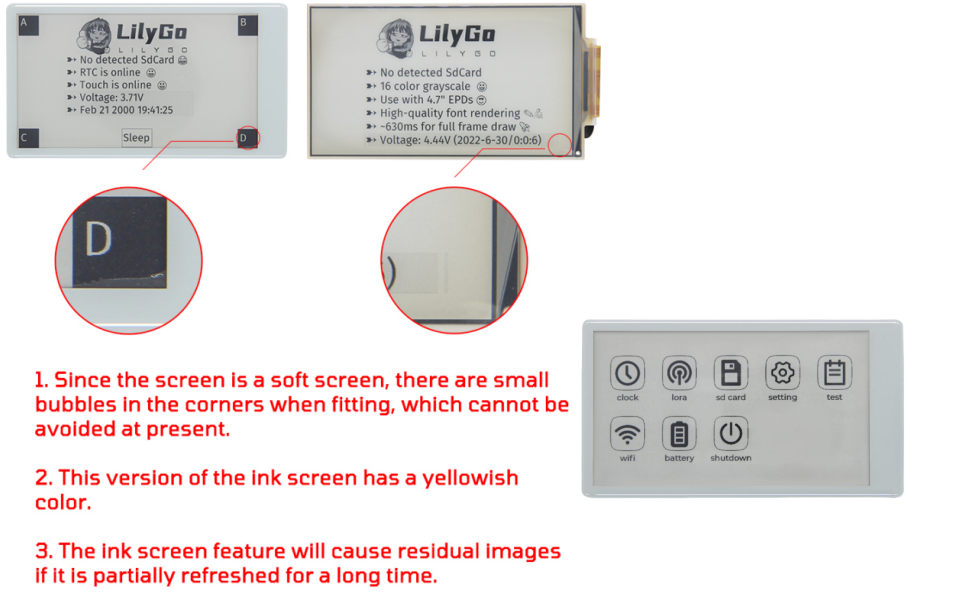
Image: An illustration detailing common characteristics and potential visual artifacts of e-paper displays, such as corner bubbles, yellowish tint, and residual images from partial refreshes.
For further assistance, refer to the LILYGO GitHub repository or contact LILYGO support.
8. Specifications
Detailed technical specifications for the LILYGO T5 4.7 Inch E-Paper V2.3 ESP32-S3 Development Board:
| Attribute | Value |
|---|---|
| Brand | LILYGO |
| Model Name | LILYGO T5 |
| MCU | ESP32-S3-WROOM-1-N1 6R8 |
| Display Size | 4.7 Inch E-Paper |
| Display Resolution | 540(H)x960(V) pixels |
| Gray Levels | 16 |
| Touch Function | No |
| Flash Memory | 16 MB |
| PSRAM | 8 MB |
| Wireless Connectivity | Wi-Fi, Bluetooth V5.0 |
| External Storage | TF Card Support |
| RTC | PCF8563 |
| Operating System | FreeRTOS (or similar RTOS) |

Image: The LILYGO T5 4.7 Inch E-Paper V2.3 ESP32-S3 Development Board with its length, width, and height dimensions indicated in millimeters.
9. Warranty and Support
For warranty information and technical support, please refer to the official LILYGO website or contact the seller directly. The LILYGO GitHub repository (github.com/Xinyuan-LilyGO/LilyGo-EPD47) is an excellent resource for documentation, example code, and community support.