
Caline CP-05
Caline CP-05 Guitar Pedal Power Supply User Manual
Model: CP-05
Introduction
The Caline CP-05 is a compact and efficient power supply designed for guitar effect pedals. It features 10 independent isolated DC outputs, ensuring stable and noise-free power delivery to your pedals. This manual provides essential information for the safe and effective use of your CP-05 power supply.
Package Contents
- 1 x Caline CP-05 Guitar Pedal Power Supply
- 1 x Power Adapter (Input: AC 100-240V, Output: DC 18V)
- 8 x DC Power Cables (standard barrel connectors)
- 2 x Polarity Reversal Cables
- 1 x User Manual

Image: Caline CP-05 power supply unit shown with its complete set of accessories, including the power adapter, eight DC power cables, and two polarity reversal cables.
Product Features
- Isolated Outputs: 10 independent DC outputs prevent unwanted noise and hum between pedals.
- Versatile Power Options: Provides 9V, 12V, and 18V DC outputs to accommodate various pedal requirements.
- Short-Circuit Protection: Each output is independently protected against short circuits. A fault in one output will not affect others.
- LED Indicators: Bright blue LEDs indicate the operational status of each output. They turn off if a short circuit occurs.
- Compact and Durable: Constructed from high-quality aluminum alloy, making it lightweight and robust for portability.

Image: The Caline CP-05 power supply, displaying its 10 DC output jacks and the blue LED indicators above each output, signifying power status.
Setup Instructions
- Connect the Power Adapter: Plug the included 18V DC power adapter into the "DC 18V IN" jack on the CP-05 unit. Then, plug the adapter into a standard AC wall outlet.
- Power On: The blue LED indicators above each output will illuminate, indicating the unit is powered on and ready for use.
- Connect Pedals: Use the provided DC power cables to connect your guitar effect pedals to the appropriate output jacks on the CP-05.
- Outputs 1-7: 9V DC, 100mA each
- Output 8: 9V DC, 500mA
- Output 9: 12V DC, 100mA
- Output 10: 18V DC, 100mA
- Check Polarity: Most guitar pedals use a center-negative polarity. The CP-05 outputs are standard center-negative. If a pedal requires center-positive polarity, use one of the included polarity reversal cables.
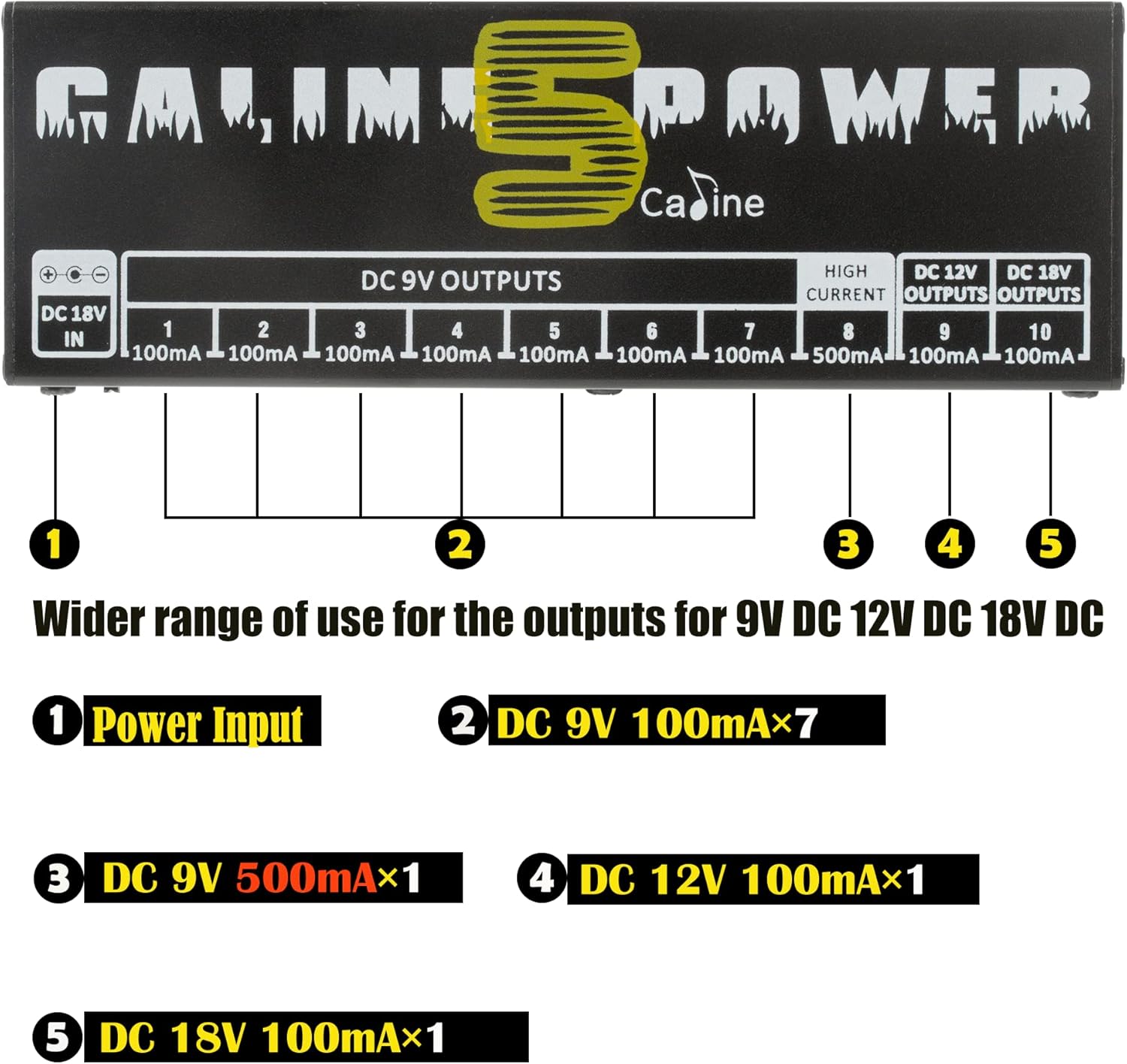
Image: A clear diagram of the Caline CP-05 power supply, labeling the DC 18V input and each of the 10 DC outputs with their respective voltage and current ratings (9V 100mA, 9V 500mA, 12V 100mA, 18V 100mA).
Video: A demonstration of connecting power cables to the Caline CP-05 power supply and then to guitar pedals, illustrating the setup process.
Operating Instructions
Once connected, the Caline CP-05 operates automatically. The blue LEDs indicate that power is being supplied to the connected pedals. Ensure that the total current draw of your pedals does not exceed the maximum current rating of each individual output.
- LED Indicator Function: A lit blue LED indicates normal operation for that output. If an LED turns off, it signifies a short circuit or overload on that specific output.
- LED Switch: A switch located near the DC 18V input allows you to turn the blue LED indicators on or off. This can be useful in dark environments or to conserve minimal power.
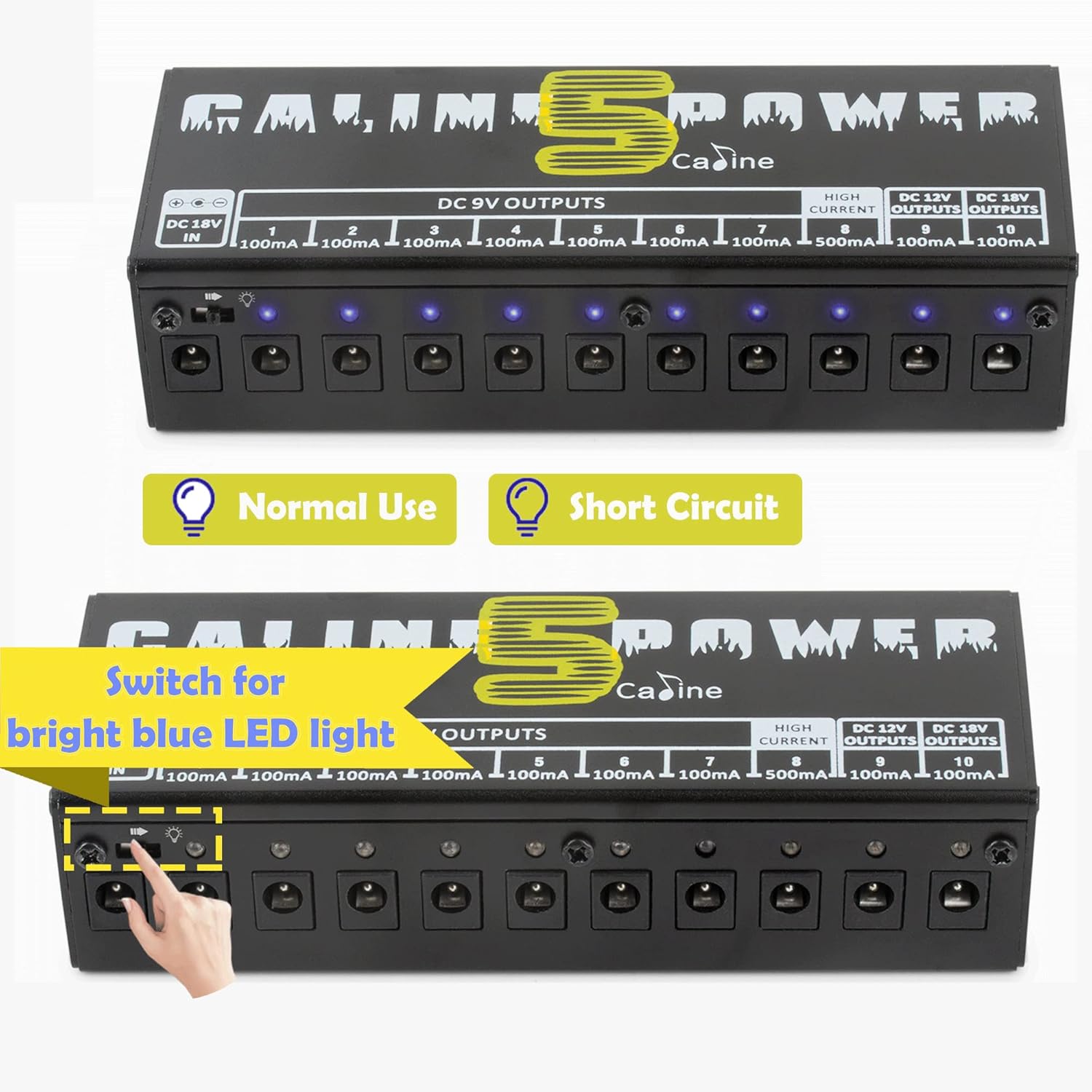
Image: The Caline CP-05 power supply with its blue LED indicators illuminated, demonstrating normal operation. An accompanying graphic illustrates the LED behavior during a short circuit.
Maintenance
- Cleaning: Use a soft, dry cloth to clean the unit. Do not use liquid cleaners or solvents.
- Storage: Store the power supply in a dry environment, away from extreme temperatures and direct sunlight.
- Cable Management: Ensure all cables are neatly organized to prevent damage or accidental disconnections.
- Inspection: Periodically inspect the power adapter and cables for any signs of wear or damage. Replace damaged components immediately.
Troubleshooting
| Problem | Possible Cause | Solution |
|---|---|---|
| No power to pedals / No LEDs lit. | Power adapter not connected or faulty; wall outlet not active. | Ensure the 18V DC adapter is securely connected to the CP-05 and a live wall outlet. Test the outlet with another device. |
| One or more LEDs are off. | Short circuit or overload on that specific output. | Disconnect the pedal from the affected output. Check the pedal and cable for faults. If the LED illuminates after disconnecting, the issue is with the pedal or cable. Reconnect a known working pedal. |
| Humming or noise in audio signal. | Ground loop; faulty cable; pedal issue. | Ensure all pedals are connected to the isolated outputs. Try different cables. Test pedals individually to identify the source of the noise. |
| Pedal not functioning correctly. | Incorrect voltage or current supplied; incorrect polarity. | Verify the pedal's power requirements (voltage, current, polarity) and ensure it is connected to the correct CP-05 output. Use a polarity reversal cable if needed. |
Specifications
| Brand | Caline |
| Model | CP-05 |
| Material | Aluminum Alloy |
| Input Voltage | DC 18V (via included adapter) |
| Output 1-7 | DC 9V, 100mA (each) |
| Output 8 | DC 9V, 500mA |
| Output 9 | DC 12V, 100mA |
| Output 10 | DC 18V, 100mA |
| Dimensions | Approx. 15cm x 5cm x 3cm (5.9in x 1.9in x 1.1in) |
| Weight | Approx. 200g (6.9 oz) |
| Polarity | Center Negative (standard for most outputs) |

Image: The compact size of the Caline CP-05 power supply is demonstrated by a hand holding the unit, with its dimensions (15cm x 5cm x 3cm) and weight (200g) clearly indicated.
Safety Information
- Use only the provided power adapter. Using an incorrect adapter may damage the unit or connected pedals.
- Do not expose the unit to water, moisture, or extreme temperatures.
- Do not attempt to disassemble or modify the unit. This will void the warranty and could lead to electric shock.
- Keep out of reach of children.
- Ensure proper ventilation around the unit during operation.
Warranty and Support
Caline products are designed for reliability and performance. For warranty information and technical support, please refer to the contact details provided with your purchase or visit the official Caline website. Keep your purchase receipt as proof of purchase for warranty claims.
For additional assistance, you may contact the seller, Yuemo Music, through the Amazon platform.
Ask a question about this manual
Ask about setup, troubleshooting, compatibility, parts, safety, or missing instructions. Manuals+ will review the question and use this page’s manual context to help answer it.