Introduction
The UNI-T UT122 is an ultra-thin, True RMS digital multimeter designed for accurate electrical measurements. It features a large 6000-count display and auto-ranging capabilities for various parameters including AC/DC voltage, AC voltage frequency, resistance, capacitance, frequency, and temperature. This device is equipped with a built-in rechargeable lithium battery and a Type-C charging port, making it convenient for both professional and non-professional users. The UT122 also offers dual display functionality, allowing simultaneous viewing of two measurement results, and includes Non-Contact Voltage (NCV) and Live wire detection features.

Image: The UNI-T UT122 Smart Digital Multimeter, highlighting its True RMS 600V capability, flashlight, backlight, and Li-On rechargeable battery. The display shows voltage, frequency, resistance, continuity, capacitance, temperature, NCV, and Live detection symbols.
Safety Information
Always adhere to safety precautions when using any electrical testing equipment. Failure to do so may result in injury or damage to the meter or equipment under test.
- Ensure the meter is in good working condition before use.
- Do not apply voltage or current that exceeds the maximum specified limits for the meter.
- Use caution when working with voltages above 30V AC RMS, 42V peak, or 60V DC. These voltages pose a shock hazard.
- Always connect the common (COM) test lead first and disconnect it last.
- Verify the meter's operation on a known voltage source before and after use.
- Do not operate the meter if the battery cover is not properly closed.
- Adhere to local and national safety codes.
Package Contents
Verify that all items are present in the package:
- UNI-T UT122 Smart Digital Multimeter
- DMM Test Leads (Red and Black)
- Temperature Probes
- User Manual (this document)
Product Features
- True RMS Measurement: Provides accurate readings for non-sinusoidal waveforms.
- Auto-Ranging: Automatically selects the correct measurement range.
- Large 6000-Count Display: Clear and easy-to-read measurements.
- Dual Display: Shows two measurement results simultaneously (e.g., voltage and frequency).
- Rechargeable Lithium Battery: Built-in 3.7V/700mAh Li-On battery with Type-C charging.
- Non-Contact Voltage (NCV) Detection: Detects AC voltage without direct contact.
- Live Wire Detection: Identifies live electrical wires.
- Measurement Functions: AC/DC Voltage, Resistance, Capacitance, Frequency, Temperature, Diode Test, Continuity Buzzer.
- Backlight and Flashlight: For improved visibility in various lighting conditions.

Image: The UNI-T UT122 Multimeter displaying its large color screen and backlit display, showing various measurement modes and battery status.
Setup
1. Charging the Battery
The UNI-T UT122 is equipped with a built-in 3.7V/700mAh Li-On rechargeable battery. Before initial use, or when the battery indicator shows low power, charge the device using a standard Type-C USB cable and a compatible power adapter.
- Connect the Type-C end of the USB cable to the multimeter's charging port.
- Connect the other end of the USB cable to a USB power adapter (not included) or a computer's USB port.
- The charging indicator on the multimeter will show the charging status.
- Once fully charged, disconnect the charging cable.
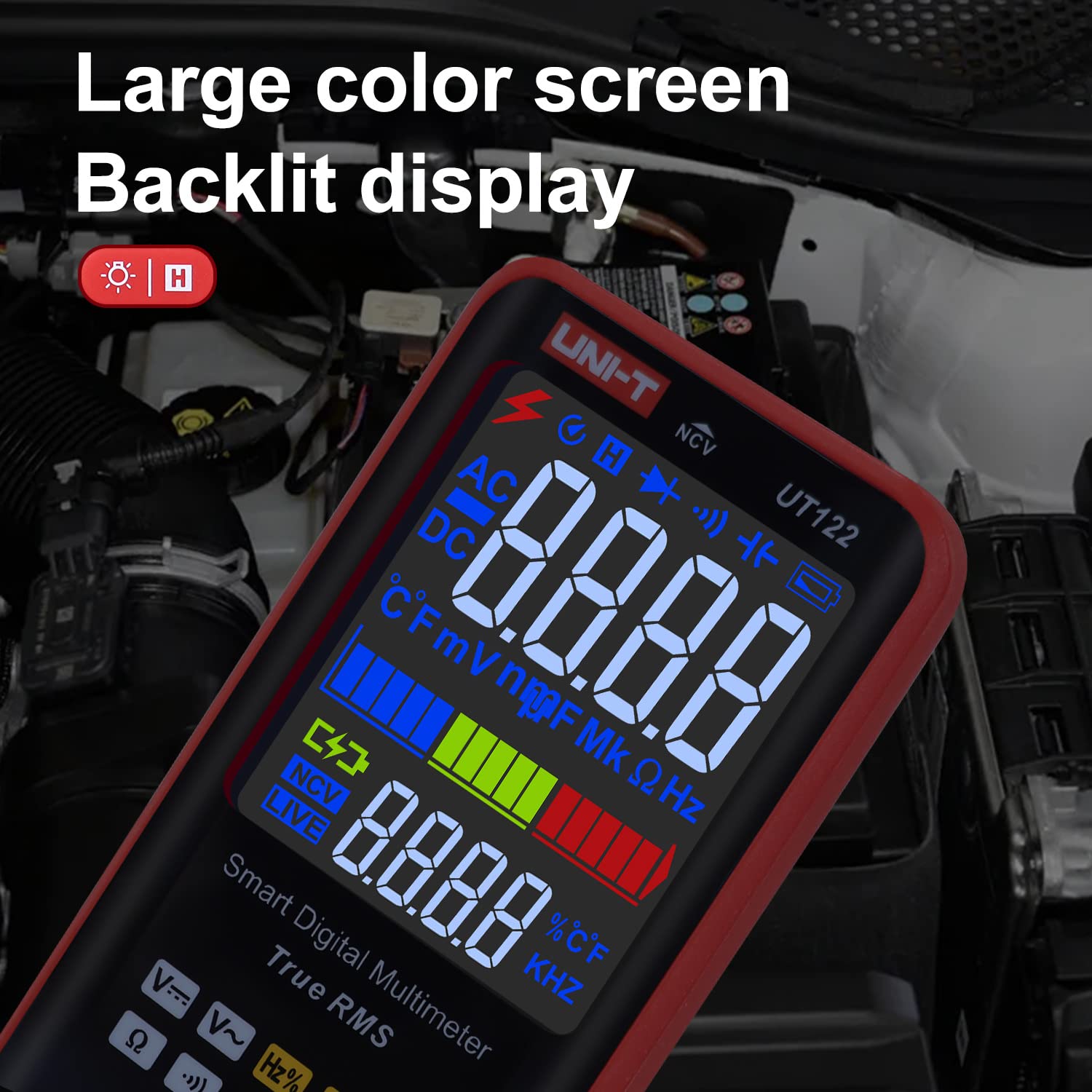
Image: The UNI-T UT122 Multimeter connected to a wall adapter via a Type-C USB cable for charging its built-in 3.7V/700mAh Li-On rechargeable battery.
2. Connecting Test Leads
Properly connect the test leads to the multimeter before taking any measurements.
- Insert the red test lead into the VΩHz input jack.
- Insert the black test lead into the COM (Common) input jack.
Ensure the connections are secure to prevent inaccurate readings or potential hazards.
Operating Instructions
The UT122 features auto-ranging for most functions, simplifying operation. Turn the rotary switch to the desired measurement function.
1. AC/DC Voltage Measurement
- Turn the rotary switch to the V~ (AC Voltage) or V-- (DC Voltage) position. The meter will automatically select the appropriate range.
- Connect the test leads in parallel to the circuit or component under test.
- Read the voltage value on the display. The UT122 can display voltage and frequency simultaneously.
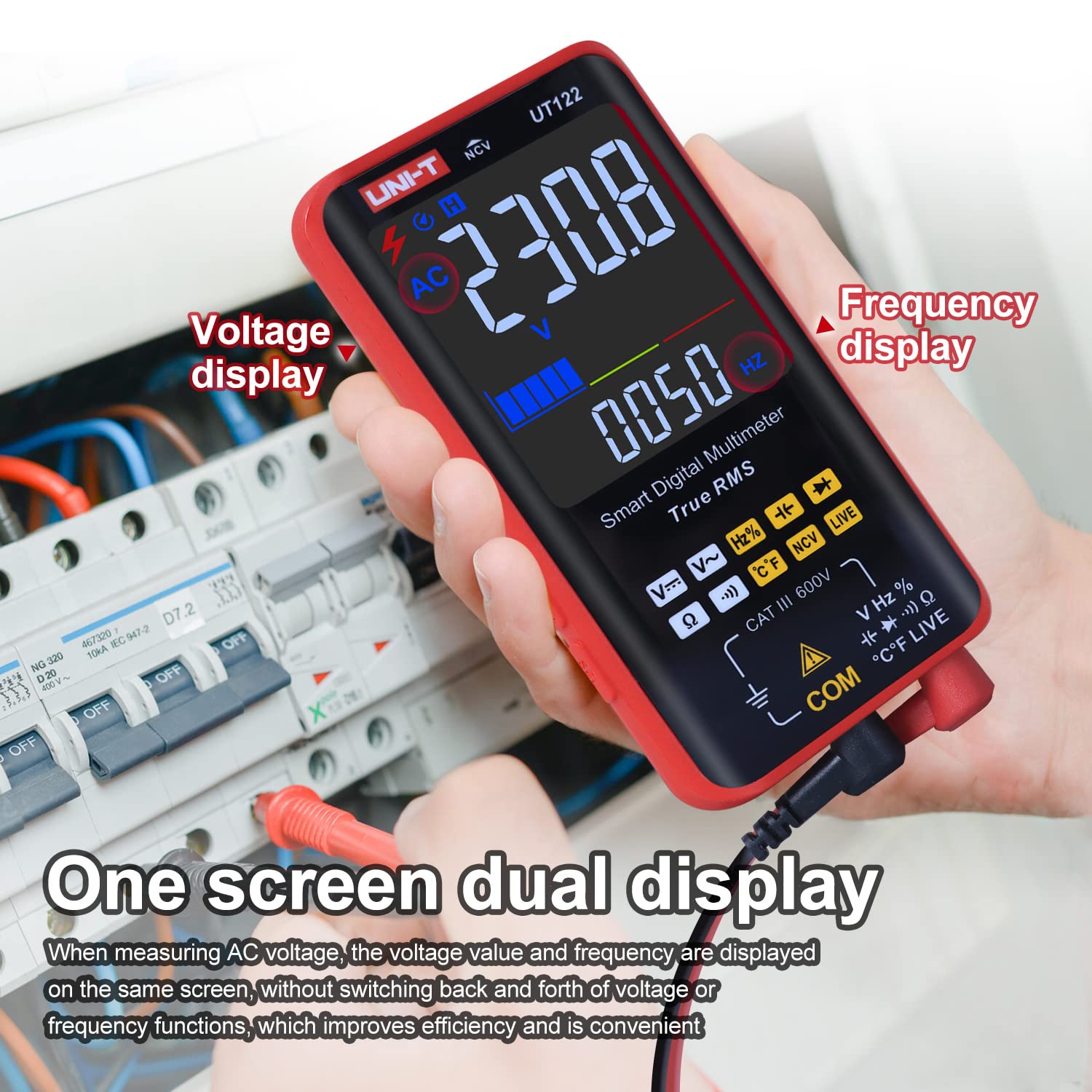
Image: The UNI-T UT122 Multimeter in use, demonstrating its one-screen dual display feature, showing both voltage (230.8V AC) and frequency (0050 Hz) simultaneously when measuring AC voltage.
2. Resistance Measurement (Ω)
- Turn the rotary switch to the Ω position.
- Ensure the circuit is de-energized before measuring resistance.
- Connect the test leads across the component to be measured.
- Read the resistance value on the display.
3. Capacitance Measurement (F)
- Turn the rotary switch to the F position.
- Ensure the capacitor is fully discharged before measurement to prevent damage to the meter.
- Connect the test leads across the capacitor terminals.
- Read the capacitance value on the display.
4. Frequency Measurement (Hz)
- Turn the rotary switch to the Hz% position.
- Connect the test leads in parallel to the circuit where frequency is to be measured.
- Read the frequency value on the display.
5. Temperature Measurement (°C/°F)
- Turn the rotary switch to the °C°F position.
- Connect the temperature probe to the input jacks, observing polarity.
- Place the tip of the temperature probe on or near the object whose temperature is to be measured.
- Read the temperature value on the display.
6. Non-Contact Voltage (NCV) Detection
- Turn the rotary switch to the NCV position.
- Move the top end of the multimeter near the conductor or outlet.
- The meter will indicate the presence of AC voltage through an audible beep and visual indication on the display (EF).
7. Live Wire Detection
- Turn the rotary switch to the LIVE position.
- Insert the red test lead into the suspected live wire or socket hole.
- The display will show "LIVE" and an audible alarm will sound if a live wire is detected. This function helps distinguish between live and neutral lines.

Image: The UNI-T UT122 Multimeter demonstrating Non-Contact Voltage (NCV) detection with an 'EF' indication, and Live wire detection showing 'LiVE' on the display, distinguishing zero and live lines.
8. Diode Test (→|)
- Turn the rotary switch to the →| position.
- Connect the red test lead to the anode and the black test lead to the cathode of the diode.
- The display will show the forward voltage drop. Reverse the leads; an open circuit (OL) reading indicates a good diode.
9. Continuity Test ())))
- Turn the rotary switch to the ))) position.
- Connect the test leads across the circuit or component.
- If the resistance is below approximately 50Ω, the buzzer will sound, indicating continuity.

Image: A collage demonstrating various functions of the UNI-T UT122 Multimeter, including DC voltage measurement, temperature measurement, on-off buzzer (continuity), diode measurement, resistance measurement, and capacitance measurement.
Maintenance
1. Cleaning
To clean the multimeter, wipe the case with a damp cloth and a mild detergent. Do not use abrasives or solvents. Ensure the meter is powered off and test leads are disconnected before cleaning.
2. Battery Care
The built-in lithium-ion battery should be charged regularly, even if the meter is not in frequent use, to maintain battery health. Avoid fully discharging the battery for extended periods. If the meter will not be used for a long time, charge it to approximately 50% and store it in a cool, dry place.
3. Test Lead Inspection
Periodically inspect the test leads for any signs of damage, such as cracked insulation or exposed metal. Replace damaged leads immediately to ensure safety and accurate measurements.
Troubleshooting
- No Display/Meter Not Turning On:
- Check if the battery is charged. Connect the Type-C charger and observe the charging indicator.
- Ensure the power button is pressed correctly.
- Inaccurate Readings:
- Verify that the test leads are properly connected to the meter and the circuit.
- Ensure the correct measurement function is selected.
- Check the battery level; low battery can affect accuracy.
- Ensure the circuit under test is de-energized for resistance and capacitance measurements.
- "OL" (Overload) Display:
- The measured value exceeds the selected range. The UT122 is auto-ranging, so this usually indicates a value beyond the meter's maximum capability for that function, or an open circuit (e.g., in continuity/diode test).
- No NCV/Live Detection Response:
- Ensure the meter is in the correct NCV or LIVE mode.
- Confirm the presence of AC voltage with a known source.
Specifications
| Parameter | Value |
|---|---|
| Model | UT122 |
| Display Count | 6000 |
| AC/DC Voltage | 600V |
| AC Voltage Frequency | 10Hz~1kHz |
| Resistance | Yes |
| Capacitance | Yes |
| Frequency | Yes |
| Temperature | Yes (with included probe) |
| NCV (Non-Contact Voltage) | Yes |
| Live Detection | Yes |
| Diode Test | Yes |
| Continuity Buzzer | Yes |
| True RMS | Yes |
| Power Source | Built-in 3.7V/700mAh Li-On Rechargeable Battery |
| Charging Port | Type-C USB |
| Safety Rating | CAT III 1000V, CAT IV 600V, CE |
| Dimensions (L x W x H) | 8 x 5 x 3 Centimeters |
| Item Weight | 0.6 Kilograms (600 g) |
| Included Components | Multimeter, DMM Test Leads, Temperature Probes |
Warranty Information
UNI-T products are manufactured to high-quality standards. For specific warranty terms and conditions, please refer to the warranty card included with your product or visit the official UNI-T website. Keep your purchase receipt as proof of purchase for warranty claims.
Support
For technical assistance, product inquiries, or service, please contact UNI-T customer support through their official website or the contact information provided in your product packaging. When contacting support, please have your product model (UT122) and purchase details ready.
You can find more information and resources on the official UNI-T website: www.uni-trend.com


