1. Product Overview
The Midea MA200W80/W-SA is an 8 kg automatic top load washing machine designed for efficient and convenient laundry care. It features push-button controls for easy operation and a robust design for reliable performance. This appliance is suitable for various fabric types and washing needs, offering a practical solution for household laundry.
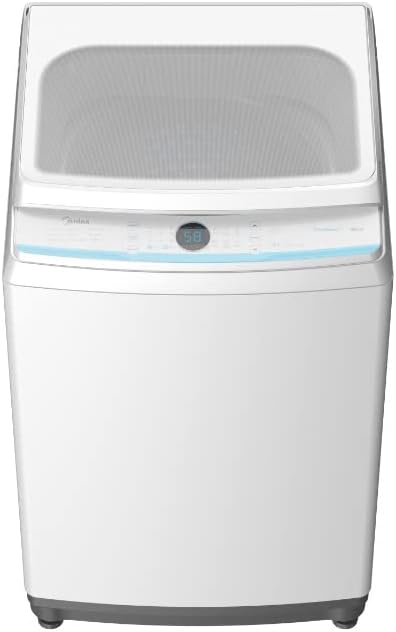
Figure 1.1: Front view of the Midea 8 kg Automatic Top Load Washing Machine, showcasing its white finish and control panel.
2. Safety Information
Please read all safety instructions carefully before operating the appliance to prevent injury or damage. Keep this manual for future reference.
- Electrical Safety: Ensure the washing machine is connected to a properly grounded power outlet with the correct voltage (220 Volts). Do not use extension cords or adapters. Disconnect power before cleaning or maintenance.
- Water Connection: Use new hose sets for water connection. Do not reuse old hose sets. Ensure all connections are tight to prevent leaks.
- Child Safety: This appliance is not intended for use by persons (including children) with reduced physical, sensory or mental capabilities, or lack of experience and knowledge, unless they have been given supervision or instruction concerning use of the appliance by a person responsible for their safety. Children should be supervised to ensure that they do not play with the appliance.
- Installation: Install the machine on a firm, level surface. Do not install in areas exposed to freezing temperatures or direct sunlight.
- Usage: Do not wash items that are soiled with gasoline, dry-cleaning solvents, or other flammable or explosive substances. Do not reach into the tub while it is spinning.
3. Setup
Proper installation is crucial for the washing machine's performance and longevity.
- Unpacking: Carefully remove all packaging materials, including the base packaging and any internal packing. Inspect the machine for any damage.
- Location: Choose a location with a solid, level floor that can support the machine's weight (33 kg) when full of water and laundry. Ensure there is access to a water supply, drain, and power outlet.
- Connecting Water Supply: Connect the hot and cold water inlet hoses to the corresponding valves on the back of the machine and to your household water supply. Tighten connections securely.
- Connecting Drain Hose: Securely attach the drain hose to the machine's drain outlet and route it to a standpipe or laundry tub, ensuring it is properly secured to prevent dislodging during operation.
- Power Connection: Plug the power cord into a grounded 220V AC outlet.
- Leveling the Machine: The machine is equipped with adjustable leveling legs. Use a wrench to adjust the legs until the machine is perfectly level and stable. This minimizes vibration and noise during operation.
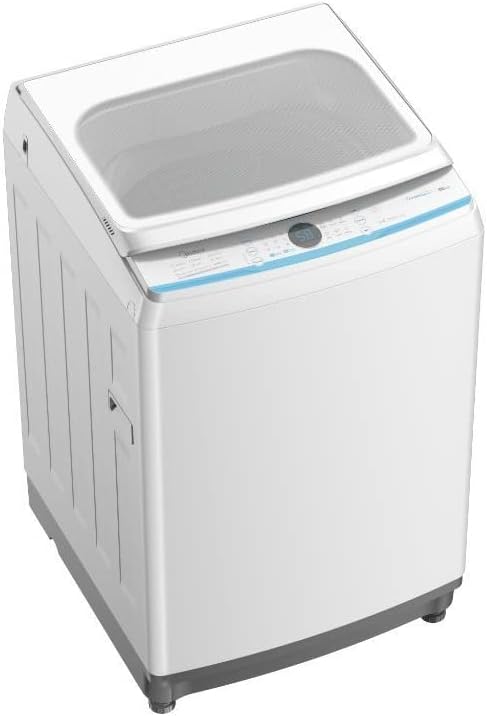
Figure 3.1: Side view of the washing machine, illustrating its freestanding installation type and the location of adjustable leveling legs.
4. Operating Instructions
Follow these steps for optimal washing results.

Figure 4.1: The push-button control panel, featuring various program selections and a digital display.
- Loading Laundry: Open the top lid and load clothes loosely into the drum. Do not overload the machine; ensure there is enough space for clothes to tumble freely.
- Adding Detergent: Add the appropriate amount of detergent to the detergent dispenser. Refer to your detergent's instructions for dosage.
- Selecting Wash Program: Use the push buttons on the control panel to select the desired wash program (e.g., Normal, Heavy, Delicate). The digital display will show the selected program or remaining time.
- Starting a Cycle: Press the 'Start/Pause' button to begin the wash cycle. The machine will automatically fill with water, wash, rinse, and spin.
- Pausing/Stopping a Cycle: To pause a cycle, press the 'Start/Pause' button. To stop and reset the cycle, press and hold the 'Power' button for a few seconds.

Figure 4.2: Top view with the lid open, revealing the spacious 8 kg capacity drum and the integrated lint filter.
5. Maintenance
Regular maintenance ensures the longevity and efficiency of your washing machine.
- Cleaning the Exterior: Wipe the exterior surfaces with a soft, damp cloth. Do not use abrasive cleaners or solvents.
- Cleaning the Detergent Dispenser: Periodically remove and clean the detergent dispenser drawer to prevent residue buildup. Rinse with warm water and dry thoroughly before reinserting.
- Cleaning the Lint Filter: For top load machines, locate and remove the lint filter (often found in the agitator or on the side of the drum). Clean accumulated lint under running water and reinsert. Perform this after every few washes.
- Drum Cleaning: Run a 'Tub Clean' or 'Self Clean' cycle (if available) or a hot wash cycle with a washing machine cleaner or a cup of white vinegar to remove detergent residue and odors from the drum.
- Water Inlet Filters: Check the filters at the water inlet hoses periodically for blockages. Turn off water supply, disconnect hoses, and clean the filters with a brush.
6. Troubleshooting
Refer to this section for common issues and their solutions.
| Problem | Possible Cause | Solution |
|---|---|---|
| Machine does not start | No power; Lid not closed; Program not selected. | Check power cord; Close lid securely; Select a program and press Start. |
| Water not filling | Water supply off; Inlet hoses kinked; Water inlet filters blocked. | Turn on water taps; Straighten hoses; Clean inlet filters. |
| Water not draining | Drain hose kinked or blocked; Drain pump filter blocked. | Check and clear drain hose; Clean drain pump filter (refer to service manual if needed). |
| Excessive vibration/noise | Machine not level; Shipping bolts not removed; Uneven load. | Adjust leveling legs; Ensure all shipping bolts are removed; Redistribute laundry evenly. |
| Clothes not clean | Overloading; Insufficient detergent; Incorrect program. | Reduce load size; Use correct detergent amount; Select appropriate wash program. |
If the problem persists after attempting these solutions, please contact customer support.
7. Specifications
Key technical specifications for the Midea MA200W80/W-SA washing machine:
| Feature | Specification |
|---|---|
| Brand Name | Midea |
| Model Info | MA200W80/W-SA |
| Product Dimensions | 56 x 54 x 91 cm |
| Item Weight | 33 Kilograms |
| Capacity | 8 Kilograms |
| Max Spin Speed | 700 RPM |
| Noise Level | 55 dB |
| Installation Type | Freestanding |
| Color | White |
| Control Console | Push Button |
| Access Location | Top Load |
| Voltage | 220 Volts |
| Wattage | 450 watts |
| Material Type | Plastic |
| Special Features | Adjustable Leveling Legs |
8. Warranty and Support
Your Midea MA200W80/W-SA washing machine comes with a 2-Year Warranty from the date of purchase, covering manufacturing defects under normal use conditions.
For installation services or technical support, please contact Midea authorized service centers:
- Riyadh: +966 -11- 4094006 Ext – 113
- Jeddah: +966- 12- 6577714
- Dammam: +966-13- 8343691
- Qassim: +966 581044198
- Abha: +966 593322785
When contacting support, please have your model number (MA200W80/W-SA) and purchase date ready.