1. Introduction
The CAMMHD C8 Body Camera is a robust and versatile recording device designed for various applications, including law enforcement, security, and personal use. It features 2K/1296P video recording, infrared night vision, and a durable IP67 waterproof rating. This manual provides detailed instructions for setting up, operating, and maintaining your C8 Body Camera to ensure optimal performance.

Image 1.1: Front and back view of the CAMMHD C8 Body Camera. The front shows the lens and indicator lights, while the back displays the screen and control buttons.
2. What's in the Box
Please verify that all items are present in your package:
- 1x C8 Body Camera
- 1x User Manual
- 1x Type-C Data Cable
- 1x Charger
- 1x Long Clip
- 1x Short Clip

Image 2.1: Visual representation of the CAMMHD C8 Body Camera's dimensions and the complete package contents.
3. Product Overview
The CAMMHD C8 features a compact design with intuitive controls. Key components include:
- Front Lens: Captures video and photos.
- 2.0-inch LCD Screen: For live view, playback, and menu navigation.
- Control Buttons: Power, Record, Photo, Menu, Navigation, and Alarm buttons located on the sides and front.
- Infrared Lights: For night vision recording.
- Speaker/Microphone: For audio recording and playback.
- USB-C Port: For charging and data transfer.
- Clip Slot: For attaching the rotatable clips.
4. Setup
4.1. Charging the Device
Before first use, fully charge the C8 Body Camera. Connect the provided Type-C data cable to the camera's USB-C port and the other end to the charger. Plug the charger into a power outlet. The charging indicator will show the charging status. A full charge typically takes approximately 4 hours.
4.2. Attaching the Clips
The C8 Body Camera comes with two rotatable clips (long and short) for flexible mounting options. To attach a clip:
- Align the clip with the slot on the back of the camera.
- Slide the clip firmly into the slot until it clicks into place.
- To remove, press the release tab on the clip and slide it out.
Video 4.1: Demonstration of how to attach and detach the rotatable clips to the CAMMHD C8 Body Camera.

Image 4.1: Examples of how the CAMMHD C8 Body Camera can be used with a car mount, short clip for shirt pockets, and long clip for uniform straps.
4.3. Powering On/Off
To power on the camera, press and hold the Power button until the screen illuminates. To power off, press and hold the Power button again until the device shuts down.
5. Operating Instructions
5.1. Video Recording
Press the Video Record button to start recording. Press it again to stop. The camera supports 1296P resolution, offering clear video capture. A fully charged battery allows for up to 12 hours of recording at 1296P (with infrared night vision off).
5.2. Photo Capture
Press the Photo button to take a still image. The camera will capture a high-resolution photograph.
5.3. Night Vision
The C8 Body Camera is equipped with two infrared night vision lamp beads. In low-light conditions, the camera can automatically activate infrared night vision mode. This allows for clear identification of individuals and objects up to 32 feet (10 meters) away. LED and warning lights can also be manually activated if required.

Image 5.1: The CAMMHD C8 Body Camera's automatic infrared night vision capability, capturing clear images in low-light environments.
5.4. Playback and Preview
The 2.0-inch display allows for direct playback of recorded videos and preview of captured images. Navigate through the menu using the control buttons to access your media files. This feature facilitates quick review of content on the device.
5.5. Data Encryption and Password Protection
To protect your recorded data, the C8 Body Camera supports password protection. You can set a customizable 6-digit password using numbers and letters. This prevents unauthorized access, modification, or theft of your camera's data.
5.6. Video Compression Technology
The camera utilizes H.265/H.264 video compression technology to optimize storage space and data transfer efficiency. This allows for more content to be stored on the 128GB internal memory.
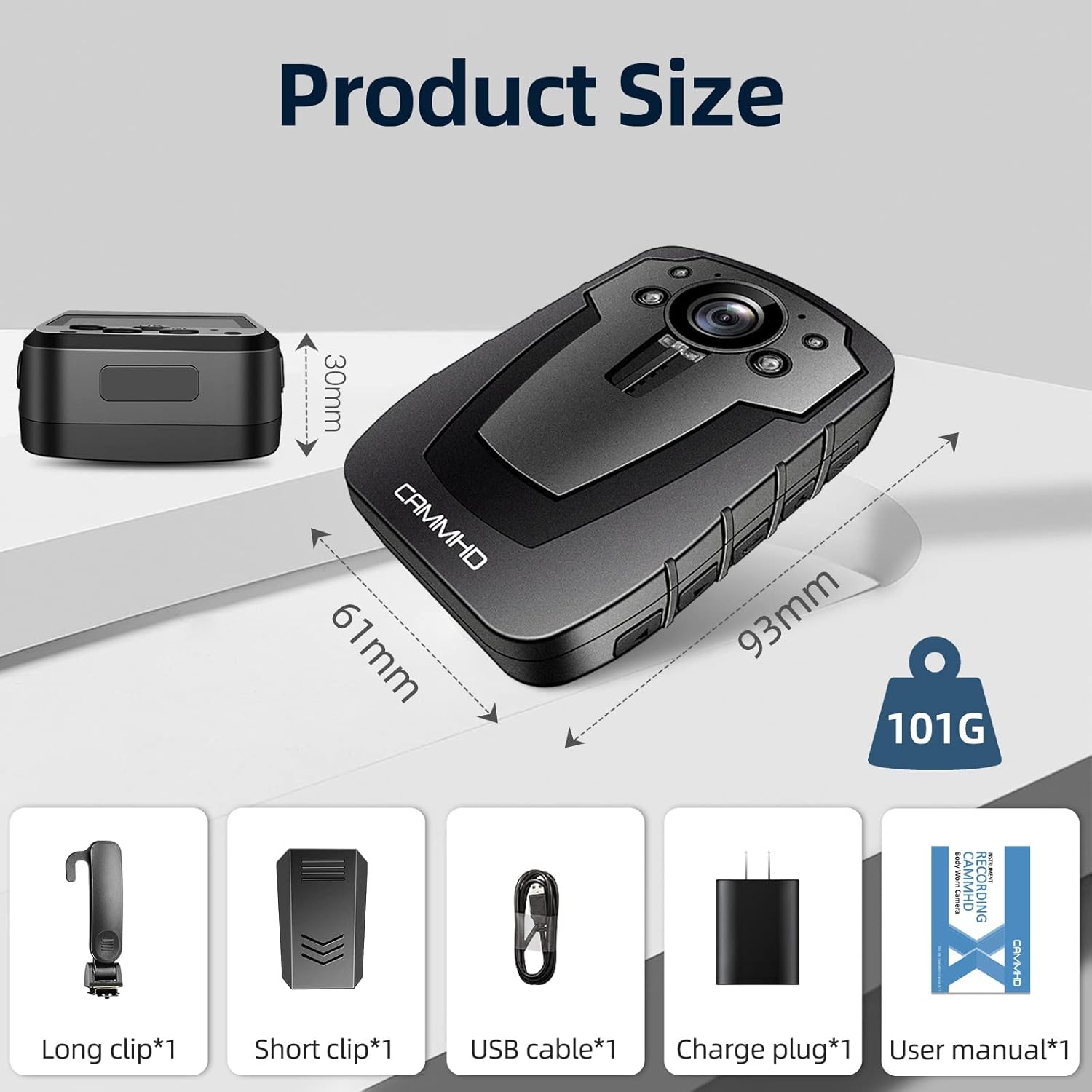
Image 5.2: Illustration of H.265/H.264 video compression benefits, including reduced transfer time and storage usage.
Video 5.1: Overview of the CAMMHD C8 1440P 2K HD Body Camera's features and capabilities.
6. Maintenance
To ensure the longevity and optimal performance of your CAMMHD C8 Body Camera, follow these maintenance guidelines:
- Cleaning: Use a soft, dry cloth to clean the camera body and lens. Avoid abrasive materials or harsh chemicals.
- Storage: Store the camera in a cool, dry place away from direct sunlight and extreme temperatures.
- Battery Care: For extended storage, ensure the battery is partially charged (around 50%). Avoid fully discharging the battery for long periods.
- Firmware Updates: Check the official CAMMHD website periodically for any available firmware updates to improve performance and add new features.
7. Troubleshooting
If you encounter issues with your CAMMHD C8 Body Camera, refer to the following common solutions:
- Camera not turning on: Ensure the battery is charged. Connect the camera to the charger and try again.
- Recording issues: Check if the internal memory is full. Delete unnecessary files or transfer them to a computer. Ensure the camera is not in another mode (e.g., playback).
- Poor video/photo quality: Clean the camera lens. Ensure adequate lighting for optimal results, especially if night vision is not active.
- Device unresponsive: Try performing a soft reset by holding the Power button for an extended period (e.g., 10-15 seconds) until the device restarts.
- Password forgotten: Refer to the full user manual or contact CAMMHD support for instructions on resetting the password.
8. Specifications
| Feature | Specification |
|---|---|
| Brand Name | CAMMHD |
| Model Number | C8 |
| Item Weight | 4.4 ounces (126g) |
| Product Dimensions | 2.28 x 1.81 x 3.62 inches (58 x 46 x 92 mm) |
| Battery | 3600mAh Lithium Ion (1 required) |
| Color | Black |
| Video Resolution | Up to 2K/1296P |
| Recording Time | Up to 12 hours (1296P, IR off) |
| Night Vision | Infrared, up to 32 feet (10 meters) |
| Display Screen | 2.0 Inches |
| Connectivity | USB |
| Storage | Built-in 128GB SD card |
| Waterproof Rating | IP67 |
| Video Compression | H.265/H.264 |
9. Warranty and Support
For warranty information and technical support, please refer to the documentation included with your product or visit the official CAMMHD website. You may also contact the seller, CAMMHD, directly for assistance with product-related inquiries.


