
Introduction
Thank you for choosing the IKEA BEKANT Left Corner Sit/Stand Desk. This manual provides comprehensive instructions for the assembly, operation, maintenance, and troubleshooting of your new desk. Please read this manual carefully before beginning assembly or use to ensure proper function and longevity of your product.

Figure 1: The IKEA BEKANT Left Corner Sit/Stand Desk, showcasing its ergonomic design and clean aesthetic.

Figure 2: The BEKANT desk seamlessly integrated into a home office, demonstrating its versatility.
Setup and Assembly
The IKEA BEKANT desk requires assembly. It is recommended that two people assemble the desk to ensure safety and ease of construction. Ensure you have sufficient space and all components before starting.
Before You Begin:
- Unpack all components and verify against the parts list provided in the packaging.
- Clear a large, flat area for assembly.
- Gather necessary tools (typically a screwdriver and possibly an Allen key, often included).
Assembly Steps:
- Attach Legs to Tabletop: Carefully place the tabletop upside down on a soft, clean surface to prevent scratches. Attach the desk legs to the designated mounting points on the underside of the tabletop using the provided screws and hardware. Ensure all connections are secure.
- Connect Sit/Stand Mechanism: Follow the specific instructions for connecting the sit/stand motor and control unit. This typically involves attaching the motor to the leg frame and connecting the control panel.
- Install Cable Management Net: The BEKANT desk includes an integrated cable management net. Attach this net to the underside of the desk to organize power cords and cables, keeping your workspace tidy.
- Position the Desk: With the help of another person, carefully flip the desk upright and move it to its desired location. Ensure it is placed on a level surface.
- Initial Height Calibration: After assembly, perform an initial calibration of the sit/stand mechanism as per the specific instructions in your packaged manual. This usually involves lowering the desk to its lowest point and holding the down button for a few seconds.

Figure 3: The BEKANT desk integrated into a modern office environment, demonstrating its functional design.

Figure 4: Detailed view of the desk's corner, highlighting the smooth finish and precise construction.
Operating Instructions
The BEKANT sit/stand desk allows you to easily switch between sitting and standing positions, promoting a healthier work routine.
Adjusting Desk Height:
- To Raise the Desk: Press and hold the UP arrow button on the control panel. The desk will smoothly ascend to your desired standing height. Release the button to stop.
- To Lower the Desk: Press and hold the DOWN arrow button on the control panel. The desk will smoothly descend to your desired sitting height. Release the button to stop.
- Safety Stop: The desk is equipped with a safety stop feature. If the desk encounters an obstruction during movement, it will automatically stop. Remove the obstruction and resume adjustment.

Figure 5: Detail of the height adjustment control panel, allowing seamless transitions between sitting and standing positions.
Cable Management:
Utilize the integrated cable management net located under the tabletop to keep your cables organized and out of sight. This helps maintain a clean and safe workspace.
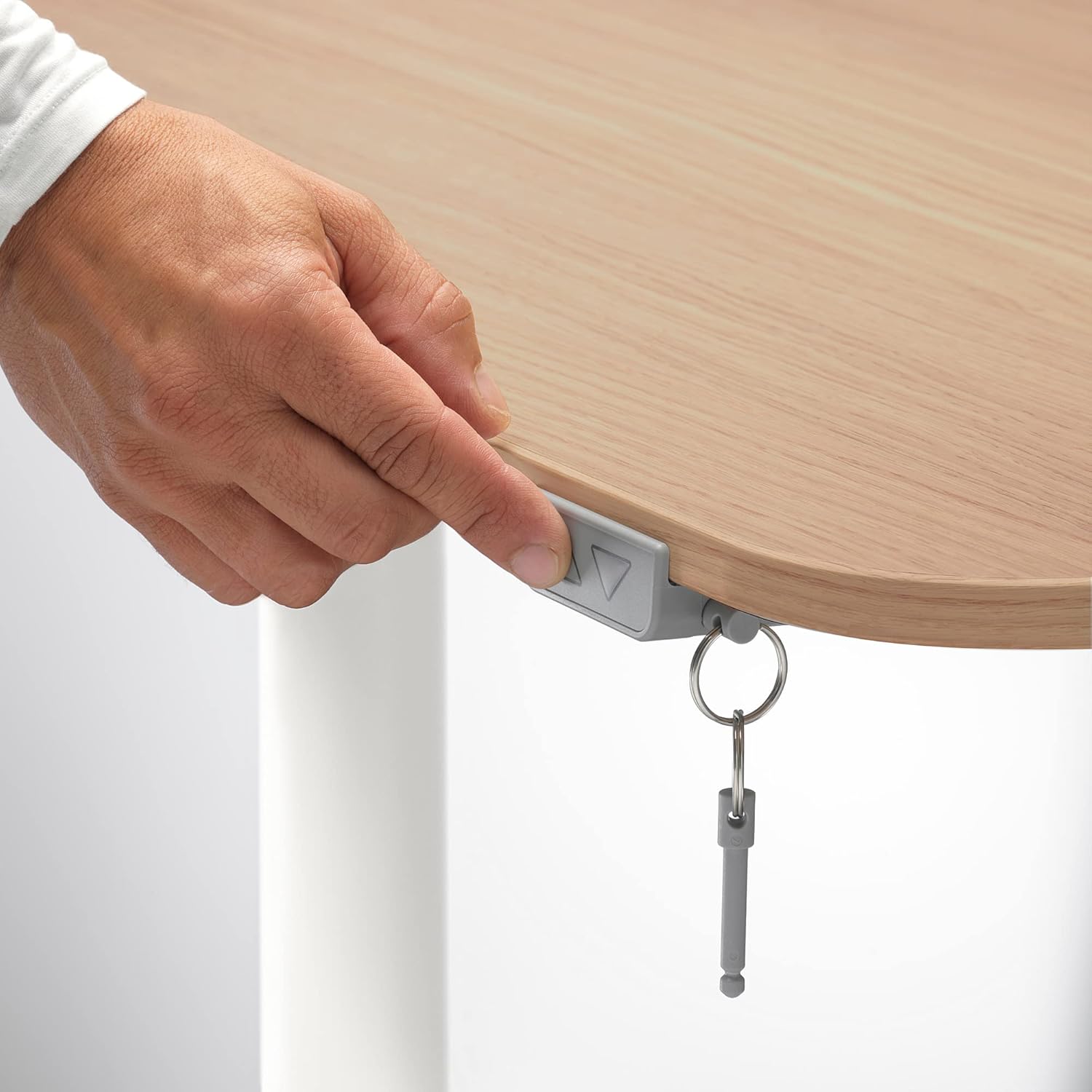
Figure 6: View of the underside of the BEKANT desk, highlighting the practical cable management net for an organized workspace.
Maintenance and Care
Proper care will ensure the longevity and appearance of your IKEA BEKANT desk.
- Cleaning: Wipe the desk surface and legs with a damp cloth. For stubborn marks, use a mild soap solution. Dry thoroughly with a clean cloth.
- Avoid Harsh Chemicals: Do not use abrasive cleaners, strong detergents, or chemical solvents, as these can damage the finish.
- Protect Surface: Use coasters for drinks and protective pads under hot items to prevent stains and heat damage to the tabletop.
- Check Connections: Periodically check all screws and fittings to ensure they are tight. Retighten if necessary.
- Motor Care: Keep the motor and electrical components free from dust and moisture. Do not attempt to open or repair the motor unit yourself.
Troubleshooting
If you encounter issues with your BEKANT desk, refer to the following common problems and solutions:
| Problem | Possible Cause | Solution |
|---|---|---|
| Desk does not move up or down. | Power cable disconnected, motor overload, or safety stop activated. | Check power connection. Unplug and replug the desk. If overloaded, wait 20 minutes for the motor to cool down. Remove any obstructions. Perform a reset (refer to your specific manual for reset procedure, usually holding down button). |
| Desk moves unevenly. | Uneven load, or calibration issue. | Ensure weight is evenly distributed on the desk. Perform a height calibration as described in the assembly section. |
| Unusual noise during operation. | Loose fittings or internal mechanism issue. | Check and tighten all screws and connections. If the noise persists, contact IKEA customer service. |
If these solutions do not resolve the issue, please contact IKEA customer support for further assistance.
Specifications
| Feature | Detail |
|---|---|
| Brand | Ikea |
| Model Number | IK.392.823.05 |
| Color | White stained oak veneer / White |
| Product Dimensions (Surface L x W) | 160 x 110 cm |
| Adjustable Height (Min.) | 65 cm |
| Material | Wood (Oak veneer) |
| Special Feature | Ergonomic, Sit/Stand Function |
| Desk Design | Standing Desk, Corner Desk |
| Top Material Type | Oak Wood |
| Finish Type | Varnished |
Warranty and Support
IKEA products are designed for durability and quality. While specific warranty details for this product were not provided in the initial product listing, IKEA typically offers a limited warranty on its furniture. Please refer to the warranty information included with your product packaging or visit the official IKEA website for detailed warranty terms and conditions.
Customer Support:
For technical assistance, missing parts, or any other inquiries regarding your IKEA BEKANT desk, please contact IKEA customer service. You can find contact information on the official IKEA website or through the documentation provided with your purchase.
Note: Always provide your product model number (IK.392.823.05) when contacting support to ensure efficient service.


