
1. Introduction
Thank you for choosing the IKEA BEKANT Corner Desk. This manual provides essential information for the safe and efficient assembly, operation, and maintenance of your new desk. The BEKANT series is designed to offer a flexible and ergonomic workspace solution, featuring an adjustable height and a spacious corner design.
2. Safety Information
- Always follow the assembly instructions carefully. Incorrect assembly can lead to instability and injury.
- Do not overload the desk. Refer to the specifications for maximum weight capacity.
- Keep small parts and packaging materials away from children to prevent choking hazards.
- Ensure all screws and fittings are tightened securely before use and periodically check them for tightness.
- Do not stand or climb on the desk.
- Place the desk on a level surface to prevent tipping.
3. Package Contents
Before beginning assembly, ensure all components are present. If any parts are missing or damaged, please contact IKEA customer service.
- Desk tabletop (1)
- Leg frames (2)
- Connecting frame/support beam (1)
- Cable management net (1)
- Assembly hardware (screws, bolts, washers, etc.)
- Assembly tool (e.g., Allen key)
4. Setup and Assembly Instructions
Assembly is required for this product. It is recommended to have two people for assembly. You will need a screwdriver and possibly a wrench (an Allen key is usually included).
- Unpack and Identify Parts: Carefully remove all components from the packaging. Lay them out on a soft, clean surface to prevent scratches. Refer to the parts list to identify each component.
- Assemble Leg Frames: Attach the horizontal support bars to the vertical leg posts using the provided hardware. Ensure all connections are secure but do not overtighten initially.
- Connect Leg Frames: Attach the two assembled leg frames to the main connecting frame/support beam. This forms the base structure of the desk.
- Attach Tabletop: Carefully place the desk tabletop upside down on a protected surface. Align the assembled leg and frame structure with the pre-drilled holes on the underside of the tabletop. Secure the frame to the tabletop using the designated screws.
- Install Cable Management Net: Attach the cable management net to the underside of the desk frame using the provided hooks or clips. This helps organize power cords and cables.
- Final Tightening: Once all components are in place, carefully turn the desk upright. Systematically tighten all screws and bolts to ensure the desk is stable and rigid.
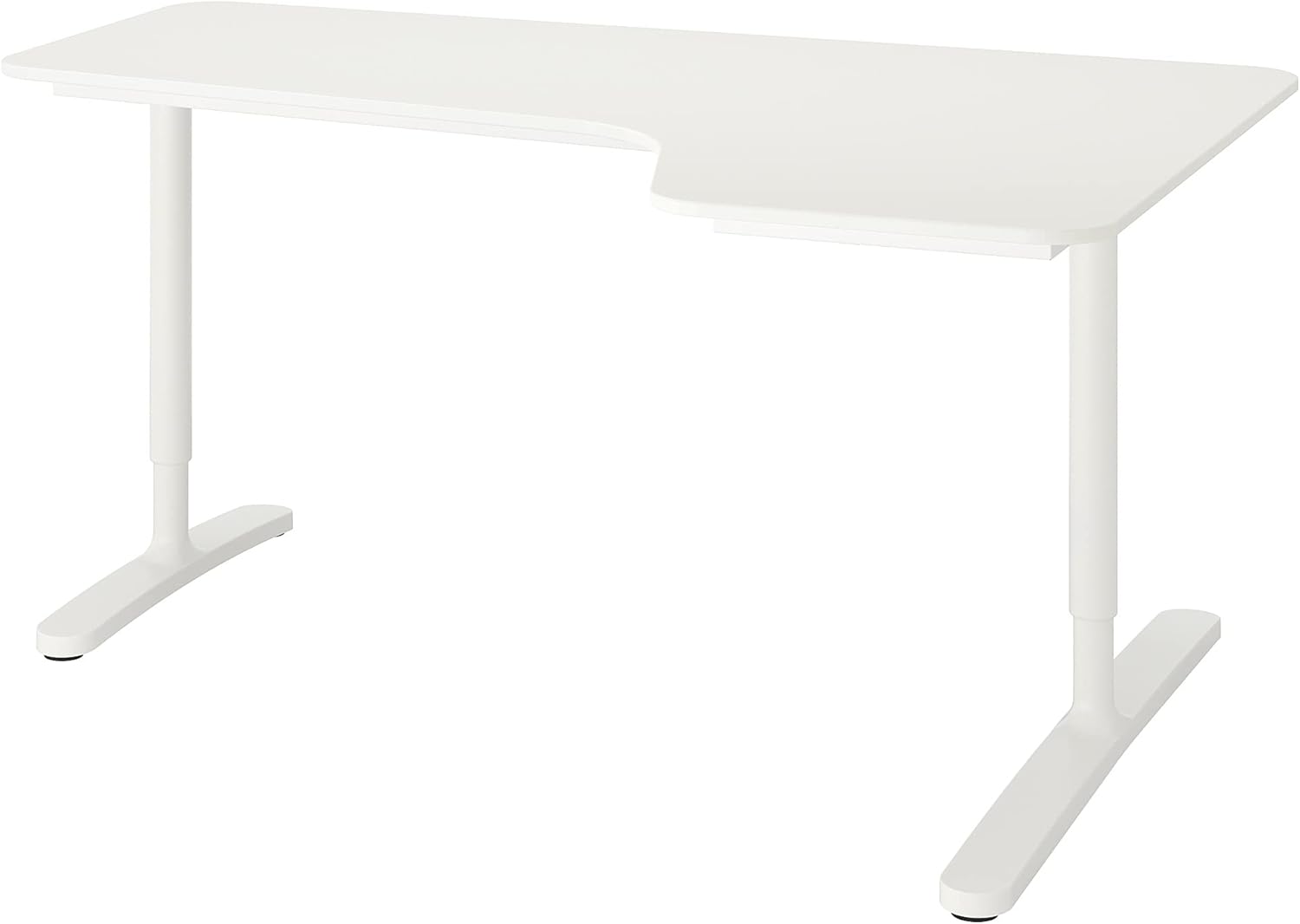
This image displays the complete IKEA BEKANT Corner Desk from the front, highlighting its white surface and sturdy metal legs. The right-hand corner design is visible, indicating its ergonomic shape for office use.

A detailed view of the underside of the IKEA BEKANT desk, revealing the integrated cable management net. This feature helps to keep power cords and cables organized and out of sight, contributing to a tidy and functional workspace.
5. Operating Instructions
The IKEA BEKANT desk features adjustable legs, allowing you to customize the height to your preference for optimal ergonomics.
- Height Adjustment: The desk legs are manually adjustable. Locate the adjustment points on each leg, typically secured by a screw or a pin. Loosen the mechanism, adjust the leg to the desired height (within the specified range of 65 cm to 85 cm), and then securely tighten the mechanism to lock the leg in place.
- Ensure both legs are adjusted to the same height to maintain a level and stable work surface.

The IKEA BEKANT Corner Desk is shown in a typical office setup, complete with a laptop, desk lamp, and an office chair. This view demonstrates the desk's practical size and how it fits into a modern workspace, providing ample surface area for work.
6. Maintenance
Proper care will extend the life and appearance of your BEKANT desk.
- Cleaning: Wipe clean with a damp cloth and a mild cleaner. Wipe dry with a clean cloth.
- Avoid Harsh Chemicals: Do not use abrasive cleaners, strong solvents, or harsh chemicals, as these can damage the laminated surface.
- Regular Checks: Periodically check all assembly fittings and re-tighten them if necessary to ensure stability.
- Protect Surface: Use coasters or desk pads to protect the surface from spills, heat, and scratches.
7. Troubleshooting
- Desk is Wobbly: Ensure all screws and bolts are fully tightened. Check that the desk is placed on a level surface. If not, use shims or adjust the leg levelers (if present) to stabilize.
- Height Adjustment Issues: If the legs are difficult to adjust, ensure the locking mechanisms are fully disengaged. Check for any obstructions or debris in the adjustment mechanism.
- Scratches/Damage: For minor scratches on the laminated surface, touch-up pens or repair kits designed for laminate furniture may be used. For significant damage, contact IKEA customer service.
8. Specifications
| Feature | Detail |
|---|---|
| Brand | IKEA |
| Model Name | BEKANT |
| Color | White |
| Dimensions (Length x Width) | 160x110 cm |
| Minimum Height | 65 Centimeters |
| Maximum Height | 85 Centimeters |
| Top Material Type | Mahogany (Laminated) |
| Base Material | Metal |
| Special Feature | Adjustable Height |
| Assembly Required | Yes |
| Desk Design | Corner Desk / Computer Desk |
9. Warranty and Support
The IKEA BEKANT Corner Desk comes with a Limited Warranty. Please refer to the specific warranty terms and conditions provided at the time of purchase or on the official IKEA website for full details regarding coverage and duration.
For further assistance, missing parts, or warranty claims, please contact IKEA customer service through their official website or local store. Have your proof of purchase and product model information (BEKANT, 160x110 cm, White) ready when contacting support.


